Uvod
This manual provides detailed instructions for the safe and effective operation of your WOUXUN KG-R56 VHF Professional Radio. Please read this manual thoroughly before using the device to ensure proper function and to prevent damage.
Product Overview
The WOUXUN KG-R56 is a compact and robust professional VHF transceiver designed for authorized users, operating within the 66-88 MHz frequency range. It features 256 memory channels, advanced menu functions, and integrated USB Type-C charging. The device is compliant with current R&TTE RED CE standards.
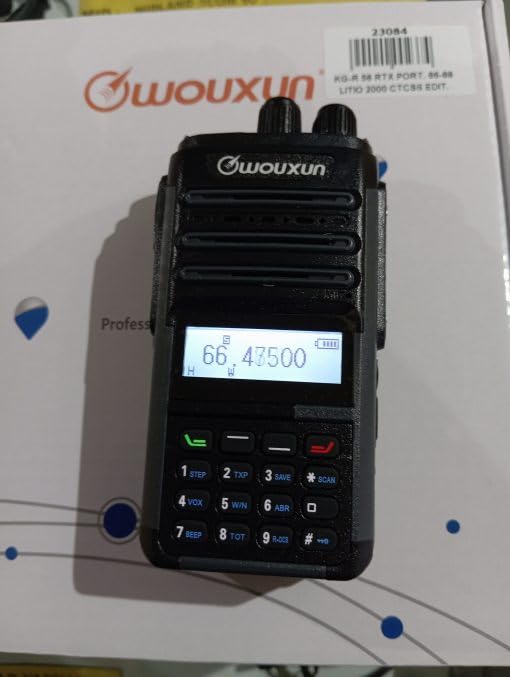
Image: WOUXUN KG-R56 VHF Professional Radio. This image shows the front view radija, ističući njegov ekran, tastaturu i priključak antene.
Sadržaj paketa
Provjerite da li se u vašem paketu nalaze sve dolje navedene stavke:
- KG-R56 Transceiver
- 7.4V - 2000 mAh Lithium-Ion Battery Pack
- Punjač
- 220V napajanje
- Flexible Rubber Antenna
- Belt Clip
- User Manual (in original language)
- Certifikati
Setup
1. Instalacija baterije
- Poravnajte baterijski paket sa žljebovima na stražnjoj strani radija.
- Pomaknite baterijski paket prema gore dok se sigurno ne učvrsti na svoje mjesto.
- Da biste je uklonili, pritisnite osigurač za otpuštanje baterije (ako postoji) i pomaknite bateriju prema dolje.
2. Punjenje baterije
The KG-R56 features an integrated USB Type-C port for convenient charging.
- Connect a USB Type-C cable to the radio's USB-C port.
- Connect the other end of the cable to the provided charger or a compatible USB power source.
- The charging indicator light on the radio will show the charging status.
- Potpuno punjenje obično traje nekoliko sati. Izbjegavajte prekomjerno punjenje baterije.
3. Pričvršćivanje antene
- Screw the flexible rubber antenna clockwise onto the antenna connector on top of the radio until it is finger-tight.
- Nemojte previše zatezati antenu.
4. Pričvršćivanje kopče za remen
- Use the provided screws to attach the belt clip to the designated area on the back of the radio.
Uputstvo za upotrebu
1. Uključivanje/isključivanje
Rotate the Power/Volume knob clockwise to turn the radio on. Rotate it counter-clockwise until a click is heard to turn it off.
2. Podešavanje jačine zvuka
After powering on, continue rotating the Power/Volume knob to adjust the audio output level to your preference.
3. Odabir kanala
Use the Up/Down arrow keys or the rotary encoder (if present) to select the desired channel or frequency. The display will show the selected channel number, frequency, or channel name.
4. Slanje i primanje
- Za prijenos, pritisnite i držite dugme Pritisni-za-govor (PTT) sa strane radio-stanice. Govorite jasno u mikrofon.
- Otpustite PTT dugme za prijem.
- Always ensure the channel is clear before transmitting to avoid interference.
5. Navigacija menijem
The KG-R56 features an advanced menu system for managing various radio functions.
- Pritisnite MENU dugme za ulazak u glavni meni.
- Use the Up/Down arrow keys to scroll through the available menu options.
- Pritisnite MENU opet ili OK (if available) to select an option.
- Use the Up/Down keys to change settings within a selected option.
- Pritisnite IZLAZ or NAZAD za povratak na prethodni meni ili izlazak iz sistema menija.
Ključne karakteristike
- DTMF kodiranje/dekodiranje: Supports DTMF tones for advanced signaling capabilities.
- CTCSS/DCS: Includes 50 CTCSS groups and 105 DCS groups for selective calling. These can be customized via PC programming software.
- CTCSS/DCS Scanner: Automatically detects CTCSS/DCS tones on a received signal.
- Glasovni vodič: Provides audible prompts for menu navigation and function selection, enhancing user experience.
- Channel Name Display: Allows for editing and displaying custom channel names for easier identification.
- Battery Capacity Inquiry: Check the current battery level directly from the radio.
- Programabilno na računaru: Customize radio settings, frequencies, and channels using dedicated PC software.
- Selectable Bandwidth: Choose between various channel spacing options (5K/6.25K/10K/12.5K/25K).
- Reverse Frequency Function: Quickly switch between transmit and receive frequencies for specific operations.
- Multiple Scan Modes (TO/CO/SE): Offers various scanning options for monitoring channels efficiently.
- Načini prikaza: Switch between displaying Frequency, Channel Number, or Channel Name.
- TOT (Tajmer za istek vremena): Prevents excessively long transmissions by limiting transmission duration.
- Blokada zauzetog kanala (BCLO): Prevents transmission on an occupied channel, avoiding interference.
- Keypad Lock (Automatic/Manual): Prevents accidental key presses and setting changes.
- Wired Clone Function: Copy settings and configurations from one radio to another using a cable.
- USB Type-C punjenje: Conveniently charge the radio via a standard USB-C port.
Održavanje
Čišćenje
Obrišite površinu radija mekom krpomamp cloth. Do not use harsh chemicals, abrasive cleaners, or solvents, as these can damage the casing. Ensure the USB-C port cover is closed when not charging to protect against dust and moisture.
Battery Care
- U potpunosti napunite bateriju prije prve upotrebe.
- Do not expose the battery to extreme temperatures (hot or cold).
- Ako radio nećete koristiti duži period, izvadite bateriju i čuvajte je na hladnom i suhom mjestu.
- Use only WOUXUN approved battery packs and chargers to ensure safety and optimal performance.
Rješavanje problema
| Problem | Mogući uzrok | Rješenje |
|---|---|---|
| Radio se ne uključuje. | Baterija je slaba ili nije pravilno instalirana. | Napunite bateriju ili je ponovo pravilno instalirajte. |
| Ne može se prenijeti. | Busy Channel Lockout (BCLO) active; incorrect frequency/channel; low battery. | Wait for the channel to clear; verify frequency/channel settings; charge battery. |
| No reception or weak signal. | Antenna not attached correctly; squelch level too high; out of range. | Check antenna connection; adjust squelch level; move closer to transmitting station. |
| Tastatura ne reaguje. | Zaključavanje tastature je aktivno. | Disable keypad lock (refer to operating instructions for specific key combination). |
| USB-C charging not working. | Cable or charger faulty; port dirty. | Try a different USB-C cable/charger; carefully clean the port if visibly dirty. |
| Audio output is distorted. | Volume too high; weak signal; speaker damage. | Adjust volume; check signal strength; contact support if speaker is damaged. |
Tehničke specifikacije
- Model: KG-R56
- Frekvencijski raspon: 66-88 MHz
- Broj kanala: 256
- Razmak kanala: 5K/6.25K/10K/12.5K/25K
- modulacija: FM F3E
- Operating Voltage: 7.4V DC
- RF izlazna snaga: 5W/1W (odabirljivo)
- Osjetljivost prijemnika: 0.25 µV (12 dB SINAD)
- Osjetljivost na squelch: <0.16 µV
- Audio izlazna snaga: 500 mW at 8 ohms
- Vrsta baterije: 7.4V - 2000 mAh Lithium-Ion Pack
- Struja pripravnosti: 50 mA
- Radna temperatura: -30°C do +60°C
- Dimenzije (V x Š x D): 105 x 63 x 39 mm (without antenna and battery)
- Težina: 250 g (with battery and antenna)
- Ocjena međunarodne zaštite: IP54 (Protected from limited dust ingress and water spray from any direction)
- Nivo vodootpornosti: Not designed for immersion in water.
- Posebne karakteristike: Weather-resistant, USB rechargeable
Napomena: Specifikacije se mogu promijeniti bez prethodne najave.
Sigurnosne informacije
- Do not operate the radio in explosive atmospheres (e.g., near flammable gases, dust particles, or metallic powders).
- Do not modify the radio. Unauthorized modifications can void your warranty and violate regulatory compliance.
- Keep the radio away from medical devices (e.g., pacemakers) to avoid potential interference.
- Use only WOUXUN approved accessories, including batteries and chargers.
- Do not expose the radio to direct sunlight for extended periods or to extreme heat sources.
- Dispose of batteries properly according to local environmental regulations.
- While rated IP54 for weather resistance, this device is not designed for immersion in water. Avoid exposing it to heavy rain or submersion.
Garancija i podrška
For warranty information or technical support, please contact your authorized WOUXUN dealer or the point of purchase. Keep your purchase receipt as proof of purchase.
For further assistance, you may visit the official WOUXUN website or consult the contact information provided in your original product packaging.