
1. Uvod
The Aubess Mini Smart Wi-Fi Switch 16A (Model WSM02) is designed to integrate seamlessly into your smart home ecosystem. This device enables remote control of connected appliances via your smartphone or tablet, offering convenience and enhanced energy management. It features an integrated energy monitor that provides real-time consumption data, helping you make informed decisions about your energy usage.
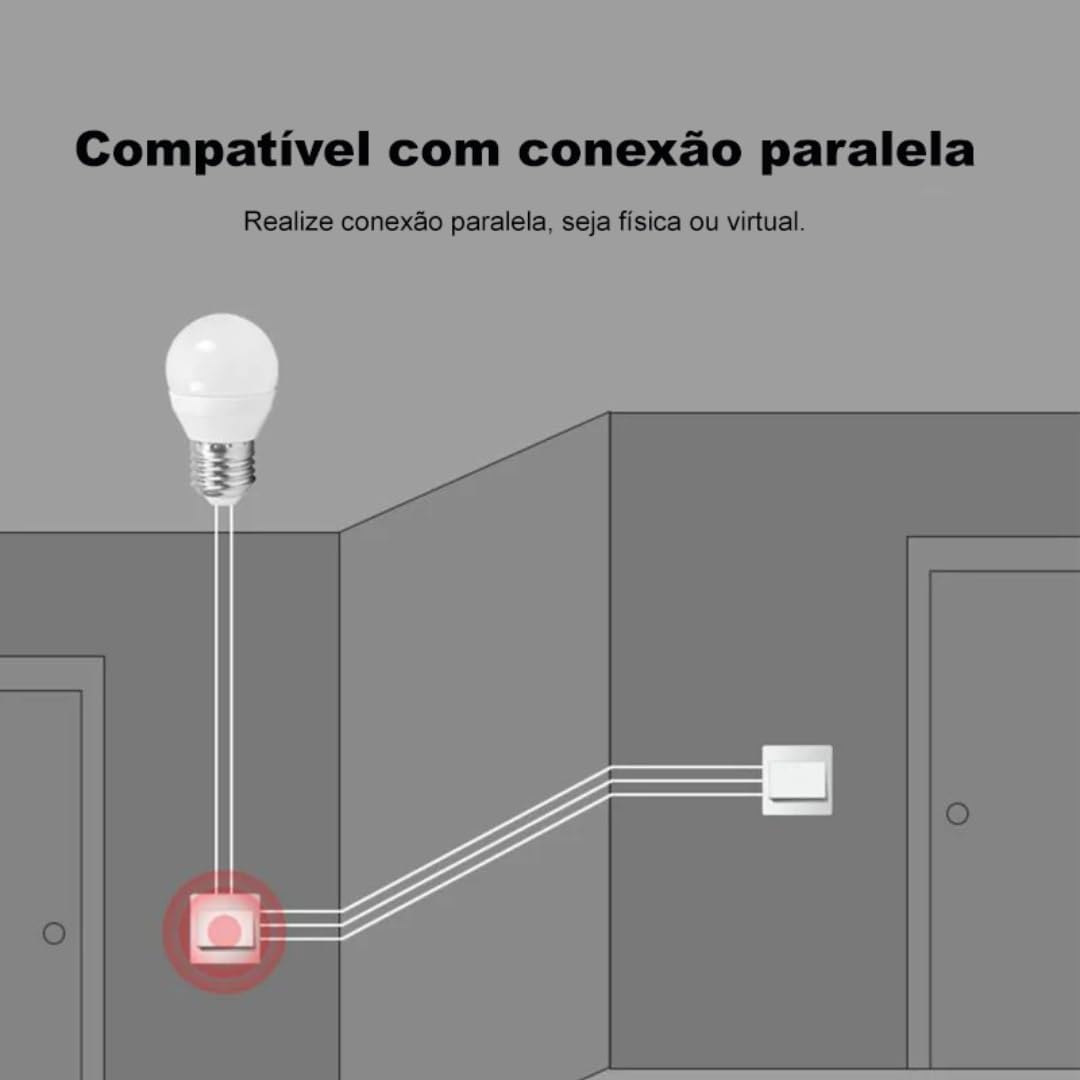
The switch is compatible with popular voice assistants such as Amazon Alexa and Google Home, and works with smart home platforms like Tuya Smart, Smart Life, and Home Assistant. Its compact design allows for simple and quick installation, including parallel installation with existing switches.
2. Sigurnosne informacije
UPOZORENJE: Electrical installation should only be performed by a qualified electrician to ensure safety and compliance with local electrical codes. Incorrect installation can lead to electric shock, fire, or device damage.
- Uvijek isključite napajanje na prekidaču prije instalacije ili održavanja.
- Osigurajte da se uređaj koristi unutar njegove navedene količinetage and current ratings (110V, 16A, 1600W).
- Ne izlažite uređaj vlazi ili ekstremnim temperaturama.
- Ovaj uređaj je dizajniran samo za upotrebu u zatvorenom prostoru.
3. Sadržaj paketa
- 1 x Aubess Mini Smart Wi-Fi Switch
- 1 x Uputstvo za upotrebu
4. Značajke proizvoda
- Wi-Fi povezivanje: Operates on 2.4GHz Wi-Fi networks for remote control.
- Monitoring energije: Provides real-time and historical energy consumption data.
- upravljanje glasom: Kompatibilno s Amazon Alexom i Google Homeom za rad bez upotrebe ruku.
- Kontrola aplikacije: Works with Tuya Smart and Smart Life applications for comprehensive management.
- High Power Rating: Podržava do 16 Amperes and 1600 Watts.
- Paralelna instalacija: Designed to facilitate parallel wiring with existing traditional switches.
- Kompaktan dizajn: Small form factor for easy integration into electrical boxes.


5. Specifikacije
| Specifikacija | Vrijednost |
|---|---|
| Način rada | On-Off |
| Current Rating | 16 Amperes |
| Operating Voltage | 110 Volts |
| Vrsta kontakta | Normalno zatvoreno |
| Tip konektora | Clamp |
| Tip prekidača | Slajd |
| Terminal | Screw |
| Tip kruga | 1-way |
| Vrsta montaže | Zidni nosač |
| Broj pozicija | 2 |
| Maksimalna temperatura | 55 stepeni Celzijusa |
| Tip kontrole | Amazon Alexa, Push Button, Google Assistant |
| Kontrolni metod | Application, Remote, Touch, Voice |
| Vrsta povezanosti | Wi-Fi (2.4GHz) |
| Snaga | 1600 Watts |
| Boja | Bijelo |
| Dimenzije artikla | 41 x 20 x 41 milimetara |
| Unit Count | 1 Jedinica |
| Količina artikala | 1 |
| Materijal | Plastika |
| Kontakt materijal | Metal |
| Međunarodna ocjena zaštite | IP00 |
| Compliant Specification | CE, RoHS |
| Proizvođač | Aubess |
| Broj dijela | WSM02 |
6. Postavljanje i instalacija
6.1 Upute za ožičenje
Važno: Ensure power is disconnected at the circuit breaker before proceeding with any wiring. Professional installation is highly recommended.
- Identifikujte žice: Locate the Live (L), Neutral (N), and Load (L1, L2, etc.) wires in your electrical box. The Aubess switch requires a Neutral wire for operation.
- Spojite žice: Connect the Live wire from your power source to the 'L' terminal on the switch. Connect the Neutral wire to the 'N' terminal. Connect the Load wire(s) (to your light fixture or appliance) to the 'L1' (and 'L2' if applicable) terminal(s).
- Sigurne veze: Osigurajte da su svi spojevi žica sigurni i pravilno izolirani.
- Prekidač za montažu: Carefully place the switch into the electrical box and secure it.
- Vrati snagu: Nakon što je instalacija završena i provjerena, vratite napajanje na prekidaču.
6.2 Uparivanje aplikacija
To control your Aubess Mini Smart Wi-Fi Switch, you need to pair it with the Tuya Smart or Smart Life application.
- Preuzmi aplikaciju: Preuzmite aplikaciju 'Tuya Smart' ili 'Smart Life' iz trgovine aplikacija za vaš pametni telefon (iOS ili Android).
- Registracija/Prijava: Otvorite aplikaciju i registrujte se za novi račun ili se prijavite ako ga već imate.
- Dodaj uređaj: Dodirnite ikonu '+' u gornjem desnom uglu aplikacije da biste dodali novi uređaj.
- Odaberite vrstu uređaja: Choose 'Electrical Switch' or 'Switch (Wi-Fi)'.
- Unesite detalje o Wi-Fi mreži: Ensure your phone is connected to a 2.4GHz Wi-Fi network. Enter your Wi-Fi password in the app.
- Stavite uređaj u način rada za uparivanje: Power on the switch. If the indicator light is not blinking rapidly, press and hold the reset button on the switch for 5-10 seconds until it blinks rapidly.
- Confirm Blinking: U aplikaciji potvrdite da indikatorska lampica brzo treperi.
- Povežite se: The app will begin searching for the device. Once found, you can rename it and complete the setup.
7. Uputstvo za upotrebu
7.1 Kontrola aplikacija
Once paired, you can control the switch from anywhere using the Tuya Smart or Smart Life app:
- On/Off: Dodirnite ikonu prekidača u aplikaciji da biste uključili ili isključili povezani uređaj.
- Zakazivanje: Set schedules or timers for automatic operation.
- scene: Kreirajte prilagođene scene za istovremeno upravljanje više uređaja.
7.2 Glasovno upravljanje (Alexa/Google Home)
To enable voice control, link your Tuya Smart/Smart Life account with Amazon Alexa or Google Home:
- Otvorite aplikaciju Alexa ili Google Home.
- Idite na 'Vještine i igre' (Alexa) ili 'Radi s Googleom' (Google Home).
- Traži 'Tuya Smart' or 'Smart Life'.
- Enable the skill/service and link your account using your app credentials.
- Discover devices. You can now control your switch using voice commands like: "Alexa, turn on the living room light" or "Hey Google, turn off the fan."
7.3 Praćenje energije
The integrated energy monitor allows you to track power consumption:
- In the Tuya Smart/Smart Life app, select your Aubess switch.
- Look for the 'Energy Monitoring' or 'Power Statistics' section.
- View real-time power usage (Watts), current (Amperes), and voltage (Volti).
- Access historical data, including daily, weekly, or monthly consumption graphs.

8. Održavanje
- čišćenje: Za čišćenje uređaja koristite meku, suhu krpu. Ne koristite jake hemikalije ili abrazivna sredstva za čišćenje.
- Ažuriranja firmvera: Povremeno provjeravajte aplikaciju Tuya Smart/Smart Life za dostupna ažuriranja firmvera kako biste osigurali optimalne performanse i sigurnost.
- Uslovi okoline: Ensure the device is kept within its operating temperature range (max 55°C) and away from excessive humidity.
9. Otkrivanje problema
- Uređaj ne reagira:
- Provjerite da li uređaj ima napajanje.
- Verify your Wi-Fi network is active and stable (2.4GHz).
- Ensure your smartphone has an internet connection.
- Try restarting the switch by cycling its power at the circuit breaker.
- Nije moguće upariti:
- Make sure the switch's indicator light is blinking rapidly (pairing mode). If not, reset it by holding the button for 5-10 seconds.
- Confirm your Wi-Fi network is 2.4GHz. 5GHz networks are not supported.
- Provjerite da li ste ispravno unijeli lozinku za Wi-Fi.
- Move the switch closer to your Wi-Fi router during pairing.
- Glasovno upravljanje ne radi:
- Verify that the Tuya Smart/Smart Life skill/service is enabled and linked correctly in your Alexa/Google Home app.
- Ensure the device name in the smart home app matches the name you are using in voice commands.
- Try rediscovering devices in your Alexa/Google Home app.
10. Garancija i podrška
For warranty information, technical support, or service inquiries, please contact Aubess customer support through their official website or the contact information provided at the point of purchase. Please have your product model (WSM02) and purchase details ready when contacting support.


