
T10M Pro+
Vortex T10M Pro+ Tablet User Manual
Model: T10M Pro+
1. Uvod
Thank you for choosing the Vortex T10M Pro+ Tablet. This manual will guide you through the features and functions of your new device, ensuring a smooth and enjoyable user experience. Please read this manual carefully before using your tablet.
Šta je u kutiji
Upon unboxing your Vortex T10M Pro+ Tablet, please verify that all the following items are present:
- Vortex T10M Pro+ Tablet
- Punjač
- Screen Protector
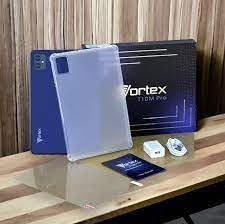
Image: Contents of the Vortex T10M Pro+ Tablet box. This includes the tablet, a clear protective case, the power adapter, and a screen protector, all neatly arranged on a wooden surface.
2. Proizvod je gotovview
Familiarize yourself with the physical components and key features of your Vortex T10M Pro+ Tablet.
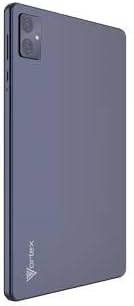
Slika: Stražnja strana view of the Vortex T10M Pro+ Tablet. The tablet has a sleek, dark finish with the 'Vortex' logo subtly placed at the bottom. The camera module is visible in the upper left corner.

Slika: Detaljna view of the back of the Vortex T10M Pro+ Tablet, highlighting its specifications. Printed details include '10.1-inch Brilliant Display', '5MP Front Camera', '8MP Rear Camera', 'MTK6766 Processor', 'Quad-Core, 4GB+64GB', '5000mAh Mega Battery', and 'Android 12'.
3. Podešavanje
3.1. Punjenje uređaja
Before first use, fully charge your tablet. Connect the provided charger to the tablet's charging port and plug it into a power outlet. The battery indicator on the screen will show charging progress.
3.2. Umetanje SIM/MicroSD kartice
The Vortex T10M Pro+ supports 4G LTE connectivity and expandable storage. To insert a SIM card (for mobile data) or a microSD card (for additional storage):
- Pronađite ladicu za SIM/microSD karticu sa strane tableta.
- Koristite priloženi alat za izbacivanje SIM kartice da biste otvorili ladicu.
- Carefully place the SIM card(s) and/or microSD card into the designated slots, ensuring correct orientation.
- Lagano gurnite ladicu nazad u tablet dok ne klikne na svoje mjesto.
3.3. Početno uključivanje
Press and hold the Power button located on the side of the tablet until the Vortex logo appears. Follow the on-screen prompts to complete the initial setup, including language selection, Wi-Fi connection, and Google account setup.
4. Uputstvo za upotrebu
4.1. Osnovna navigacija
Vaš tablet radi na Androidu 13.0. Koristite geste dodira za navigaciju:
- Dodirnite: Odaberite stavku ili otvorite aplikaciju.
- Prevucite: Skrolajte kroz ekrane ili liste.
- Zumiranje štipanjem: Uvećavanje ili smanjivanje fotografija i web stranice.
- Dugi pritisak: Pristupite kontekstualnim menijima ili premjestite ikone.
4.2. Povezivanje na Wi-Fi
Za povezivanje na Wi-Fi mrežu:
- Idi na Postavke > Mreža i internet > Internet.
- Uključite Wi-Fi.
- Odaberite željenu mrežu s popisa i unesite lozinku ako se to od vas zatraži.
4.3. Using Mobile Data (4G LTE)
If you have inserted a valid SIM card with an active data plan:
- Idi na Postavke > Mreža i internet > SIM kartice.
- Ensure Mobile data is enabled for your SIM.
4.4. Rad kamere
Tablet ima zadnju kameru od 8 MP i prednju kameru od 5 MP.
- Otvorite aplikaciju Kamera.
- Dodirnite dugme okidača da biste snimili fotografiju.
- Prebacujte se između prednje i zadnje kamere pomoću ikone za prebacivanje kamere.
4.5. Upravljanje pohranom
Your tablet comes with 64GB of internal storage. You can expand this using a microSD card up to 128GB. To view korištenje prostora za pohranu, idite na Postavke > Skladištenje.
5. Održavanje
5.1. Čišćenje
Za čišćenje ekrana i kućišta tableta koristite meku krpu koja ne ostavlja dlačice. Izbjegavajte upotrebu jakih hemikalija ili abrazivnih materijala.
5.2. Ažuriranja softvera
Povremeno provjeravajte ažuriranja softvera kako biste bili sigurni da vaš tablet ima najnovije funkcije i sigurnosne zakrpe. Idite na Postavke > Sistem > Ažuriranje sistema.
5.3. Održavanje baterije
Da produžite vijek trajanja baterije:
- Izbjegavajte ekstremne temperature.
- Ne dozvolite da se baterija često potpuno isprazni.
- Isključite punjač kada se baterija napuni.
6. Otkrivanje problema
Ovaj odjeljak se bavi uobičajenim problemima s kojima se možete susresti prilikom korištenja tableta.
| Issue | Moguće rješenje |
|---|---|
| Tablet se ne uključuje | Provjerite je li baterija napunjena. Pritisnite i držite dugme za napajanje najmanje 10-15 sekundi da biste prisilno ponovo pokrenuli uređaj. |
| Problemi sa Wi-Fi vezom | Restart the tablet and your Wi-Fi router. Forget the network in settings and reconnect. |
| Aplikacije su spore ili se ruše | Close background apps. Clear app cache (Settings > Apps > [App Name] > Storage > Clear cache). Restart the tablet. |
| Storage full message | Izbrišite nepotrebno files or apps. Move media to a microSD card. |
7. Specifikacije
Detailed technical specifications for the Vortex T10M Pro+ Tablet.
| Feature | Specifikacija |
|---|---|
| Naziv modela | T10M Pro+ Tablet (Unlocked) Blue 10.1" 64GB 4GB GSM 4G LTE + Wifi 8MP |
| Veličina ekrana | 10.1 inča |
| Maksimalna rezolucija ekrana | 1280 x 800 piksela |
| Refresh Rate | 120 Hz |
| Procesor | MediaTek, 2 GHz |
| RAM | 4 GB |
| Interna pohrana | 64 GB |
| Proširiva pohrana | MicroSD (do 128 GB) |
| Operativni sistem | Android 13.0 |
| Zadnja kamera | 8 MP |
| Prednja kamera | 5 MP |
| Povezivanje | 4G LTE, Wi-Fi, Bluetooth, GPS |
| Vrsta baterije | Litijum-jonski |
| Prosječno trajanje baterije | 18 sata |
| Dimenzije proizvoda | 10.1 x 5 x 3 inča |
| Boja | Crna |
8. Informacije o garanciji
This product is covered by a manufacturer's warranty. Please refer to the warranty card included with your purchase or visit the manufacturer's official webstranicu za detaljne uslove i odredbe u vezi sa garancijskim pokrićem, trajanjem i postupkom podnošenja reklamacija.
9. Podrška
For further assistance, technical support, or service inquiries, please contact the manufacturer's customer support. Contact information can typically be found on the product packaging, the manufacturer's webstranicu ili dokumentaciju o garanciji.
Ask a question about this manual
Ask about setup, troubleshooting, compatibility, parts, safety, or missing instructions. Manuals+ will review the question and use this page’s manual context to help answer it.