
1. Uvod
This manual provides essential information for the safe and efficient operation of your Sharp GX-BT190 Portable Bluetooth Speaker. Please read it thoroughly before using the device and retain it for future reference.
2. Sigurnosne informacije
- Ne izlažite zvučnik ekstremnim temperaturama, direktnoj sunčevoj svjetlosti ili visokoj vlažnosti.
- Ne rastavljajte, ne popravljajte niti modificirajte zvučnik. To može poništiti garanciju i predstavljati sigurnosni rizik.
- Ensure the charging port cover is securely closed when using the speaker near water to maintain its IP67 rating.
- Koristite samo priloženi kabel za punjenje ili njegov certificirani ekvivalent.
- Čuvajte zvučnik dalje od djece i kućnih ljubimaca.
- Izbjegavajte slušanje na visokim nivoima glasnoće tokom dužeg perioda kako biste spriječili oštećenje sluha.
3. Sadržaj paketa
- Sharp GX-BT190 Portable Bluetooth Speaker
- USB kabl za punjenje
- Lanyard
- Uputstvo za upotrebu
4. Proizvod je gotovview

Front view of the Sharp GX-BT190 speaker, showing the central speaker grille with the Sharp logo and the LED light ring.

Side view of the Sharp GX-BT190 speaker, highlighting the textured speaker grille and the integrated lanyard.
Pozadi view of the Sharp GX-BT190 speaker, showing the control buttons and the sealed charging port cover.
Kontrole i indikatori:
- Dugme za napajanje: Pritisnite i držite za uključivanje/isključivanje.
- Dugme za pojačavanje zvuka / sljedeću pjesmu (+): Kratki pritisak za povećanje jačine zvuka, dugi pritisak za sledeću numeru.
- Dugme za smanjenje jačine zvuka / prethodnu pjesmu (-): Kratki pritisak za smanjenje jačine zvuka, dugi pritisak za prethodnu pjesmu.
- Play/Pause / Call Button (►||): Kratki pritisak za reprodukciju/pauzu, odgovaranje/prekidanje poziva. Dugi pritisak za odbijanje poziva.
- Mode / Light Button (M): Short press to cycle through LED light modes. Long press to turn off LED lights.
- USB-C priključak za punjenje: For charging the speaker. Ensure the rubber cover is sealed when not charging.
- LED indikator: Displays charging status and Bluetooth pairing status.
5. Podešavanje
5.1 Punjenje zvučnika
- Open the rubber cover on the back of the speaker to access the USB-C charging port.
- Connect the provided USB charging cable to the speaker's USB-C port.
- Drugi kraj USB kabla priključite na USB adapter za napajanje (nije uključen) ili na USB port računara.
- LED indikator će svijetliti tokom punjenja i ugasiti se kada se uređaj potpuno napuni.
- Close the rubber cover securely after charging to maintain the speaker's waterproof rating.
5.2 Uključivanje/isključivanje
- Za uključivanje: Press and hold the Power button for approximately 3 seconds. You will hear an audible prompt, and the LED indicator will flash.
- Za isključivanje: Press and hold the Power button for approximately 3 seconds. You will hear an audible prompt, and the LED indicator will turn off.
5.3 Bluetooth uparivanje
- Ensure the speaker is powered on and the LED indicator is flashing, indicating it is in pairing mode.
- Na svom mobilnom uređaju omogućite Bluetooth i potražite dostupne uređaje.
- Select "GX-BT190" from the list of devices.
- Nakon uparivanja, LED indikator će prestati treptati i ostati stalno svijetliti, a čut ćete i zvučni signal potvrde.
- Zvučnik će se automatski ponovo povezati sa posljednjim uparenim uređajem kada se uključi, ako je uređaj u dometu i ako je Bluetooth omogućen.
5.4 Uparivanje putem pravog bežičnog stereo sistema (TWS)
TWS allows you to pair two GX-BT190 speakers together for a stereo audio experience.

Two Sharp GX-BT190 speakers, one red and one blue, positioned together, illustrating the True Wireless Stereo (TWS) pairing feature.
- Provjerite jesu li oba GX-BT190 zvučnika uključena i nisu povezana ni sa jednim Bluetooth uređajem.
- Na jednom od zvučnika (ovo će biti primarni zvučnik), dvaput pritisnite dugme za napajanje. Zvučnik će ući u TWS režim uparivanja.
- The two speakers will automatically search for and connect to each other. You will hear a confirmation tone once TWS pairing is successful.
- Nakon uparivanja TWS-a, povežite svoj mobilni uređaj s primarnim zvučnikom putem Bluetootha kao što je opisano u odjeljku 5.3.
- To disconnect TWS, double-press the Power button on either speaker.
6. Operativni
6.1 Reprodukcija zvuka
- Pusti/pauza: Kratko pritisnite dugme Play/Pause.
- Povećavanje glasnoće: Kratko pritisnite dugme '+'.
- Smanjivanje jačine zvuka: Kratko pritisnite dugme '-'.
- Sljedeća pjesma: Dugo pritisnite dugme '+'.
- Prethodni zapis: Dugo pritisnite dugme '-'.
6.2 Pozivi bez upotrebe ruku
- Odgovori na poziv: Kratko pritisnite dugme Reprodukuj/Pauziraj kada zvoni dolazni poziv.
- Završi poziv: Kratko pritisnite dugme Reprodukuj/Pauziraj tokom poziva.
- odbiti poziv: Dugo pritisnite dugme Reprodukuj/Pauziraj kada zvoni dolazni poziv.
6.3 LED Mood Lights
- Short press the 'M' (Mode/Light) button to cycle through the 6 available LED mood light modes.
- Long press the 'M' button to turn off the LED lights.
6.4 Vodootporna i prašinootporna upotreba (IP67)

The Sharp GX-BT190 speaker partially submerged in water, demonstrating its IP67 waterproof and dustproof capabilities.
The GX-BT190 speaker is rated IP67, meaning it is protected from dust ingress and can withstand immersion in water up to 1 meter for 30 minutes. To ensure this protection:
- Always ensure the rubber cover for the charging port is fully and securely sealed before exposing the speaker to water or dust.
- Ne uranjajte zvučnik namjerno na duži period ili preko navedene dubine.
- Nakon izlaganja vodi, obrišite zvučnik suhom mekom krpom prije punjenja.
7. Održavanje
7.1 Čišćenje
- Obrišite zvučnik mekom, damp tkanina.
- Ne koristite abrazivna sredstva za čišćenje, alkohol ili hemijske rastvarače.
- Ensure the speaker is dry before charging or storing.
7.2 Skladištenje
- Čuvajte zvučnik na hladnom i suhom mjestu, dalje od direktne sunčeve svjetlosti i ekstremnih temperatura.
- Ako skladištite bateriju duži period, periodično je punite (npr. svaka 3 mjeseca) kako biste je održali u ispravnom stanju.
8. Otkrivanje problema
| Problem | Rješenje |
|---|---|
| Zvučnik se ne uključuje. | Provjerite je li baterija napunjena. Spojite zvučnik na izvor napajanja pomoću USB kabela. |
| Nije moguće uparivanje putem Bluetootha. | Ensure the speaker is in pairing mode (LED flashing). Turn off and on Bluetooth on your device. Move the speaker closer to your device. Clear previous Bluetooth connections on your device. |
| Nema zvuka ili je jačina zvuka niska. | Increase the volume on both the speaker and your connected device. Ensure the speaker is properly paired. |
| Loša kvaliteta zvuka. | Move the speaker closer to your device. Ensure there are no obstructions between the speaker and your device. Try playing a different audio source. |
| Uparivanje TWS-a nije uspjelo. | Ensure both speakers are GX-BT190 models and are not connected to any other Bluetooth device. Try powering both speakers off and on, then re-attempt TWS pairing. |
9. Specifikacije

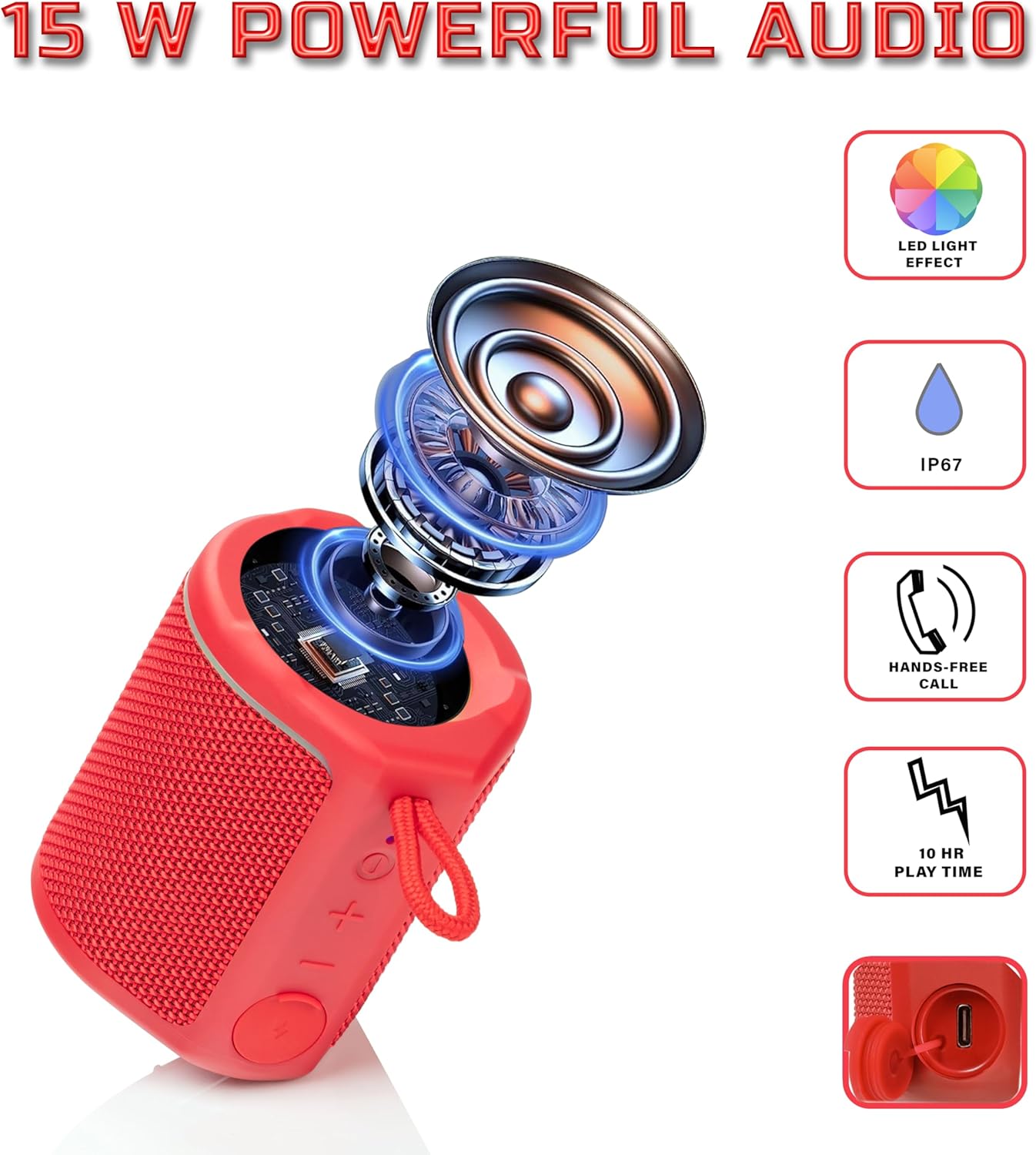
Diagram illustrating the internal components of the Sharp GX-BT190 speaker, including the speaker driver, and highlighting features like LED light effect, IP67 rating, hands-free call function, and battery life.
| Feature | Detalj |
|---|---|
| Broj modela | GX-BT190 |
| Tehnologija povezivanja | Bluetooth |
| Maksimalna izlazna snaga zvučnika | 10 Watts |
| Waterproof Rating | IP67 |
| Trajanje baterije | Do 15 sati |
| Vrsta baterije | 1 litijum jonski (uključen) |
| Kapacitet baterije | 1200 mAh |
| Dimenzije proizvoda (D x Š x V) | 7.5 x 7.5 x 7.5 cm (otprilike) |
| Težina artikla | 226.8 g (8 unce) |
| bežični domet | Do 33 stopa |
| Dodatne karakteristike | LED Light, True Wireless Stereo (TWS), Hands-Free Calling |
10. Garancija
The Sharp GX-BT190 Portable Bluetooth Speaker comes with a 1-Year Limited Warranty from the date of purchase. This warranty covers manufacturing defects under normal use. It does not cover damage caused by misuse, accidents, unauthorized modifications, or normal wear and tear. Please retain your proof of purchase for warranty claims.
11. Podrška
For technical assistance, warranty inquiries, or further information regarding your Sharp GX-BT190 speaker, please contact Sharp Inc. customer support:
- Kontakt proizvođača: Sharp Inc
- Telefon: 1-800-BE-SHARP