
1. Važna sigurnosna uputstva
Molimo vas da pažljivo pročitate sva uputstva prije upotrebe ovog uređaja i sačuvate ih za buduću upotrebu. Nepoštivanje ovih uputstava može dovesti do strujnog udara, požara ili ozbiljnih tjelesnih povreda.
- Always ensure the fan is unplugged from the power outlet before cleaning, servicing, or moving.
- Ne koristite ventilator s oštećenim kabelom ili utikačem. Ako je kabel za napajanje oštećen, mora ga zamijeniti proizvođač, njegov servisni agent ili slično kvalificirana osoba kako bi se izbjegla opasnost.
- Keep fingers, pencils, or any other objects out of the fan grille when operating.
- Do not use the fan near windows, in wet areas, or where it may be exposed to water.
- Postavite ventilator na stabilnu, ravnu površinu kako biste spriječili njegovo prevrtanje.
- Ovaj uređaj je namijenjen samo za upotrebu u domaćinstvu. Ne koristiti na otvorenom.
- Osigurajte voltagNazivna snaga navedena na naljepnici s karakteristikama odgovara jačini vaše električne mreže.tage.
2. Proizvod je gotovview
The Sona SSO 6062N is a 12-inch power stand fan designed to provide efficient air circulation. It features a robust aluminium alloy fan blade for strong and powerful wind delivery, along with a durable anti-rust coating for longevity. The fan offers 3-speed control and wide-angle oscillation for comprehensive cooling coverage, complemented by a free neck for tilt adjustment.
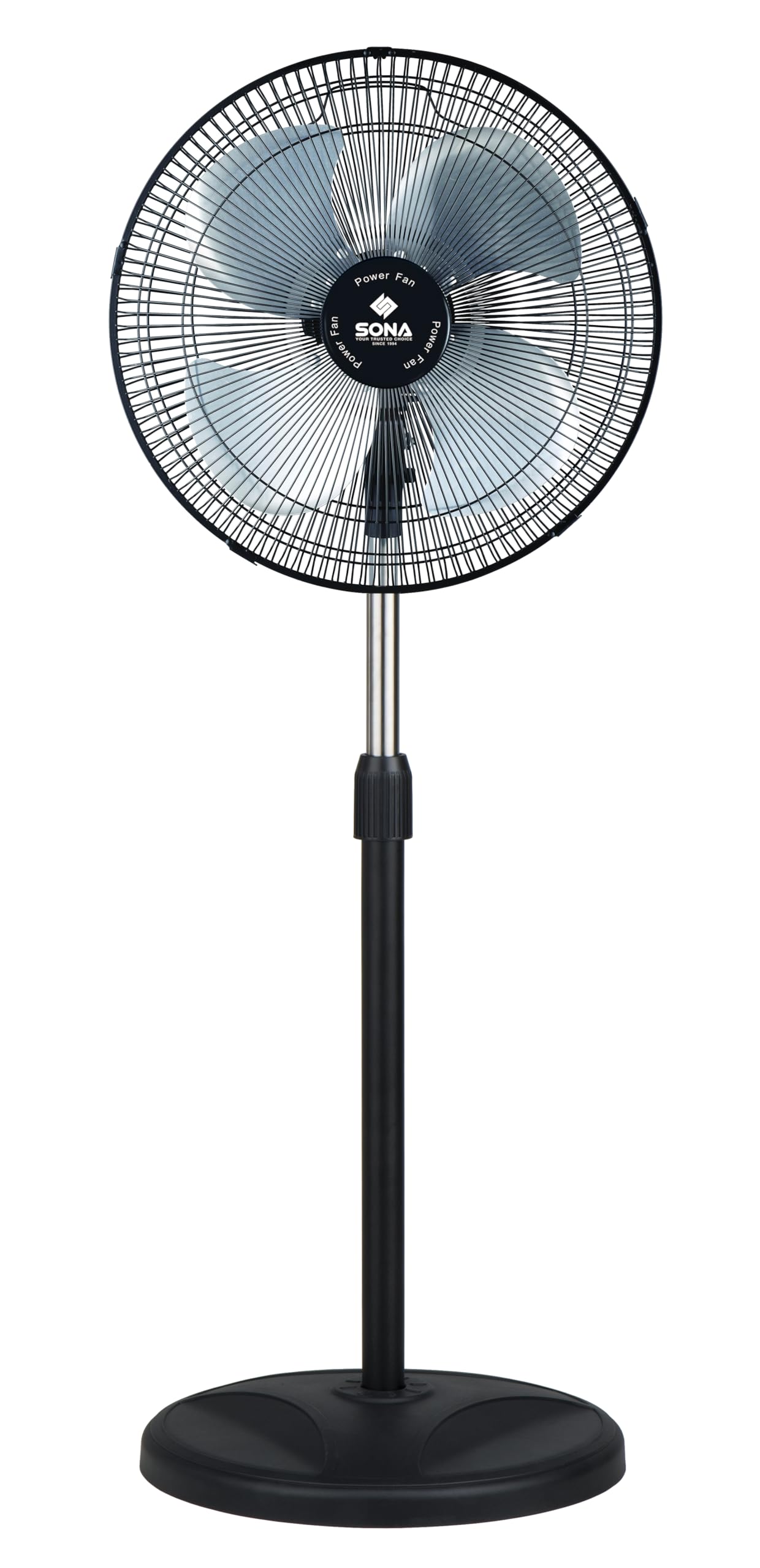
Image 2.1: Sona SSO 6062N 12-inch Power Stand Fan. This image displays the fully assembled stand fan, showcasing its pedestal design, fan head with grille, and control panel on the motor unit.
3. Sadržaj paketa
Before assembly, ensure all components are present and undamaged. If any parts are missing or damaged, do not attempt to assemble or operate the fan. Contact customer support.
- Fan Motor Unit (with rear grille and power cord)
- Fan Blades (Aluminium Alloy)
- Front Grille
- Matica za pričvršćivanje rešetke
- Matica za pričvršćivanje oštrice
- Podesivi štand
- Okrugla baza
- Vijak za pričvršćivanje baze
- Uputstvo za upotrebu
4. Montaža i postavljanje
Follow these steps to assemble your Sona SSO 6062N stand fan:
- Pričvrstite štap postolja na bazu: Insert the adjustable stand pole into the round base. Secure it from underneath the base using the provided base fixing screw. Tighten firmly.
- Montirajte motornu jedinicu: Place the fan motor unit onto the top of the stand pole. Ensure it is seated securely.
- Ugradite zadnju rešetku: The rear grille is typically pre-attached to the motor unit. If not, align it with the motor unit and secure it with the grille retaining nut.
- Pričvrstite lopatice ventilatora: Slide the aluminium alloy fan blades onto the motor shaft. Ensure the blades are correctly oriented and seated firmly. Secure them with the blade retaining nut, turning it clockwise until tight.
- Ugradite prednju rešetku: Place the front grille over the fan blades, aligning it with the rear grille. Secure the front grille by clipping it into place or using any provided fasteners. Ensure it is fully closed and locked for safety.
- Postavite ventilator: Place the assembled fan on a stable, flat surface, away from curtains or other objects that could obstruct airflow or get caught in the blades.
5. Operacija
Once assembled, plug the fan into a suitable power outlet. The controls are located on the motor unit.
- Uključivanje/isključivanje i kontrola brzine: Use the rotary switch or push buttons on the control panel to turn the fan on and select your desired speed. The fan offers 3 speed settings: 1 (Low), 2 (Medium), and 3 (High). Select '0' or 'OFF' to turn the fan off.
- Funkcija oscilacije: To activate the wide-angle oscillation, press down the oscillation knob located on top of the motor unit. To stop oscillation and fix the fan in one direction, pull the knob up.
- Podešavanje nagiba: The fan head features a free neck for tilt adjustment. Gently push or pull the fan head up or down to direct the airflow to your preferred angle. Do not force the head beyond its natural range of motion.
- Podešavanje visine: To adjust the fan's height, loosen the height adjustment knob on the stand pole, raise or lower the pole to the desired height, and then firmly tighten the knob.
6. Održavanje i čišćenje
Redovno čišćenje i održavanje osigurat će optimalne performanse i produžiti vijek trajanja vašeg ventilatora.
- Uvijek isključite ventilator iz struje iz utičnice prije čišćenja.
- Eksterijerno čišćenje: Obrišite vanjske površine ventilatora mekom,amp krpom. Ne koristite abrazivna sredstva za čišćenje, voskove ili sredstva za poliranje jer mogu oštetiti završnu obradu.
- Čišćenje rešetke i lopatica: To clean the fan blades and inside of the grilles, you may need to carefully remove the front grille. Refer to the assembly instructions in reverse for safe removal. Use a soft cloth or a vacuum cleaner with a brush attachment to remove dust and debris. Ensure all parts are completely dry before reassembling and operating the fan.
- Skladištenje: If storing the fan for an extended period, clean it thoroughly, disassemble if desired, and store it in its original packaging or a suitable container in a cool, dry place.
7. Otkrivanje problema
Ako naiđete na bilo kakve probleme s ventilatorom, pogledajte sljedeće uobičajene probleme i rješenja:
| Problem | Mogući uzrok | Rješenje |
|---|---|---|
| Ventilator se ne uključuje. | Nema napajanja. Fan not plugged in. Prekidač za napajanje je isključen. | Provjerite utičnicu. Uvjerite se da je utikač potpuno umetnut. Turn the speed control knob to a numbered setting (1, 2, or 3). |
| Ventilator ne oscilira. | Dugme za oscilaciju je povučeno prema gore. | Press down the oscillation knob on top of the motor unit. |
| Neobična buka tokom rada. | Labavi dijelovi. Obstruction in blades/grille. | Unplug the fan and check for any loose screws or components. Unplug the fan and carefully check for any foreign objects or debris caught in the blades or grilles. Clean as per maintenance instructions. |
Ako problem i dalje postoji nakon isprobavanja ovih rješenja, obratite se korisničkoj podršci.
8. Specifikacije
Technical details for the Sona SSO 6062N Power Stand Fan:
- Brand: Sona
- Naziv modela: SSO 6062N
- Tip ventilatora: Pedestal Fan / Stand Fan
- Veličina: 12 inča
- Dimenzije (D x Š x V): 33D x 35W x 109H centimetara
- Materijal: Aluminium (Blades), Coated Finish
- Broj brzina: 3
- Posebne karakteristike: Oscillating, Tilt Adjustment
- Vrsta montaže: Podni nosač
- Proizvođač: Cahaya Electronics PTE LTD
9. Garancija i podrška
This Sona SSO 6062N Power Stand Fan comes with a 6 Years Warranty on Motor od datuma kupovine. Molimo sačuvajte dokaz o kupovini za potrebe reklamacije.
The warranty covers manufacturing defects in the motor under normal household use. It does not cover damage caused by misuse, accident, unauthorized modification, or normal wear and tear.
For warranty service, technical support, or inquiries, please contact your retailer or the manufacturer's authorized service center. Contact information can typically be found on the product packaging or the manufacturer's official website.
