
Lisowod L01Pro
Lisowod Mini Projector User Manual
Model: L01Pro
Prenosivi pametni projektor
1. Uvod
Hvala na kupoviniasing the Lisowod Mini Projector. This compact and powerful device is designed to provide a vivid 1080P FHD viewing experience with advanced features like automatic keystone correction and electric focus. Its portable design, complete with a convenient strap, makes it ideal for travel and various entertainment needs. This manual will guide you through the setup, operation, and maintenance of your new projector.
2. Važne informacije o sigurnosti
- Ne izlažite projektor kiši ili vlazi kako biste spriječili požar ili strujni udar.
- Osigurajte odgovarajuću ventilaciju. Ne blokirajte ventilacijske otvore.
- Koristite samo adapter za napajanje koji dolazi s projektorom.
- Izbjegavajte gledanje direktno u sočivo projektora kada je lamp je uključen, jer jarko svjetlo može oštetiti vaše oči.
- Držite projektor dalje od izvora toplote i direktne sunčeve svjetlosti.
- Ne pokušavajte sami rastavljati ili popravljati projektor. Za sve servisne radove obratite se kvalifikovanom osoblju.
3. Sadržaj paketa
Molimo vas da pažljivo provjerite sadržaj paketa. Ako bilo koji artikl nedostaje ili je oštećen, obratite se prodavaču.
- Lisowod Mini Projector (L01Pro)
- Adapter za napajanje
- HDMI kabl
- Daljinski upravljač
- Uputstvo za upotrebu
4. Proizvod je gotovview
Komponente projektora

Slika 4.1: Front view of the Lisowod Mini Projector, showcasing its compact design, lens, and key features like 1080P FHD, Auto Keystone, Electric Focus, 2.4+5G Wi-Fi, and Bluetooth connectivity.
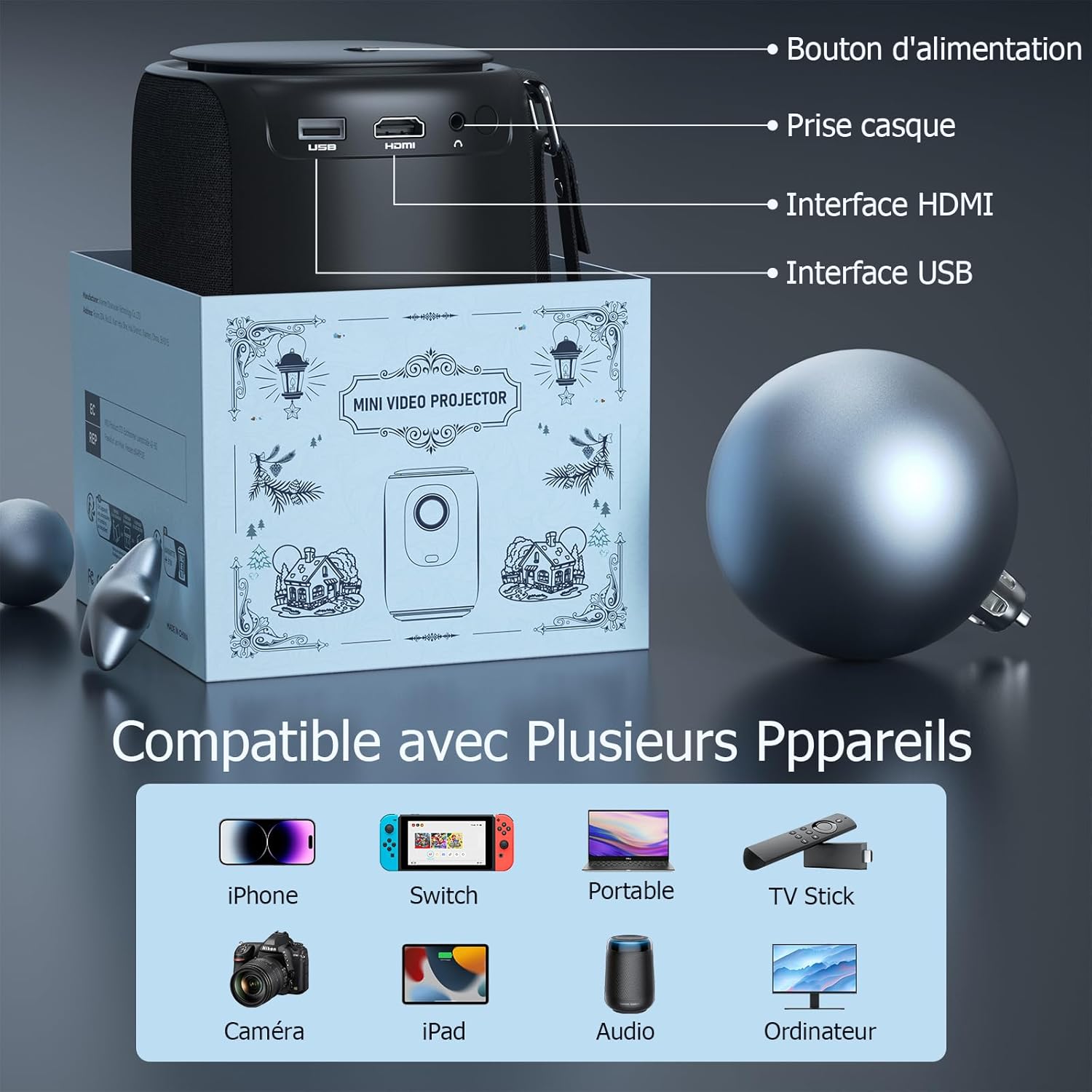
Slika 4.2: Pozadi view of the projector, indicating the power button, headphone jack, HDMI interface, and USB interface for various connections.
Ključne karakteristike
- 1080P FHD Display: Delivers vivid and immersive images.
- Automatic Keystone Correction (±50°): Automatically corrects distorted images vertically for a perfect rectangular display.
- električni fokus: Achieve clear images quickly with a single click on the remote control, eliminating manual adjustments.
- Dual-band Wi-Fi (2.4G+5G): Provides smoother and lower latency connectivity for streaming and gaming.
- Bidirectional Bluetooth & Integrated Stereo Speakers: Can be used as a Bluetooth speaker and offers Hi-Fi sound effects.
- Portable Strap Design: Convenient for carrying the projector during travel.
5. Vodič za postavljanje
5.1 Uključivanje
- Spojite adapter za napajanje na ulazni priključak za napajanje projektora.
- Uključite adapter za napajanje u zidnu utičnicu.
- Pritisnite dugme za napajanje na projektoru ili daljinskom upravljaču da ga uključite.
5.2 Početno smještaj
Place the projector on a stable, flat surface. Ensure there is adequate space around the projector for ventilation.
5.3 Adjusting Focus and Keystone
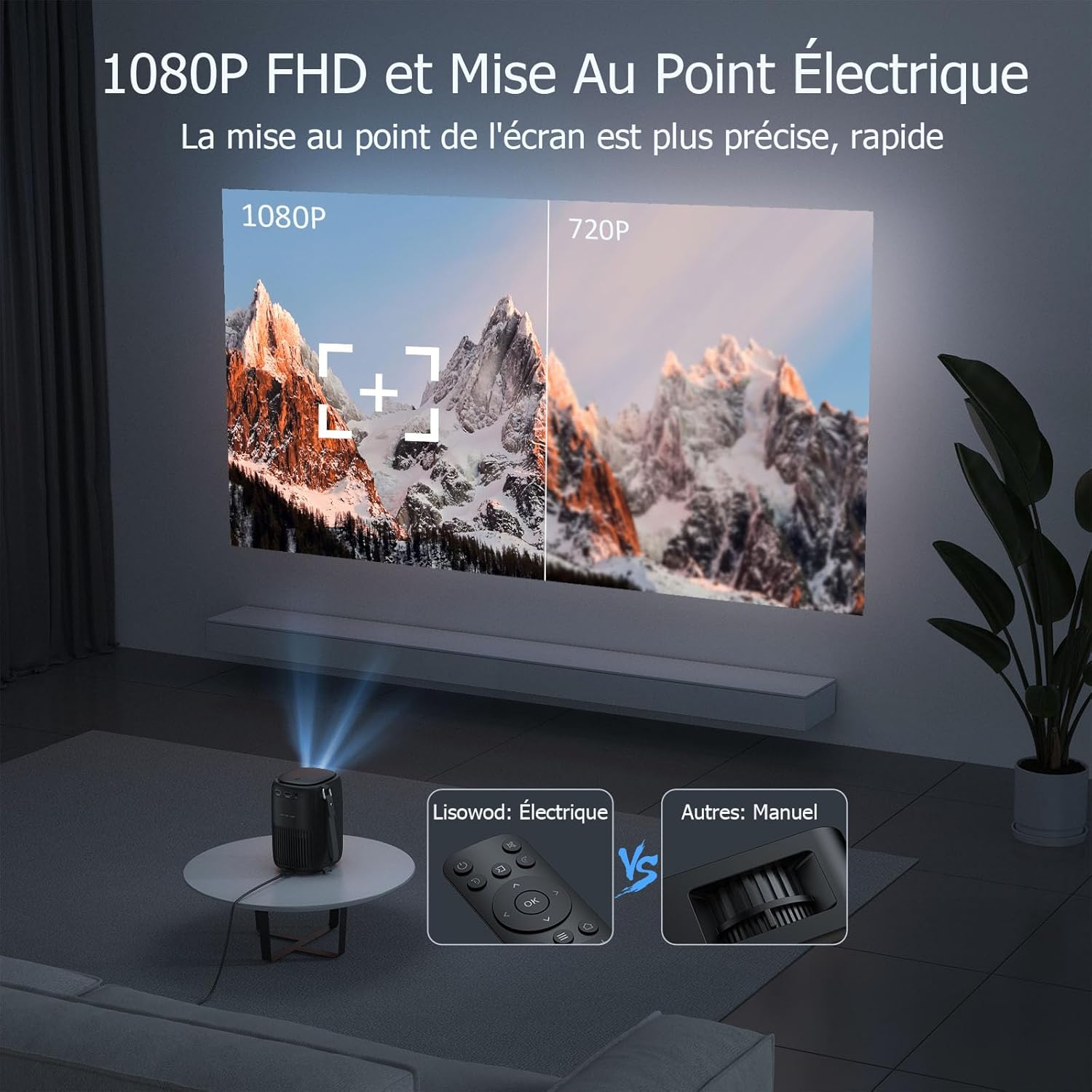
Slika 5.1: Illustrates the precision of 1080P FHD and the ease of electric focus compared to manual focus.

Slika 5.2: Demonstrates the automatic keystone correction feature, which adjusts the image shape automatically.
- električni fokus: Use the remote control to adjust the focus. The built-in high-precision infrared sensor allows for quick and clear image acquisition with a single click.
- Automatska korekcija Keystone: The projector features automatic keystone correction, which automatically adjusts the image vertically (up and down) if the projector is not perfectly aligned with the screen.
6. Uputstvo za upotrebu
6.1 Povezivanje uređaja
The projector is compatible with a variety of devices:
Slika 6.1: The projector supports connections with various devices including iPhone, Switch, Laptops, TV Sticks, Cameras, iPads, Audio devices, and Computers.
- HDMI: Connect laptops, game consoles, TV sticks, or other media players using the provided HDMI cable.
- USB: Umetnite USB disk za reprodukciju medija files direktno.
- pametni telefon/tablet: Connect your smartphone or tablet for screen mirroring (specific adapter or app may be required, refer to device instructions).
- Audio izlaz: Connect external speakers or headphones via the headphone jack for enhanced audio.
6.2 Wi-Fi veza

Slika 6.2: Demonstrates the advantage of 2.4G+5G Wi-Fi for smoother and lower latency performance.
- Navigate to the Wi-Fi settings in the projector's menu.
- Select your desired Wi-Fi network (supports both 2.4GHz and 5GHz).
- Unesite lozinku i povežite se.
6.3 Bluetooth audio

Slika 6.3: Highlights the projector's bidirectional Bluetooth and integrated stereo speakers, allowing it to function as a Bluetooth speaker.
- Go to the Bluetooth settings in the projector's menu.
- Omogućite Bluetooth i potražite dostupne uređaje.
- Odaberite Bluetooth zvučnik ili slušalice za uparivanje.
6.4 Using Streaming Services (Netflix, Amazon Prime, etc.)
Due to copyright restrictions, direct casting or HDMI connection from a phone/tablet for services like Netflix, Amazon Prime, etc., may not display video (only audio). To enjoy videos from these platforms, you must connect a dedicated TV stick (e.g., Amazon Fire TV Stick, Google Chromecast) to the projector's HDMI port.
7. Održavanje i njega
- Čišćenje sočiva: Koristite meku krpu koja ne ostavlja dlačice, posebno dizajniranu za optička sočiva. Ne koristite abrazivna sredstva za čišćenje ili rastvarače.
- Čišćenje tijela projektora: Wipe the surface with a soft, dry cloth. For stubborn stains, use a slightly damp krpom, a zatim dobro osušite.
- ventilacija: Provjerite da li su ventilacijski otvori čisti od prašine i ostataka. Koristite meku četku ili komprimirani zrak da ih nježno očistite.
- Skladištenje: Kada se projektor ne koristi duži period, čuvajte ga na hladnom i suhom mjestu, po mogućnosti u originalnom pakovanju ili zaštitnoj futroli.
8. Otkrivanje problema
| Problem | Mogući uzrok | Rješenje |
|---|---|---|
| Nema prikazane slike | Power cable not connected; Input source incorrect; Device not powered on. | Check power connection; Select correct input source (HDMI, USB); Ensure connected device is on. |
| Slika je mutna | Fokus nije podešen; Projektor je previše daleko/blizu platnu. | Use the remote control to adjust electric focus; Adjust projection distance. |
| Slika je iskrivljena (trapezoidnog oblika) | Projektor nije okomit u odnosu na platno. | The projector has automatic keystone correction. Ensure it's on a stable surface. If manual adjustment is needed, check menu settings. |
| Nema zvuka | Volume too low; Muted; External audio device not connected properly; Source device audio settings. | Increase volume; Unmute; Check external speaker connection; Adjust audio output on source device. |
| Cannot play Netflix/Amazon Prime Video | Copyright restrictions on direct casting/HDMI from phone/tablet. | Connect a dedicated TV stick (e.g., Amazon Fire TV Stick, Google Chromecast) to the projector's HDMI port. |
| Daljinski upravljač ne radi | Baterije su slabe/prazne; Prepreka između daljinskog upravljača i projektora. | Replace batteries; Remove any obstructions; Point remote directly at the projector's IR receiver. |
9. Tehničke specifikacije
| Feature | Specifikacija |
|---|---|
| Brand | Lisowod |
| Broj modela | L01Pro |
| Maksimalna rezolucija ekrana | 1920 x 1080 (1080P FHD) |
| Tehnologija povezivanja | HDMI, USB, Wi-Fi (2.4G+5G), Bluetooth |
| Display Type | LCD |
| Odnos kontrasta slike | 20000:1 |
| Osvetljenost | 158 lumena |
| Form Factor | Prijenosni |
| Vrsta montaže | Table Mount |
| Uključene komponente | Adapter, HDMI Cable, Remote Control |
| Kompatibilni uređaji | Laptop, Game Console, Smartphone, Other Media Players, Speaker |
10. Garancija i podrška
Your Lisowod Mini Projector is covered by a standard manufacturer's warranty. Please refer to the warranty card included in your package for specific terms and conditions, including the warranty period and coverage details.
For technical support, troubleshooting assistance, or warranty claims, please contact Lisowod customer service through the retailer where you purchased the product or visit the official Lisowod webstranica za kontakt informacije.
Please have your model number (L01Pro) and purchase information ready when contacting support.
Ask a question about this manual
Ask about setup, troubleshooting, compatibility, parts, safety, or missing instructions. Manuals+ will review the question and use this page’s manual context to help answer it.