
SuperFire X60-T
SuperFire X60-T Flashlight User Manual
Model: X60-T | Brand: SuperFire
1. Uvod
This manual provides comprehensive instructions for the safe and effective use of your SuperFire X60-T High Lumens Rechargeable LED Flashlight. Please read this manual thoroughly before operating the device and retain it for future reference.
2. Značajke proizvoda
- High Powered Illumination: Equipped with upgraded super bright LED chips (36W), delivering a maximum of 10000 lumens in turbo mode with a maximum beam distance of 350 meters (1148 feet).
- Raznovrsni režimi osvetljenja: Features 5 distinct lighting modes: High, Medium, Strobe, SOS, and Turbo, allowing adaptation to various lighting requirements.
- Fokus koji se može zumirati: The flashlight offers a telescopic focusing design; zoom in for a wide floodlight covering 56 square meters, or zoom out for a narrow spotlight capable of illuminating over 350 meters.
- Durable & Waterproof Construction: Constructed from aviation-grade aluminum, ensuring heavy-duty performance and resistance to extreme conditions. It boasts an IP44 waterproof rating, suitable for use in heavy rain and snow.
- Punjiva tipa C: Utilizes an upgraded high-capacity battery, providing approximately 6 hours of operation in high mode and 15 hours in low mode. Fast-charging via a Type-C port takes 4-6 hours for a full charge, compatible with laptops, power banks, and adapters.
- Prijenosni dizajn: Compact size (15.8 cm / 6.22 in L x 4.1 cm / 1.61 in W) with an integrated clip for easy storage and carrying in pockets or backpacks.
- Funkcionalnost Power banke: Can function as a portable power bank to charge smartphones or tablets in emergency situations.
3. Sadržaj paketa
Molimo Vas da prilikom otvaranja paketa provjerite da li su svi artikli prisutni i u dobrom stanju:
- SuperFire X60-T Flashlight
- USB-C kabl za punjenje
- Belt Clip (pre-attached or included separately)
- Korisnički priručnik (ovaj dokument)
4. Podešavanje
4.1 Početno punjenje
Before first use, fully charge the flashlight. The charging port is a Type-C port located on the side of the flashlight, typically protected by a rubber cover.
- Locate the Type-C charging port on the flashlight.
- Gently lift the rubber cover to expose the port.
- Connect the provided USB-C charging cable to the flashlight's port.
- Connect the other end of the USB-C cable to a compatible USB power source (e.g., wall adapter, computer USB port, power bank).
- The indicator light on the flashlight will show charging status. It typically glows red while charging and turns blue when fully charged.
- Punjenje obično traje 4-6 sata za potpuno punjenje.
- Nakon što se potpuno napuni, isključite kabel i čvrsto zatvorite gumeni poklopac kako biste održali vodootpornost.
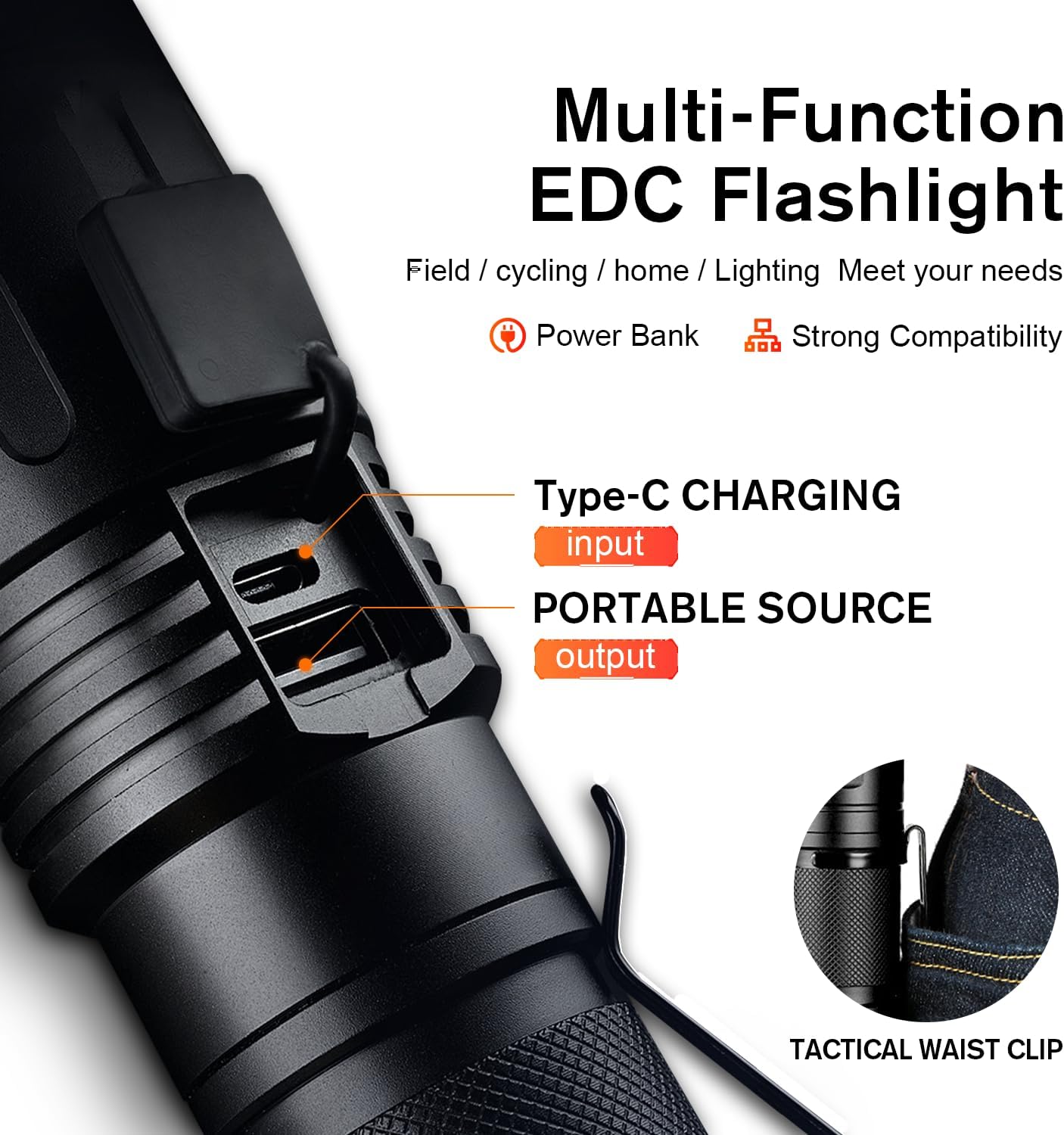
Figure 1: Type-C Charging Port and Tactical Waist Clip. The image displays a close-up of the flashlight's body, highlighting the Type-C input and USB output ports, along with a visual of the tactical waist clip.
5. Uputstvo za upotrebu
5.1 Uključivanje/isključivanje napajanja
Pritisnite dugme za napajanje koje se nalazi sa strane lampe da biste je uključili ili isključili.
5.2 Promjena načina osvjetljenja
With the flashlight powered on, short press the power button repeatedly to cycle through the 5 lighting modes:
- visoka: Maximum brightness for general illumination.
- srednji: Moderate brightness for extended battery life.
- nisko: Minimal brightness for close-range tasks or preserving night vision.
- Stroboskop: Rapid flashing light for signaling or disorientation.
- SOS: International Morse code signal for emergencies (three short, three long, three short flashes).
- Turbo: (If applicable, usually a double-click from off or on) Provides the absolute maximum lumen output for a short burst. Refer to product specifications for activation.

Figure 2: Five Lighting Modes. This image illustrates the different light output levels and special modes (Strobe, SOS) of the flashlight in various outdoor scenarios.
5.3 Funkcionalnost zumiranja
The SuperFire X60-T features a telescopic focusing design to adjust the beam from a wide floodlight to a narrow spotlight.
- Da biste podesili snop, lagano pomaknite glavu baterijske lampe naprijed ili nazad.
- Sliding the head forward will narrow the beam, creating a focused spotlight for long-distance illumination.
- Sliding the head backward will widen the beam, creating a broad floodlight for illuminating a larger area.

Figure 3: Telescopic Focusing. The image shows the flashlight's zoomable design, illustrating the wide beam (floodlight) and narrow beam (spotlight) capabilities.
5.4 Korištenje kao Power Bank
The flashlight can serve as a portable power bank to charge other devices.
- Locate the USB output port, usually next to the Type-C input port, under the same rubber cover.
- Connect your device's charging cable (e.g., smartphone, tablet) to the USB output port on the flashlight.
- The flashlight will begin charging your device. Monitor your device's charging indicator.
- Disconnect when charging is complete or when the flashlight's battery is low.
6. Održavanje
- čišćenje: Obrišite baterijsku lampu mekom, damp tkanina. Nemojte koristiti abrazivna sredstva za čišćenje ili rastvarače.
- Skladištenje: Store the flashlight in a cool, dry place away from direct sunlight and extreme temperatures. If storing for extended periods, charge the battery every 3-6 months to maintain its lifespan.
- Otpornost na vodu: Ensure the rubber cover for the charging ports is always securely closed to maintain the IP44 water resistance rating. Avoid submerging the flashlight in water.
- Održavanje baterije: Use only the provided charging cable or a compatible Type-C cable. Do not attempt to replace the internal battery.
7. Otkrivanje problema
| Problem | Mogući uzrok | Rješenje |
|---|---|---|
| Lampa se ne uključuje. | Baterija je prazna. | Charge the flashlight fully using the provided Type-C cable. |
| Izlaz svjetlosti je slab. | Slaba baterija ili pogrešan način rada. | Charge the battery. Cycle through modes to ensure High or Turbo mode is selected. |
| Svjetiljka se ne puni. | Cable or adapter issue; port not connected properly. | Ensure the Type-C cable is securely connected to both the flashlight and the power source. Try a different USB port or adapter. |
| Funkcija zumiranja je kruta. | Prašina ili ostaci u mehanizmu. | Gently clean the sliding mechanism. Avoid forcing the zoom. |
8. Specifikacije
| Feature | Detalj |
|---|---|
| Model | X60-T |
| Brand | SuperFire |
| Vrsta izvora svjetlosti | LED |
| Svjetlina (maks.) | 10000 Lumens (Turbo Mode) / 2100 Lumens (Standard) |
| Udaljenost snopa (maks.) | 350 metara (1148 stopa) |
| Izvor napajanja | Napaja se baterijama (1 litijum-jonska baterija uključena) |
| Port za punjenje | Tip-C |
| Vrijeme punjenja | 4-6 sata |
| Vrijeme rada (visoki način rada) | 6 sati |
| Vrijeme rada (niski način rada) | 15 sati |
| Materijal | Aluminijum za vazduhoplovstvo |
| Nivo vodootpornosti | IP44 (vodootporni) |
| Dimenzije proizvoda | 2.1"D x 2.1"W x 6.7"H (15.8 cm L x 4.1 cm W) |
| Težina artikla | 1.01 funte |
| Posebne karakteristike | Adjustable Focus, Durable, High Power, Portable, Weatherproof, Power Bank Functionality |

Figure 4: Size and Performance Comparison. This image provides a visual comparison of the X60-T's size relative to a smartphone and another model (X60), along with a table detailing their respective runtimes and lumen outputs.
9. Jamstvo i podrška
For warranty information, technical support, or any inquiries regarding your SuperFire X60-T flashlight, please refer to the contact information provided on the product packaging or visit the official SuperFire webSačuvajte račun kao dokaz o kupovini za reklamacije u slučaju reklamacije.
Ask a question about this manual
Ask about setup, troubleshooting, compatibility, parts, safety, or missing instructions. Manuals+ will review the question and use this page’s manual context to help answer it.