Uvod
This manual provides instructions for the safe and efficient use of your Cygnett Boost Power Bank 10,000 mAh. This device is designed to charge compatible electronic devices on the go, offering convenience and reliability.
Sadržaj paketa
- Cygnett Boost Power Bank 10,000 mAh
- USB-A na USB-C kabl za punjenje
- Uputstvo za upotrebu
Product Overview
Komponente i karakteristike
The Cygnett Boost Power Bank features multiple charging ports and a digital display for battery status, ensuring you are always aware of its charge level.
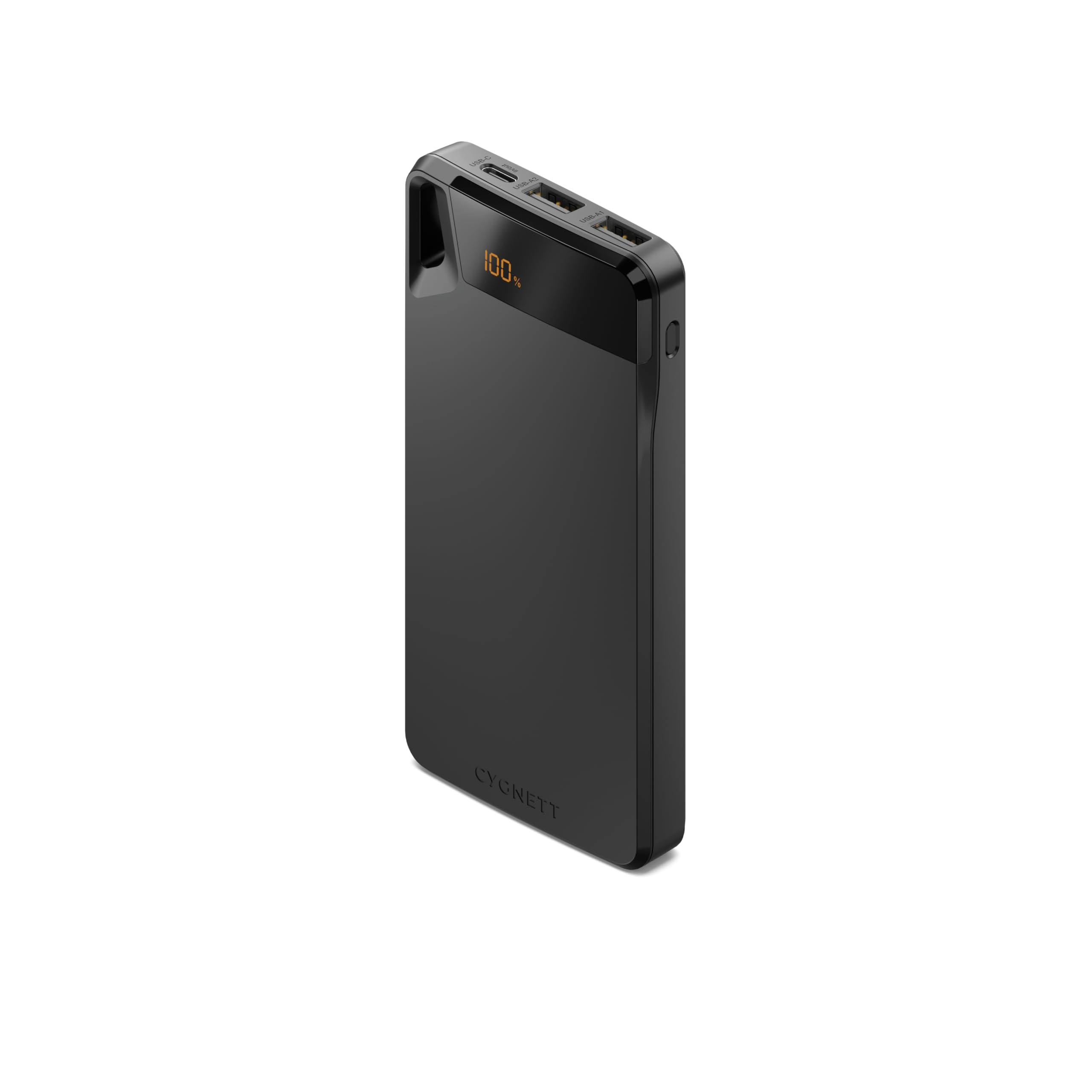
Opis slike: A black Cygnett Boost Power Bank showing its top surface with the "CYGNETT" logo, and the front edge displaying a digital "100%" battery indicator, one USB-C port labeled "in/out", and two USB-A ports labeled "USB-A1" and "USB-A2". A black lanyard is attached to the side.
- Digitalni prikaz: Jasno prikazuje preostali postotak baterijetage.
- USB-C Port (In/Out): Used for both recharging the power bank and charging compatible devices.
- USB-A portovi (izlaz): Two ports available for charging various devices.
- Vrpca: Integrated for convenient portability and secure carrying.
Setup
Početno punjenje
Before using your power bank for the first time, ensure it is fully charged to optimize battery performance.
- Connect the provided USB-A to USB-C cable to the power bank's USB-C port.
- Drugi kraj kabla priključite na kompatibilni USB punjač (nije uključen).
- The digital display will show the charging progress. Once it reaches "100%", the power bank is fully charged and ready for use.
Uputstvo za upotrebu
Punjenje vaših uređaja
The power bank is capable of charging up to three devices simultaneously.
- Connect your device's charging cable to one of the power bank's USB-A ports or the USB-C port.
- Drugi kraj kabla priključite na vaš elektronski uređaj.
- Power bank će automatski početi puniti vaš uređaj. Digitalni displej će prikazivati preostali kapacitet power bank-a.
- Disconnect your device once it is fully charged to conserve power bank battery life.
Punjenje Power Bank
When the digital display indicates a low battery percentage, recharge the power bank promptly.
- Use the provided USB-A to USB-C cable or a compatible USB-C to USB-C cable.
- Connect the USB-C end to the power bank's USB-C port.
- Connect the other end to a USB wall charger or a powered USB port.
- The display will indicate the charging status until it reaches 100%.
Održavanje
Održavanje i skladištenje
- Keep the power bank dry and away from moisture to prevent damage.
- Izbjegavajte izlaganje uređaja ekstremnim temperaturama (vrućim ili hladnim).
- Do not drop, puncture, or attempt to disassemble the power bank.
- Vanjski dio čistite mekom, suhom krpom. Ne koristite jake hemikalije ili abrazivna sredstva za čišćenje.
- For long-term storage, charge the power bank to approximately 50-75% every three months to maintain optimal battery health.
Rješavanje problema
Uobičajeni problemi
| Problem | Mogući uzrok | Rješenje |
|---|---|---|
| Power bank ne puni uređaj | Low power bank battery | Potpuno napunite power bank. |
| Incorrect cable or connection | Ensure cables are securely connected and compatible with both devices. | |
| Power bank se ne puni | Faulty wall adapter or cable | Try a different wall adapter or charging cable. |
| USB-C port used for output only | Ensure the USB-C port is functioning for input by using a compatible charger. | |
| Digitalni displej ne radi | Neispravnost uređaja | Obratite se korisničkoj podršci za pomoć. |
If problems persist after attempting these solutions, please contact Cygnett customer support for further assistance.
Specifikacije
Tehnički podaci
- Model: CY4747PBCHE
- Kapacitet: 10,000 mAh
- Ulaz (USB-C): Up to 15W (e.g., 5V/3A)
- Izlaz (USB-C): Up to 15W (e.g., 5V/3A)
- Output (USB-A1/A2): Up to 15W total (e.g., 5V/3A shared)
- Ukupan izlaz: 15W
- Dimenzije: 10 x 5 x 3 centimetara
- Težina: 100 grama
- Materijal: Plastika
- Boja: Crna
Garancija i podrška
Informacije o garanciji
This Cygnett Boost Power Bank comes with a 2 godine garancije od datuma kupovine. Ova garancija pokriva proizvodne nedostatke pri normalnoj upotrebi. Ne pokriva štetu uzrokovanu nepravilnom upotrebom, nezgodama, neovlaštenim modifikacijama ili normalnim habanjem.
For warranty claims or technical support, please visit the official Cygnett webstranice ili kontaktirajte njihov odjel za korisničku podršku.
Cygnett Webstranica: www.cygnett.com