
XTAR MX4
XTAR MX4 Intelligent Battery Charger User Manual
Model: MX4
1. Uvod
The XTAR MX4 is an advanced 4-slot intelligent battery charger designed for a wide range of rechargeable batteries. It supports 1.5V Li-ion, 3.6V/3.7V Li-ion, 3.2V LiFePO4, and 1.2V Ni-MH battery types, offering a versatile charging solution. The MX4 incorporates multiple safety features and smart charging technology to ensure efficient and safe battery charging.
2. Sadržaj paketa
Provjerite da li su sve stavke prisutne u paketu:
- XTAR MX4 Battery Charger
- USB A na C kabl
- Korisnički priručnik (ovaj dokument)

Image: The XTAR MX4 charger, a USB-A to USB-C cable, and the user manual are shown neatly arranged next to the product packaging.
3. Specifikacije
| Feature | Detalj |
|---|---|
| Model | MX4 |
| Input | 5V — 2A |
| Konstantna struja punjenja | 1A x 2 / 0.5A x 4 |
| Charge Cutoff Voltage (3.6/3.7V Li-ion) | 4.20 ± 0.05V |
| Charge Cutoff Voltage (1.5V Li-ion) | N/A (Internal regulation by battery) |
| Charge Cutoff Voltage (3.2V LiFePO4) | 3.65 ± 0.05V |
| Charge Cutoff Voltage (1.2V Ni-MH) | 1.45 ± 0.1V |
| Struja prekida punjenja | ≤100mA |
| Radna temperatura | 0-40°C |
| Dimenzije | L100 x W97 x H26.3mm (3.9 x 3.8 x 1 inches) |
| Neto težina | 100 g (5.6 unci) |
| Certifikati | CE, FCC, RoHS |
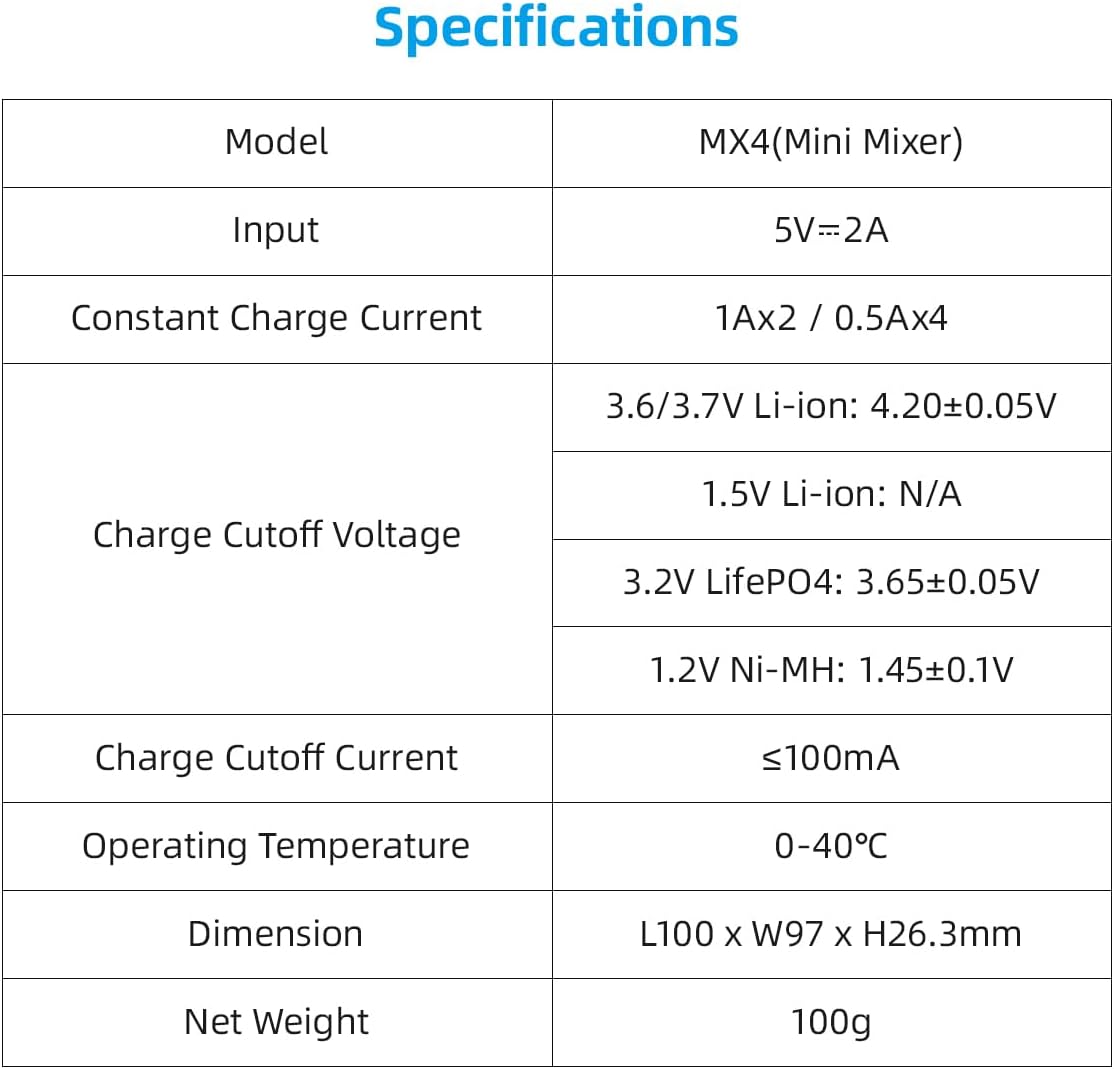
Image: A detailed table outlining the technical specifications of the XTAR MX4 charger, including input voltage, charge currents, cutoff voltages for different battery types, operating temperature, dimensions, and weight.
4. Podešavanje
To set up your XTAR MX4 charger:
- Priključite napajanje: Use the provided USB A to C cable to connect the charger to a 5V 2A USB power adapter or a compatible USB power source. The charger's indicator lights will illuminate briefly upon connection.
- plasman: Place the charger on a stable, flat, and non-flammable surface, away from direct sunlight or heat sources.
5. Uputstvo za upotrebu
The XTAR MX4 features intelligent battery recognition and independent charging slots.
5.1 Umetanje baterija
Carefully insert one or more rechargeable batteries into the charging slots, ensuring the positive (+) and negative (-) terminals align correctly with the markings on the charger. The spring-loaded contacts accommodate various battery lengths.

Image: The XTAR MX4 charger with four different types of batteries inserted into its slots, demonstrating its multi-chemistry compatibility. Each battery type is clearly labeled with its voltage i kapacitet.
5.2 Proces punjenja
Upon insertion, the charger will automatically detect the battery type and initiate the appropriate charging mode. The LED indicator above each slot provides charging status:
- Red Light (Solid): Baterija se puni.
- Red Light (Slow Flash): Battery identification/activation in progress.
- Red Light (Rapid Flash): Recovery failed or an anomaly occurred.
- Green Light (Solid): Charging is complete or no battery is present.
The charger employs an intelligent charging strategy (TC-CC-CV for Li-ion) to optimize battery lifespan and performance, automatically stopping when fully charged.
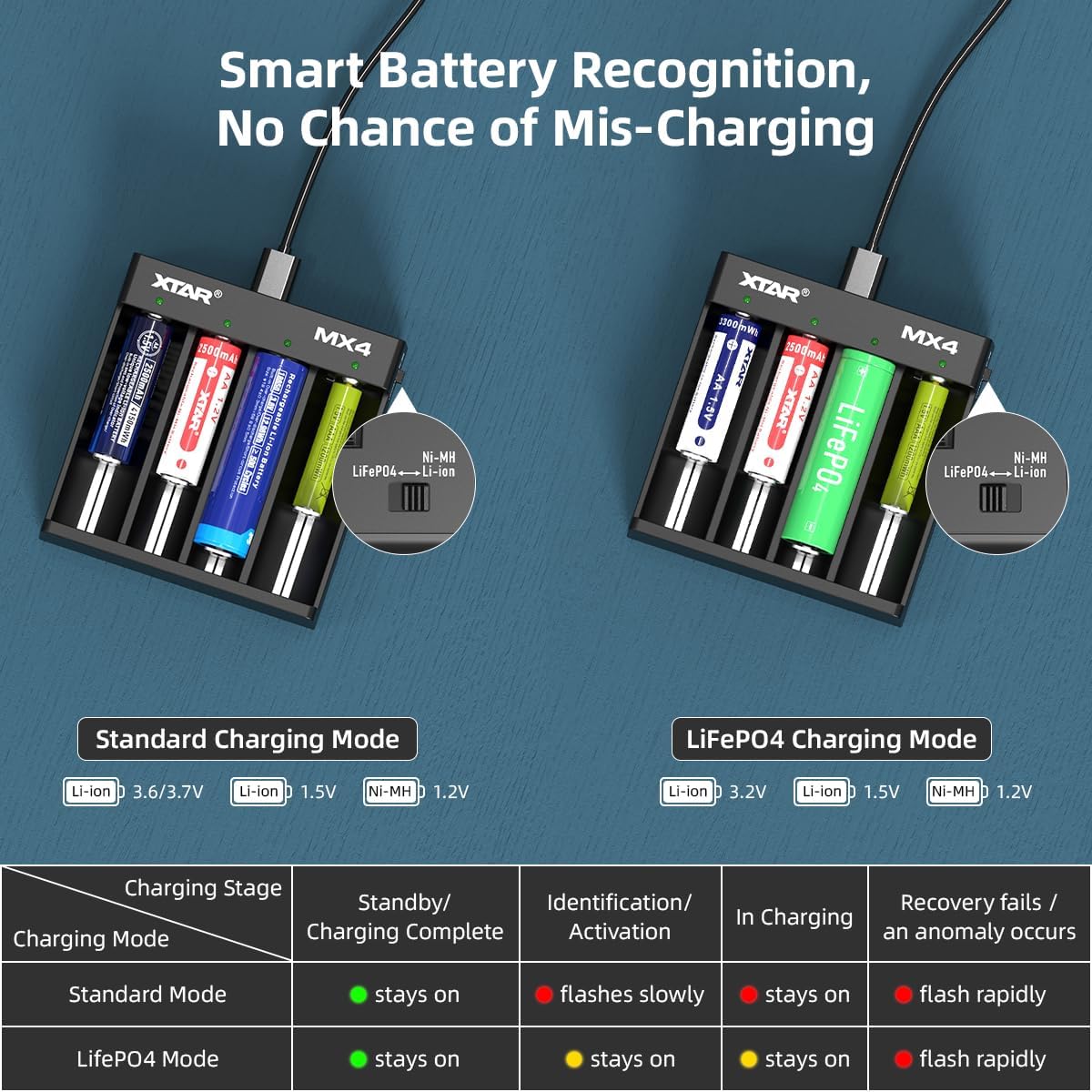
Image: A diagram illustrating the XTAR MX4's smart battery recognition feature, showing how it distinguishes between standard charging mode (Li-ion, Ni-MH) and LiFePO4 charging mode. A table below details the meaning of the LED indicator lights for each charging stage i način rada.
6. Kompatibilnost baterija
The XTAR MX4 is compatible with a wide range of cylindrical rechargeable batteries from 34mm to 70mm in length. Supported battery types include:
- 3.6V/3.7V Li-ion: 10440, 14500, 16340, 18350, 18500, 18650, 18700, 20700, 21700 (unprotected)
- 3.2V LiFePO4
- 1.5 V Li-ion: AAA, AA
- 1.2V Ni-MH: AAA, AA, A, SC, C

Image: A visual representation of the XTAR MX4's wide compatibility, showing various battery types and sizes (Li-ion, LiFePO4, Ni-MH, 1.5V Li-ion) that can be charged, along with a diagram of the charger itself.
7. Sigurnosne informacije i zaštitne funkcije
The XTAR MX4 charger is designed with multiple safety features to ensure a secure charging experience. Always adhere to the following safety guidelines:
- Use only compatible rechargeable batteries. Do not attempt to charge non-rechargeable batteries.
- Pazite na ispravan polaritet baterije prilikom umetanja baterija.
- Nemojte rastavljati niti modificirati punjač.
- Držite punjač dalje od vode, vlage i visokih temperatura.
- Isključite punjač iz izvora napajanja kada ga ne koristite ili tokom čišćenja.
7.1 Ugrađene zaštitne funkcije
The MX4 incorporates advanced protection technologies:
- Inteligentna detekcija: Automatically identifies battery type and selects optimal charging parameters.
- soft start: Gradually increases charging current to protect batteries.
- Zaštita od kratkog spoja: Sprečava oštećenja od kratkih spojeva.
- Zaštita od prekomjernog punjenja: Automatically stops charging when batteries are full.
- Over-Voltage Zaštita: Zaštitne mjere protiv prekomjernog volumenatage ulaz.
- Zaštita od obrnutog polariteta: Sprečava oštećenja ako se baterije nepravilno umetnu.
- Timely Stop When Fully Charged: Ensures batteries are not overcharged, preserving their lifespan.

Image: A graphic illustrating the various protection technologies integrated into the XTAR MX4 charger, including intelligent detection, soft start, short circuit protection, over-charge protection, over-voltage protection, reverse polarity protection, and timely stop when fully charged.
8. Održavanje
To ensure the longevity and optimal performance of your XTAR MX4 charger:
- čišćenje: Isključite punjač iz struje prije čišćenja. Koristite meku, suhu krpu za brisanje površine. Ne koristite abrazivna sredstva za čišćenje ili rastvarače.
- Skladištenje: Čuvajte punjač na hladnom i suvom mestu kada ga ne koristite.
- Izbjegavajte kapi: Protect the charger from physical shocks and drops.
9. Otkrivanje problema
| Problem | Mogući uzrok | Rješenje |
|---|---|---|
| Punjač se ne uključuje. | Nema priključka za napajanje ili je kabel/adapter neispravan. | Ensure the USB cable is securely connected to both the charger and a working 5V 2A power source. Try a different USB cable or power adapter. |
| Battery not charging (Red light flashing rapidly). | Battery inserted incorrectly, battery is severely over-discharged, or battery is damaged. | Re-insert the battery ensuring correct polarity. If the issue persists, the battery may be too deeply discharged for recovery or is faulty. Try a different battery. |
| Punjenje je sporo. | Insufficient input power or charging too many batteries at high current. | Ensure your USB power adapter provides at least 5V 2A. The charger provides 1A for two slots or 0.5A for four slots. Charging four batteries simultaneously will result in 0.5A per slot. |
| LED is green but battery is not fully charged. | Poor contact with battery terminals or battery is not rechargeable. | Adjust the battery position to ensure good contact. Verify that the battery is indeed a rechargeable type compatible with the MX4. |
10. Garancija i podrška
XTAR products are manufactured with high quality standards. If your product arrives damaged or you encounter any issues, please contact XTAR customer support immediately. For products purchased on Amazon, you may reach out to the seller, AllmaybeDirect, for assistance. Replacements for damaged products can be swiftly dispatched from our California warehouse.
For further support or inquiries, please visit the official XTAR webweb-mjesto ili kontaktirajte njihove kanale za korisničku podršku.
Ask a question about this manual
Ask about setup, troubleshooting, compatibility, parts, safety, or missing instructions. Manuals+ will review the question and use this page’s manual context to help answer it.