
Uvod
This manual provides detailed instructions for the installation, operation, and maintenance of your GREATHTEK HDMI KVM Switch. This device allows you to control up to four computers using a single monitor, keyboard, and mouse, enhancing workspace efficiency and reducing cable clutter. Please read this manual thoroughly before use to ensure proper functionality and to maximize your product experience.
Sadržaj paketa
Provjerite da li se u vašem paketu nalaze sve dolje navedene stavke. Ako neke stavke nedostaju ili su oštećene, obratite se korisničkoj podršci.
- KVM Switch Unit x1
- HDMI 2.0 kabl x1
- USB 3.0 kabl x4
- USB C Power Cable x1
- Desktop Controller x1
- Uputstvo za upotrebu x1
- Podloga za stopala x4

Karakteristike proizvoda
- 4-Port KVM Functionality: Control up to four computers (PCs) with a single set of keyboard, mouse, and monitor.
- Podrška visoke rezolucije: Supports resolutions up to 4K@60Hz (3840x2160@60Hz), and is backward compatible with 2K and 1080P. Ensure your source devices, monitor, and HDMI cables all support 4K@60Hz for optimal performance.
- High-Speed USB 3.0 Ports: Equipped with 3 USB 3.0 ports and 1 USB C port, offering data transfer speeds up to 5 Gbit/s, which is ten times faster than USB 2.0. These ports can connect keyboards, mice, USB drives, printers, scanners, and other USB devices.
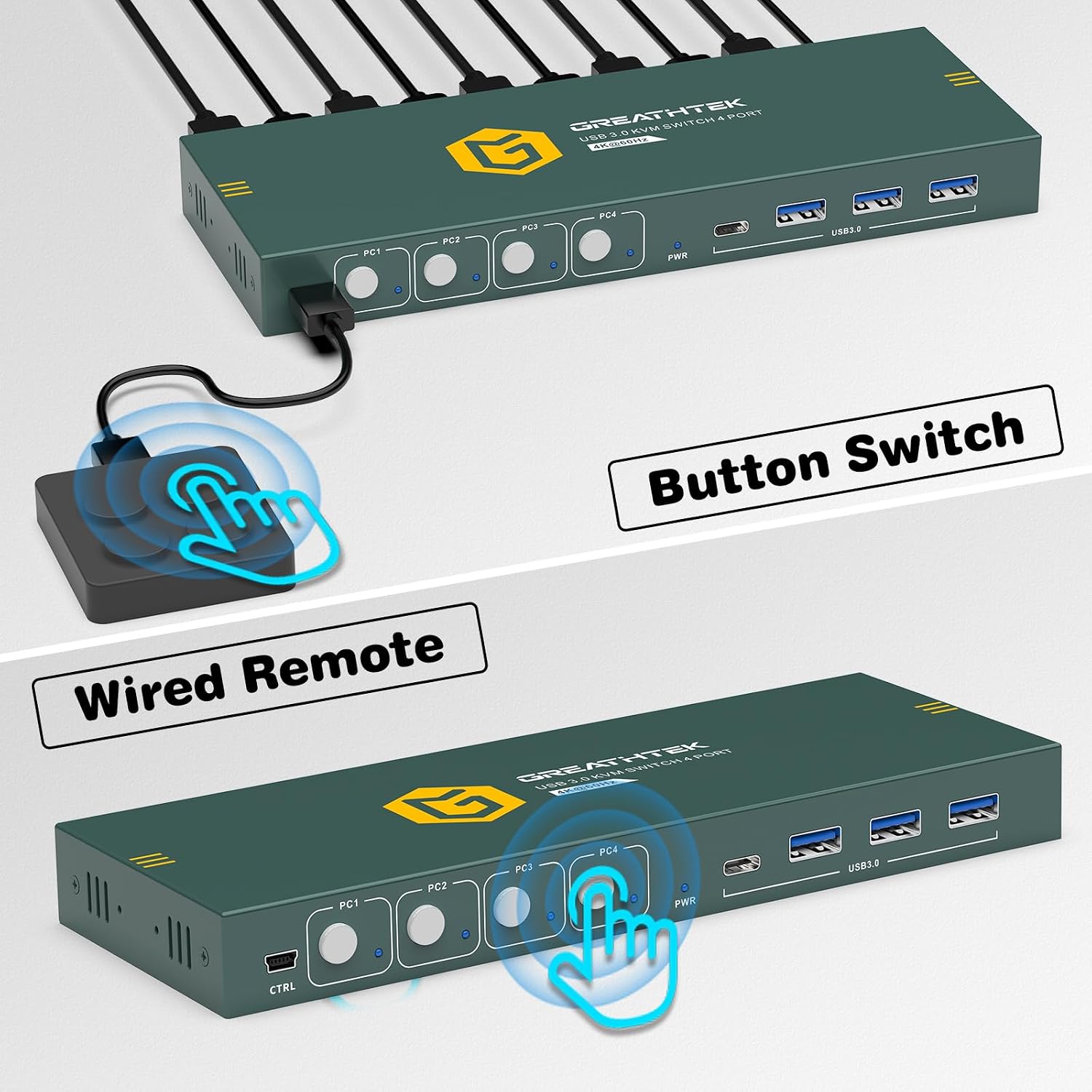
- Dual Switching Methods: Easily switch between connected computers using either the physical button on the KVM switch or the included 1.5m wired desktop controller.
- EDID Adaptation: Features EDID adaptation to maintain consistent window and resolution settings when switching between computers, preventing display disruption.
- Široka kompatibilnost: Compatible with various operating systems including Windows, Linux, Unix, and Mac.


Uputstva za postavljanje
Follow these steps to properly set up your GREATHTEK HDMI KVM Switch:
- Isključite sve uređaje: Before starting, ensure all computers and your monitor are powered off and unplugged from their power sources.
- Povežite monitor: Connect your monitor to the "HD OUT" port on the KVM switch using an HDMI cable.
- Connect Computers (HDMI): For each computer, connect an HDMI cable from the computer's HDMI output to an available "HD IN" port (PC1, PC2, PC3, PC4) on the KVM switch.
- Connect Computers (USB): For each computer, connect a USB 3.0 cable from the computer's USB port to the corresponding "USB 3.0" input port (PC1, PC2, PC3, PC4) on the KVM switch. These connections enable keyboard, mouse, and other USB device sharing.
- Povežite tastaturu i miš: Connect your keyboard and mouse to the dedicated USB 3.0 ports on the KVM switch. You can also connect other USB peripherals like a USB drive or printer to the remaining USB 3.0 ports.
- Priključite napajanje: Connect the USB C power cable to the KVM switch's power input and then to a suitable USB power adapter (not included) or a powered USB port.
- Uključeno: Uključite KVM prekidač, zatim monitor i na kraju računare.

Uputstvo za upotrebu
Once the KVM switch is set up, you can easily switch between your connected computers.
Prebacivanje između računara
The GREATHTEK HDMI KVM Switch offers two methods for switching:
- Dugme na prednjoj ploči: Press the corresponding button (PC1, PC2, PC3, or PC4) on the front panel of the KVM switch to select the desired computer. The LED indicator next to the button will illuminate to show the active computer.
- Žičani kontroler za desktop računar: Use the included wired desktop controller. Press the button on the controller to cycle through the connected computers. This allows for convenient switching without reaching for the KVM unit itself.

Održavanje
Da biste osigurali dugotrajnost i optimalne performanse vašeg KVM prekidača, slijedite ove smjernice za održavanje:
- čišćenje: Za čišćenje vanjštine uređaja koristite meku, suhu krpu. Izbjegavajte upotrebu tečnih sredstava za čišćenje ili aerosola, jer mogu oštetiti uređaj.
- ventilacija: Osigurajte da je KVM prekidač postavljen u dobro prozračenom prostoru kako biste spriječili pregrijavanje. Ne blokirajte ventilacijske otvore.
- Upravljanje kablovima: Keep cables organized and free from kinks or excessive bending to prevent damage and ensure stable connections.
- Uslovi okoline: Izbjegavajte izlaganje uređaja ekstremnim temperaturama, vlazi ili direktnoj sunčevoj svjetlosti.
Rješavanje problema
Ako naiđete na probleme s KVM prekidačem, pogledajte sljedeće uobičajene probleme i rješenja:
- Nema izlaza za prikaz:
- Ensure all HDMI cables are securely connected to both the KVM switch and the computers/monitor.
- Verify that the KVM switch is powered on.
- Provjerite je li na vašem monitoru odabran ispravan ulazni izvor.
- Pokušajte ponovo pokrenuti KVM prekidač i povezane računare.
- Confirm that your HDMI cables support the desired resolution (e.g., 4K@60Hz).
- Tastatura/miš ne reaguje:
- Ensure the USB 3.0 cables from the computers to the KVM switch are properly connected.
- Verify that the keyboard and mouse are connected to the dedicated USB 3.0 ports on the KVM switch.
- Try connecting the keyboard and mouse directly to the computer to confirm they are functional.
- Some specialized gaming keyboards/mice may require direct connection or specific drivers; try a standard keyboard/mouse first.
- Display Resolution/Refresh Rate Issues:
- Ensure all connected devices (computers, monitor, HDMI cables) support the desired resolution and refresh rate (e.g., 4K@60Hz).
- Adjust display settings on your computer to match the capabilities of your monitor and KVM switch.
- Kašnjenje prebacivanja:
- A slight delay during switching is normal as the system re-establishes connections. Excessive delays might indicate a cable issue; try replacing HDMI or USB cables.
If these steps do not resolve your issue, please contact GREATHTEK customer support for further assistance.
Specifikacije
| Feature | Specifikacija |
|---|---|
| Broj modela | GHT-S7415H-01 |
| Brand | GREATHTEK |
| KVM portovi | 4 Computers, 1 Monitor |
| Video Rezolucija | Up to 4K@60Hz (3840x2160@60Hz) |
| USB portovi | 3 x USB 3.0, 1 x USB C |
| USB Transfer Speed | Do 5 Gbit/s |
| Metode prebacivanja | Button Switch, Desktop Controller |
| Desktop Controller Cable Length | 1.5m |
| Kompatibilnost | Windows, Linux, Unix, Mac |
| Tip konektora | HDMI, USB-A, USB-C |
| Materijal | Bakar (kontaktni materijal) |
| Boja | Crna |
| Dimenzije (paket) | 25.2 x 18.3 x 6.9 cm |
| Težina (paket) | 810 g |
Garancija i podrška
GREATHTEK products are designed for reliability and performance. This product comes with a standard manufacturer's warranty. For specific warranty details, please refer to the warranty card included in your package or contact GREATHTEK customer support.
If you encounter any issues or have questions regarding your KVM switch, please do not hesitate to contact our customer support team. We are committed to providing prompt and helpful assistance.