
1. Proizvod je gotovview
The Irfora SZ305 is a professional digital multimeter designed for accurate and rapid measurement of various electrical parameters. It features a high-definition backlit LCD display for clear readings in diverse environments and a retractable stand for convenient use.
Ključne funkcije uključuju:
- AC/DC Voltage i Mjerenje struje
- Diode, Resistance, and Capacitance testing
- Merenje frekvencije
- Buzzer continuity test
- hFE Triode testing for NPN/PNP transistors
- Non-Contact Voltage (NCV) detekcija
- Battery detection (1.5V, 3V, 9V, 12V)

Image 1.1: The Irfora SZ305 Digital Multimeter highlighting its various measurement functions including AC/DC voltage/current, diode, capacitance, frequency, buzzer, resistance, NCV induction, hFE, and battery detection.
2. Sigurnosne informacije
Please read and understand all safety instructions before operating the multimeter. Failure to follow these instructions may result in electric shock, fire, or damage to the device.
- Uvijek se uvjerite da je multimetar postavljen na ispravnu funkciju i raspon prije bilo kakvog mjerenja.
- Ne pokušavajte izmjeriti voltagili struje koje prelaze maksimalne specificirane granice za uređaj.
- Budite izuzetno oprezni pri radu sa strujnim kolima pod naponom. Visoka volumenizacijatagmože biti opasno.
- Inspect test leads for damage before each use. Do not use if insulation is cracked or damaged.
- Ne koristite multimetar ako izgleda oštećeno ili ne funkcioniše ispravno.
- Izbjegavajte korištenje multimetra u vlažnim okruženjima ili tokom oluja s grmljavinom.
- Odmah zamijenite baterije kada se pojavi indikator slabe baterije kako biste osigurali tačna očitavanja.
- Uvijek isključite mjerne kablove iz strujnog kola prije promjene funkcija ili raspona.
3. Postavljanje i početna upotreba
3.1 Instalacija baterije
The multimeter requires batteries for operation. To install or replace batteries:
- Provjerite je li multimetar isključen iz napajanja i da li su mjerni kablovi odvojene.
- Pronađite poklopac odjeljka za bateriju na stražnjoj strani uređaja.
- Upotrijebite odvijač da otvorite odjeljak.
- Insert new batteries, observing correct polarity (+ and -).
- Vratite poklopac odeljka za baterije i pričvrstite ga vijkom.
3.2 Using the Retractable Support Stand
The multimeter is equipped with a retractable stand on its back for convenient viewtokom mjerenja.
- To deploy the stand, gently pull it outwards from the back of the device until it locks into position.
- Place the multimeter on a flat surface.
- To retract the stand, push it back into its original position until it is flush with the device body.
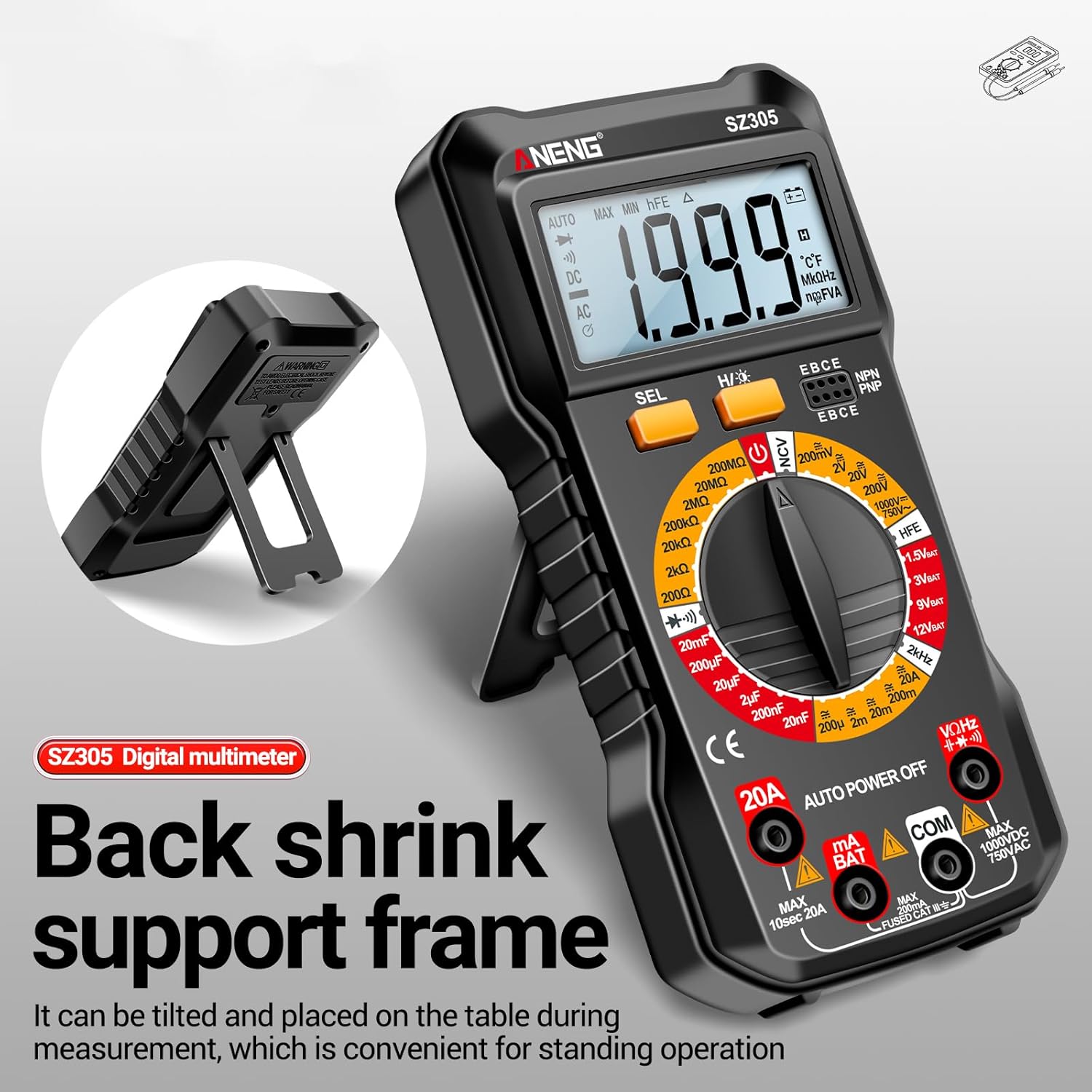
Image 3.1: The Irfora SZ305 Digital Multimeter demonstrating its retractable back support frame for angled viewing on a table.
4. Uputstvo za upotrebu
This section details how to perform various measurements with your Irfora SZ305 Digital Multimeter.
4.1 Uključivanje/isključivanje i pozadinsko osvjetljenje
- To power on the device, rotate the rotary switch from "AUTO POWER OFF" to any desired measurement function.
- To power off, rotate the switch back to "AUTO POWER OFF". The device also features an auto-power-off function after a period of inactivity.
- To activate the LCD backlight, press and hold the "H/☝" button. The backlight will illuminate, improving visibility in dark environments. Press and hold again to turn off.

Image 4.1: The Irfora SZ305 Digital Multimeter displaying its high-definition backlit LCD screen, enhancing readability in low-light conditions.
4.2 AC/DC Voltage Measurement
- Insert the red test lead into the "VHz" jack and the black test lead into the "COM" jack.
- Rotate the rotary switch to the "V~" (AC Voltage) ili "V=" (DC Voltage) domet.
- Spojite ispitne sonde preko strujnog kola ili komponente koju treba mjeriti.
- Pročitajte voltage vrijednost prikazana na LCD ekranu.

Image 4.2: A user measuring AC voltage with the Irfora SZ305 Digital Multimeter in an electrical panel, demonstrating proper probe placement.
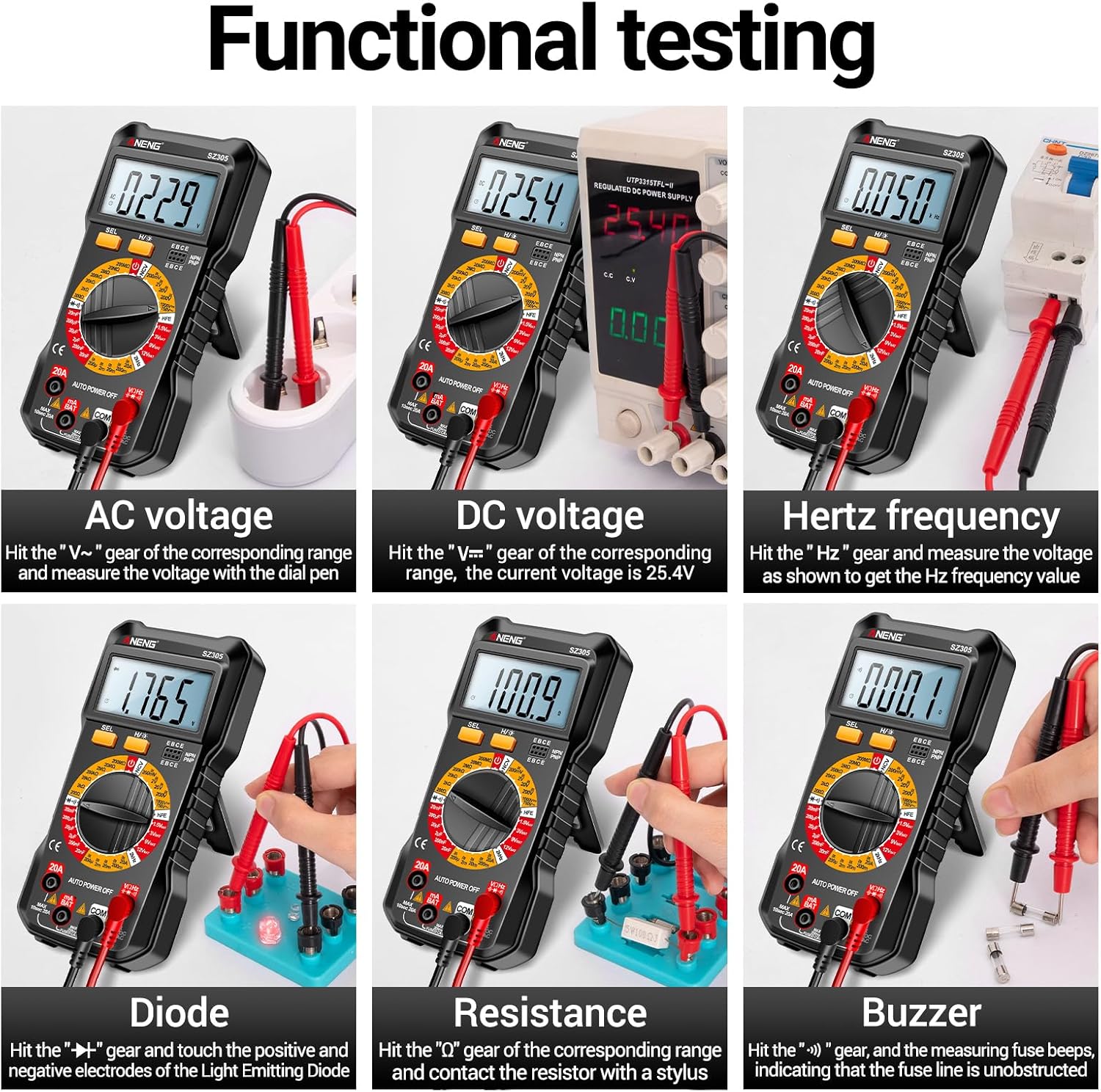
Slika 4.3: Primjeramples of functional testing with the Irfora SZ305, showing measurements for AC voltage, DC voltage, Hertz frequency, diode, resistance, and continuity (buzzer).
4.3 Mjerenje AC/DC struje
Oprez: Ensure the circuit is de-energized before connecting the multimeter in series for current measurement. Incorrect connection can blow the fuse or damage the meter.
- Insert the red test lead into the "mA" or "20A" jack (depending on expected current) and the black test lead into the "COM" jack.
- Rotate the rotary switch to the appropriate "mA~" / "mA=" or "20A~" / "20A=" range.
- Otvorite strujni krug u kojem treba mjeriti struju i spojite multimetar serijski.
- Priključite napajanje na strujno kolo i očitajte vrijednost struje.

Slika 4.4: Primjeramples of functional testing with the Irfora SZ305, showing measurements for 9V, 3V, 1.5V, and 12V batteries, hFE, capacitance, AC current, and DC current.
4.4 Mjerenje otpora
- Insert the red test lead into the "VHz" jack and the black test lead into the "COM" jack.
- Rotate the rotary switch to the "Ω" (Resistance) range.
- Ensure the component to be measured is de-energized. Connect the test probes across the component.
- Očitajte vrijednost otpora.
4.5 Mjerenje kapaciteta
- Insert the red test lead into the "VHz" jack and the black test lead into the "COM" jack.
- Rotate the rotary switch to the "F" (Capacitance) range.
- Prije mjerenja provjerite je li kondenzator potpuno ispražnjen kako biste spriječili oštećenje mjerača.
- Spojite mjerne sonde preko priključaka kondenzatora.
- Očitajte vrijednost kapacitivnosti.
4.6 Diode Test and Continuity (Buzzer)
- Insert the red test lead into the "VHz" jack and the black test lead into the "COM" jack.
- Rotate the rotary switch to the "Diode/Buzzer" symbol.
- Za testiranje diode: Spojite crvenu sondu na anodu, a crnu sondu na katodu diode. Naprijed volt...tage drop will be displayed. Reverse the probes; an open circuit ("OL") should be displayed.
- Za test kontinuiteta: Connect the probes across the circuit or component. If resistance is below a certain threshold, the buzzer will sound, indicating continuity.
4.7 Mjerenje frekvencije (Hz)
- Insert the red test lead into the "VHz" jack and the black test lead into the "COM" jack.
- Rotate the rotary switch to the "Hz" range.
- Spojite ispitne sonde preko izvora signala.
- Read the frequency value displayed.
4.8 hFE Triodni Test
This function measures the DC current gain (hFE) of transistors.
- Rotate the rotary switch to the "hFE" position.
- Identify whether the transistor is NPN or PNP type.
- Insert the transistor leads (Emitter, Base, Collector) into the corresponding sockets on the multimeter's hFE test port.
- Read the hFE value displayed on the screen.

Image 4.5: The Irfora SZ305 Digital Multimeter conducting an hFE test, showing a transistor inserted into the dedicated test socket.
4.9 Non-Contact Voltage (NCV) Detekcija
NCV funkcija omogućava detekciju AC volumnatage bez direktnog kontakta, što povećava sigurnost.
- Rotate the rotary switch to the "NCV" position.
- Bring the top front part of the multimeter close to the suspected AC voltage source (e.g., a live wire, outlet).
- The multimeter will emit an audible alarm and the NCV indicator will flash. The closer the device is to the voltage source, the more urgent the alarm will be.

Image 4.6: The Irfora SZ305 Digital Multimeter demonstrating its Non-Contact Voltage (NCV) detection feature near an electrical outlet, indicating the presence of AC voltage.
4.10 Battery Detection (1.5V, 3V, 9V, 12V)
The multimeter can test common battery voltages.
- Rotate the rotary switch to the desired battery voltage range (e.g., "1.5V BAT", "3V BAT", "9V BAT", "12V BAT").
- Spojite crveni mjerni kabel na pozitivni pol baterije, a crni mjerni kabel na negativni pol.
- Pročitajte voltage prikazano na ekranu.
5. Održavanje
5.1 Čišćenje
Za čišćenje multimetra, obrišite kućište sredstvom za čišćenje.amp krpom i blagim deterdžentom. Ne koristite abrazivna sredstva ili rastvarače. Prije čišćenja provjerite je li uređaj isključen iz strujnog kruga i odvojen od svih strujnih krugova.
5.2 Zamjena baterije
Refer to section 3.1 for instructions on battery installation and replacement. Replace batteries when the low battery indicator appears on the display to maintain measurement accuracy.
5.3 Zamjena osigurača
If the current measurement function fails, the fuse may need replacement. This typically requires opening the back casing of the multimeter. Refer to the specifications for the correct fuse type and rating. If unsure, consult a qualified technician.
6. Otkrivanje problema
- Nema prikaza ili slab prikaz:
- Provjerite napunjenost baterije. Zamijenite baterije ako su prazne.
- Ensure the multimeter is powered on by rotating the switch from "AUTO POWER OFF".
- Netačna očitanja:
- Osigurajte da su za mjerenje odabrani ispravna funkcija i raspon.
- Check test leads for proper connection and damage.
- Verify battery charge. Low batteries can affect accuracy.
- Ensure the circuit or component is properly prepared (e.g., capacitor discharged).
- Mjerenje struje ne radi:
- Check if the fuse is blown. Replace if necessary (refer to section 5.3).
- Ensure test leads are connected to the correct current jacks ("mA" or "20A").
- Verify the multimeter is connected in series with the circuit.
- NCV function not responding:
- Ensure the rotary switch is set to "NCV".
- Confirm there is an AC voltage source present.
7. Specifikacije
| Feature | Detalj |
|---|---|
| Model | SZ305 |
| Brand | Irfora |
| Display | 1999 brojanja, LCD sa pozadinskim osvjetljenjem |
| Funkcije | AC/DC Voltage, AC/DC Current, Resistance, Capacitance, Frequency, Diode, Continuity, hFE, NCV, Battery Test |
| Automatsko isključivanje | Da |
| Boja | Crna |
| Referenca proizvođača | TYHDEE24863B |
Note: Detailed measurement ranges and accuracies are typically found in the full product datasheet.