
1. Uvod
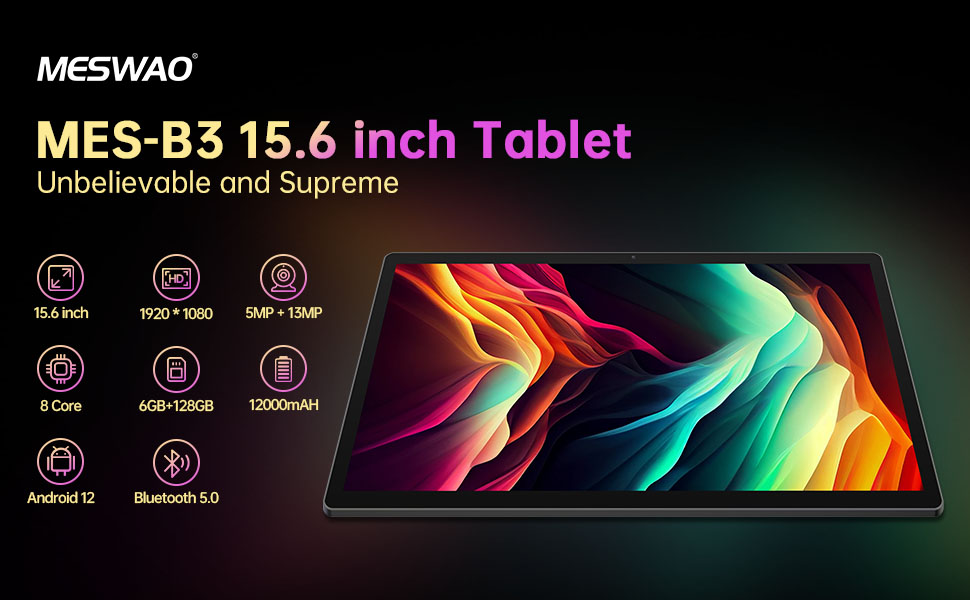
Welcome to the user manual for your MESWAO MES-B3 15.6-inch Android 13 Tablet. This document provides essential information for setting up, operating, maintaining, and troubleshooting your device. The MES-B3 tablet features a large 15.6-inch IPS HD display, an Octa-Core processor, 6GB RAM, 128GB internal storage (expandable), and a 12000mAh battery, designed for a versatile user experience.

Figure 1: MESWAO MES-B3 Tablet Overview
2. Sigurnosne informacije
Please read all safety instructions carefully before using your tablet to prevent injury or damage to the device. Keep this manual for future reference.
- Sigurnost baterije: Do not attempt to replace the battery yourself. Do not expose the tablet to extreme temperatures, direct sunlight, or fire. Do not puncture, drop, or disassemble the battery.
- Voda i vlaga: This tablet is not waterproof. Avoid exposing it to water, rain, or high humidity.
- čišćenje: Use a soft, dry cloth to clean the tablet. Do not use liquid cleaners or aerosols.
- Rukovanje: Avoid dropping the tablet or subjecting it to strong impacts.
- Zaštita sluha: When using headphones, set the volume to a moderate level to avoid hearing damage.
3. Sadržaj paketa
Provjerite da li su sve stavke prisutne u paketu:
- MESWAO MES-B3 15.6-inch Android 13 Tablet
- Adapter za napajanje
- USB-C kabl
- Korisnički priručnik (ovaj dokument)
4. Device Overview
Familiarize yourself with the physical components of your MESWAO MES-B3 tablet.

Figure 2: Buttons and Connectors
- Dugme za napajanje: Press and hold to turn the tablet on or off. Press briefly to turn the screen on or off.
- Dugmad za jačinu zvuka: Podesite jačinu zvuka.
- Prednja kamera: Za video pozive i selfije (5MP).
- Rear Camera with Flashlight: Za snimanje fotografija i videa (13MP).
- Port tipa C: Za punjenje tableta i povezivanje s računarom.
- Utor za TF karticu: Insert a MicroSD card to expand storage.
- Stereo zvučnici: Obezbedite audio izlaz.
5. Podešavanje
5.1 Punjenje tableta
Before first use, fully charge your tablet. Connect the USB-C cable to the tablet's Type-C port and the other end to the power adapter. Plug the adapter into a wall outlet. The battery indicator on the screen will show charging status.
5.2 Uključivanje/isključivanje
- Za uključivanje: Press and hold the Power Button until the MESWAO logo appears.
- Za isključivanje: Press and hold the Power Button until the power options appear, then select 'Power off'.
- Za ponovno pokretanje: Press and hold the Power Button until the power options appear, then select 'Restart'.
5.3 Čarobnjak za početno podešavanje
Upon first power-on, the tablet will guide you through an initial setup process:
- Odaberite željeni jezik.
- Povežite se na Wi-Fi mrežu.
- Prijavite se sa svojim Google računom ili kreirajte novi.
- Review i prihvatite uslove i odredbe.
- Postavite zaključavanje ekrana (PIN, uzorak, lozinka).
5.4 Umetanje MicroSD kartice
To expand the tablet's storage, you can insert a MicroSD card (up to 256GB, as per some product information, though 1TB is also mentioned in images, please verify with product packaging for exact maximum). Locate the TF card slot on the side of the tablet. Gently insert the MicroSD card with the gold contacts facing down until it clicks into place.

Figure 3: Storage Expansion with MicroSD Card
6. Upravljanje tabletom
6.1 Osnovna navigacija
The MESWAO MES-B3 runs on Android 13, offering an intuitive touch interface.
- Dodirnite: Odaberite stavku ili otvorite aplikaciju.
- Prevucite: Navigacija kroz ekrane, listanje ili odbacivanje obavještenja.
- Zumiranje štipanjem: Uvećajte ili smanjite sadržaj na ekranu.
- Početni ekran: Access your apps and widgets. Swipe down from the top for notifications and quick settings.
Slika 4: Interfejs Androida 13
6.2 Wi-Fi veza
- Idi na Postavke > Mreža i internet > Internet.
- Uključite Wi-Fi.
- Odaberite željenu mrežu s popisa i unesite lozinku ako se to od vas zatraži.
6.3 Bluetooth uparivanje
Tablet podržava Bluetooth 5.0 za povezivanje bežičnih dodataka.
- Idi na Postavke > Povezani uređaji > Postavke veze > Bluetooth.
- Uključite Bluetooth.
- Provjerite je li vaš Bluetooth uređaj u načinu rada za uparivanje.
- Select your device from the 'Available devices' list and follow on-screen prompts to pair.
6.4 Upravljanje aplikacijama
- Instalirajte aplikacije: Open the Google Play Store app, search for your desired app, and tap 'Install'.
- Deinstaliraj aplikacije: Pritisnite i držite ikonu aplikacije na početnom ekranu ili u ladici s aplikacijama, a zatim je povucite do opcije 'Deinstaliraj' ili odaberite 'Informacije o aplikaciji' i odaberite 'Deinstaliraj'.
- Upravljanje aplikacijama: Idi na Postavke > Apps to view, force stop, or clear data for installed applications.
6.5 Postavke ekrana
Prilagodite svoj viewiskustvo:
- Idi na Postavke > Display.
- Podesite Nivo svjetline.
- Set Istek ekrana (sleep duration).
- Promjena Veličina fonta i Veličina ekrana.
- Omogući Tamna tema for reduced eye strain.
6.6 Upravljanje baterijom
The MES-B3 features a 12000mAh battery for extended use.

Slika 5: Produženi vijek trajanja baterije
- Idi na Postavke > Baterija to view usage and optimize settings.
- Omogući Ušteda baterije mode to extend battery life when needed.
- Zatvorite nekorištene aplikacije koje rade u pozadini.
- Smanjite svjetlinu ekrana.
7. Održavanje
7.1 Čišćenje
- Koristite meku krpu koja ne ostavlja dlačice da nježno obrišete ekran i kućište.
- Za tvrdokorne mrlje, lagano dampOperite krpu vodom ili sredstvom za čišćenje ekrana posebno namijenjenim za elektroniku.
- Avoid using abrasive materials, alcohol, or chemical solvents.
7.2 Skladištenje
- Tablet čuvajte na hladnom i suhom mjestu, dalje od direktne sunčeve svjetlosti i ekstremnih temperatura.
- If storing for an extended period, ensure the battery is charged to about 50% to prolong its lifespan.
7.3 Ažuriranja softvera
Redovno provjeravajte ažuriranja softvera kako biste osigurali optimalne performanse i sigurnost.
- Idi na Postavke > Sistem > Ažuriranje sistema.
- The tablet will check for available updates. Follow the on-screen instructions to download and install any updates.
8. Otkrivanje problema
Evo rješenja za uobičajene probleme s kojima se možete susresti:
| Problem | Rješenje |
|---|---|
| Tablet se ne uključuje | Ensure the tablet is charged. Connect it to the charger for at least 30 minutes, then try powering it on again. |
| Problemi sa Wi-Fi vezom | Restart your Wi-Fi router and the tablet. Go to Settings > Network & internet > Internet, forget the network, and reconnect. |
| Spore performanse | Close unused apps. Clear cache for frequently used apps (Settings > Apps > [App Name] > Storage & cache > Clear cache). Restart the tablet. |
| Baterija se brzo prazni | Reduce screen brightness. Disable Wi-Fi/Bluetooth when not in use. Close background apps. Check battery usage in Settings > Battery to identify power-hungry apps. |
| Aplikacije se ruše ili zamrzavaju | Force stop the app (Settings > Apps > [App Name] > Force stop). Clear the app's cache. If the problem persists, uninstall and reinstall the app. |
9. Specifikacije
Detailed technical specifications for the MESWAO MES-B3 tablet:

Slika 6: Ključne karakteristike i specifikacije
| Feature | Specifikacija |
|---|---|
| Brand | MESWAO |
| Broj modela | MES-B3 |
| Operativni sistem | Android 13 |
| Procesor | MediaTek Octa-Core (MTK6789) |
| RAM | 6 GB |
| Interna pohrana | 128 GB |
| Proširiva pohrana | Up to 256 GB (via TF/MicroSD card) |
| Veličina ekrana | 15.6 inča |
| Rezolucija ekrana | 1920 x 1080 Pixels (IPS HD) |
| Prednja kamera | 5 MP |
| Zadnja kamera | 13 MP |
| Kapacitet baterije | 12000 mAh |
| Trajanje baterije | Approximately 10 hours (usage dependent) |
| Povezivanje | Bluetooth 5.0, Wi-Fi (802.11ac, 2.4G/5G) |
| Luke | USB Type-C, TF Card Slot |
| Boja | Grey |
| Dimenzije (D x Š x V) | 36.85 x 22.25 x 0.93 cm |
| Težina | 1.1 kilograma |
10. Garancija i podrška
Your MESWAO MES-B3 tablet is covered by a standard manufacturer's warranty. Please refer to the warranty card included in your package for specific terms and conditions, including warranty duration and coverage details.
For technical support, troubleshooting assistance beyond this manual, or warranty claims, please contact MESWAO customer service through the retailer where you purchased the product or visit the official MESWAO webstranica za kontakt informacije.