
eppfun AK3046G
eppfun AK3046G Pro Bluetooth 5.3 Audio Adapter User Manual
Model: AK3046G Pro
1. Uvod
The eppfun AK3046G Pro is a versatile Bluetooth 5.3 audio adapter designed to add wireless audio capabilities to various devices. It functions as both a Bluetooth transmitter (TX mode) and a Bluetooth receiver (RX mode), allowing you to stream audio wirelessly to or from non-Bluetooth devices. This manual provides detailed instructions for setup, operation, and maintenance.
Sadržaj paketa
- eppfun AK3046G Pro Bluetooth 5.3 Audio Adapter
- 3.5 mm AUX audio kabel
- USB-C kabl za punjenje
- Optical Audio Cable (TOSLINK)
- Koaksijalni audio kabl
- Korisnički priručnik (ovaj dokument)
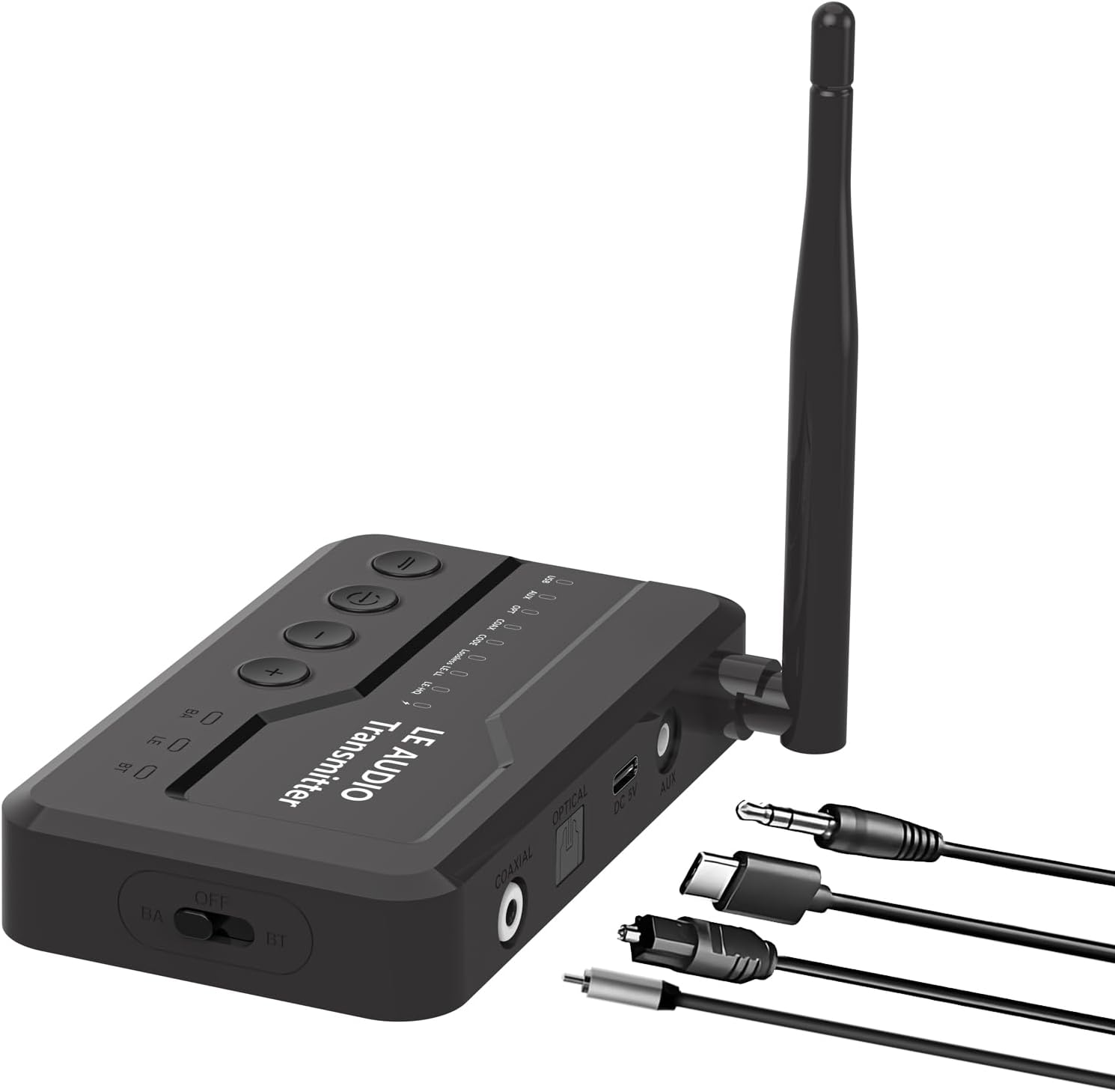
Image 1.1: The eppfun AK3046G Pro Bluetooth 5.3 Audio Adapter shown with its detachable antenna and various included cables: 3.5mm AUX, USB-C charging, optical, and coaxial. The adapter features control buttons on top and input/output ports on the side.
2. Ključne karakteristike
- Bluetooth 5.3 tehnologija: Ensures stable connection and fast transmission.
- 2-u-1 funkcionalnost: Operates as both a Bluetooth Transmitter (TX) and Receiver (RX).
- LED ekran: Shows Bluetooth connection status, volume, battery level, and working mode.
- CVC8.0 Noise Cancellation & DSP: Reduces background noise for clear call quality.
- Ugrađeni mikrofon: Omogućava hands-free pozive u RX režimu.
- Višestruki audio ulaz/izlaz: Supports 3.5mm AUX, Optical, and Coaxial connections.
- Zgodna kontrolna dugmad: Easy management of music playback, calls, and volume.
- Micro USB punjenje: Efficient charging with included cable.
3. Podešavanje i povezivanje
3.1 Uređaj je završenview
Upoznajte se s portovima i kontrolama uređaja:
- Gornja ploča: Power button, Play/Pause, Volume Up (+), Volume Down (-).
- Prednja ploča: Led displej.
- Bočna ploča: OFF/BA/BT switch (Power/Bypass/Bluetooth mode), Optical IN/OUT, Coaxial IN/OUT, DC 5V (Micro USB charging), AUX IN/OUT.
- antena: Detachable for improved signal.
Slika 3.1: Detaljan view of the eppfun AK3046G Pro, highlighting the control buttons (Power, Play/Pause, Volume Up, Volume Down) on the top surface, the LED display, and the various ports on the side including Optical, Coaxial, DC 5V (Micro USB), and AUX. The OFF/BA/BT switch is also visible.
3.2 Punjenje uređaja
- Connect the Micro USB charging cable to the DC 5V port on the adapter.
- Connect the other end of the USB cable to a 5V USB power source (e.g., car charger, wall adapter, computer USB port).
- LED displej će prikazivati status punjenja. Potpuno punjenje traje otprilike 35 minuta.
3.3 Podešavanje režima prijemnika (RX)
Use RX mode to receive audio from a Bluetooth-enabled device (e.g., smartphone) and output it to a non-Bluetooth audio system (e.g., car stereo, wired headphones, home stereo).
- Prebacite se na RX način rada: Slide the switch on the side of the adapter to the "BT" position.
- Povežite se na audio sistem:
- For 3.5mm AUX: Connect one end of the 3.5mm AUX cable to the adapter's AUX port and the other end to your audio system's AUX input.
- For Optical: Connect the optical cable to the adapter's OPTICAL port and your audio system's optical input.
- For Coaxial: Connect the coaxial cable to the adapter's COAXIAL port and your audio system's coaxial input.
- Uključeno: Press and hold the power button on the top panel until the LED display illuminates.
- Uparivanje: The adapter will automatically enter pairing mode (indicated on the LED display). On your Bluetooth-enabled device (e.g., smartphone), search for "eppfun AK3046G Pro" in the Bluetooth settings and select it to pair.
- Audio reprodukcija: Once paired, play audio on your Bluetooth device, and it will stream wirelessly to your connected audio system.
3.4 Podešavanje režima predajnika (TX)
Use TX mode to transmit audio from a non-Bluetooth audio source (e.g., TV, PC, MP3 player) to a Bluetooth-enabled audio device (e.g., Bluetooth headphones, Bluetooth speaker).
- Prebacivanje u TX način rada: Slide the switch on the side of the adapter to the "BT" position.
- Povežite se na izvor zvuka:
- For 3.5mm AUX: Connect one end of the 3.5mm AUX cable to the adapter's AUX port and the other end to your audio source's audio output (e.g., headphone jack).
- For Optical: Connect the optical cable to the adapter's OPTICAL port and your audio source's optical output.
- For Coaxial: Connect the coaxial cable to the adapter's COAXIAL port and your audio source's coaxial output.
- Uključeno: Press and hold the power button on the top panel until the LED display illuminates.
- Uparivanje: Ensure your Bluetooth headphones or speaker are in pairing mode. The adapter will automatically search for and connect to nearby Bluetooth audio devices. The LED display will show the connection status.
- Audio reprodukcija: Once connected, play audio from your non-Bluetooth source, and it will transmit wirelessly to your Bluetooth audio device.
4. Operacija
4.1 Uključivanje/isključivanje napajanja
- Uključeno: Pritisnite i držite dugme za napajanje otprilike 3 sekunde.
- Iskljuciti: Pritisnite i držite dugme za napajanje otprilike 3 sekunde.
4.2 Music Control (RX Mode)
- Pusti/pauza: Pritisnite dugme za reprodukciju/pauzu jednom.
- Povećavanje glasnoće: Pritisnite dugme "+".
- Smanjivanje jačine zvuka: Pritisnite dugme "-".
- Sljedeća pjesma: Pritisnite i držite dugme "+".
- Prethodni zapis: Pritisnite i držite dugme "-".
4.3 Call Control (RX Mode)
When connected to a smartphone in RX mode:
- Odgovori na poziv: Pritisnite dugme za reprodukciju/pauzu jednom.
- Završi poziv: Pritisnite dugme Reprodukuj/Pauziraj jednom tokom poziva.
- odbiti poziv: Pritisnite i držite tipku Play/Pause 2 sekunde.
- Ponovno biranje zadnjeg broja: Dvaput pritisnite dugme Play/Pause.
4.4 LED indikatori na ekranu
LED displej pruža informacije u realnom vremenu:
- Status Bluetooth veze: Indicates if a device is connected or in pairing mode.
- Nivo glasnoće: Shows the current audio volume.
- Nivo baterije: Prikazuje preostalo punjenje baterije.
- Način rada: Indicates whether the device is in RX (Receiver) or TX (Transmitter) mode.
- Audio kodek: May display the active audio codec (e.g., SBC, aptX).
5. Održavanje i njega
- Punjenje: Charge the device fully before first use. Recharge when the battery indicator is low. Avoid overcharging for extended periods.
- čišćenje: Za čišćenje uređaja koristite meku, suhu krpu. Ne koristite tekuća sredstva za čišćenje ili rastvarače.
- Skladištenje: Uređaj čuvajte na hladnom i suhom mjestu, dalje od direktne sunčeve svjetlosti i ekstremnih temperatura.
- Izloženost vodi: This device is not waterproof. Avoid exposure to water or moisture.
6. Otkrivanje problema
6.1 Uređaj se ne uključuje
- Ensure the device is fully charged. Connect it to a power source using the Micro USB cable and try again.
6.2 Nije moguće uparivanje s Bluetooth uređajem
- Ensure the adapter is in the correct mode (RX for receiving, TX for transmitting) and the side switch is set to "BT".
- Make sure the adapter is in pairing mode (LED display will indicate).
- Place the adapter and the target Bluetooth device close to each other.
- Turn off and on the Bluetooth function on your pairing device.
- Obrišite listu za uparivanje putem Bluetootha na svom uređaju i pokušajte ponovo upariti uređaj.
6.3 Nema zvuka ili je jačina zvuka niska
- Check all cable connections (AUX, Optical, Coaxial) are secure and correctly inserted.
- Ensure the volume on both the adapter and the connected audio device/source is turned up.
- Verify that the correct input/output source is selected on your audio system (e.g., AUX input on car stereo).
- Confirm the adapter is successfully paired and connected.
6.4 Poor Audio Quality or Disconnections
- Reduce the distance between the adapter and the connected Bluetooth device.
- Remove any obstacles (walls, large objects) that may interfere with the Bluetooth signal.
- Izbjegavajte jake elektromagnetske smetnje od drugih elektronskih uređaja.
- Provjerite je li adapter potpuno napunjen.
7. Specifikacije
| Naziv modela | AK3046G Pro |
| Bluetooth verzija | 5.3 |
| Hardversko sučelje | Bluetooth, USB |
| Kompatibilni uređaji | Car Stereo System, Headphone, Home Stereo System, Smartphone, Speaker |
| Posebne karakteristike | Built-In Microphone, LED Display |
| Audio ulaz | 3.5mm AUX, Optical, Coaxial |
| Audio izlaz | 3.5mm AUX, Optical, Coaxial, Bluetooth |
| Izvor napajanja | Battery Powered (Lithium-Polymer) |
| Port za punjenje | Micro USB (DC 5V) |
| Radno vrijeme RX moda | Približno 7.5 sata |
| TX mod Radno vrijeme | Približno 5 sata |
| Vrijeme punjenja | Otprilike 35 minuta |
| Težina | 0.1 kilograma |
| Dimenzije | 12 x 9 x 1 cm (Dimenzije pakovanja) |
8. Garancija i podrška
eppfun products are designed and manufactured to the highest quality standards. For information regarding warranty coverage, technical support, or customer service, please refer to the official eppfun webstranicu ili kontaktirajte lokalnog distributera. Molimo sačuvajte dokaz o kupovini za reklamacije.
Za dodatnu pomoć posjetite: www.eppfun.com
Ask a question about this manual
Ask about setup, troubleshooting, compatibility, parts, safety, or missing instructions. Manuals+ will review the question and use this page’s manual context to help answer it.