
1. Uvod
Hvala na kupoviniasing the JVC XS-N1123PB Party Bluetooth Speaker. This manual provides essential information for the safe and efficient operation of your speaker. Please read it thoroughly before use and retain it for future reference.
2. Sigurnosne informacije
- Ne izlažite zvučnik ekstremnim temperaturama, direktnoj sunčevoj svjetlosti ili visokoj vlažnosti.
- Izbjegavajte ispuštanje ili izlaganje zvučnika jakim udarcima.
- Ne rastavljajte niti pokušavajte sami popraviti zvučnik. Za sve popravke obratite se kvalifikovanom osoblju.
- Držite zvučnik dalje od vode i drugih tekućina kako biste spriječili strujni udar ili oštećenje.
- Koristite samo navedenu jačinu punjenjatage (5 Volts) and compatible charger.
3. Sadržaj paketa
Provjerite da li su sve stavke prisutne u paketu:
- JVC XS-N1123PB Party Bluetooth Speaker
- USB kabl za punjenje
- Uputstvo za upotrebu
4. Proizvod je gotovview
4.1 Prednji View

The front of the speaker features the main speaker grille with integrated RGB lighting, displaying various color patterns.
4.2 Strana View

Sa strane view shows the compact and portable design of the speaker, suitable for easy transport.
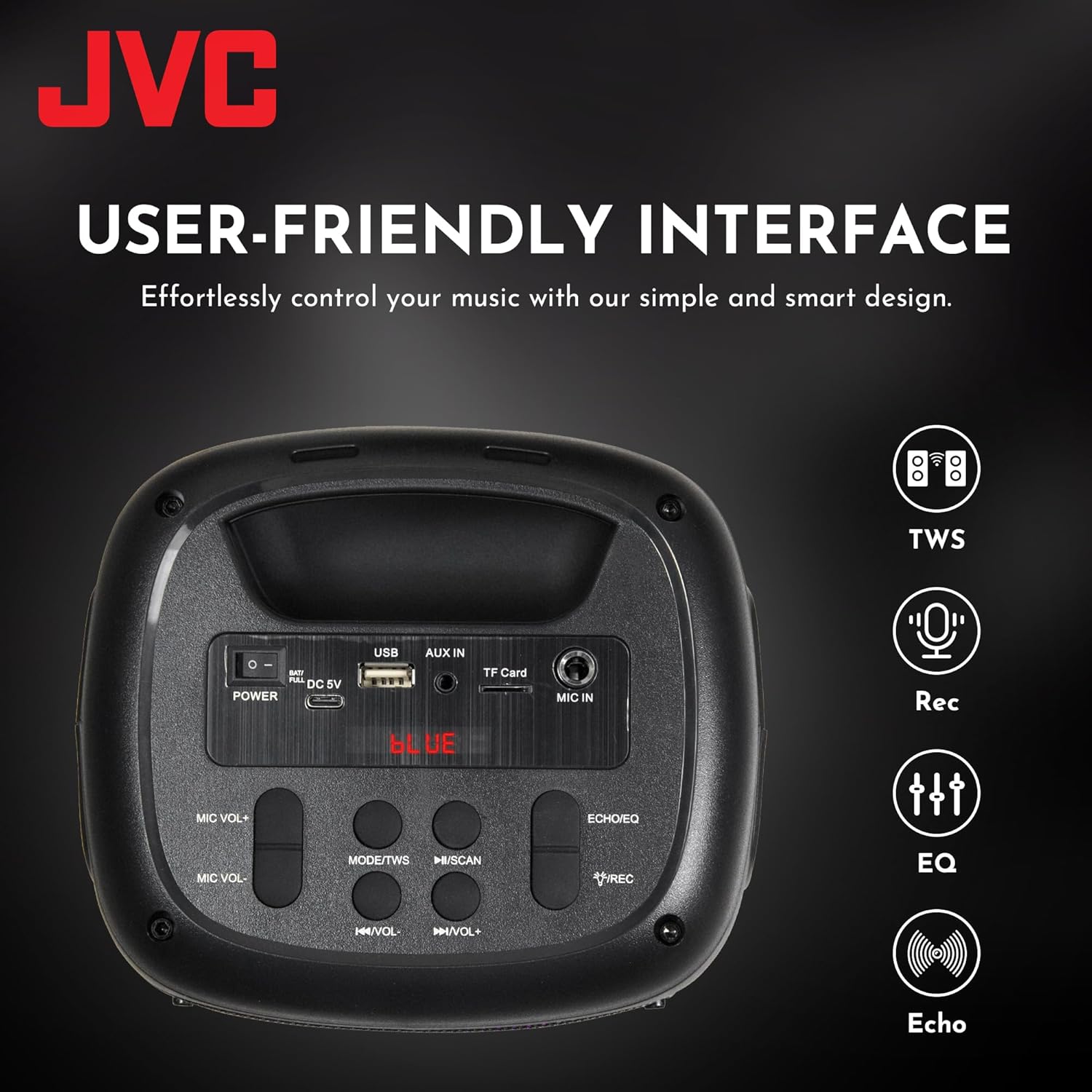
4.3 Kontrole i priključci na gornjoj ploči

This image displays the top control panel, including buttons for power, mode selection, volume, track control, and recording. It also shows the USB, AUX IN, TF Card, and MIC IN ports.
4.4 Pozadi View

Pozadi view of the speaker, highlighting its robust enclosure and design.
5. Podešavanje
5.1 Punjenje zvučnika
Before first use, fully charge the speaker. Connect the provided USB charging cable to the DC 5V port on the speaker and the other end to a USB power adapter (not included) or a computer's USB port.
- Indikatorska lampica punjenja će svijetliti tokom punjenja.
- The light will turn off or change color when charging is complete.
The speaker features a 1500 mAh dual battery system for extended playback.
5.2 Uključivanje/isključivanje
To power on the speaker, press and hold the Power button located on the top panel. To power off, press and hold the Power button again.
5.3 Bluetooth uparivanje
- Uključite zvučnik. Automatski će ući u Bluetooth način uparivanja, što će biti naznačeno trepćućim LED svjetlom.
- Omogućite Bluetooth na svom mobilnom uređaju (pametnom telefonu, tabletu itd.).
- Traži available Bluetooth devices and select "JVC XS-N1123PB" from the list.
- Nakon uparivanja, zvučnik će emitirati zvuk potvrde, a LED lampica će prestati treptati.
5.4 Uparivanje putem pravog bežičnog stereo sistema (TWS)
TWS allows you to connect two JVC XS-N1123PB speakers for a stereo sound experience.

Pair two speakers wirelessly for a dynamic stereo sound experience.
- Provjerite jesu li oba zvučnika uključena i nisu povezana ni s jednim drugim Bluetooth uređajem.
- On one speaker (this will be the primary speaker), press and hold the TWS button (if available, or a designated pairing button) until you hear a pairing tone.
- Dva zvučnika će se automatski povezati jedan s drugim. Potvrdni zvuk će se oglasiti nakon uspješnog uparivanja TWS-a.
- Sada povežite svoj mobilni uređaj sa primarnim zvučnikom putem Bluetootha kao što je opisano u odjeljku 5.3. Oba zvučnika će reprodukovati zvuk u stereo formatu.
6. Uputstvo za upotrebu
6.1 Odabir načina rada
Press the 'MODE' button on the top panel to switch between different input modes: Bluetooth, USB, TF Card, AUX, and FM Radio.
6.2 Audio reprodukcija
- Bluetooth način rada: Nakon uspješnog uparivanja, reproducirajte zvuk sa povezanog uređaja.
- Način rada USB/TF kartice: Insert a USB drive or TF card into the respective port. The speaker will automatically detect and play audio files.
- AUX način rada: Connect an external audio device using a 3.5mm audio cable to the AUX IN port.
- FM radio način rada: In FM mode, press the Play/Pause button to auto-scan and save available radio stations. Use the Previous/Next buttons to navigate between saved stations.
6.3 Kontrola jačine zvuka
Use the 'VOL-' and 'VOL+' buttons on the top panel to decrease or increase the volume.
6.4 Track Control
- Press the 'Previous Track' button to go to the beginning of the current track or the previous track.
- Press the 'Next Track' button to skip to the next track.
- Press the 'Play/Pause' button to play or pause audio.
6.5 Upravljanje svjetlosnim spektaklom
The speaker features built-in RGB lights. Specific controls for the light show (e.g., changing patterns, turning on/off) may be integrated with the 'MODE' button or a dedicated light button if available. Refer to the quick start guide for specific light control functions.
6.6 Microphone and Guitar Input (Karaoke Function)

Connect a microphone or guitar to the respective input ports for karaoke or live performance. Adjust microphone volume using the MIC VOL+/- buttons.
7. Održavanje
7.1 Čišćenje
Wipe the speaker with a soft, dry cloth. Do not use abrasive cleaners, waxes, or solvents as they may damage the finish.
7.2 Skladištenje
When not in use for extended periods, store the speaker in a cool, dry place, away from direct sunlight and extreme temperatures. It is recommended to charge the battery periodically to maintain its lifespan.
8. Otkrivanje problema
| Problem | Mogući uzrok | Rješenje |
|---|---|---|
| Zvučnik se ne uključuje | Slaba baterija; Dugme za napajanje nije pravilno pritisnuto | Charge the speaker; Press and hold the Power button for a few seconds |
| Nema zvuka | Jačina zvuka je preniska; Nepravilan način unosa; Uređaj nije povezan | Increase volume; Select correct input mode; Reconnect Bluetooth device or AUX cable |
| Bluetooth uparivanje nije uspjelo | Zvučnik nije u načinu uparivanja; Uređaj je previše udaljen; Smetnje | Ensure speaker is in pairing mode; Move device closer; Turn off other Bluetooth devices |
| TWS uparivanje ne uspijeva | Zvučnici su previše udaljeni; Jedan zvučnik je već povezan s uređajem | Ensure speakers are within range; Disconnect any Bluetooth devices from both speakers before TWS pairing |
| FM radio prijem je slab | Slab signal; Smetnje | Relocate the speaker; Extend the antenna (if applicable) |
9. Specifikacije
| Feature | Specifikacija |
|---|---|
| Broj modela | XS-N1123PB (AP-W113Y) |
| Izlazna snaga | 15 W RMS (40 W vršno) |
| Veličina zvučnika | 4 inča |
| Povezivanje | Bluetooth, USB, TF Card, AUX-in, FM Radio |
| Način audio izlaza | Stereo |
| Ulazni voltage | 5 Volts |
| Baterija | 1 litijum-jonska baterija (uključena) |
| Materijal | Plastika |
| Dimenzije (D x Š x V) | 15.7D x 13.3Š x 21.8V cm |
| Posebne karakteristike | Bass Boost, RGB Light Show, TWS Function, Microphone Input |
| Zemlja porijekla | Kina |

Product dimensions for the JVC XS-N1123PB speaker.
10. Garancija i podrška
10.1 Informacije o garanciji
This JVC XS-N1123PB Party Bluetooth Speaker comes with a 1 godina garancije od datuma kupovine. Molimo sačuvajte dokaz o kupovini za reklamacije u slučaju garancije. Garancija pokriva nedostatke u proizvodnji, ali ne pokriva štetu uzrokovanu nepravilnom upotrebom, nezgodama, neovlaštenim modifikacijama ili normalnim habanjem.
10.2 Korisnička podrška
For technical assistance, warranty claims, or further information, please contact JVC customer support through their official website or the retailer where the product was purchased. Please have your model number (XS-N1123PB) and proof of purchase ready when contacting support.