
Vetroo AL800
Vetroo AL800 Mid Tower ATX PC Computer Case
Uputstvo za upotrebu
Uvod
This manual provides detailed instructions for the assembly, operation, and maintenance of your Vetroo AL800 Mid Tower ATX PC Computer Case. Please read this manual thoroughly before beginning installation to ensure proper setup and optimal performance.

Figure 1: Vetroo AL800 Mid Tower ATX PC Computer Case (Black)
Sigurnosne informacije
- Uvijek isključite napajanje iz zidne utičnice prije instaliranja ili uklanjanja bilo kakvih komponenti.
- Handle components with care to avoid damage from electrostatic discharge. Consider using an anti-static wrist strap.
- Keep the case and components away from liquids and excessive humidity.
- Osigurajte odgovarajuću ventilaciju kako biste spriječili pregrijavanje.
- Do not attempt to modify the case or its components, as this may void your warranty and pose safety risks.
Sadržaj paketa
Provjerite da li su sve stavke prisutne u paketu:
- Vetroo AL800 Mid Tower ATX PC Computer Case
- Kutija s priborom (vijci, odstojnici, vezice za kablove)
- Pre-installed 1x 120mm PWM/ARGB Fan (rear)
- Korisnički priručnik (ovaj dokument)
Ključne karakteristike
- ARGB LED Strip: Integrated LED lighting and ARGB case fans can be synchronized with compatible motherboards via a 5V 3-pin interface.
- Door Opening Design: Features a 4mm thick tempered glass side panel with a convenient door-opening mechanism for easy access to internal components.
- High Performance Airflow: A mesh front panel and strategically placed dust filters ensure optimal airflow and system cooling.
- Široka kompatibilnost: Podržava ATX, M-ATX i ITX matične ploče. Prima grafičke kartice dužine do 340 mm i CPU hladnjake visine do 165 mm.
- Podrška za tečno hlađenje: Front panel supports up to a 360mm liquid cooling radiator.
- Podrška obožavatelja: Podržava do 8 x 120 mm ventilatora.
- Jednostavno upravljanje kablovima: Includes two soft silicone cord grommets for organized cable routing.
- Powerful I/O Panel: Features 1x USB 3.2 Type-C port, 2x USB 3.0 ports, and a combined microphone/headphone jack.
Postavljanje i instalacija
1. Opća priprema
- Postavite kućište na ravnu, stabilnu površinu.
- Open the tempered glass side panel by gently pulling it open. It is hinged for easy access.
- Remove the tempered glass panel if necessary for easier installation by lifting it off its hinges once open.

Figure 2: Tempered Glass Door Opening Design
2. Instalacija matične ploče
- Instalirajte I/O štitnik (ako je primjenjivo) u zadnji otvor kućišta.
- Align your ATX, M-ATX, or ITX motherboard with the pre-installed standoffs.
- Secure the motherboard using the provided screws from the accessory box.
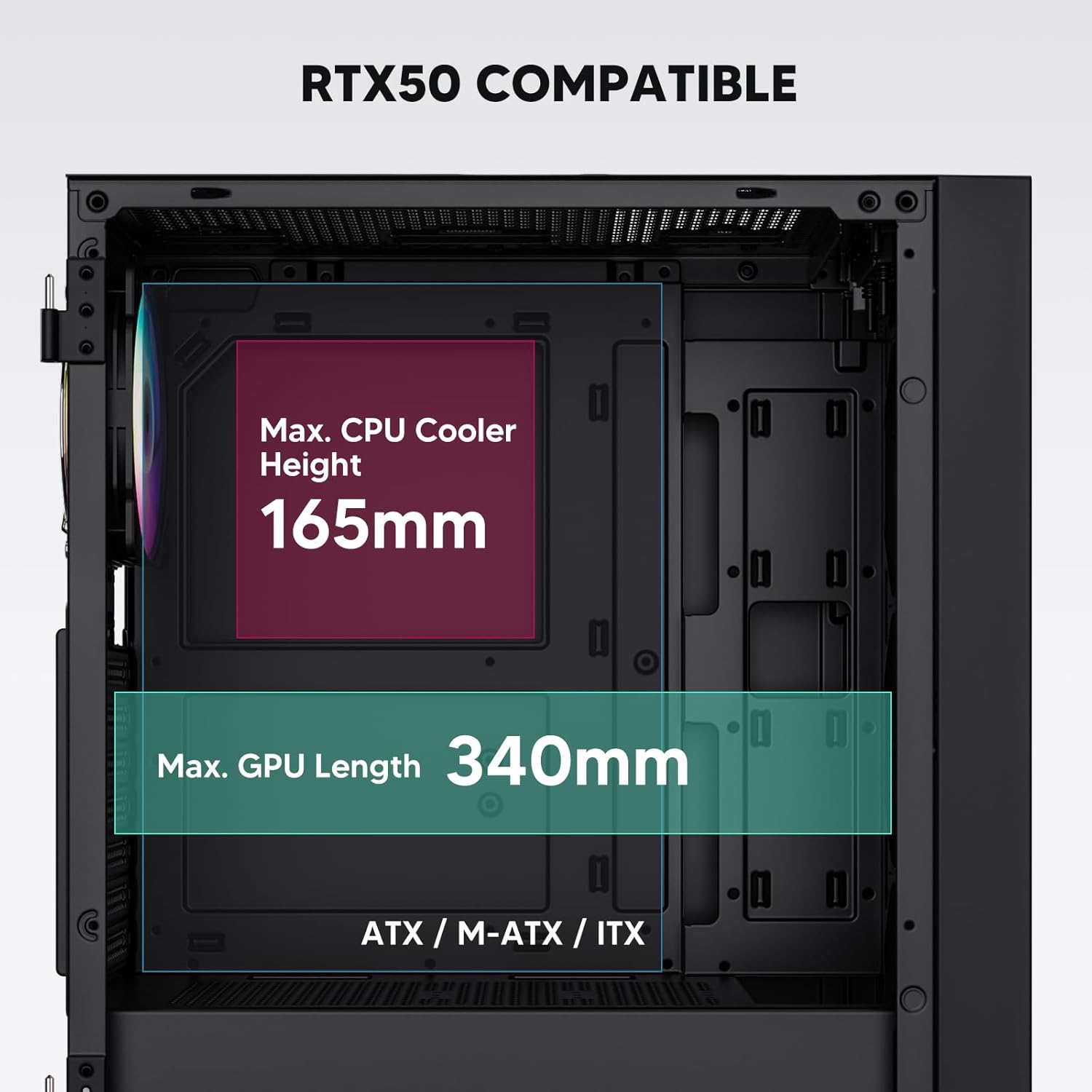
Figure 3: Motherboard and Component Clearance (Max CPU Cooler Height 165mm, Max GPU Length 340mm)
3. Storage Device Installation (HDD/SSD)
- Locate the dedicated mounting points for SSDs and HDDs.
- Install 2.5" SSDs onto the SSD trays or mounting brackets.
- Install 3.5" HDDs into the drive cage located at the bottom of the case.
- Pričvrstite sve pogone odgovarajućim vijcima.

Figure 4: Internal Layout with Drive Bay Locations (SSD, HDD, Power Supply)
4. Instalacija napajanja
- Mount your power supply unit (PSU) in the dedicated compartment at the bottom rear of the case.
- Ensure the PSU fan faces downwards (if the case has a bottom vent) or upwards, depending on your cooling preference.
- Secure the PSU with screws from the rear of the case. The case supports PSUs up to 200mm in length.
5. Instalacija kartice za proširenje (GPU)
- Uklonite potrebne poklopce PCI-E utora sa stražnje strane kućišta.
- Umetnite grafičku karticu ili druge kartice za proširenje u PCI-E utore na matičnoj ploči.
- Secure the cards with screws. The case supports GPUs up to 340mm in length.
6. Cooling System Installation (Fans/Radiators)
- The case comes with one pre-installed 120mm PWM/ARGB fan at the rear.
- Additional fans (120mm or 140mm) can be installed at the front, top, and bottom.
- Liquid cooling radiators up to 360mm can be installed at the front, and up to 240mm at the top.
- Refer to the diagram for supported fan and radiator configurations.

Figure 5: Fan and Liquid Radiator Support Diagram
7. Priključci na prednjoj ploči
- Connect the front panel cables (Power, Reset, USB 3.0, USB Type-C, HD Audio) to the corresponding headers on your motherboard.
- Consult your motherboard manual for the exact pin layout of these headers.
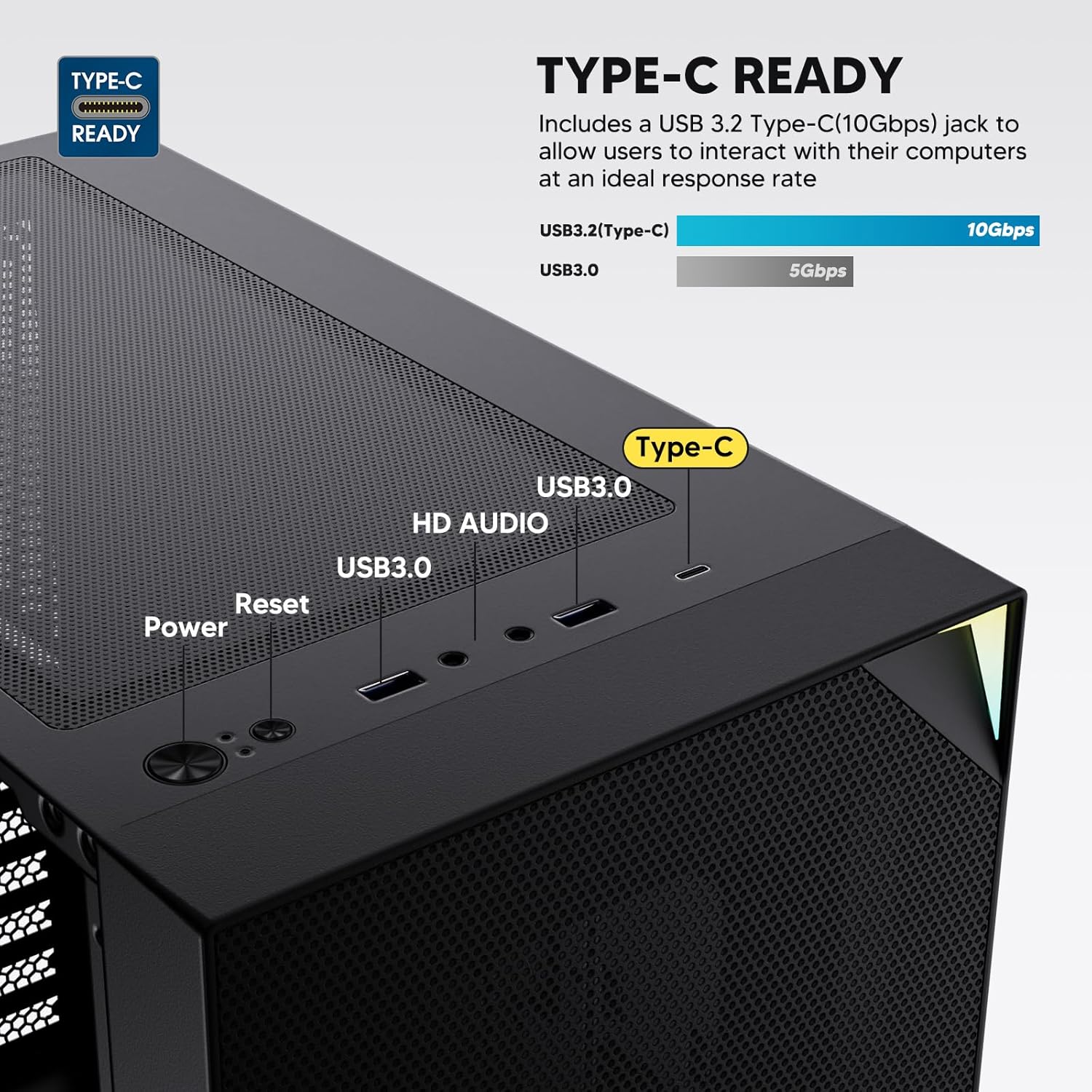
Figure 6: Top I/O Panel Connections
8. ARGB and PWM Connections
- The pre-installed fan and ARGB LED strip require connection to your motherboard.
- Connect the 4-pin PWM connector from the fan to a compatible fan header on your motherboard for speed control.
- Connect the 3-pin ARGB connector from the fan and LED strip to a 5V 3-pin ARGB header on your motherboard for lighting synchronization. Ne spajajte na 12V RGB konektor, jer će to oštetiti LED diode.
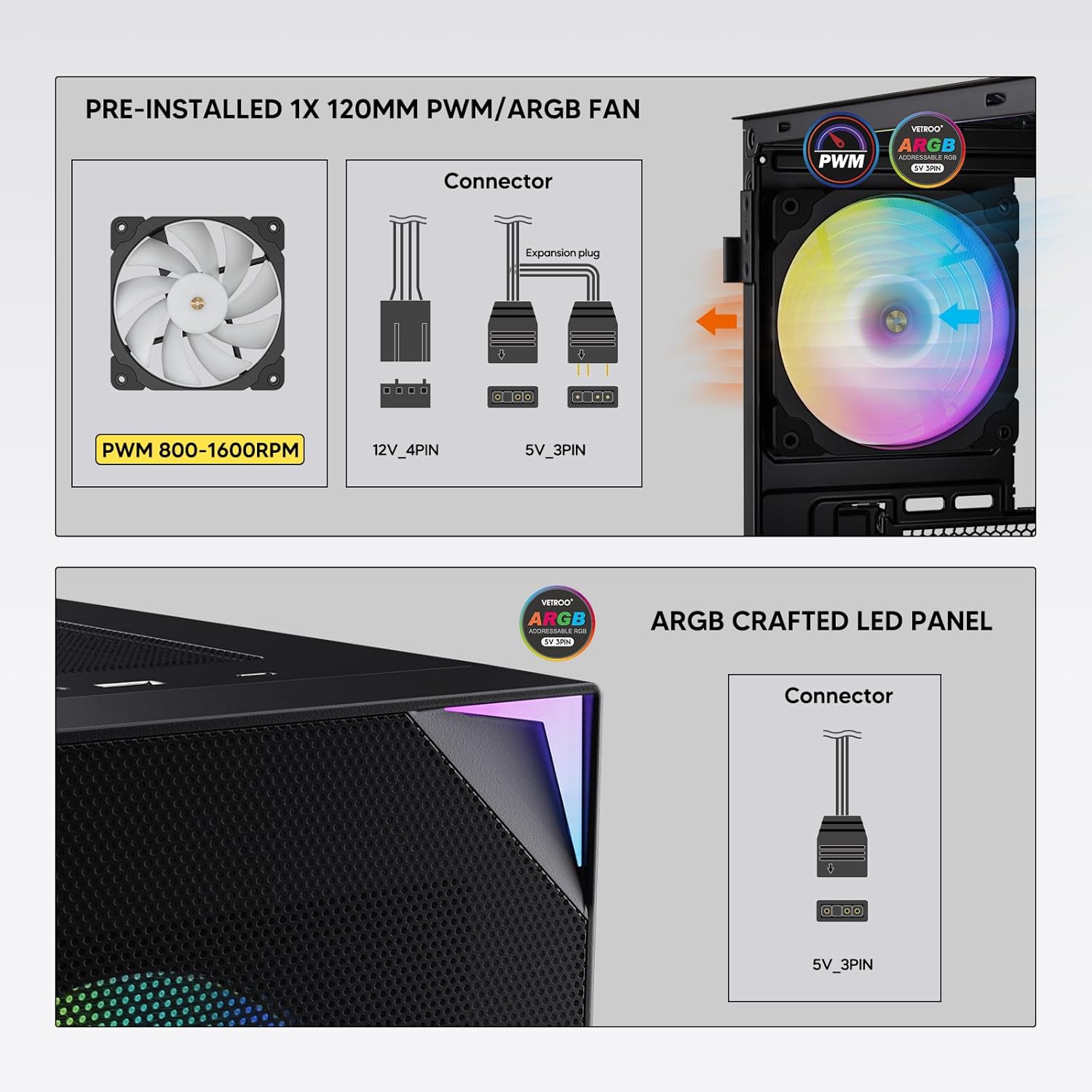
Figure 7: PWM and ARGB Connector Details
9. Upravljanje kablovima
- Koristite izreze za usmjeravanje kablova i tačke za vezivanje iza ležišta matične ploče da biste organizovali kablove.
- The soft silicone grommets help protect cables and provide a clean look.
- Pravilno upravljanje kablovima poboljšava protok zraka i estetiku.
Operacija
1. Početno uključivanje
- After all components are securely installed and cables connected, close the tempered glass side panel.
- Connect your monitor, keyboard, mouse, and power cable to the PC.
- Okrenite prekidač za napajanje na vašem PSU-u u položaj 'UKLJUČENO'.
- Press the power button on the top I/O panel of the case to start your system.
2. ARGB kontrola rasvjete
- If connected to a compatible motherboard's 5V 3-pin ARGB header, the lighting of the pre-installed fan and LED strip can be controlled via your motherboard's RGB software (e.g., ASUS Aura Sync, MSI Mystic Light Sync, Gigabyte RGB Fusion, ASRock Polychrome Sync).
- Refer to your motherboard's manual for specific instructions on using its ARGB control software.
3. Upravljanje protokom zraka
- The mesh front panel is designed for optimal air intake.
- Ensure that intake fans (typically front and bottom) and exhaust fans (typically rear and top) are configured to create positive or neutral air pressure for efficient cooling and dust prevention.

Figure 8: Airflow Diagram with Dust Filters
Održavanje
1. Čišćenje filtera za prašinu
- The case is equipped with dust filters on the top and bottom panels.
- Regularly check and clean these filters to maintain optimal airflow and prevent dust buildup inside the system.
- Gently remove the magnetic dust filters and clean them with compressed air or by rinsing with water (ensure they are completely dry before re-installation).
2. Tempered Glass Panel Care
- Clean the tempered glass panel with a soft, lint-free cloth and a non-abrasive glass cleaner.
- Avoid harsh chemicals or abrasive materials that could scratch or damage the glass.
Rješavanje problema
- Sistem se ne uključuje:
- Provjerite je li kabel za napajanje sigurno spojen i na PSU i na zidnu utičnicu.
- Provjerite je li prekidač za napajanje u položaju 'UKLJUČENO'.
- Provjerite je li kabel dugmeta za napajanje na prednjoj ploči ispravno spojen na konektor matične ploče.
- Confirm all power cables (24-pin ATX, CPU, GPU) are properly seated in the motherboard and components.
- Ventilatori se ne okreću / ARGB se ne pali:
- Check that the fan's PWM connector is securely plugged into a motherboard fan header.
- Verify the ARGB 3-pin connector is correctly attached to a 5V 3-pin ARGB header on the motherboard (not 12V RGB).
- Ensure your motherboard's ARGB software is installed and configured correctly.
- USB portovi ne rade:
- Confirm the USB 3.0 and USB Type-C front panel cables are correctly connected to their respective motherboard headers.
- Check your motherboard manual for correct header locations.
- For other component-specific issues, refer to the instruction manuals for your motherboard, CPU, GPU, and other installed hardware.
Specifikacije
| Brand | Vetroo |
| Naziv modela | AL800 |
| Broj modela stavke | VT-CASE-AL800-BK (FBA) |
| Tip slučaja | Mid Tower |
| Kompatibilnost matične ploče | ATX, M-ATX, ITX |
| Boja | Crna |
| Materijal | Metal, Kaljeno staklo |
| Težina artikla | 12.37 funte (otprilike 5.61 kg) |
| Dimenzije proizvoda (DxŠxV) | 18.4 x 8.6 x 17.9 inča (približno 46.7 x 21.8 x 45.5 cm) |
| Maksimalna dužina GPU-a | 340 mm |
| Maksimalna visina CPU hladnjaka | 165 mm |
| Max PSU Length | 200 mm |
| Prednji I / O portovi | 1x USB 3.2 Type-C, 2x USB 3.0, HD Audio (Mic/Headphone), Power, Reset |
| Podrška fanovima | Front: 3x 120mm or 2x 140mm; Top: 2x 120mm or 2x 140mm; Rear: 1x 120mm; Bottom: 2x 120mm |
| Podrška radijatora | Front: 120/140/240/280/360mm; Top: 120/140/240mm; Rear: 120mm |
| Unaprijed instalirani ventilatori | 1x 120mm PWM/ARGB (Rear) |
Garancija i podrška
For warranty information, technical support, or to inquire about replacement parts, please visit the official Vetroo webweb-mjesto ili direktno kontaktirajte njihovu korisničku službu. Sačuvajte dokaz o kupovini za slučaj reklamacije.
Official Vetroo Store: Vetroo Amazon prodavnica
Ask a question about this manual
Ask about setup, troubleshooting, compatibility, parts, safety, or missing instructions. Manuals+ will review the question and use this page’s manual context to help answer it.