Uvod
This manual provides instructions for the use and maintenance of your new replacement remote control. This remote is designed to function as a substitute for the original remote control of Chiq GCBLTV6EA-C4 L32H7N Smart LED TVs. Please note that as a replacement, some advanced or specific functions of your original remote may not be fully replicated.
Setup
Instalacija baterije
Daljinski upravljač zahtijeva dvije AAA baterije (nisu uključene). Slijedite ove korake da biste ih instalirali:
- Pronađite poklopac odeljka za baterije na poleđini daljinskog upravljača.
- Pritisnite jezičak i pomaknite poklopac prema dolje da biste otvorili pretinac.
- Umetnite dvije AAA baterije, pazeći da pozitivni (+) i negativni (-) terminali budu pravilno poravnati s oznakama unutar odjeljka.
- Vratite poklopac pretinca za baterije na mjesto dok ne klikne sigurno.
Once batteries are installed, the remote control is ready for use. No pairing or programming is typically required for this replacement remote.
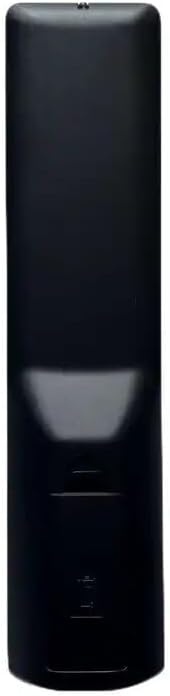
Slika: Nazad view of the remote control, illustrating the location of the battery compartment. The compartment is a rectangular indentation on the lower half of the remote's back, designed to hold two AAA batteries.
Uputstvo za upotrebu
This section outlines the general functions of the buttons on your replacement remote control. Button layouts may vary slightly depending on the specific model received (black or white version).

Slika: Front view of the replacement remote control. It is black with various grey and colored buttons, including a power button, number pad, navigation arrows, volume and channel controls, and dedicated buttons for Netflix and YouTube.
- Dugme za napajanje (●): Uključuje ili isključuje TV.
- Numerička tastatura (0-9): Direktno unosi brojeve kanala.
- Jačina/stišavanje (+/-): Podešava jačinu zvuka.
- Kanal gore/dolje (P+/P-): Mijenja TV kanal.
- Isključi zvuk (Mute): Isključuje ili uključuje zvuk TV-a.
- Strelice za navigaciju (gore, dolje, lijevo, desno): Kreće kroz menije i opcije.
- Dugme OK: Potvrđuje odabire u menijima.
- Natrag/Povratak: Vraća se na prethodni ekran ili meni.
- Izvor/Ulaz: Mijenja ulazni izvor (HDMI, AV, itd.).
- Netflix dugme: Direktan pristup Netflix aplikaciji.
- YouTube dugme: Direktan pristup YouTube aplikaciji.
- Meni/Početna: Opens the TV's main menu or smart TV home screen.
For specific functions not listed, refer to your television's original user manual, as this remote is designed to mimic common functions.
Održavanje
Čišćenje daljinskog upravljača
Za čišćenje daljinskog upravljača koristite meku, suhu krpu. Za tvrdokornu prljavštinu, laganoampObrišite krpu vodom ili blagim, neabrazivnim sredstvom za čišćenje. Nemojte koristiti jake hemikalije niti uranjati daljinski upravljač u vodu.
Zamjena baterije
Replace batteries when the remote's responsiveness decreases or it stops functioning. Always replace both batteries at the same time with new AAA batteries. Do not mix old and new batteries, or different types of batteries.
Rješavanje problema
| Problem | Mogući uzrok | Rješenje |
|---|---|---|
| Daljinski ne radi. | Prazne ili nepravilno instalirane baterije. Prepreka između daljinskog upravljača i televizora. | Check battery polarity and replace batteries. Ensure clear line of sight to TV's IR receiver. |
| Some functions not working. | This is a replacement remote; some specific functions may not be supported. | Confirm if the function is standard. If not, it may be a limitation of the replacement remote. |
| Remote is unresponsive. | Low batteries. Remote sensor blocked. | Replace batteries. Clean the remote's IR emitter and TV's IR receiver. |
Specifikacije
- Brand: Generic
- Model: Replacement Remote Control (ASIN: B0CKWGC1KD)
- Kompatibilni uređaji: Television, Stereo System, Set Top Box, DVD/Blu-ray Player, Home Theater
- Maksimalni broj podržanih uređaja: 5
- Posebna karakteristika: Ergonomski
- Boja: Black/White (sent randomly)
- Materijal: ABS plastika
Garancija i podrška
Specific warranty information for this generic replacement remote control is not provided in the product details. For any issues or support inquiries, please contact the seller directly through the platform where the purchase was made. It is recommended to provide your original remote part number or unit model to the seller for better assistance.


