
XINJI C1 Pros
XINJI COBEE C1 Pros Smart Watch User Manual
Model: C1 Pros
1. Uvod
This manual provides comprehensive instructions for the XINJI COBEE C1 Pros Smart Watch. It covers setup, operation, maintenance, and troubleshooting to ensure optimal use of your device. The XINJI COBEE C1 Pros features a 1.91" HD display, Bluetooth calling, 100+ sports modes, SpO2 monitoring, and 24/7 heart rate tracking.

Slika 1: Prednja strana view of the XINJI COBEE C1 Pros Smart Watch. This image displays the watch face with various health metrics and the black silicone strap.
2. Šta se nalazi u kutiji
Nakon otvaranja pakovanja, provjerite da li su sve komponente prisutne:
- XINJI COBEE C1 Pros Smart Watch
- Kabel za punjenje
- Extra Band (if included in your specific package)
- Korisnički priručnik (ovaj dokument)
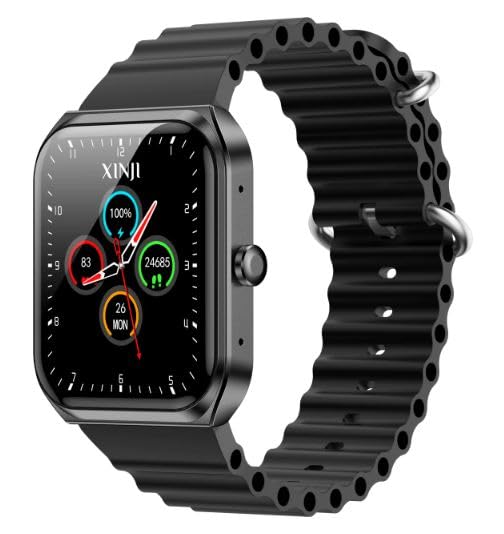
Figure 2: The XINJI COBEE C1 Pros Smart Watch, showcasing its design and strap.
3. Podešavanje
3.1 Početno punjenje
Before first use, fully charge your XINJI COBEE C1 Pros Smart Watch. Connect the magnetic charging cable to the charging points on the back of the watch and plug the USB end into a compatible power adapter (not included) or a computer USB port.
- Potpuno punjenje obično traje otprilike 2 sata.
- Ekran sata će prikazivati status punjenja.

Slika 3: Pozadi view of the XINJI COBEE C1 Pros Smart Watch, highlighting the optical sensors and magnetic charging contacts.
3.2 Instalacija i uparivanje aplikacije
To unlock the full functionality of your smart watch, download and install the companion application on your smartphone. The watch is compatible with Android 5.0 and above, and iOS 10.0 and above.
- Scan the QR code provided in the watch's quick start guide or search for the official XINJI app in your smartphone's app store (Google Play Store for Android, Apple App Store for iOS).
- Instalirajte aplikaciju i otvorite je.
- Omogućite Bluetooth na svom pametnom telefonu.
- Follow the in-app instructions to search for and pair with your XINJI COBEE C1 Pros Smart Watch. Ensure the watch is powered on and within Bluetooth range.
- Potvrdite zahtjev za uparivanje i na telefonu i na satu.
Once paired, you can synchronize data, customize settings, and receive notifications directly on your watch.
4. Upravljanje pametnim satom
4.1 Osnovna navigacija
- Touchscreen: Prevucite prstom gore, dolje, lijevo ili desno za navigaciju kroz menije i ekrane. Dodirnite za odabir stavki.
- Bočno dugme: Press the side button to return to the home screen or wake the display. A long press may access power options or a quick menu, depending on the context.
4.2 Bluetooth pozivanje
The XINJI COBEE C1 Pros supports direct Bluetooth calling. Once paired with your smartphone, you can answer incoming calls or dial out directly from the watch.
- Provjerite je li vaš sat povezan s telefonom putem Bluetootha.
- Kada pristigne poziv, sat će prikazati ID pozivaoca. Dodirnite zelenu ikonu da biste odgovorili ili crvenu ikonu da biste odbili.
- To dial out, access the call function on the watch (usually through the main menu) and use the on-screen dial pad or contact list.
4.3 sportskih modova
The watch offers over 100 sports modes to track various physical activities. Select your desired sport to monitor metrics such as duration, calories burned, heart rate, and more.
- Navigate to the "Sports" or "Workout" section on your watch.
- Browse and select the specific activity you are performing (e.g., Running, Cycling, Yoga).
- Start the activity. The watch will begin recording data.
- End the activity when finished. Data will be saved and synchronized with the app.
4.4 Monitoring zdravlja
The XINJI COBEE C1 Pros is equipped with advanced sensors for continuous health tracking.
- Praćenje srčanog ritma: Sat kontinuirano prati vaš otkucaj srca. View podaci u stvarnom vremenu na satu ili detaljni historijski podaci u aplikaciji.
- Praćenje SpO2 (kiseonika u krvi): Izmjerite nivo zasićenosti krvi kisikom. Za tačna očitanja, provjerite da li vam sat čvrsto prianja uz zapešće.
- Praćenje spavanja: Sat automatski prati vaše obrasce spavanja, uključujući duboki san, lagani san i vrijeme buđenja.view kvalitet vašeg sna u pratećoj aplikaciji.
- Praćenje aktivnosti: Prati pređene korake, pređenu udaljenost i potrošene kalorije tokom dana.
Note: The health monitoring features are for general fitness and wellness purposes only and should not be used for medical diagnosis or treatment. Consult a medical professional for health concerns.
5. Održavanje
5.1 Čišćenje
Redovno čišćenje pomaže u održavanju izgleda i funkcionalnosti sata.
- Obrišite ekran i kućište sata mekom krpom koja ne ostavlja dlačice.
- Za tvrdokorne mrlje, lagano dampIsperite krpu vodom. Izbjegavajte upotrebu jakih hemikalija ili abrazivnih materijala.
- Povremeno čistite kontakte za punjenje na poleđini sata kako biste osigurali pravilno punjenje.
5.2 Otpornost na vodu
The XINJI COBEE C1 Pros is IP68 water-resistant. This means it is protected against dust and can withstand immersion in water up to 1.5 meters for up to 30 minutes. It is suitable for daily use, such as hand washing or light rain.
- Do not use the watch for diving, snorkeling, or high-pressure water activities.
- Avoid exposing the watch to hot water, steam, or detergents, as this may compromise the water resistance.
- If the watch gets wet, wipe it dry before charging or operating buttons.
5.3 Njega baterija
Da produžite vijek trajanja baterije:
- Izbjegavajte ekstremne temperature.
- Charge the watch fully before long periods of inactivity.
- Ne dozvolite da se baterija često potpuno isprazni.
6. Otkrivanje problema
| Problem | Mogući uzrok | Rješenje |
|---|---|---|
| Sat se ne uključuje | Slaba baterija; Dugme za napajanje nije pravilno pritisnuto | Charge the watch for at least 30 minutes. Press and hold the side button for 5-10 seconds. |
| Nije moguće uparivanje s telefonom | Bluetooth off; Watch not in pairing mode; App issue | Ensure Bluetooth is enabled on both devices. Restart both watch and phone. Reinstall the app. |
| Netačni zdravstveni podaci | Watch not worn snugly; Sensor obstruction | Ensure the watch is worn snugly on the wrist. Clean the sensors on the back of the watch. |
| Kratko trajanje baterije | Frequent use of power-intensive features; High screen brightness | Reduce screen brightness. Limit continuous heart rate monitoring or GPS usage if not needed. Disable unnecessary notifications. |
7. Specifikacije
The following table outlines the key technical specifications for the XINJI COBEE C1 Pros Smart Watch:
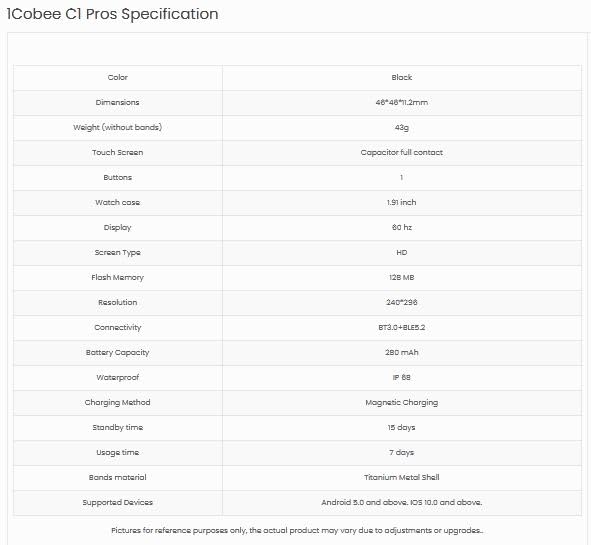
Figure 4: Detailed specifications for the XINJI COBEE C1 Pros Smart Watch, including dimensions, display, memory, and connectivity.
| Feature | Detalj |
|---|---|
| Brand | XINJI |
| Naziv modela | Cobee C1 Pros |
| Veličina ekrana | 1.91 Inches HD Display |
| Refresh Rate | 60Hz |
| Rezolucija | 240 x 240 |
| Povezivanje | Bluetooth |
| Trajanje baterije (prosječno) | 15 Days (Standby), 7 Days (Usage) |
| Otpornost na vodu | IP68 |
| Memory Storage | 128 MB |
| Kompatibilan OS | Android 5.0+, iOS 10.0+ |
| Dimenzije | 4.6 x 4.6 x 1.12 cm |
| Težina | 300 g |
| Posebne karakteristike | Activity Tracker, Blood Pressure Monitor, Cycle Tracking, Daily Workout Memory, ECG, GPS, Oxymeter (SpO2), Phone Call |
8. Garancija i podrška
The XINJI COBEE C1 Pros Smart Watch comes with a 1 godina garancije od datuma kupovine. Ova garancija pokriva nedostatke u proizvodnji i nedostatke materijala pri normalnoj upotrebi.
- Garancijski zahtjevi: For warranty service, please retain your proof of purchase. Contact XINJI customer support through their official webweb-mjesto ili kontakt informacije navedene na pakovanju vašeg proizvoda.
- Izuzeci: Garancija ne pokriva štetu uzrokovanu nepravilnom upotrebom, nezgodama, neovlaštenim popravkama ili normalnim habanjem.
Korisnička podrška
For technical assistance, troubleshooting, or general inquiries, please contact XINJI customer support. Refer to the official XINJI webnajnovije kontakt informacije potražite na web stranici ili na pakovanju vašeg proizvoda.

Figure 5: The official XINJI brand logo.
Ask a question about this manual
Ask about setup, troubleshooting, compatibility, parts, safety, or missing instructions. Manuals+ will review the question and use this page’s manual context to help answer it.