
1. Uvod
This manual provides detailed instructions for the setup, operation, and maintenance of your KOORUI MG27K1Q 27-inch QHD 240Hz VA Mini LED Gaming Monitor. Please read this manual thoroughly before using the product to ensure proper functionality and to prevent damage.
2. Sadržaj paketa
Verify that all items listed below are included in your product package. If any items are missing or damaged, please contact KOORUI customer support.
- KOORUI MG27K1Q 27-inch Gaming Monitor
- Monitor Stand (Base and Support)
- Adapter za napajanje
- DisplayPort (DP) kabel
3. Podešavanje
3.1 Sastavljanje postolja
- Pažljivo izvadite komponente monitora i postolja iz ambalaže.
- Attach the stand support to the monitor panel. Ensure it clicks securely into place or is fastened with screws if provided.
- Connect the stand base to the stand support. Tighten any screws to secure the assembly.
- Postavite sastavljeni monitor na stabilnu, ravnu površinu.
3.2 Povezivanje na uređaje
The monitor offers multiple connectivity options for various devices. Ensure the monitor is powered off before making any connections.
- DisplayPort (DP 1.4): Connect the included DisplayPort cable from your computer's graphics card to the DisplayPort input on the monitor for optimal performance, including 240Hz refresh rate and Adaptive Sync.
- HDMI (HDMI 2.0): Connect an HDMI cable from your device (PC, gaming console) to one of the two HDMI 2.0 inputs on the monitor.
- Audio izlaz: Use the 3.5mm audio jack to connect external speakers or headphones.
Slika: Stražnja strana view of the monitor illustrating the available connection ports (DisplayPort 1.4, 2x HDMI 2.0, Audio Out) and VESA mount points. Examples of compatible devices like PS5, Xbox, Laptop, and Nintendo Switch are shown.
3.3 Priključak za napajanje
- Spojite adapter za napajanje na ulaz za napajanje monitora.
- Uključite adapter za napajanje u zidnu utičnicu.
4. Rukovanje monitorom
4.1 Osnovni rad
- Uključivanje/isključivanje: Press the power button, usually located on the back or bottom right of the monitor, to turn the monitor on or off.
- Odabir ulaza: Use the On-Screen Display (OSD) menu to select the desired input source (DP, HDMI 1, HDMI 2).
4.2 Karakteristike ekrana
The KOORUI MG27K1Q monitor is equipped with advanced display technologies for an enhanced visual experience.
- QHD rezolucija (2560x1440): Provides sharp and detailed images.
- VA Mini LED Panel: Offers deep blacks, high contrast, and vibrant colors.
- HDR 1000: High Dynamic Range support for brighter whites and darker blacks, enhancing visual depth and realism.

Image: Visual comparison demonstrating the enhanced contrast and detail provided by HDR 1000 technology compared to a standard display.
4.3 Performanse u igrama
Designed for gaming, this monitor delivers smooth and responsive gameplay.
- Brzina osvježavanja od 240Hz: Ensures ultra-smooth motion and reduced input lag.
- Vrijeme odziva od 1 ms: Minimizira zamućenje pokreta i duhove za jasnu, brzu akciju.
- Adaptive Sync (G-SYNC Compatible): Sinhronizira brzinu osvježavanja monitora s brzinom kadrova vaše grafičke kartice kako bi se eliminiralo trzanje i trzanje slike.
- Exclusive Game Display Modes: Features like Crosshair, Timer, and FPS Counter can be enabled via the OSD for an advantage in gaming.

Image: The monitor displaying a high-speed racing game, emphasizing its 240Hz refresh rate and 1ms response time for a fluid gaming experience.
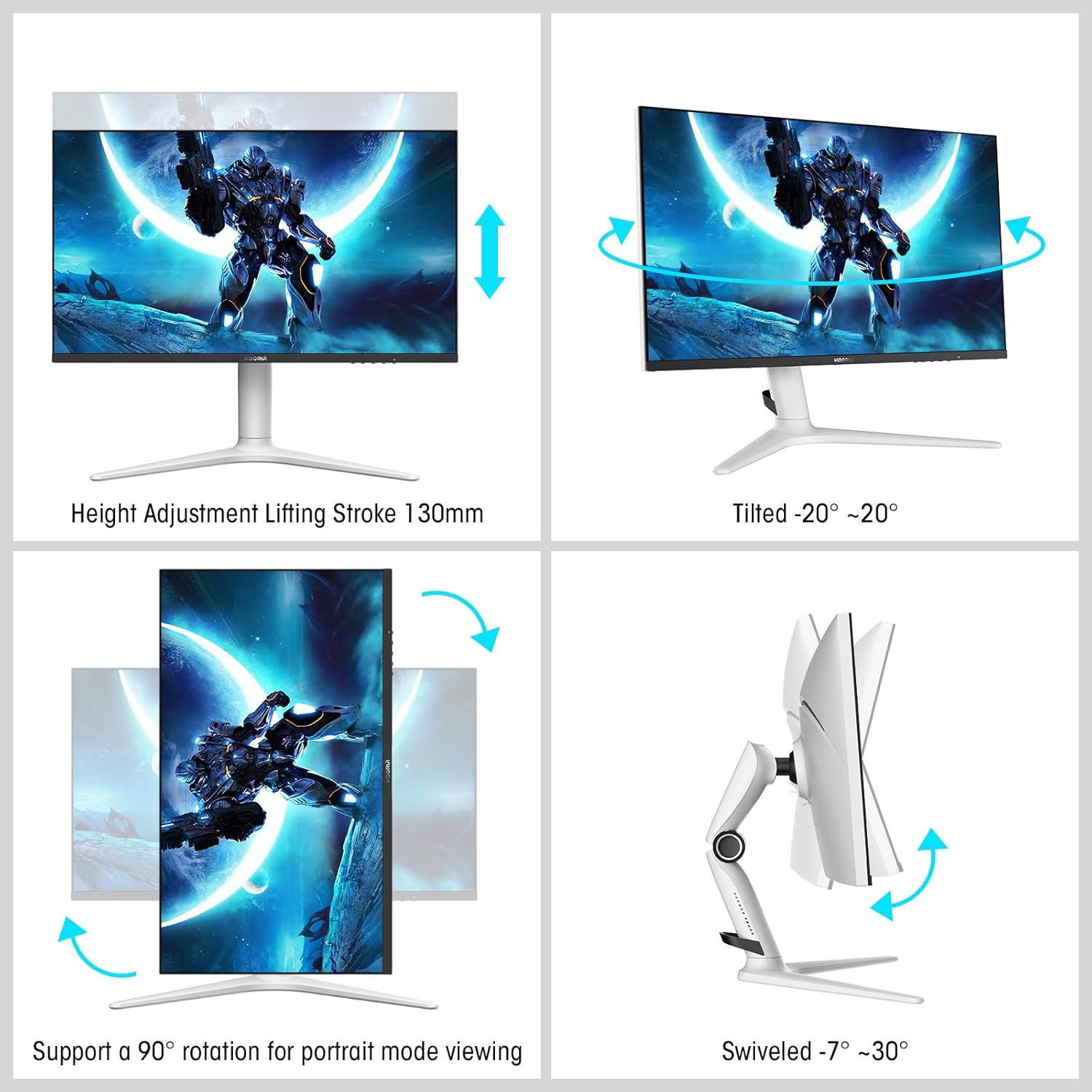
Image: A gaming scenario on the monitor, illustrating the 'Exclusive Game Display Mode' features such as Crosshair, Timer, FPS Counter, and RTS Counter, alongside Adaptive Sync functionality.
4.4 Funkcije za njegu očiju
The monitor includes features to reduce eye strain during prolonged use.
- Filter plavog svjetla: Reduces harmful blue light emissions. This can be adjusted or enabled/disabled through the OSD menu.
5. Podešavanja
Stalak za monitor omogućava razna ergonomska podešavanja za optimizaciju vašeg viewudobnost.
- Podešavanje visine: Adjust the monitor height up to 130mm.
- Nagib: Tilt the screen from -7° (downward) to 30° (upward).
- Okretni: Rotate the monitor horizontally from -20° to 20°.
- Pivot: Rotirajte ekran za 90° za portretni način rada viewing.
- VESA nosač: Compatible with VESA 75x75mm mounting solutions for alternative setups.

Image: Diagrams demonstrating the monitor's ergonomic adjustments, including height, tilt, swivel, and pivot for portrait mode.
6. Specifikacije
| Feature | Specifikacija |
|---|---|
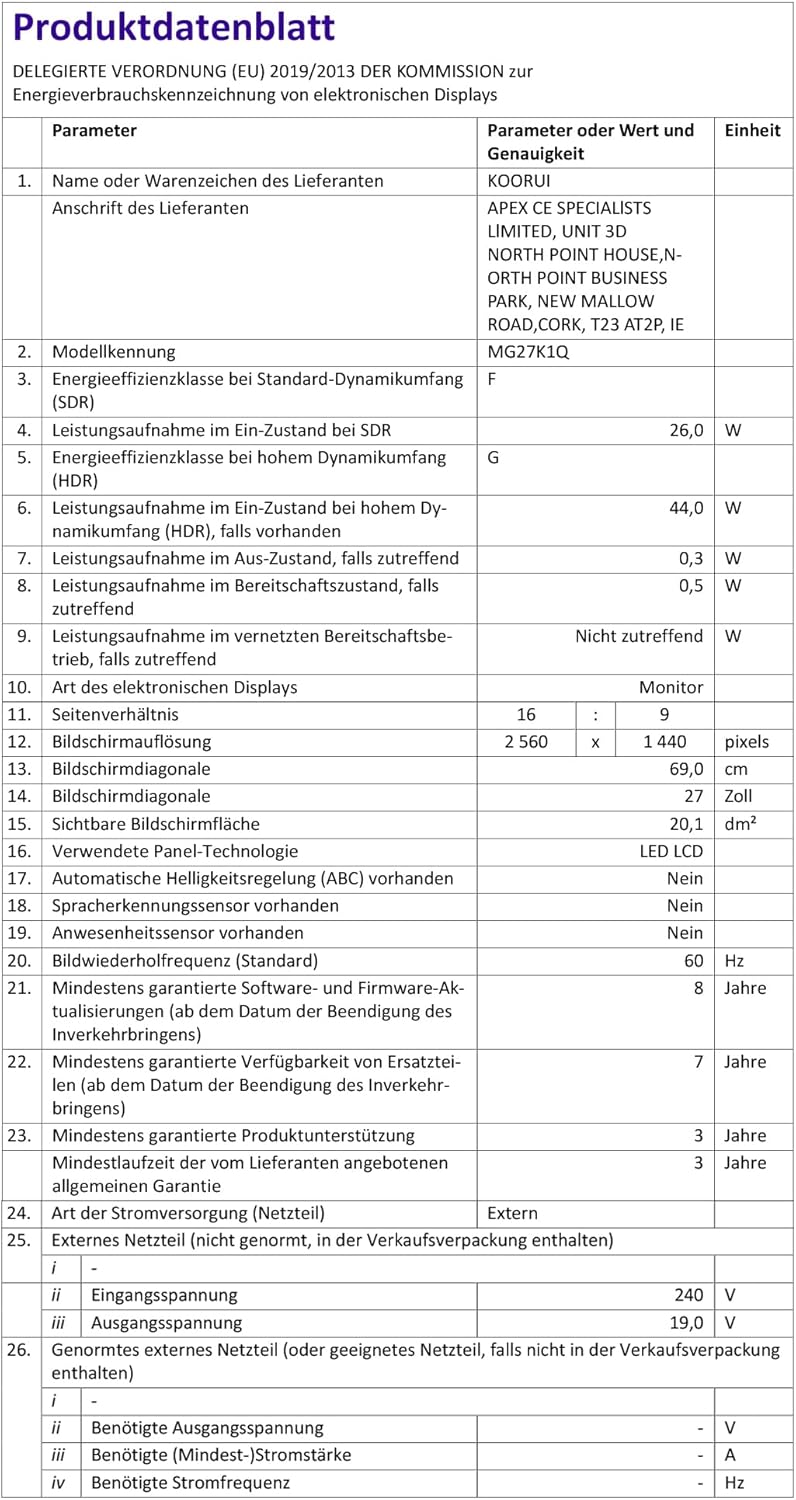
| Broj modela | MG27K1Q |
| Veličina ekrana | 27 inča |
| Tip panela | VA Mini-LED |
| Rezolucija | QHD (2560 x 1440) |
| Aspect Ratio | 16:9 |
| Refresh Rate | 240 Hz |
| Vrijeme odgovora | 1 ms |
| Kontrast (statički) | 3000:1 |
| Omjer kontrasta (dinamički) | 20,000,000:1 |
| Osvetljenost | 275 nita |
| Viewing Angle | 178 stepeni |
| HDR podrška | HDR 1000 |
| Adaptive Sync | Compatible with NVIDIA G-SYNC |
| Povezivanje | 2x HDMI 2.0, 1x DisplayPort 1.4, audio izlaz |
| VESA Mount | 75x75mm |
| Potrošnja energije | 90 Watt |
| Dimenzije (D x Š x V) | 32 x 61.3 x 52.3 cm |
| Težina | 9.34 kilograma |
| Posebne karakteristike | Blue Light Filter, Gaming Modes (Crosshair, Timer, FPS Counter) |
7. Otkrivanje problema
Ako naiđete na probleme s monitorom, pogledajte sljedeće uobičajene korake za rješavanje problema:
- Nema napajanja: Provjerite je li adapter za napajanje sigurno priključen i na monitor i na ispravnu utičnicu. Provjerite je li indikatorska lampica napajanja na monitoru upaljena.
- Nema signala: Verify that the video cable (DP or HDMI) is correctly connected to both the monitor and your computer/device. Ensure the correct input source is selected in the monitor's OSD menu. Try a different video cable or port.
- Treperenje/iskrivljena slika: Check the video cable connections. Ensure your graphics card drivers are up to date. Try reducing the refresh rate in your display settings to see if the issue persists.
- Adaptive Sync Not Working: Ensure Adaptive Sync (G-SYNC Compatible) is enabled in both the monitor's OSD settings and your graphics card control panel. Use a DisplayPort cable for optimal performance.
- Mrtvi pikseli: While rare, a small number of dead pixels may be considered within manufacturing tolerances. Refer to the warranty policy for specific details regarding pixel defects.
8. Garancija i podrška
KOORUI provides comprehensive support for your product.
- garancija: This monitor comes with a 3-year warranty from the date of purchase.
- Usluga zamjene: A 1-year replacement service is offered for qualifying issues.
- Korisnička podrška: If you encounter any damages, malfunctions, or find missing accessories, please do not hesitate to contact KOORUI customer support for assistance.