
1. prekoview
The Moukey MAMP1 is a compact yet powerful 2.0 channel Bluetooth audio stereo amplifier receiver designed for various home audio applications. It delivers 400 watts of maximum power output, providing a high-quality audio experience for karaoke, home theater, acoustic sound systems, and monitor headphones. Featuring multiple input and output modes, EQ controls, Bluetooth 5.0 connectivity, and an HD LED screen, the MAMP1 offers versatile and user-friendly operation.
2. Važne informacije o sigurnosti
- Read and heed all instructions.
- Nemojte koristiti ovaj proizvod u blizini vode.
- Čistite samo suhom krpom.
- Osigurajte voltage of your local mains supply matches the product's requirements.
- Do not block any ventilation openings. Install according to manufacturer's instructions.
- Ne postavljajte u blizini izvora toplote kao što su radijatori, grejni registri, peći ili drugi uređaji (uključujući ampLifiers) koji proizvode toplotu.
- Koristite samo dodatke/pribor koje je naveo proizvođač.
- Isključite ovaj proizvod iz struje tokom grmljavine ili kada se ne koristi duže vreme.
- Sav servis prepustite kvalifikovanom serviseru.
3. Sadržaj paketa
- Moukey MAMP1 Audio Stereo Amplifier
- Daljinski upravljač
- FM antena
- Power Cable
- Uputstvo za upotrebu
4. Značajke proizvoda
- 400 Watts Max Power: Compact yet powerful 2.0 Channel Bluetooth Audio Stereo Amplifier Receiver, ideal for karaoke, home theater, acoustic sound systems, and monitor headphones.
- Multiple Input and Output Modes: Supports 2 pairs of RCA audio inputs (for CD/DVD players), 2 x 1/4 inch (6.35mm) microphone inputs, USB (Max 64G), SD card (Max 32G), 3.5mm AUX IN, and FM radio. Features RCA Line Out and banana plug speaker outputs. Includes a 1/4 inch (6.35mm) headphone connection.
- EQ kontrole: Features clear, responsive buttons and knobs for microphone echo/volume, balance, bass, treble, master volume, input source, and unique folder/track control.
- Bluetooth 5.0 povezivanje: Professional indoor stereo receiver with Bluetooth music streaming up to 40 feet / 10 meters or more. Easily pairs with smartphones, tablets, iPads, iPhones, and computers.
- HD LED Screen: Integrated FM radio with built-in LED display and front panel audio control center. FM Antenna and Remote Control included for distant audio adjustments.
5. Kontrole na prednjoj ploči
The front panel provides access to all essential controls for operating your Moukey MAMP1 amplifier.
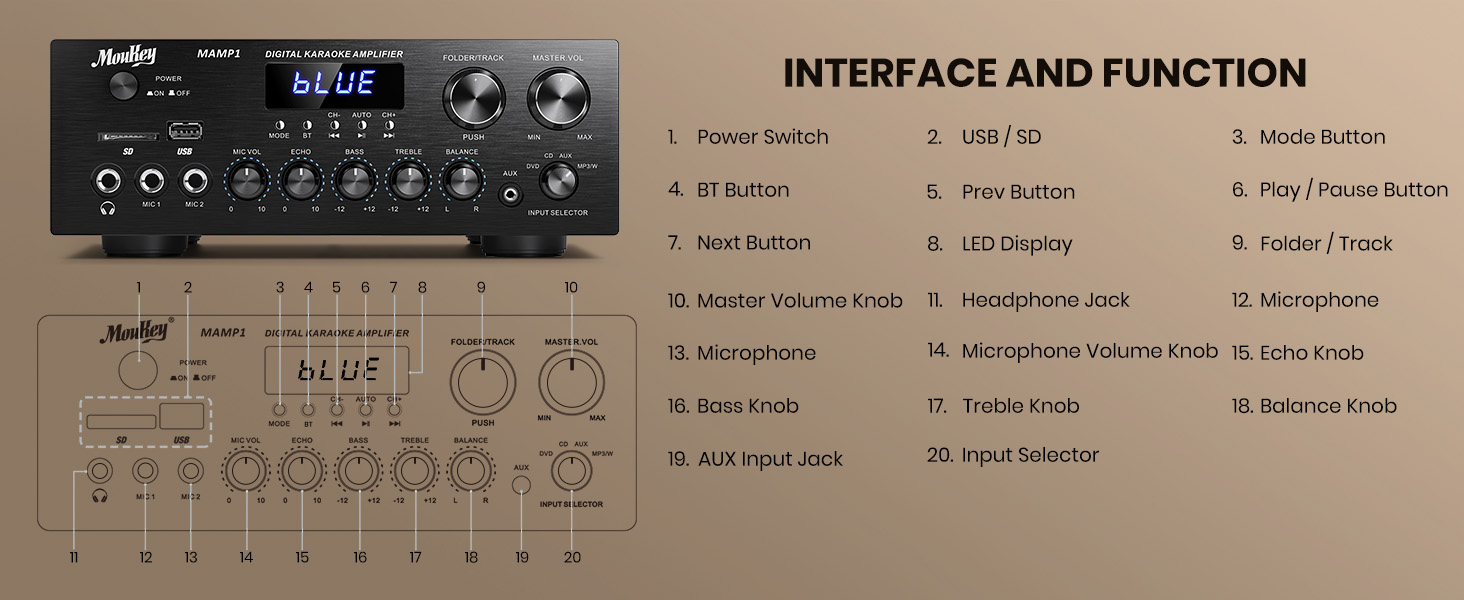
Figure 1: Moukey MAMP1 Raspored prednje ploče
- Prekidač: Pritisnite da uključite ili isključite jedinicu.
- USB / SD Card Slot: Insert USB flash drives (max 64GB) or SD cards (max 32G) for MP3 playback.
- Dugme za način rada: Press to cycle through input sources (USB/SD, Bluetooth, FM, AUX, CD, DVD).
- BT dugme: Pritisnite da biste odabrali Bluetooth način rada.
- Dugmad Prethodno/Sljedeće: Navigate tracks in USB/SD/Bluetooth mode or stations in FM mode.
- Dugme za reprodukciju/pauzu: Reprodukcija ili pauziranje reprodukcije zvuka.
- Led displej: Prikazuje trenutni način rada, informacije o pjesmi ili FM frekvenciju.
- Folder/Track Knob: Select folders or tracks.
- Glavno dugme za jačinu zvuka: Podešava ukupnu jačinu zvuka na izlazu.
- Priključak za slušalice (6.35 mm): Priključite slušalice za privatno slušanje.
- Microphone Inputs (MIC1, MIC2 - 6.35mm): Connect up to two microphones for karaoke or public address.
- Dugme za podešavanje jačine zvuka mikrofona: Podešava jačinu zvuka povezanih mikrofona.
- Echo dugme: Podešava efekat odjeka za mikrofone.
- bas dugme: Podešava niskofrekventni izlaz.
- Visokotonsko dugme: Podešava visokofrekventni izlaz.
- Dugme za balans: Podešava balans lijevog/desnog kanala.
- Dugme za odabir ulaza: Manually select input sources (CD, AUX, DVD, MP3/BT).
6. Priključci na stražnjoj ploči
The rear panel provides all necessary ports for connecting your audio sources and speakers.

Figure 2: Moukey MAMP1 Izgled zadnje ploče
- Priključak za FM antenu: Spojite priloženu FM antenu za radio prijem.
- Audio Input (DVD/CD - RCA): Connect external audio sources like DVD or CD players using RCA cables.
- Line Out (RCA): Povežite se s drugim amppodizač ili uređaj za snimanje.
- Speaker Output (Banana Plugs): Spojite pasivne zvučnike. Osigurajte ispravan polaritet (+ na + i - na -).
- Ulazna snaga: Connect the power cable to a standard AC outlet.
7. Podešavanje
7.1 Priključivanje zvučnika
To connect your passive speakers to the Moukey MAMP1 ampLifier, slijedite ove korake:

Figure 3: Speaker Connection Diagram
- Osigurajte ampUređaj za ispuštanje pare je isključen i iskopčan iz električne utičnice.
- Identify the positive (+) and negative (-) terminals on both your speakers and the amplifier.
- For bare wire connections: Rotate and loosen the speaker knob on the amplifier. Insert the bare wire (remove approximately 10mm insulation). Tighten the knobs to secure the wires.
- Spojite pozitivni (+) pol vašeg zvučnika na pozitivni (+) pol amplifier.
- Spojite negativni (-) terminal vašeg zvučnika s negativnim (-) terminalom amplifier.
- Repeat for all speakers. Ensure all connections are secure to prevent short circuits.
7.2 Povezivanje audio izvora
- RCA Devices (CD/DVD Player): Use RCA cables to connect the audio output of your CD or DVD player to the corresponding RCA input jacks on the ampzadnja ploča spasilačkog uređaja.
- AUX Devices: Connect devices with a 3.5mm audio output (e.g., smartphone, tablet) to the 3.5mm AUX IN jack on the front panel.
- mikrofoni: Plug 1/4 inch (6.35mm) microphones into the MIC1 or MIC2 jacks on the front panel.
- FM antena: Connect the included FM antenna to the FM ANT jack on the rear panel for radio reception.
7.3 Priključak za napajanje
- Ensure all audio and speaker connections are made.
- Connect the power cable to the AC POWER INPUT on the rear panel of the amplifier.
- Uključite drugi kraj kabla za napajanje u odgovarajuću AC utičnicu.
8. Uputstvo za upotrebu
8.1 Uključivanje/isključivanje napajanja
Pritisnite POWER prekidač na prednjoj ploči da biste uključili amplifier ON or OFF. The LED display will illuminate when powered on.
8.2 Odabir ulaznog izvora
Koristite MODE dugme ili ODABIR ULAZA knob on the front panel to choose your desired audio source (Bluetooth, USB, SD, AUX, FM, CD, DVD).
8.3 Kontrola jačine zvuka i tona
- Glavni volumen: Rotirajte MASTER VOL dugme za podešavanje ukupnog nivoa zvuka.
- Jačina zvuka mikrofona: Koristite MIC VOL knob to adjust microphone volume independently.
- odjek: Adjust the microphone echo effect with the ECHO dugme.
- bas/visoki tonovi: Fine-tune the low and high frequencies using the BASS i TREBLE dugmad.
- Stanje: Adjust the left/right channel balance with the BALANCE dugme.
8.4 Bluetooth uparivanje
- Pritisnite MODE dugme ili BT button to select Bluetooth mode. The LED display will show "BLUE".
- Na svom mobilnom uređaju omogućite Bluetooth i potražite dostupne uređaje.
- Odaberite "M"AMP1" from the list to pair. A confirmation tone will sound upon successful connection.
8.5 Reprodukcija sa USB-a/SD kartice
- Insert a USB flash drive or SD card into the respective slot on the front panel.
- The amplifier will automatically switch to USB/SD mode and begin playback. If not, press the MODE dugme da biste ga izabrali.
- Koristite PRETHODNO/SLJEDEĆE dugmad za preskakanje pjesama i PLAY/PAUSE dugme za kontrolu reprodukcije.
8.6 Rad FM radija
- Ensure the FM antenna is connected to the rear panel.
- Pritisnite MODE button to select FM radio mode. The LED display will show the frequency.
- Pritisnite AUTO dugme za automatsko skeniranje i spremanje dostupnih FM stanica.
- Koristite CH- i CH+ tipke za navigaciju kroz spremljene stanice.
9. Održavanje
- Održavajte jedinicu čistom tako što ćete je brisati mekom, suvom krpom.
- Izbjegavajte korištenje jakih kemikalija ili abrazivnih sredstava za čišćenje.
- Osigurajte odgovarajuću ventilaciju tako što ćete otvore za ventilaciju držati čistim od prepreka.
- Čuvajte ampČuvajte na hladnom i suhom mjestu, dalje od direktne sunčeve svjetlosti i ekstremnih temperatura.
10. Otkrivanje problema
| Problem | Mogući uzrok | Rješenje |
|---|---|---|
| Nema struje | Kabl za napajanje nije priključen; Prekidač isključen; Kvar utičnice | Check power cable connection; Turn power switch ON; Test outlet with another device. |
| Nema izlaza zvuka | Incorrect input source; Volume too low; Speaker connections loose/incorrect; Faulty audio cable | Select correct input source; Increase master volume; Check speaker wiring; Replace audio cables. |
| Bluetooth se ne povezuje | Not in Bluetooth mode; Device too far; Device already connected to another unit | Switch to Bluetooth mode; Move device closer; Disconnect from other devices and try again. |
| Loš FM prijem | Antena nije povezana; Slab signal | Connect FM antenna; Adjust antenna position for better reception. |
11. Specifikacije
| Feature | Specifikacija |
|---|---|
| Brand | Moukey |
| Model | MAMP1 |
| Izlazna snaga | 400 W max |
| Kanali | 2.0 Channel |
| Bluetooth verzija | 5.0 |
| Bluetooth domet | Do 40 metara |
| Ulazni interfejsi | 2x RCA (CD/DVD), 2x 1/4" (6.35mm) MIC, USB, SD, 3.5mm AUX IN, FM Antenna |
| Izlazni interfejsi | RCA Line Out, Banana Plug Speaker Outputs, 1/4" (6.35mm) Headphone |
| USB/SD Max Capacity | USB: 64G, SD: 32G |
| Frekvencijski odziv | 20Hz-20kHz |
| Tehnologija tjunera | FM |
| Dimenzije proizvoda | 81.28 x 78.74 x 43.18 cm; 3.19 kg |
12. Garancija i podrška
Moukey products are designed and manufactured to the highest quality standards. For detailed warranty information and customer support, please refer to the warranty card included in your package or visit the official Moukey website. If you encounter any issues or have questions regarding your MAMP1 amplifier, please contact Moukey customer service for assistance.