
1. Uvod
Thank you for choosing the Upperizon 15.6 inch 4K UHD OLED Touchscreen Portable Monitor. This manual provides essential information for setting up, operating, and maintaining your new monitor. Please read it thoroughly before use to ensure optimal performance and longevity of the product.
This portable monitor features a 15.6-inch OLED UHD 4K (3840 x 2160) display, offering a 100% DCI-P3 color gamut, 100,000:1 contrast ratio, 350 cd/m² brightness, and a 178° wide viewing angle with a 60 Hz refresh rate. Its ultra-slim design and integrated kickstand make it ideal for various applications, including professional color grading, extended desktop use, and portable gaming.

Image 1.1: The Upperizon portable monitor showcasing its 4K UHD OLED display with 100% DCI-P3 color accuracy.
2. Sadržaj paketa
Molimo označite kućicu za sljedeće stavke:
- 1 × Upperizon Portable Monitor (Model P156UHT-R)
- 2 × USB-C to USB-C Cable (full-featured)
- 1 × HDMI to Mini HDMI Cable
- 1 × USB-A na USB-C kabl
- 1 × 45W Wall Charger
- 1 × Sleeve Case
3. Značajke proizvoda
- OLED 4K UHD Display: 3840 x 2160 resolution for super clear visuals.
- Visoka tačnost boja: 100% DCI-P3 color gamut, ideal for professional color grading and graphic design.
- Visok kontrast: 100,000:1 contrast ratio for deep blacks and bright whites.
- Brzo vrijeme odziva: 1ms response time for smooth motion.
- Funkcionalnost ekrana na dodir: 10-point multi-touch support for Windows devices.
- Prijenosni dizajn: Ultra-slim (0.17 inch at slimmest point) and lightweight (1.9 lbs) with an integrated, adjustable kickstand.
- Svestrano povezivanje: Two USB-C ports (for video & power), one Mini HDMI port, and one USB-C OTG port.
- Ugrađeni zvučnici: Za audio izlaz.
- Karakteristike za udobnost očiju: Blue light filter and low reflection screen.

Image 3.1: Visual comparison highlighting the superior contrast and color reproduction of OLED technology compared to ordinary LED displays.
4. Priključci i portovi
The monitor is equipped with multiple ports for various devices:
- USB-C (Full-featured): Two ports for video signal, power delivery, and touchscreen data (depending on device).
- Mini HDMI: For video signal input from devices with HDMI output.
- USB-C OTG: For connecting peripherals like a keyboard or mouse. Do not use this port for power input.
- 3.5 mm audio priključak: Za spajanje eksternih slušalica ili zvučnika.

Slika 4.1: Gotovoview of the monitor's rich interface options for connecting various devices.
5. Vodič za postavljanje
5.1 Napajanje monitora
Always ensure the monitor receives sufficient power. Use the included 45W wall charger and a full-featured USB-C to USB-C cable for optimal performance.
5.2 Connecting via USB-C (Full-featured)
For devices with a full-featured USB-C port (supporting DisplayPort Alternate Mode and Power Delivery):
- Connect one end of the full-featured USB-C to USB-C cable to your device's USB-C port.
- Connect the other end to one of the monitor's full-featured USB-C ports.
- If your device cannot provide enough power, connect the 45W wall charger to the other full-featured USB-C port on the monitor.
Napomena: Ensure your laptop has a Thunderbolt 3/4 or full-featured USB-C port for single-cable operation.

Image 5.1: USB-C connection setup for video, power, and touch functionality.
5.3 Connecting via HDMI
For devices with an HDMI output:
- Connect one end of the HDMI to Mini HDMI cable to your device's HDMI port.
- Connect the Mini HDMI end to the monitor's Mini HDMI port.
- Connect the 45W wall charger to one of the monitor's full-featured USB-C ports for power.
- For touchscreen functionality with Windows laptops/PCs, connect the USB-A to USB-C cable from your computer's USB-A port to the monitor's full-featured USB-C port.
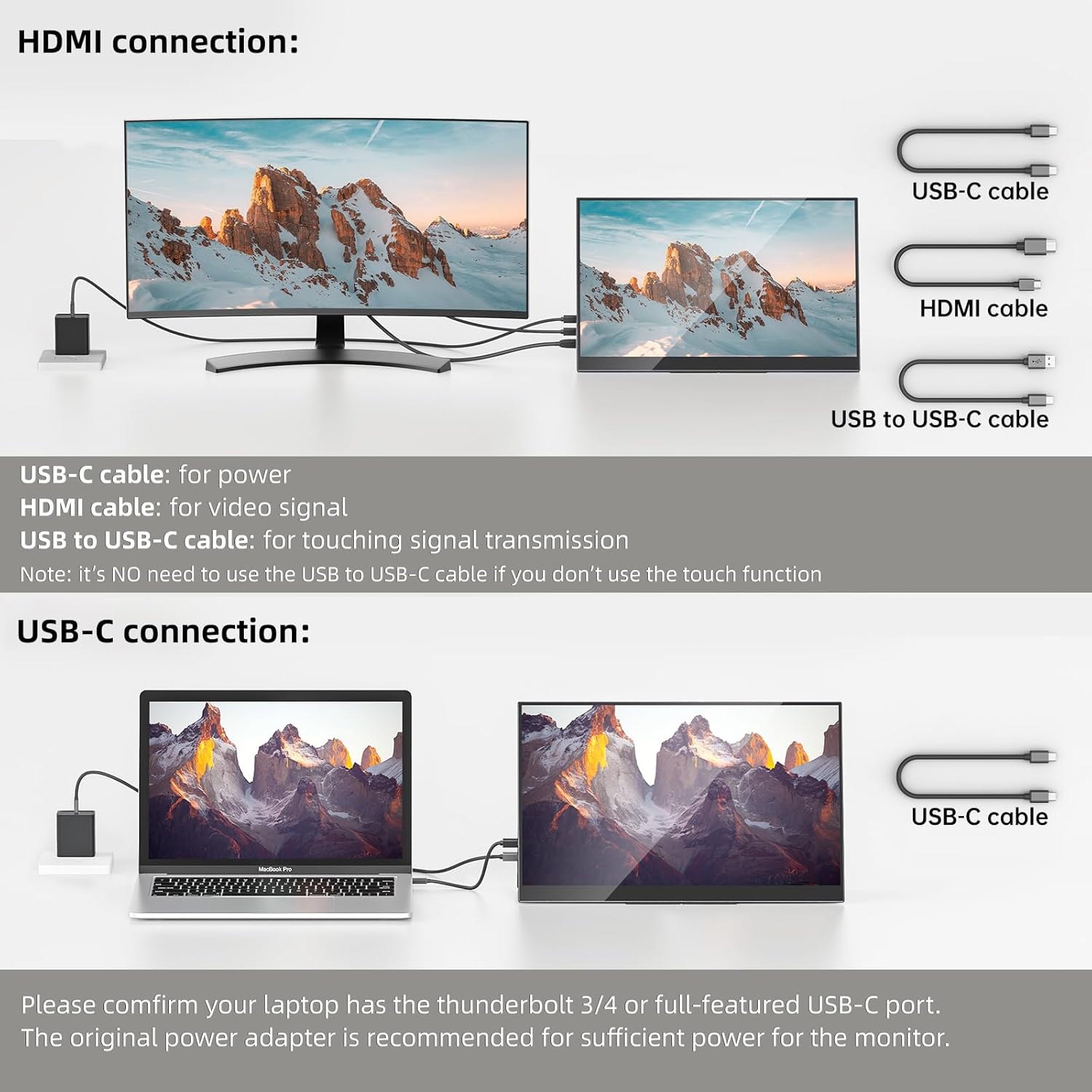
Image 5.2: HDMI connection setup, including separate power and touch signal cables.
6. Uputstvo za upotrebu
6.1 Načini prikaza
Monitor podržava različite načine prikaza:
- Duplicirani način rada: Mirrors your primary screen, useful for presentations.
- Prošireni način rada: Extends your desktop, increasing workspace and productivity.
- Portretni način: The integrated kickstand allows for easy setup in portrait orientation.

Slika 6.1: Primjeramples of duplicated, extended, and portrait display configurations.
6.2 Funkcionalnost ekrana osjetljivog na dodir
The monitor features touchscreen capabilities with specific compatibility:
- Windows Laptops/PCs: Supports 10-point multi-touch. Requires a USB-A to USB-C cable connection for touch signal when using HDMI for display.
- MacOS (MacBook, Mac mini, iMac): Supports single-point touch only. 10-point multi-touch is NOT supported.
- iPad, iPhone, Game Consoles (PS4, PS5, Xbox, etc.): Touchscreen functionality is NOT supported.

Image 6.2: Touchscreen compatibility matrix for various devices.
6.3 On-Screen Display (OSD) meni
The OSD menu allows you to adjust various display settings. Access it using the physical buttons on the monitor. Typical settings include brightness, contrast, color temperature, input source, and audio volume.
7. Održavanje
To ensure the longevity and optimal performance of your monitor:
- čišćenje: Koristite meku krpu koja ne ostavlja dlačice da nježno obrišete ekran. Za tvrdokorne mrlje, lagano obrišiteampOperite krpu vodom ili sredstvom za čišćenje ekrana. Izbjegavajte jake hemikalije ili abrazivne materijale.
- Skladištenje: When not in use, store the monitor in its sleeve case to protect it from dust and scratches.
- Rukovanje: Izbjegavajte pretjerani pritisak na ekran ili ispuštanje monitora.
- ventilacija: Ensure the monitor's vents are not obstructed to prevent overheating.
8. Otkrivanje problema
| Problem | Mogući uzrok | Rješenje |
|---|---|---|
| No display/"No Signal" | Nepravilan priključak kabla, nedovoljno napajanje, pogrešan ulazni izvor. | Check all cable connections (USB-C, HDMI). Ensure the monitor is receiving adequate power (use 45W adapter). Select the correct input source via the OSD menu. Verify your device's USB-C port supports video output. |
| Touchscreen ne radi | Missing USB-A to USB-C connection (for HDMI), incompatible device, driver issue. | For HDMI connections, ensure the USB-A to USB-C cable is connected for touch signal. Confirm your device (Windows) supports touchscreen functionality. Check device settings for touch input. MacOS only supports single touch. Touch is not supported for iPads, iPhones, or game consoles. |
| Treperenje ekrana | Cable issue, power fluctuation, refresh rate mismatch. | Try a different cable. Ensure stable power supply. Check display settings on your device for refresh rate. |
| Nema zvuka sa monitora | Volume too low, incorrect audio output device selected. | Increase monitor volume via OSD. Check your device's audio settings to ensure the monitor is selected as the output device. |
9. Specifikacije
| Feature | Specifikacija |
|---|---|
| Brand | Upperizon |
| Broj modela | P156UHT-R |
| Veličina ekrana | 15.6 inča |
| Rezolucija | 4K UHD (3840 x 2160p) |
| Display Type | OLED |
| Refresh Rate | 60 Hz |
| Vrijeme odgovora | 1 milisekunda |
| Kontrast Ratio | 100,000:1 |
| Osvetljenost | 350 kandela (cd/m²) |
| Gamut boja | 100% DCI-P3 |
| Viewing Angle | 178 stepeni |
| Povezivanje | 2x USB-C (Full-featured), 1x Mini HDMI, 1x USB-C OTG |
| Dodatne karakteristike | Touchscreen, Built-In Speakers, Blue Light Filter, Kickstand |
| Težina artikla | 1.9 funti |
| Dimenzije (D x Š x V) | 0.2"D x 14"Š x 8.8"H |
10. Garancija i podrška
The Upperizon Portable Monitor P156UHT-R comes with a 2-godišnja garancija proizvođača. For technical support, warranty claims, or any inquiries, please contact Upperizon customer service. Refer to the contact information provided with your product or visit the official Upperizon websajt za pomoć.
Garancija: This warranty covers defects in materials and workmanship under normal use. It does not cover damage caused by accident, misuse, abuse, neglect, improper installation, or unauthorized repairs.