
Vorago BSP-500-V2
Vorago BSP-500-V2 Bluetooth Speaker User Manual
Model: BSP-500-V2
Marka: Vorago
1. Proizvod je gotovview
The Vorago BSP-500-V2 is a portable Bluetooth speaker designed for robust performance and durability. It features IPX5 water resistance, making it suitable for various environments, including outdoor adventures and parties. This manual provides detailed instructions for setting up, operating, and maintaining your speaker.
Ključne karakteristike:
- True Wireless Stereo (TWS) Connectivity: Connect two BSP-500-V2 speakers for an immersive stereo sound experience.
- Produženi vijek trajanja baterije: Enjoy up to 7 hours of music playback at 70% volume, thanks to its 2000 mAh battery.
- USB Type-C punjenje: Praktičan i moderan USB-C priključak za punjenje.
- Svestrano povezivanje: Supports Bluetooth for wireless streaming and a 3.5mm auxiliary input for wired connections.
- IPX5 vodootpornost: Zaštićeno od mlazova vode niskog pritiska iz bilo kojeg smjera.
Sadržaj paketa:
- Vorago BSP-500-V2 Bluetooth zvučnik
- USB kabel za punjenje tipa C
- 3.5 mm audio kabl
- Korisnički priručnik (ovaj dokument)
Dijagram proizvoda:

Slika 1.1: Prednja strana view of the Vorago BSP-500-V2 Bluetooth speaker, showcasing its mesh grille and central Vorago logo.

Slika 1.2: Pod uglom view of the speaker, highlighting its robust, rectangular design and integrated carrying strap.

Slika 1.3: Vrh view showing the control panel with power, volume down, play/pause, and volume up buttons.
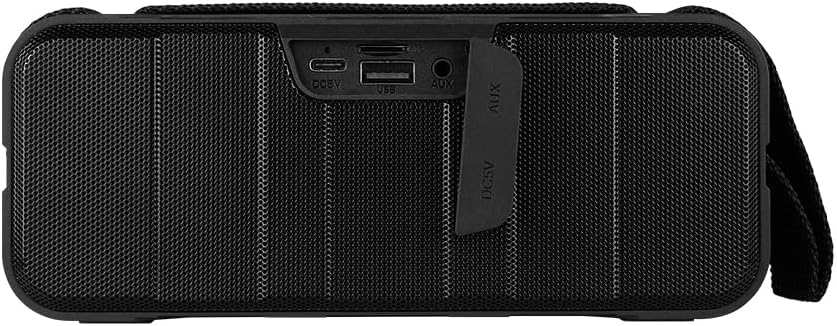
Slika 1.4: Pozadi view of the speaker, showing the protective flap covering the input ports.

Figure 1.5: Close-up of the input ports, including DC 5V (USB-C), USB-A, and AUX (3.5mm) inputs, protected by a rubber cover.
2. Sigurnosne informacije
- Ne izlažite zvučnik ekstremnim temperaturama (vrućim ili hladnim).
- Izbjegavajte ispuštanje ili izlaganje zvučnika jakim udarcima.
- Keep the speaker away from direct sunlight and heat sources.
- Ne rastavljajte, ne popravljajte niti modificirajte zvučnik sami. To će poništiti garanciju.
- Ensure the port cover is securely closed when using the speaker near water to maintain IPX5 water resistance.
- Do not immerse the speaker in water. IPX5 rating protects against splashes and light rain, not submersion.
- Use only the provided charging cable or a certified USB Type-C cable for charging.
- Očistite zvučnik mekom, suhom krpom. Ne koristite abrazivna sredstva za čišćenje ili rastvarače.
3. Podešavanje
3.1 Punjenje zvučnika
- Open the protective rubber cover on the rear of the speaker to access the charging port.
- Connect the USB Type-C end of the charging cable to the speaker's DC 5V port.
- Drugi kraj USB kabla priključite na USB adapter za napajanje (nije uključen) ili na USB port računara.
- Indikatorska lampica punjenja će svijetliti tokom punjenja i ugasiti se kada se uređaj potpuno napuni.
- Once charging is complete, securely close the protective rubber cover to maintain water resistance.
3.2 Uključivanje/isključivanje
- Za uključivanje: Pritisnite i držite Dugme za napajanje on the top panel for approximately 3 seconds until you hear an audible prompt.
- Za isključivanje: Pritisnite i držite Dugme za napajanje for approximately 3 seconds until you hear an audible prompt.
3.3 Bluetooth uparivanje
- Provjerite je li zvučnik uključen. Automatski će ući u Bluetooth način uparivanja, što će biti naznačeno trepćućim LED svjetlom.
- Na svom uređaju (pametnom telefonu, tabletu, laptopu) omogućite Bluetooth i potražite dostupne uređaje.
- Select "BSP-500-V2" from the list of found devices.
- Once successfully paired, the speaker will emit an audible confirmation, and the LED light will stop flashing and remain solid.
- Zvučnik će se automatski ponovo povezati sa posljednjim uparenim uređajem kada se uključi, ako je uređaj u dometu i ako je Bluetooth omogućen.
3.4 Uparivanje putem pravog bežičnog stereo sistema (TWS)
TWS allows you to connect two BSP-500-V2 speakers together for a true stereo sound experience.
- Ensure both BSP-500-V2 speakers are powered on and not connected to any other Bluetooth device.
- On one of the speakers (this will be the primary speaker), double-press the Dugme za reprodukciju/pauzu. The speaker will enter TWS pairing mode.
- The two speakers will automatically search for and connect to each other. You will hear an audible confirmation once they are successfully paired.
- Once TWS is established, connect your device to the primary speaker via Bluetooth as described in Section 3.3.
- Da biste isključili TWS, dvaput pritisnite Dugme za reprodukciju/pauzu na oba zvučnika.
3.5 Pomoćna (AUX) veza
For devices without Bluetooth, you can use the 3.5mm audio cable.
- Open the protective rubber cover on the rear of the speaker.
- Spojite jedan kraj 3.5 mm audio kabela na AUX priključak zvučnika.
- Drugi kraj kabla priključite na audio izlaz vašeg uređaja.
- Zvučnik će se automatski prebaciti u AUX način rada.
- Once disconnected, securely close the protective rubber cover.
4. Uputstvo za upotrebu
4.1 Funkcije dugmadi:
| Dugme | Funkcija (kratki pritisak) | Funkcija (dugi pritisak) |
|---|---|---|
| Dugme za napajanje | N/A | Uključivanje/isključivanje |
| Dugme za smanjivanje jačine zvuka | Smanjite jačinu zvuka | Previous Track |
| Dugme za reprodukciju/pauzu | Reprodukcija/Pauziranje muzike, Odgovor/Završetak poziva | Reject Call, Double-press for TWS Pairing |
| Dugme za pojačavanje zvuka | Povećajte jačinu zvuka | Next Track |
5. Održavanje
- čišćenje: Use a soft, dry, lint-free cloth to clean the speaker's surface. For stubborn dirt, slightly dampNamočite krpu vodom. Ne koristite jake hemikalije, rastvarače za čišćenje ili jake deterdžente.
- Njega vodootpornosti: Always ensure the rubber port cover on the back of the speaker is fully and securely sealed when using the speaker outdoors or near water. This maintains its IPX5 water resistance. After exposure to water, wipe the speaker dry before opening the port cover for charging or auxiliary connections.
- Skladištenje: When not in use for extended periods, store the speaker in a cool, dry place, away from direct sunlight and extreme temperatures. It is recommended to charge the speaker fully before storing and to recharge it every few months to maintain battery health.
- Održavanje baterije: To prolong battery life, avoid fully discharging the battery frequently. Charge the speaker when the low battery indicator is active.
6. Otkrivanje problema
| Problem | Mogući uzrok | Rješenje |
|---|---|---|
| Zvučnik se ne uključuje. | Niska baterija. | Potpuno napunite zvučnik pomoću priloženog USB Type-C kabla. |
| Nije moguće uparivanje putem Bluetootha. | Speaker is not in pairing mode; Device's Bluetooth is off; Speaker is already connected to another device; Device is too far from speaker. | Ensure speaker is powered on and flashing (pairing mode). Turn on Bluetooth on your device. Disconnect from other devices. Move device closer to speaker (within 10 meters). |
| Nema zvuka ili je jačina zvuka niska. | Volume too low on speaker or device; Incorrect input mode; Speaker not connected. | Increase volume on both speaker and connected device. Ensure correct mode (Bluetooth or AUX) is active. Verify successful Bluetooth pairing or AUX cable connection. |
| Izobličenje zvuka. | Previsoka jačina zvuka; Uređaj je previše udaljen od zvučnika; Smetnje. | Reduce volume on speaker and/or device. Move device closer to speaker. Avoid obstacles between speaker and device. |
| Uparivanje TWS-a nije uspjelo. | Speakers are already paired to a device; Speakers are too far apart. | Ensure both speakers are disconnected from any Bluetooth devices. Place speakers close to each other during TWS pairing. |
7. Specifikacije
| Feature | Detalj |
|---|---|
| Naziv modela | BSP-500-V2 |
| Vrsta zvučnika | Multimedija |
| Posebna karakteristika | Bluetooth |
| Preporučena upotreba | Za muzičke plejere |
| Kompatibilni uređaji | Laptop, MP3 plejer, pametni telefon, tablet |
| Tip kontrolera | Dugme |
| Konfiguracija kanala surround zvuka | 5.0 |
| Trajanje baterije | 7 sata |
| Uključene komponente | Zvučnik |
| Dimenzije proizvoda | 5D x 15W x 18H centimetara |
| Težina proizvoda | 1 kilograma |
| Vodootporan | Da (IPX5) |
| Kapacitet baterije | 2000 mAh |
| Ampdizalica Tip | Aktivan |
| Izvor napajanja | Baterija |
| Frekvencijski odziv | 180 Hz |
| Tehnologija povezivanja | Bluetooth |
| Način audio izlaza | Stereo |
| Vrsta montaže | Tabletop Mount |
8. Garancija i podrška
The Vorago BSP-500-V2 Bluetooth Speaker comes with a limited warranty. Please refer to the warranty card included with your product for specific terms and conditions, or visit the official Vorago websajt za više detalja.
For technical support, troubleshooting assistance, or warranty claims, please contact Vorago customer service through their official channels. You can find more information and contact details on the Vorago Brand Store on Amazon ili njihov službenik website.
Molimo sačuvajte dokaz o kupovini u svrhu garancije.
Ask a question about this manual
Ask about setup, troubleshooting, compatibility, parts, safety, or missing instructions. Manuals+ will review the question and use this page’s manual context to help answer it.