
IPASON G-SLIM
IPASON G-SLIM Desktop PC User Manual
Model: G-SLIM | Brand: IPASON
1. Uvod
Hvala na kupoviniasing the IPASON G-SLIM Desktop PC. This compact and powerful system is designed for both business and personal use, offering stable performance and a space-saving design. This manual provides essential information for setting up, operating, maintaining, and troubleshooting your new computer.
2. Sigurnosne informacije
Please read the following safety guidelines carefully before using your IPASON G-SLIM Desktop PC to ensure safe operation and prevent damage.
- Napajanje: Koristite samo priloženi kabel za napajanje i priključite ga na uzemljenu utičnicu. Ne preopterećujte produžetke za napajanje.
- ventilacija: Ensure proper airflow around the PC. Do not block ventilation openings. Maintain at least 10cm clearance on all sides.
- Okruženje: Operate the PC in a dry, stable environment away from direct sunlight, heat sources, and excessive dust or moisture.
- Rukovanje: Avoid dropping or subjecting the PC to strong impacts.
- servisiranje: Ne pokušavajte sami otvarati ili popravljati računar. Za sve servisne radove obratite se kvalifikovanom osoblju.

Figure 2.1: The IPASON G-SLIM Desktop PC undergoes rigorous testing to ensure reliability and stability, including 3C certification, drop tests, and temperature/noise control tests.
3. Sadržaj paketa
Provjerite da li su sve stavke prisutne u paketu:
- IPASON G-SLIM Desktop PC
- Power Cable
- Korisnički priručnik (ovaj dokument)
- WPS Office License Key (if applicable)
4. Proizvod je gotovview
The IPASON G-SLIM is a compact tower PC designed for efficiency and performance. Its slim profile allows it to fit into various workspaces.

Slika 4.1: Prednja strana view of the IPASON G-SLIM Desktop PC, highlighting its sleek design and accessible front ports.
4.1 Prednja ploča
- Dugme za napajanje: Za uključivanje ili isključivanje računara.
- USB portovi: Convenient access for connecting USB devices.
- Audio priključci: Za slušalice i mikrofon.
4.2 Zadnja ploča
The rear panel contains various ports for connecting your monitor, network, and other peripherals.

Slika 4.2: Dimenzije i razne views of the IPASON G-SLIM Desktop PC, including the rear panel with its array of connectivity ports.
- Video izlazni portovi: (e.g., HDMI, DisplayPort, VGA) for connecting monitors.
- USB portovi: Additional USB 2.0 and USB 3.0 ports for peripherals.
- LAN port: Za žičanu mrežnu vezu.
- Audio portovi: Line-in, line-out, and microphone jacks.
- Ulazna snaga: Za povezivanje kabla za napajanje.
5. Podešavanje
5.1 Povezivanje perifernih uređaja
- Monitor: Connect your monitor to one of the video output ports on the rear panel (e.g., HDMI, DisplayPort).
- tastatura i miš: Connect your keyboard and mouse to any available USB ports.
- mreža: For a wired connection, connect an Ethernet cable from your router/modem to the LAN port on the rear panel.
- audio: Connect speakers or headphones to the appropriate audio jacks.
5.2 Priključak za napajanje
- Insert the provided power cable into the power input port on the rear of the PC.
- Uključite drugi kraj kabla za napajanje u uzemljenu električnu utičnicu.
5.3 Početno pokretanje
- Press the power button on the front panel of the PC.
- The system will boot up and guide you through the initial Windows 11 setup process. Follow the on-screen instructions to configure your language, region, network, and user account.
6. Operating System (Windows 11)
Your IPASON G-SLIM Desktop PC comes pre-installed with Windows 11, offering a modern and intuitive user experience.
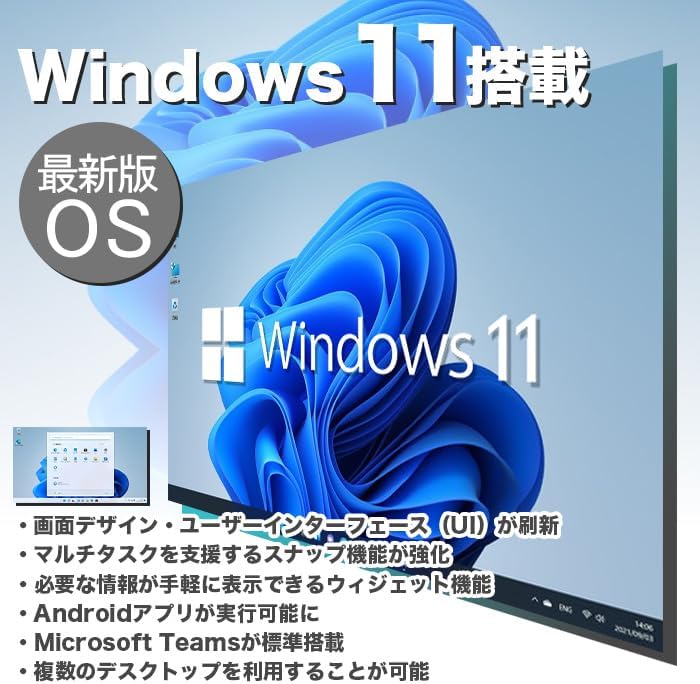
Figure 6.1: Windows 11 interface, showcasing its new design and features.
6.1 Key Features of Windows 11
- Redesigned User Interface (UI): A fresh, clean design with a centered Start menu and taskbar.
- Poboljšani multitasking: Snap Layouts and Snap Groups make organizing windows easier.
- Widgets: A personalized feed for quick access to information.
- Android App Support: Run Android applications directly on your PC (requires Amazon Appstore).
- Integracija s Microsoft Teamsom: Built-in chat and video conferencing.
- Multiple Desktops: Organize your workspace with virtual desktops.
6.2 WPS Office
Your PC includes WPS Office, a Microsoft-certified office suite with high compatibility with Microsoft Office documents. You can use it for word processing, spreadsheets, and presentations.
7. Karakteristike performansi
The IPASON G-SLIM is equipped with components chosen for a balance of performance and cost-effectiveness, making it suitable for various tasks, including business applications and light gaming.
7.1 Processor (CPU)
Features a 12th Generation Intel Core i3 processor, offering improved performance over previous generations for everyday computing and multitasking.
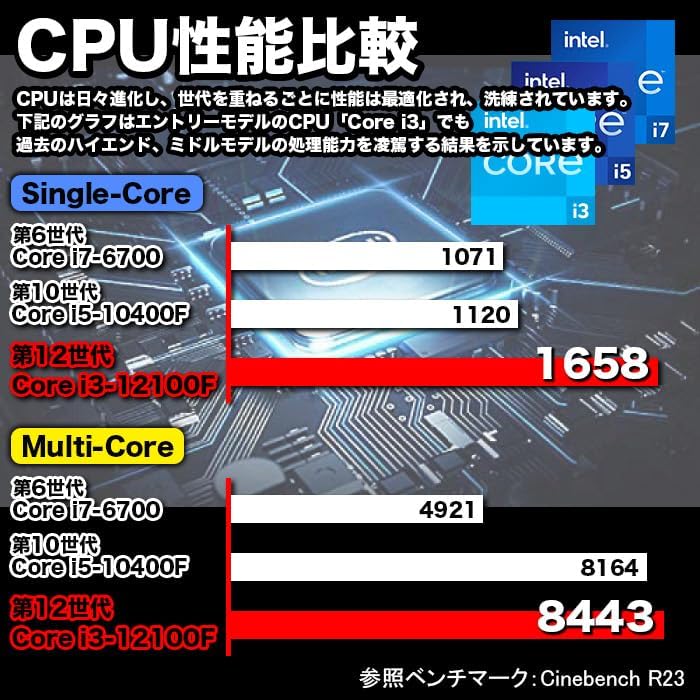
Figure 7.1: CPU Performance Comparison, demonstrating the significant performance improvements of the 12th Gen Intel Core i3.
7.2 Memorija (RAM)
Equipped with 8GB of DDR4-3200 RAM, enabling smooth multitasking and efficient handling of multiple applications simultaneously.
7.3 Storage (SSD)
Utilizes a 256GB NVMe M.2 SSD, providing significantly faster data transfer speeds compared to traditional SATA SSDs (approximately 7 times faster), resulting in quicker boot times and application loading.

Figure 7.2: The IPASON G-SLIM Desktop PC is designed for stable high performance, suitable for various business scenarios.
8. Održavanje
8.1 Čišćenje
- Eksterijer: Koristite meku, damp cloth to wipe the exterior of the PC. Avoid abrasive cleaners or solvents.
- ventilacija: Periodically use compressed air to clear dust from the ventilation openings to ensure optimal cooling.
8.2 Ažuriranja softvera
- Redovno provjeravajte i instalirajte ažuriranja za Windows kako biste osigurali stabilnost, sigurnost i performanse sistema.
- Keep your drivers updated for optimal hardware performance. You can usually find driver updates on the IPASON support webweb-mjesta ili putem Windows Updatea.
9. Otkrivanje problema
This section addresses common issues you might encounter with your IPASON G-SLIM Desktop PC.
| Problem | Mogući uzrok | Rješenje |
|---|---|---|
| Računar se ne uključuje. | Kabl za napajanje nije pravilno spojen; Problem sa utičnicom. | Ensure power cable is securely connected to both PC and outlet. Try a different outlet. |
| Nema prikaza na monitoru. | Monitor cable loose; Incorrect input source on monitor. | Check monitor cable connections. Select correct input source on your monitor. |
| Spore performanse. | Too many programs running; System not updated. | Close unnecessary applications. Check for and install Windows updates. |
| Nema internetske veze. | Ethernet cable loose; Router/modem issue. | Check Ethernet cable connection. Restart your router/modem. |
Ako naiđete na probleme koji nisu ovdje navedeni ili ako predložena rješenja ne riješe problem, obratite se korisničkoj podršci.
10. Specifikacije
Detailed technical specifications for the IPASON G-SLIM Desktop PC (Model: G-SLIM, ASIN: B0CDKLF6X6).
| Feature | Specifikacija |
|---|---|
| Brand | IPASON |
| Broj modela | G-SLIM |
| Form Factor | Small Form Factor Tower |
| Dimenzije (Š×D×V) | 100 mm × 336 mm × 350 mm |
| Težina | 3 kg |
| Operativni sistem | Windows 11 |
| Marka CPU-a | Intel |
| CPU Type | Intel Core i12 3. generacije |
| Brzina procesora | 3.3 GHz |
| Procesor Socket | LGA 1700 |
| RAM kapacitet | 8 GB |
| Vrsta memorije | DDR4-3200 SDRAM |
| Maksimalni kapacitet memorije | 16 GB |
| Kapacitet pohrane | 256 GB |
| Vrsta pohrane | NVMe M.2 SSD |
| Grafički akcelerator | Intel UHD grafika 620 (integrirana) |
| VRAM Capacity | 4 GB (dijeljeno) |
| USB 2.0 portovi | 3 |
| USB 3.0 portovi | 5 |
| Napajanje | 300W SFX |
| Optical Drive | Nije uključeno |
| Žičani LAN port | Da |
| Unaprijed instaliran softver | WPS Office |
11. Garancija i podrška
IPASON is committed to providing high-quality products and reliable customer support.
11.1 Jamstvo za proizvod
Your IPASON G-SLIM Desktop PC comes with a 1 godine garancije against manufacturing defects. This warranty covers hardware malfunctions under normal use conditions. Please retain your proof of purchase for warranty claims.
11.2 Korisnička podrška
For technical assistance, troubleshooting, or warranty inquiries, please contact the seller, Pasoul Store, through the Amazon platform. They are the authorized reseller and can provide direct support.
You can also visit the official IPASON brand store on Amazon for more information and product updates: IPASON Brand Store
Ask a question about this manual
Ask about setup, troubleshooting, compatibility, parts, safety, or missing instructions. Manuals+ will review the question and use this page’s manual context to help answer it.