
Uvod
This manual provides detailed instructions for the safe and efficient operation of your CAIWEI X99+ 4K Smart Projector. Please read this manual thoroughly before using the projector and retain it for future reference.
Sigurnosne informacije
Da biste osigurali siguran rad i spriječili oštećenja, pridržavajte se sljedećih mjera opreza:
- Do not place the projector in boxes or cabinets with poor ventilation properties. Ensure adequate airflow around the device to prevent overheating.
- Avoid direct exposure of the projector lens to sunlight.
- Nemojte blokirati otvore za ventilaciju.
- Koristite samo adapter za napajanje koji dolazi s projektorom.
- Držite projektor dalje od vode ili drugih tekućina.
- Ne pokušavajte sami rastavljati ili popravljati projektor. Za pomoć se obratite kvalifikovanom servisnom osoblju.
Sadržaj paketa
Provjerite da li su sve stavke prisutne u paketu:
- CAIWEI X99+ Smart Projector
- Daljinski upravljač
- HDMI kabl
- Power Cable (UK-plug)
- AV kabel
- Torba za projektor
- Korisnički priručnik (ovaj dokument)
Product Overview
The CAIWEI X99+ is a smart projector designed for versatile entertainment and presentation needs. It features a native 1080P resolution with 4K support, 800 ANSI lumens brightness, and an integrated Android 9.0 operating system.

Figure 1: CAIWEI X99+ Smart Projector front view, showcasing njegov kompaktni dizajn i ključne karakteristike.
Ključne karakteristike:
- Tehnologija prikaza: Native 1920x1080P resolution, 4K support, 800 ANSI lumens, 15500:1 contrast ratio.
- Smart OS: Android 9.0 with access to over 6000 authorized apps (Netflix, YouTube, Prime Video, etc.).
- Memorija: 2GB RAM + 16GB ROM.
- Bežična povezanost: Dual 2.4G/5G WiFi, Airplay/DLNA/Miracast support, Bluetooth 5.0.
- audio: Integrated 10W high-power stereo speakers, Dolby Audio support, 3.5mm audio output.
- Poboljšanje slike: HDR10 processing, MEMC technology for smoother motion.
- Podešavanja: 4D and ±50° vertical/horizontal electronic keystone correction, 40% digital image zoom.
- Trajnost: Fully sealed optical engine for dust protection and extended lifespan.

Figure 2: Visual representation of the projector's color accuracy, brightness, and image quality in various lighting conditions.
Setup
1. Plasman
Position the projector on a stable, flat surface or mount it to the ceiling using the four screw holes. Ensure the projector is placed at an appropriate distance from the projection surface to achieve the desired screen size. Maintain adequate ventilation around the unit.
2. Priključak za napajanje
- Spojite kabel za napajanje na ulazni priključak za napajanje projektora.
- Drugi kraj kabla za napajanje uključite u odgovarajuću električnu utičnicu.
- Pritisnite dugme za napajanje na projektoru ili daljinskom upravljaču da uključite uređaj.
3. Početno fokusiranje i podešavanje trapezoidnog izobličenja
Upon initial power-on, the projected image may appear blurry or distorted. Adjust these settings for optimal clarity:
- Fokus: Okrećite prsten za fokusiranje na objektivu projektora dok slika ne postane oštra i jasna.
- Keystone korekcija: Use the remote control to access the keystone correction settings. The projector supports 4D keystone correction and ±50° vertical/horizontal electronic correction to square the image if the projector is not perfectly perpendicular to the screen.
- Digitalni zum: Adjust the image size without moving the projector using the digital zoom function (40% zoom out/in).
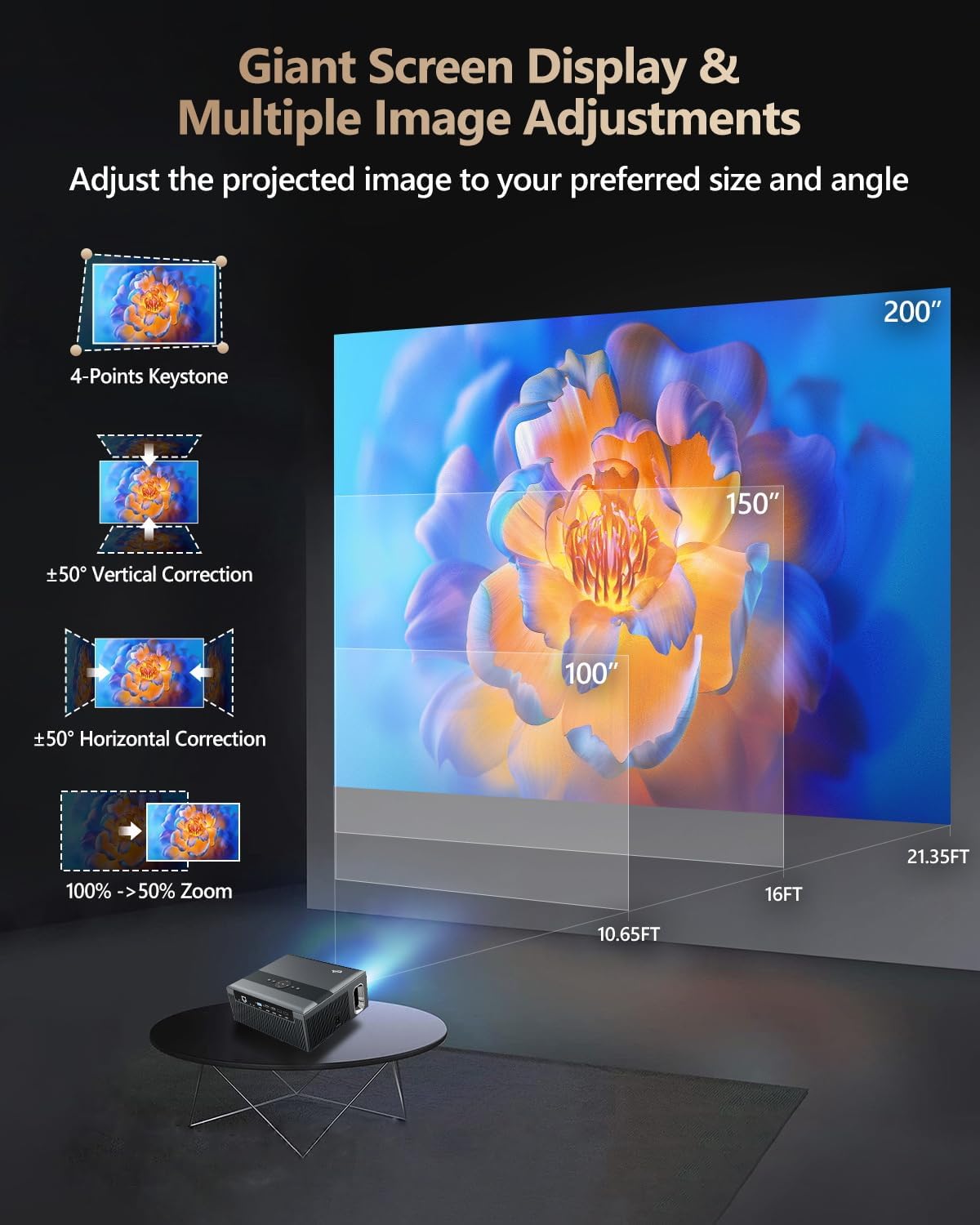
Figure 3: Image adjustment options including keystone correction and digital zoom.
4. Mrežna veza
Connect the projector to the internet for access to streaming apps and online content.
- Wi-Fi: Navigate to the network settings in the Android OS. Select your desired 2.4G or 5G Wi-Fi network and enter the password.
- LAN (Ethernet): Connect an Ethernet cable from your router to the RJ45 port on the projector for a wired internet connection.
5. Bluetooth uparivanje
Pair Bluetooth devices such as external speakers, headphones, mice, keyboards, or gamepads.
- Uvjerite se da je Bluetooth uređaj u načinu uparivanja.
- On the projector, go to Bluetooth settings within the Android OS.
- Select the desired device from the list and confirm pairing.

Figure 4: Wireless connectivity for streaming and audio.
Uputstvo za upotrebu
1. Android TV OS Navigation
Use the remote control to navigate the Android 9.0 interface. The home screen provides access to installed applications, settings, and input sources.

Figure 5: Android TV 9.0 interface with pre-installed and accessible applications.
2. App Installation and Usage
The projector comes with pre-installed apps like Netflix, YouTube, and Prime Video. You can download additional authorized applications from the app store within the Android OS.
- Select an app icon from the home screen to launch it.
- Follow on-screen prompts for login or content selection.
3. Screen Mirroring (Airplay/DLNA/Miracast)
Synchronize your smartphone, tablet, or laptop screen wirelessly to the projector.
- Provjerite jesu li vaš uređaj i projektor povezani na istu Wi-Fi mrežu.
- Select the appropriate mirroring function (Airplay for iOS, Miracast for Android/Windows, DLNA for compatible devices) on the projector's interface.
- Initiate screen mirroring from your source device.
4. Povezivanje vanjskih uređaja
The projector offers multiple ports for connecting various external devices.

Figure 6: Available input and output ports for external devices.
- HDMI: Connect Blu-ray/DVD players, TV sticks, game consoles (PS5), PCs, or laptops using an HDMI cable. Select the corresponding HDMI input from the projector's source menu.
- USB: Insert USB flash drives or hard drives into the USB ports to play media files direktno.
- VGA: Connect older PCs or laptops using a VGA cable.
- OD: Use the AV cable to connect devices with composite video and stereo audio outputs.
5. Audio izlaz
The projector features built-in 10W stereo speakers. For alternative audio experiences:
- Bluetooth: Pair with external Bluetooth speakers or headphones as described in the Setup section.
- 3.5 mm audio izlaz: Connect wired headphones or external speakers using a 3.5mm audio cable.

Figure 7: Projector's integrated audio system.
Održavanje
1. Čišćenje
- Objektiv: Koristite meku krpu bez dlačica, posebno dizajniranu za optička sočiva. Ne koristite abrazivna sredstva za čišćenje.
- Eksterijer: Obrišite vanjski dio projektora mekom, suhom krpom. Za tvrdokorne mrlje, laganoampi krpu vodom.
- Otvori za ventilaciju: Povremeno provjeravajte i pažljivo čistite ventilacijske otvore kako biste osigurali nesmetan protok zraka.
2. Dust Protection
The CAIWEI X99+ features a fully sealed optical engine and an air purifier filter, which significantly reduces dust accumulation and light decay, contributing to a longer service life.

Figure 8: Dust-proof design of the CAIWEI X99+ projector.
3. Skladištenje
When not in use for extended periods, store the projector in a cool, dry place, preferably in its original packaging or the provided projector bag, to protect it from dust and physical damage.
Rješavanje problema
Ako naiđete na probleme s projektorom, pogledajte sljedeće uobičajene probleme i rješenja:
| Problem | Mogući uzrok | Rješenje |
|---|---|---|
| Nema slike ili poruka "Nema signala" | Odabran pogrešan ulazni izvor; labava kabelska veza; uređaj nije uključen. |
|
| Mutna slika | Focus not adjusted; keystone correction needed. |
|
| Nema zvuka | Volume too low; incorrect audio output selected; external device audio issue. |
|
| Problemi sa Wi-Fi vezom | Netačna lozinka; van dometa; problemi s ruterom. |
|
| Daljinski upravljač ne radi | Prazne baterije; prepreka; problem s uparivanjem. |
|
Specifikacije
| Brand | CAIWEI |
| Model | X99+ |
| Rezolucija ekrana | Izvorna rezolucija 1920 x 1080 (podržava 4K) |
| Osvetljenost | 800 ANSI Lumens (12000 LED Lumens) |
| Kontrast Ratio | 15500:1 |
| Operativni sistem | Android 9.0 |
| Memorija | 2GB RAM + 16GB ROM |
| Tehnologija povezivanja | Bluetooth 5.0, Dual-band Wi-Fi (2.4G/5G), USB, HDMI, VGA, AV, LAN (RJ45) |
| Posebne karakteristike | Built-In Wi-Fi, Portable, Wireless, HDR10, MEMC, Dolby Audio, Sealed Optical Engine, 4D Keystone Correction, Digital Zoom |
| Audio | 10W High Power Stereo Speakers, 3.5mm Audio Output |
| Dimenzije proizvoda | 10.55 x 9.25 x 4.92 inča |
| Težina artikla | 7.48 funte |
Garancija i podrška
For warranty information and technical support, please refer to the warranty card included with your product or visit the official CAIWEI webstranica. Za pomoć u vezi s bilo kojim problemima koji nisu obuhvaćeni ovim priručnikom obratite se korisničkoj službi.
Proizvođač: CAIWEI
Webstranica: CAIWEI Official Store on Amazon