
1. Uvod
Thank you for choosing the Deko TV PRO2 DVB-T2 HEVC Digital Terrestrial Receiver. This device allows you to receive digital terrestrial television broadcasts (DVB-T2) with HEVC (H.265) encoding, providing high-quality video and audio. This manual will guide you through the setup, operation, and maintenance of your new receiver to ensure optimal performance and enjoyment.
2. Sadržaj kutije
Molimo vas da pažljivo provjerite sadržaj paketa. Ako bilo koji artikl nedostaje ili je oštećen, obratite se prodavaču.
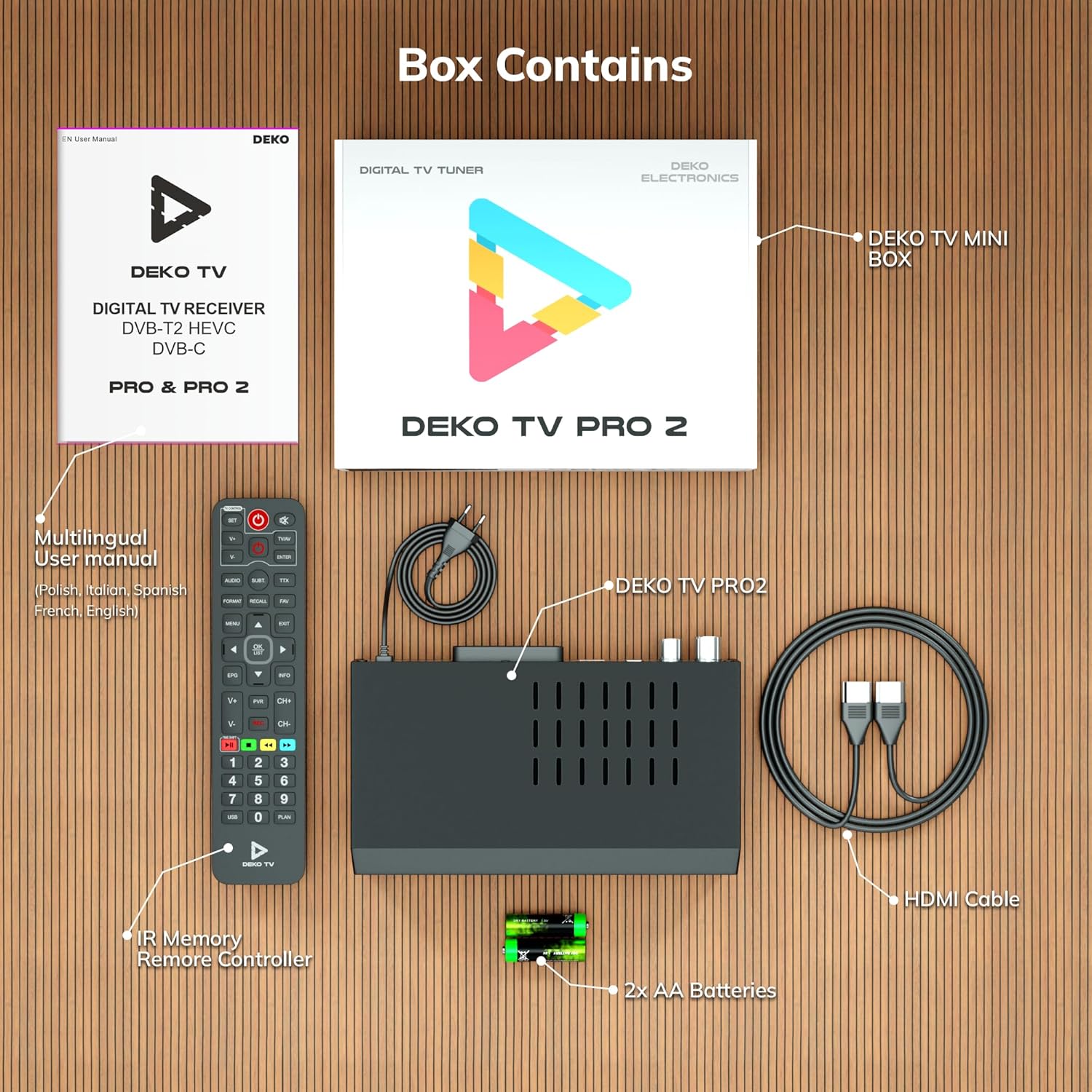
Slika 2.1: Deko TV PRO2 Box Contents. The image displays the Deko TV PRO2 receiver, a multilingual user manual, an IR remote control, two AA batteries, a power cable, and an HDMI cable.
- Deko TV PRO2 Digital Terrestrial Receiver
- IR daljinski upravljač
- 2x AAA baterije
- Power Cable
- HDMI kabl
- Višejezični korisnički priručnik
3. Značajke proizvoda
The Deko TV PRO2 offers a range of features designed to enhance your viewiskustvo:

Slika 3.1: Deko TV PRO2 Key Features. This image illustrates the main functionalities including DVB-T2 Terrestrial reception, Timeshift, HEVC H.265 Codec support, Personal Video Recorder (PVR), universal compatibility, and Crystal Clear Full HD output.
- DVB-T2 Terrestrial: Supports the latest digital terrestrial broadcasting standard.
- HEVC H.265 Codec: Ensures efficient video compression for high-quality picture.
- Univerzalna kompatibilnost: Works with both modern and older television models.
- Vremenski pomak: Pause live TV and resume watching later.
- Personal Video Recorder (PVR): Record your favorite programs to a connected USB storage device.
- Crystal Clear Full HD: Delivers high-definition video output.
- Dvojni USB portovi: For media playback and PVR functionality.
4. Vodič za postavljanje
4.1. Fizičke veze
Before powering on the device, ensure all necessary connections are made.

Slika 4.1: Rear Panel Connections. This image details the rear panel of the Deko TV PRO2, indicating the RF IN, RF LOOP THROUGH, two USB ports, HDMI output, and SCART connector.
- Priključak antene: Spojite kabel zemaljske antene na RF IN port on the back of the receiver. If you have another device (e.g., a TV with an integrated tuner) that also needs an antenna signal, you can connect it to the RF LOOP THROUGH luka.
- TV Connection (HDMI): For high-definition video and audio, connect an HDMI cable from the HDMI priključak na prijemniku na HDMI ulaz na vašem televizoru.
- TV Connection (SCART): For older televisions, connect a SCART cable from the SCART priključak na prijemniku sa SCART ulazom na vašem televizoru. (Note: Do not use both HDMI and SCART simultaneously for video output.)
- USB uređaji: Insert USB storage devices (for PVR or media playback) into the USB ports. The device has two USB ports.
- Priključak za napajanje: Connect the power cable to the receiver and then plug it into a wall outlet.
4.2. Instalacija baterije daljinskog upravljača
Open the battery compartment on the back of the remote control and insert two AAA batteries, ensuring correct polarity (+/-). Close the compartment.
4.3. Initial Power On and Channel Scan
- Uvjerite se da su sve veze sigurne.
- Turn on your television and select the correct HDMI or SCART input source corresponding to where the Deko TV PRO2 is connected.
- Power on the Deko TV PRO2 using the power button on the front panel or the remote control.
- The first time you power on the receiver, an initial setup wizard will appear. Follow the on-screen instructions to select your language, country, and initiate an automatic channel scan. This process will find and store all available digital terrestrial channels.
- Nakon što je skeniranje završeno, trebali biste biti u mogućnosti view kanali.
5. Uputstvo za upotrebu
5.1. Osnovne funkcije televizora
- Odabir kanala: Koristite CH + / CH- buttons or the numeric keypad on the remote control to change channels.
- Kontrola jačine zvuka: Koristite VOL + / VOL- dugmad na daljinskom upravljaču.
- Pristup meniju: Pritisnite MENU button to access the main menu for settings and features.
- Elektronski programski vodič (EPG): Pritisnite EPG dugme za view program information and schedules.
- Prikaz informacija: Pritisnite INFO button to display current channel and program details.
5.2. Reprodukcija USB medija
The Deko TV PRO2 supports media playback from USB storage devices.
- Insert a USB flash drive or external hard drive into one of the USB ports.
- Navigate to the "Media" or "USB" section in the main menu.
- Odaberite vrstu medija koju želite reproducirati (npr. video, muziku, fotografiju).
- Pregledajte svoje files i odaberite željeni sadržaj za reprodukciju.
5.3. PVR (Personal Video Recorder) and Timeshift
To use PVR and Timeshift functions, a USB storage device must be connected and formatted by the receiver.
- Snimanje: Dok gledate program, pritisnite dugme REC button on the remote control to start recording. Press STOP to end the recording. Recorded programs can be accessed via the "PVR" or "Recordings" menu.
- Vremenski pomak: Pritisnite PAUSE button during live TV to activate Timeshift. The program will pause, and recording will begin in the background. You can then use IGRAJ, FAST FORWARD, i REWIND buttons to control playback. Press STOP to exit Timeshift and return to live TV.
5.4. Internet and Multimedia Features (Optional Wi-Fi Adapter)
The Deko TV PRO2 supports internet connectivity via a compatible USB Wi-Fi adapter (sold separately). Once connected, you can access certain online multimedia features.

Slika 5.1: Internet Connectivity. This image shows the Deko TV PRO2 with an optional USB Wi-Fi adapter, indicating support for Wi-Fi, YouTube, and IPTV functionalities.
- Insert a compatible USB Wi-Fi adapter into one of the USB ports.
- Go to the "Network Settings" in the main menu to configure your Wi-Fi connection.
- Once connected, you may find options for applications like YouTube or IPTV within the receiver's menu, depending on the firmware version.
6. Održavanje
- čišćenje: Za čišćenje prijemnika koristite meku, suhu krpu. Ne koristite tekuća ili aerosolna sredstva za čišćenje.
- ventilacija: Ensure the receiver has adequate ventilation. Do not block the ventilation slots.
- Ažuriranja softvera: Povremeno provjeravajte proizvođačeve webweb-mjesto za dostupna ažuriranja softvera. Ažuriranja mogu poboljšati performanse i dodati nove funkcije. Pažljivo slijedite upute koje ste dobili uz ažuriranje.
7. Otkrivanje problema
| Problem | Mogući uzrok | Rješenje |
|---|---|---|
| Nema slike ili zvuka | Incorrect TV input selected; loose cables; receiver not powered on. | Select the correct HDMI/SCART input on your TV. Check all cable connections. Ensure the receiver is powered on. |
| Poruka "Nema signala" | Antenna not connected; poor antenna signal; no channels scanned. | Check antenna connection. Adjust antenna position. Perform a channel scan (refer to Section 4.3). |
| Daljinski upravljač ne radi | Batteries are dead or incorrectly inserted; obstruction between remote and receiver. | Replace batteries with new AAA batteries, ensuring correct polarity. Remove any obstructions. Point the remote directly at the receiver. |
| Nije moguće snimati na USB | USB device not connected or formatted; insufficient storage space. | Ensure USB device is properly connected. Format the USB device via the receiver's menu (this will erase all data). Check available storage space. |
8. Specifikacije
| Feature | Detalj |
|---|---|
| Brand | Deko |
| Broj modela | PRO2 |
| Tehnologija povezivanja | USB |
| Veze | USB, Wi-Fi (via adapter), HDMI, SCART, RF IN, RF LOOP THROUGH |
| Kompatibilni uređaji | Televizija |
| Posebne karakteristike | Connected and multimedia functions, universal remote control |
| Ukupni USB portovi | 2 |
| Ukupni HDMI portovi | 1 |
| Audio kodiranje | DD |
| Način audio izlaza | Stereo, Surround |
| Konfiguracija kanala surround zvuka | 2.1 |
| Vrsta daljinskog upravljača | Daljinsko upravljanje |
| Baterije su potrebne | 2 AAA batteries (Zinc-carbon) |
9. Garancija i podrška
The Deko TV PRO2 receiver comes with a standard manufacturer's warranty. Please refer to the warranty card included in your package or contact your retailer for specific warranty terms and conditions.
For technical support, troubleshooting assistance beyond this manual, or inquiries about spare parts and software updates, please visit the official Deko Electronics webweb-mjesto ili kontaktirajte njihovu službu za korisnike. Kontakt informacije se obično mogu pronaći na pakovanju proizvoda ili na proizvođačevim website.