
Hoco WE-1005004459784466-002
Hoco Smart Ear Wireless Bluetooth 5.3 Earbuds User Manual
Model: WE-1005004459784466-002
Product Overview
The Hoco Smart Ear Wireless Bluetooth 5.3 Earbuds offer a seamless audio experience with advanced features. These smart touch stereo earbuds come with a digital LED display charging case, providing convenience and clear battery status at a glance. Designed for comfort and high-quality sound, they are ideal for daily use with mobile phones and other compatible devices.
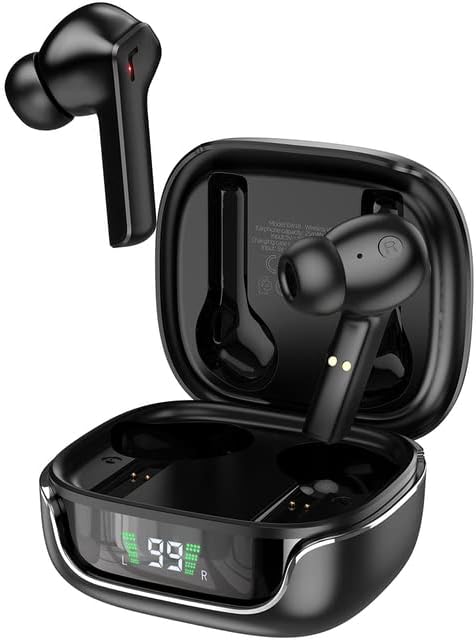
Image: The Hoco Smart Ear Wireless Bluetooth 5.3 Earbuds, showcasing both earbuds and their sleek charging case with a digital LED display.
Sadržaj paketa
- Hoco Smart Ear Wireless Bluetooth 5.3 Earbuds
- Futrola za punjenje
- Uputstvo za upotrebu
- Kabel za punjenje
Setup
Početno uparivanje
To pair your Hoco Smart Ear Earbuds for the first time, ensure they are fully charged. Open the charging case; the earbuds will automatically enter pairing mode. On your device (e.g., smartphone), navigate to Bluetooth settings and select 'Hoco EW18' or a similar name from the list of available devices. Once connected, the earbuds are ready for use.

Image: A visual representation of the Hoco earbuds establishing a wireless connection using Bluetooth 5.3 technology, highlighting stable and low-power consumption.

Image: The earbuds and charging case next to a smartphone, illustrating the automatic pairing feature and the ability to switch between devices seamlessly.
Ponovno povezivanje
After initial pairing, the earbuds will automatically reconnect to the last paired device when taken out of the charging case and Bluetooth is enabled on the device.
Uputstvo za upotrebu
The Hoco Smart Ear Earbuds feature intuitive touch controls for various functions:

Image: A detailed diagram illustrating the touch control functions of the Hoco earbuds, including playback, track navigation, call management, power, and voice assistant activation.
- Pusti/pauza: Kliknite jednom na područje dodira.
- Sljedeća pjesma: Dvaput kliknite na područje dodira.
- Prethodni zapis: Triple click the touch area.
- Odgovori na poziv: Kliknite jednom na područje dodira.
- Prekinuti vezu: Dvaput kliknite na područje dodira.
- odbiti poziv: Dugo pritisnite dodirnu površinu na 2 sekunde.
- Uključi: Open the cover of the charging case (automatic boot).
- Probudite Siri/Glasovni asistent: Dugo pritisnite dodirnu površinu na 2 sekunde.
Održavanje
Da biste osigurali dugotrajnost i optimalne performanse vaših slušalica, slijedite ove smjernice za održavanje:
- čišćenje: Redovno čistite slušalice i kućište za punjenje mekom, suhom krpom koja ne ostavlja dlačice. Nemojte koristiti jake hemikalije ili abrazivne materijale.
- Kontakti za punjenje: Periodically clean the charging contacts on both the earbuds and inside the case to ensure a proper connection.
- Skladištenje: Kada se ne koriste, slušalice čuvajte u kutijici za punjenje kako biste ih zaštitili od prašine i oštećenja.
- Izbjegavajte vlagu: Keep the earbuds and case away from water and excessive moisture.
- temperatura: Izbjegavajte izlaganje proizvoda ekstremnim temperaturama.
Rješavanje problema
If you encounter issues with your Hoco Smart Ear Earbuds, refer to the following common solutions:
- Nema zvuka:
- Provjerite jesu li slušalice napunjene.
- Provjerite jačinu zvuka uređaja i jačinu zvuka slušalica.
- Verify Bluetooth connection. Try disconnecting and reconnecting.
- Slušalice se ne uparuju:
- Provjerite jesu li slušalice u načinu rada za uparivanje (otvorite kutiju).
- Isključite i uključite Bluetooth na svom uređaju.
- Zaboravite uređaj u Bluetooth postavkama telefona i ponovo ga uparite.
- Provjerite da nijedan drugi uređaj nije povezan sa slušalicama.
- Problemi s punjenjem:
- Provjerite je li kabel za punjenje sigurno spojen.
- Ensure the charging contacts on both earbuds and case are clean.
- Pokušajte s drugim kabelom za punjenje ili adapterom za napajanje.
- Intermitentna veza:
- Ensure you are within the effective Bluetooth range.
- Minimizirajte smetnje od drugih bežičnih uređaja.
Specifikacije
Detailed technical specifications for the Hoco Smart Ear Wireless Bluetooth 5.3 Earbuds:
| Feature | Specifikacija |
|---|---|
| Model | WE-1005004459784466-002 |
| Bluetooth verzija | 5.3 |
| Broj vozača | 2 |
| Driver Diameter | 13mm |
| Totalna harmonijska distorzija | 15% |
| Impedansa | 32 Ohm |
| Faktor oblika slušalica | In-Ear |
| Tehnologija povezivanja | Bluetooth |
| Bežična komunikacijska tehnologija | Bluetooth |
| Kompatibilni uređaji | Mobilni telefoni |
| Cable Feature | Cable-free (Wireless) |
| Boja | Crna |
| Prvi raspoloživi datum | 6. jul 2023 |

Slika: Eksplodirala view illustrating the 13mm moving coil driver and bio-carbon fiber composite diaphragm, designed for immersive sound quality.

Image: A person wearing the Hoco earbuds, highlighting the soft silicone ear caps and in-ear ergonomic design for comfortable wear and pure sound enjoyment.
Garancija i podrška
Hoco is committed to customer satisfaction and product quality. We offer the following:
- 12-mesečna garancija: All products come with a 12-month warranty.
- Služba za korisnike: If you experience any issues with defective or incorrect products, please contact us through the Amazon platform. We are dedicated to providing the best solution, including full refunds or product replacements, to ensure 100% customer satisfaction.
- Garancija dostave: We ensure product delivery within the specified timeframe on our sales page.
Ask a question about this manual
Ask about setup, troubleshooting, compatibility, parts, safety, or missing instructions. Manuals+ will review the question and use this page’s manual context to help answer it.