
1. Uvod
This manual provides essential instructions for the proper use and maintenance of your TopMade Magnetic Wallet Stand CB111. This product is designed to securely attach to compatible iPhone models and MagSafe-enabled cases, offering card storage and an adjustable stand function. Please read this manual thoroughly before use.

Image 1.1: TopMade Magnetic Wallet Stand in use, demonstrating card storage and stand functionality.
2. Sigurnosne informacije
- Keep the product away from strong magnetic fields that are not related to its intended use, as this may affect magnetic sensitive items.
- Ne izlažite proizvod ekstremnim temperaturama ili direktnoj sunčevoj svjetlosti na duži period.
- Avoid contact with sharp objects to prevent damage to the vegan leather material.
- Ensure the wallet is securely attached to your device before relying on its magnetic hold.
3. Sadržaj paketa
The TopMade Magnetic Wallet Stand CB111 package typically includes:
- 1 x TopMade Magnetic Wallet Stand CB111
- 1 x Korisnički priručnik (ovaj dokument)
4. Podešavanje
4.1 Kompatibilnost
The TopMade Magnetic Wallet Stand CB111 is compatible with:
- iPhone 17, iPhone 17 Air, iPhone 17 Pro, iPhone 17 Pro Max
- iPhone 16, iPhone 16 Pro, iPhone 16 Pro Max, iPhone 16 Plus
- iPhone 15, iPhone 15 Pro, iPhone 15 Pro Max, iPhone 15 Plus
- iPhone 14, iPhone 14 Pro, iPhone 14 Pro Max, iPhone 14 Plus
- iPhone 13, iPhone 13 Pro, iPhone 13 Pro Max
- iPhone 12, iPhone 12 Pro, iPhone 12 Pro Max
- MagSafe-compatible cases for the above iPhone models.
- Other smartphones when used with a magnetic metal ring (not included) attached to a normal case.
Nije kompatibilno sa: iPhone 12 Mini, iPhone 13 Mini, non-magnetic cases, or thick leather cases.
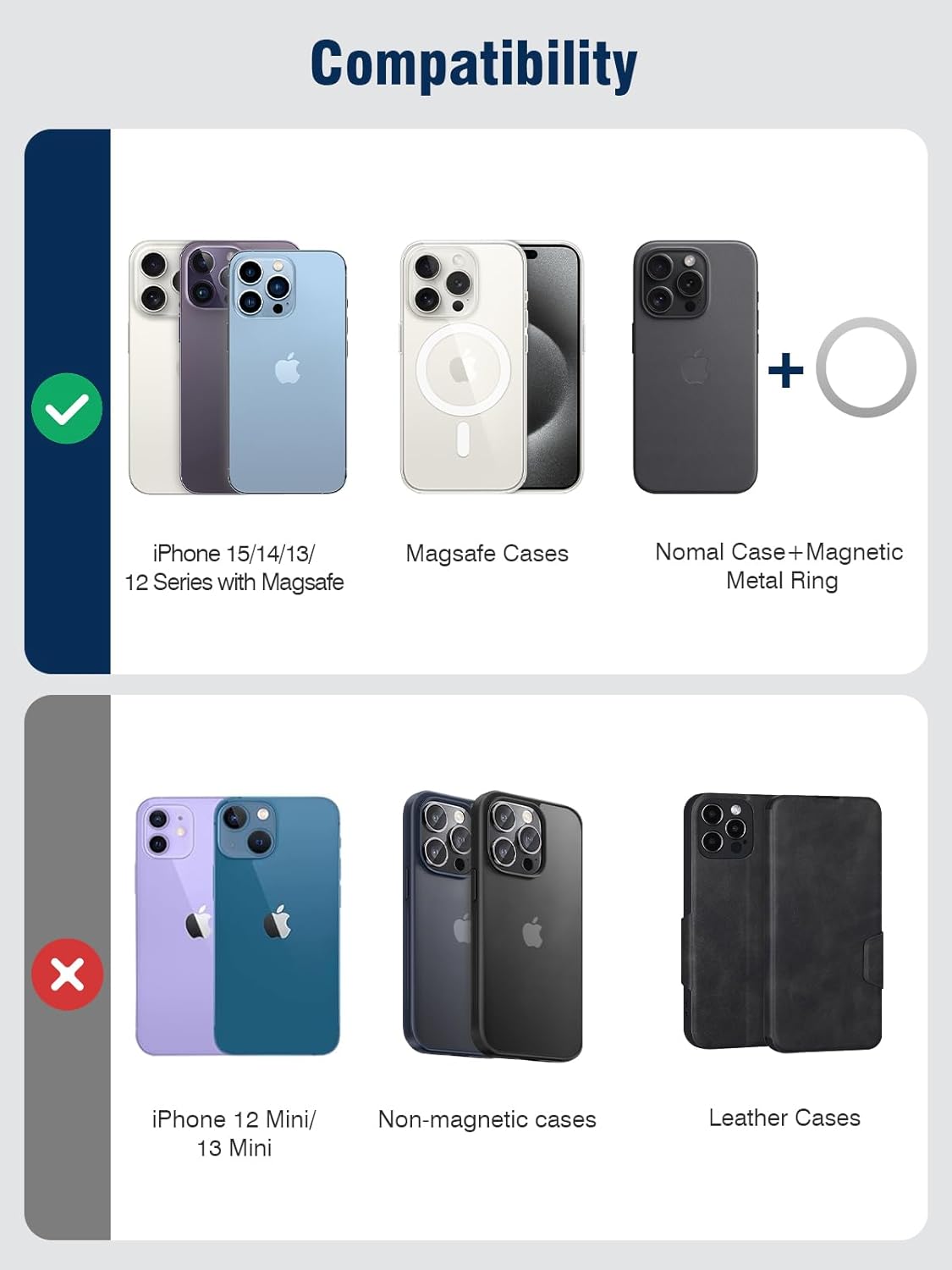
Image 4.1: Visual guide to device compatibility for the magnetic wallet stand.
4.2 Attaching the Wallet Stand
- Provjerite je li vaš iPhone ili MagSafe kompatibilna futrola čista i bez ostataka.
- Align the TopMade Magnetic Wallet Stand with the MagSafe area on the back of your iPhone or case.
- The strong magnets will automatically snap the wallet into place, providing a secure attachment.

Image 4.2: Illustration of the magnetic attachment mechanism.
4.3 Inserting Cards
The wallet stand features multiple card slots:
- It can hold up to 5 cards or a combination of cards and cash.
- An open ID window is provided for easy display of identification cards.
- Gently slide your cards into the designated slots. Do not force cards, as this may damage the material or the cards.

Image 4.3: Demonstrating the ID window and card storage capacity.
5. Uputstvo za upotrebu
5.1 Using the Adjustable Phone Stand
The integrated adjustable hinge allows for versatile viewuglovi ugla:
- To activate the stand, gently unfold the wallet portion away from your phone.
- Adjust the angle between 0 and 180 degrees to achieve your desired viewing position.
- The stand supports horizontal (landscape), vertical (portrait), and suspension modes for various activities such as watching videos, video calls, or following recipes.

Slika 5.1: Primjeramples of the wallet stand in use for hands-free viewing.

Image 5.2: iPhone in vertical stand mode on a desk.
5.2 RFID/NFC Protection
The wallet stand is equipped with advanced RFID blocking technology to safeguard your credit cards and other sensitive information from unauthorized scanning. It also provides degauss protection to prevent demagnetization of your cards.
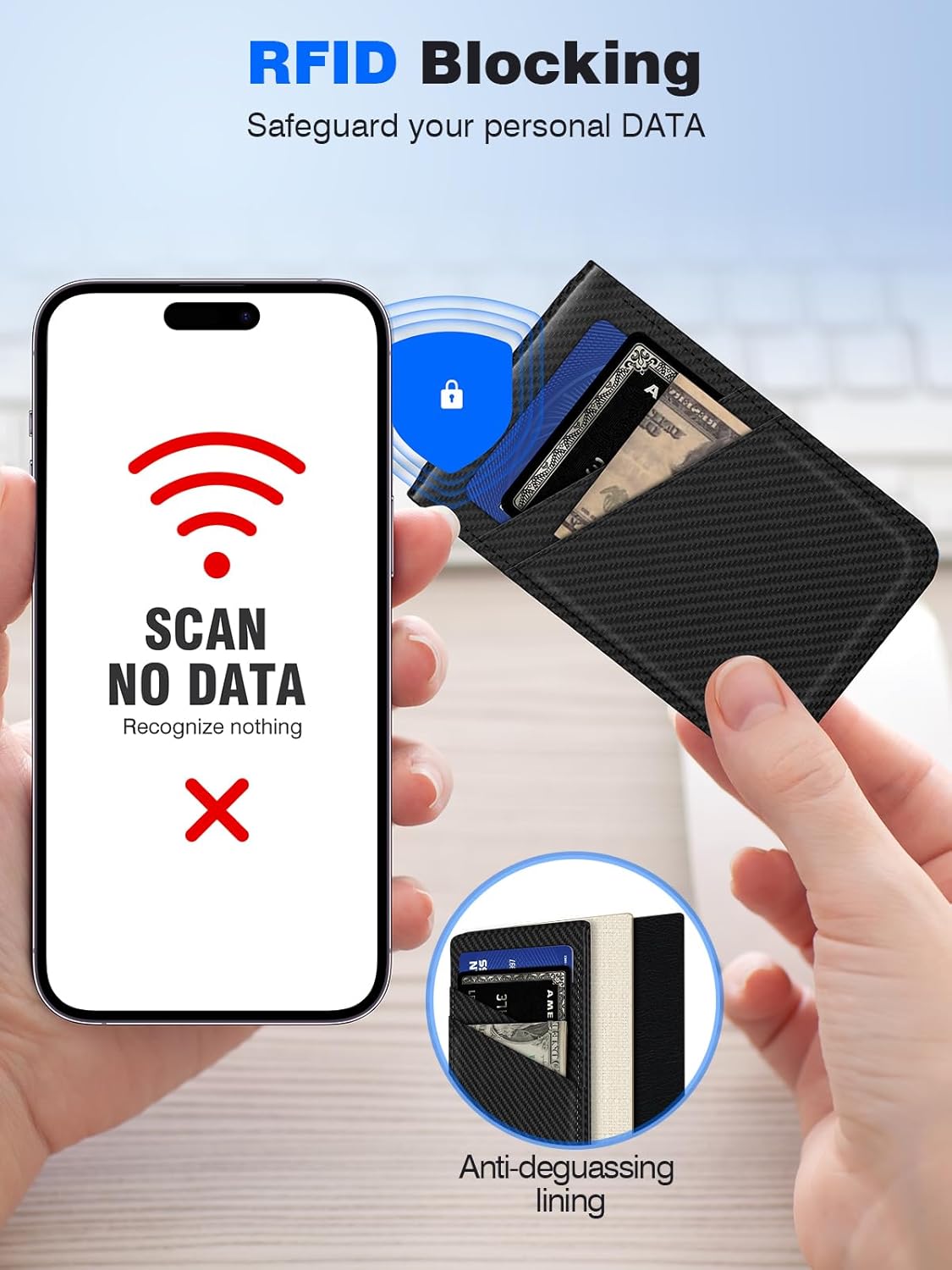
Image 5.3: Visual representation of RFID blocking functionality.
5.3 Unobstructed Camera Access
The design of the wallet stand ensures that it does not obstruct your phone's camera, allowing for full photographic functionality while attached.

Image 5.4: Wallet stand attached without obstructing the phone camera.
6. Održavanje
- To clean the vegan leather, gently wipe with a soft, damp krpom. Izbjegavajte jake hemikalije ili abrazivna sredstva za čišćenje.
- Ensure the product is completely dry before reattaching to your device or storing cards.
- Periodically check the magnetic connection for any debris that might interfere with its strength.
7. Otkrivanje problema
7.1 Wallet Not Attaching Securely
- Provjerite kompatibilnost: Ensure your phone model or case is MagSafe compatible. Refer to Section 4.1.
- Uklonite prepreke: Make sure there is no dust, dirt, or other material between the wallet and your phone/case that could weaken the magnetic connection.
- Tip slučaja: If using a case, ensure it is a MagSafe-compatible case. Non-magnetic or thick leather cases may interfere with the magnetic strength.
7.2 Cards Difficult to Insert or Remove
- Provjera kapaciteta: Ensure you are not exceeding the recommended capacity of 5 cards. Overstuffing can stretch the material and make card access difficult.
- Pravilno poravnanje: Ensure cards are inserted straight into the slots.
7.3 Stand Not Holding Position
- Površinska stabilnost: Ensure the surface on which the phone is placed is flat and stable.
- Podešavanje ugla: Adjust the hinge to a stable angle. The hinge is designed for smooth rotation and reliable positioning.
8. Specifikacije
| Feature | Specifikacija |
|---|---|
| Broj modela | CB111 |
| Brand | TopMade |
| Materijal | Veganska koža |
| Dimenzije | 4.7 x 2.6 x 0.4 inča |
| Težina artikla | 2.89 unce |
| Magnetna sila | Up to 3800 Gauss |
| Kapacitet kartice | Do 5 kartica |
| Posebne karakteristike | Adjustable Phone Stand, Credit Card Holder, Magnetic Attachment, RFID Blocking, Slim Fit |
9. Garancija i podrška
TopMade products are manufactured with quality and customer satisfaction in mind. For specific warranty details and customer support inquiries, please refer to the official TopMade webweb-mjesto ili kontaktirajte prodavača. Molimo sačuvajte dokaz o kupovini za slučaj reklamacije.