
VAIO VJPF11C11N
VAIO Pro PF (VJPF11C11N) Notebook PC User Manual
1. Uvod
This manual provides essential information for setting up, operating, maintaining, and troubleshooting your VAIO Pro PF (Model: VJPF11C11N) notebook PC. Please read this manual thoroughly before using your device to ensure proper and safe operation.
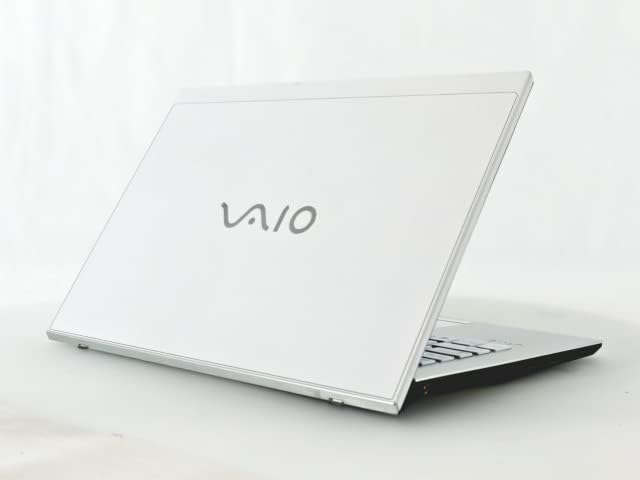
Figure 1: VAIO Pro PF Notebook PC
The VAIO Pro PF is a lightweight and compact mobile notebook designed for productivity. It features an 11.6-inch Full HD display, an Intel 8th Generation Core i5-8250U processor, 8GB of RAM, and a 256GB SSD, running on Windows 11 Pro. The device also includes a backlit keyboard for comfortable typing in various lighting conditions.
2. Podešavanje
2.1 Raspakivanje
Pažljivo izvadite sve komponente iz ambalaže. Provjerite da li su sljedeće stavke prisutne:
- VAIO Pro PF Notebook PC
- AC adapter i kabl za napajanje
- Dokumentacija (ovaj priručnik, informacije o garanciji)
2.2 Priključivanje na napajanje
Before initial use, connect the AC adapter to the laptop's power input port and then plug the power cord into a wall outlet. Allow the battery to charge fully.
2.3 Početno uključivanje i podešavanje Windowsa
Pritisnite dugme za napajanje da biste uključili laptop. Slijedite uputstva na ekranu da biste dovršili početno podešavanje sistema Windows 11 Pro, uključujući odabir jezika, mrežnu vezu i kreiranje korisničkog računa.
3. Operating Your VAIO Pro PF
3.1 Tastatura i tačped
The VAIO Pro PF features a full-sized keyboard with a backlight for improved visibility. The touchpad located below the keyboard supports multi-touch gestures for navigation.

Slika 2: Raspored tastature i tačpeda
3.2 Povezivanje vanjskih uređaja
Vaš laptop je opremljen raznim priključcima za povezivanje eksternih uređaja:
- USB 3.0 portovi (x3): Za povezivanje USB uređaja kao što su eksterni tvrdi diskovi, miševi ili tastature.
- HDMI priključak: For connecting to external displays or projectors with HDMI input.
- D-SUB15 (VGA) Port: For connecting to older external displays or projectors with VGA input.
- Wired LAN Port: For connecting to a wired network using an Ethernet cable.
- Priključak za slušalice: Za spajanje slušalica ili eksternih zvučnika.
3.3 Bežično povezivanje
The VAIO Pro PF supports both Wi-Fi and Bluetooth connectivity:
- Wi-Fi (802.11n): To connect to a wireless network, go to Windows Settings > Network & Internet > Wi-Fi, turn Wi-Fi on, and select your desired network.
- Bluetooth: To connect Bluetooth devices, go to Windows Settings > Bluetooth & devices, turn Bluetooth on, and pair your device.
3.4 Pomoću Web Kamera
Integrisani web camera can be used for video calls and conferences. Access it through applications like Camera, Microsoft Teams, or Zoom.
4. Održavanje
4.1 Čišćenje laptopa
To clean the exterior of your laptop, use a soft, lint-free cloth slightly dampened with water or a mild, non-abrasive cleaning solution. Avoid spraying liquids directly onto the device. For the screen, use a specialized screen cleaner.
4.2 Ažuriranja softvera
Regularly check for and install Windows updates to ensure your system has the latest security patches and performance improvements. Go to Windows Settings > Windows Update.
4.3 Njega baterija
Da biste produžili vijek trajanja baterije, izbjegavajte ekstremne temperature i često potpuno pražnjenje baterije. Za dugotrajno skladištenje, napunite bateriju na oko 50-70%.
5. Otkrivanje problema
This section addresses common issues you might encounter with your VAIO Pro PF.
| Problem | Rješenje |
|---|---|
| Laptop se ne uključuje. | Provjerite je li AC adapter sigurno priključen i je li utičnica funkcionalna. Pokušajte držati dugme za napajanje 10-15 sekundi. |
| Problemi s Wi-Fi vezom. | Check if Wi-Fi is enabled in Windows Settings. Restart your router and the laptop. Ensure you are within range of the Wi-Fi network. |
| Pozadinsko osvjetljenje tastature ne radi. | Check if the backlight function key (often Fn + F key) is enabled. Adjust brightness settings if available. |
| Vanjski ekran nije detektovan. | Ensure the cable is securely connected to both the laptop and the display. Use Windows display settings to detect or extend displays. Try a different cable or port if available. |
6. Specifikacije
| Feature | Detalj |
|---|---|
| Naziv modela | VAIO Pro PF (VJPF11C11N) |
| Brand | VAIO (Manufacturer: SONY) |
| Veličina ekrana | 11.6 inča |
| Rezolucija | 1920x1080 piksela (Full HD) |
| CPU | Intel Core i5-8250U (8th Gen, 4 Cores, 8 Threads, 1.6 GHz base, up to 3.4 GHz) |
| RAM | 8 GB DDR4 SDRAM |
| Skladištenje | 256 GB SSD (Solid State Drive) |
| Operativni sistem | Windows 11 Pro (64-bit) |
| Grafika | Integrisana Intel grafika |
| Bežično povezivanje | Wi-Fi (802.11n), Bluetooth |
| Luke | 3x USB 3.0, 1x HDMI, 1x D-SUB15 (VGA), 1x Wired LAN, 1x Headphone Jack |
| Web Kamera | Integrisano |
| Tastatura | Tastatura sa pozadinskim osvetljenjem |
| Težina | Približno 0.87 kg (870 g) |
| Prvi raspoloživi datum | 10. maja 2023 |
7. Garancija i podrška
For information regarding your product's warranty, please refer to the warranty card included with your purchase or visit the official VAIO support website. For technical assistance, driver downloads, or further inquiries, please contact VAIO customer support through their official channels.
Ask a question about this manual
Ask about setup, troubleshooting, compatibility, parts, safety, or missing instructions. Manuals+ will review the question and use this page’s manual context to help answer it.