
1. Uvod
Thank you for choosing the TRIGKEY Key-N Mini PC. This compact and powerful computer is designed for various tasks, from daily work to entertainment, featuring an Intel Alder Lake-N95 processor, 16GB DDR4 RAM, and a 500GB SSD. This manual provides essential information for setting up, operating, maintaining, and troubleshooting your device to ensure optimal performance.
2. Sadržaj paketa
Molimo Vas da provjerite da li se u Vašem paketu nalaze svi artikli:
- 1 x TRIGKEY Key-N Mini PC
- 1 x adapter za napajanje
- 1 x HDMI kabl
- 1 x Korisnički priručnik (ovaj dokument)
- 1 x zidni nosač
3. Proizvod je gotovview
The TRIGKEY Key-N Mini PC offers a range of interfaces for versatile connectivity and efficient performance. Familiarize yourself with the available ports and features.

Slika: Prednja i zadnja strana view of the TRIGKEY Key-N Mini PC, highlighting its rich interfaces including USB 3.2, LAN, 3.5mm Audio Jack, HDMI, and USB 2.0 ports.
Prednja ploča: Power Button, USB 3.2 (10Gbps) x 3, 3.5mm Audio Jack x 1, Power Indicator Light.
Zadnji panel: AC Jack x 1, LAN 1000Mbps x 1, HDMI (Max 4K 60Hz) x 2, USB 2.0 (480Mbps) x 3, CLR CMOS button.
4. Upute za postavljanje
4.1 Početno povezivanje
- Poveži ekran: Connect your monitor(s) to the HDMI ports on the rear panel using the provided HDMI cable. The device supports dual 4K 60Hz displays.
- Povežite periferne uređaje: Priključite tastaturu i miš na dostupne USB portove.
- Povežite mrežu: For a wired connection, connect an Ethernet cable to the 1000M LAN port. For wireless, the device supports WiFi 5.
- Priključite napajanje: Plug the power adapter into the AC Jack on the rear panel and then into a power outlet.
4.2 Uključivanje
Press the Power Button on the front panel. The power indicator light will illuminate, and the system will begin to boot up.
4.3 Podešavanje prikaza na dva ekrana
The TRIGKEY Key-N Mini PC supports dual 4K displays, enhancing productivity by allowing you to extend your desktop across two screens. Once both monitors are connected via HDMI, Windows 11 Pro should automatically detect and configure them. If not, navigate to Display Settings in Windows to arrange and extend your displays.
Video: Demonstrates how to set up and utilize the dual-screen display feature of the TRIGKEY Mini PC, showing two monitors connected and functioning simultaneously.
5. Upravljanje vašim mini računarom
5.1 Osnovni rad
- Uključivanje/isključivanje: Press the power button to turn on. To turn off, use the Windows Shut Down option or press and hold the power button for 5 seconds.
- Ponovno pokretanje: Use the Windows Restart option for a proper system reboot.
5.2 Mrežna povezivost
The Mini PC supports both wired (1000M LAN) and wireless (WiFi 5) network connections. For wireless, ensure your router is broadcasting a WiFi 5 signal for optimal performance. Bluetooth 5.0 allows for easy connection to compatible devices like headphones or speakers.

Image: Illustrates the built-in wireless module, highlighting WiFi 5 and Bluetooth 5.0 capabilities for reliable networking.
5.3 Efficient Performance
The Intel Alder Lake-N95 processor provides stable performance for everyday tasks, office work, media streaming, and light entertainment. Its compact design makes it suitable for various environments.

Image: Shows the Key-N Mini PC in an office setting, demonstrating its stable performance for applications like Word, Excel, and PowerPoint.
6. Održavanje i nadogradnje
The TRIGKEY Key-N Mini PC is designed for easy upgrades to enhance its storage and memory capabilities.
6.1 Upgrading RAM
The Mini PC is equipped with 16GB DDR4 3200MHz RAM. You can upgrade or replace the RAM module by following these steps:
- Isključite uređaj i odspojite sve kablove.
- Unscrew the four screws at the bottom of the Mini PC.
- Carefully lift the back panel from the side to expose the internal components.
- Locate the SO-DIMM DDR4 slot. Gently push the clips outward to release the existing RAM module, then lift it out.
- Align the notch of the new RAM module with the slot and insert it firmly at an angle. Push down until the clips snap into place.
- Reinstall the back panel and secure it with the screws.
Video: A step-by-step tutorial on how to install or upgrade RAM in your TRIGKEY Mini PC.
6.2 Upgrading Storage
The Mini PC comes with a single M.2 SATA 500GB SSD and supports dual M.2 2280 PCIe SSDs. You can expand the internal storage up to 4TB with two SSDs (one M.2 SATA III and one PCIe 3.0 NVMe, not included).
- Follow steps 1-3 from the RAM upgrade section to open the device.
- Locate the M.2 SSD slots. If adding a 2.5-inch SATA drive, align the slot and insert the SSD into the designated bay on the back panel.
- Secure the SSD with the provided screws.
- Reinstall the back panel and secure it with the screws.

Slika: Interna view of the Mini PC, illustrating the SO-DIMM DDR4 slot and dual M.2 2280 PCIe SSD slots for storage expansion.
Video: A detailed guide on how to install an additional HDD or SSD into your TRIGKEY Mini PC.
6.3 Generalno čišćenje
Da biste održali optimalne performanse, redovno čistite spoljašnjost Mini PC-a mekom, suhom krpom. Pazite da ventilacioni otvori budu bez prašine i začepljeni. Ne koristite tečna sredstva za čišćenje direktno na uređaju.
7. Otkrivanje problema
If you encounter issues with your TRIGKEY Key-N Mini PC, please refer to the following common solutions:
- Nema napajanja: Ensure the power adapter is securely connected to both the Mini PC and a working power outlet. Check the power indicator light.
- Bez prikaza: Verify that the HDMI cables are firmly connected to both the Mini PC and the monitor(s). Try using a different HDMI port or cable. Ensure the monitor is set to the correct input source.
- Problemi s mrežnom vezom: For wired connections, check the Ethernet cable and router status. For wireless, ensure WiFi is enabled in Windows settings and you are connected to the correct network.
- Spore performanse: Close unnecessary applications, check for background processes, and ensure your system is up to date. Consider upgrading RAM or storage if performance issues persist.
- Zamrzavanje/rušenje sistema: Perform a system restart. If issues continue, check for driver updates or perform a system restore.
For more complex issues, please contact TRIGKEY customer support.
8. Specifikacije
Below are the detailed technical specifications for the TRIGKEY Key-N Mini PC:
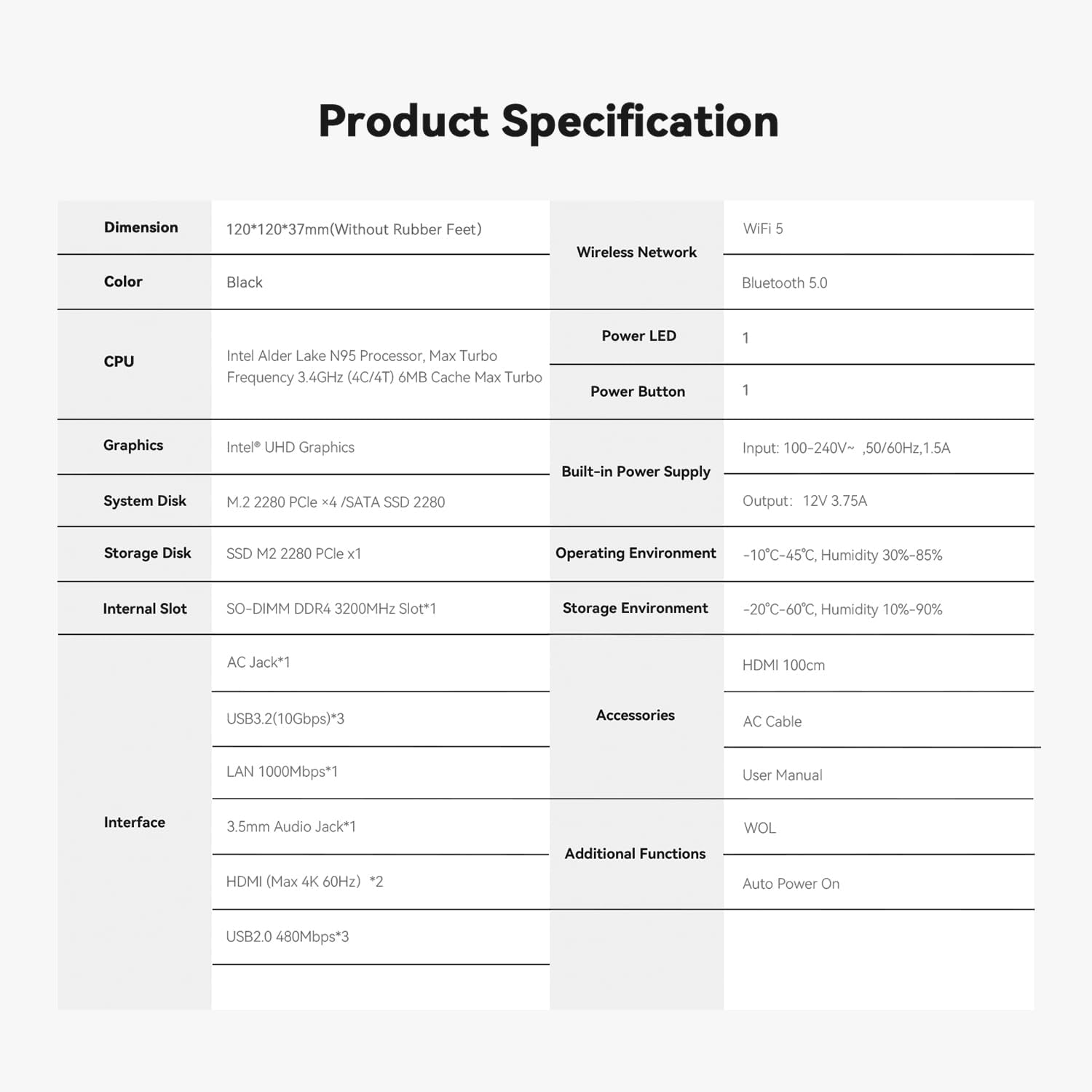
Image: A comprehensive table detailing the product specifications of the TRIGKEY Key-N Mini PC, including dimensions, CPU, RAM, storage, and interfaces.
| Feature | Specifikacija |
|---|---|
| Procesor | Intel Alder Lake N95 (4C/4T, up to 3.4GHz, 6M cache) |
| RAM | 16GB DDR4 3200MHz (SO-DIMM) |
| Skladištenje | 500GB M.2 SATA SSD (expandable with another PCIe 3.0 NVMe SSD) |
| Grafika | Intel UHD grafika |
| Video izlaz | 2 x HDMI (Max 4K 60Hz) |
| Bežično povezivanje | WiFi 5, Bluetooth 5.0 |
| Žičano povezivanje | 1 x 1000M LAN |
| USB portovi | 3 x USB 3.2 (10Gbps), 3 x USB 2.0 (480Mbps) |
| Audio | 1 x 3.5 mm audio priključak |
| Operativni sistem | Windows 11 Pro |
| Dimenzije | 120 x 120 x 37mm (Without Rubber Feet) |
| Težina | Otprilike 1.85 funti |
9. Garancija i podrška
TRIGKEY is committed to providing excellent customer service and support for your Mini PC.
9.1 Informacije o garanciji
Your TRIGKEY Key-N Mini PC comes with a jednogodišnja garancija from the date of purchase. This warranty covers manufacturing defects and ensures replacement availability within 12 months.
9.2 Korisnička podrška
Nudimo 7x24-hour one-on-one customer support i doživotna tehnička podrška. If you have any questions, encounter problems, or require assistance, please do not hesitate to contact us.

Image: Visual representation of TRIGKEY's service commitments: 24-hour quick reply, 30-day return policy, 12-month replacement, and lifetime technical support.
9.3 Kontaktirajte nas
You can reach our support team through various channels. Please refer to the contact information provided with your product or visit the official TRIGKEY websajt za pomoć.
Image: Various platforms and methods to contact TRIGKEY support, including social media, email, and technical support channels.
Video: A short promotional video highlighting TRIGKEY's commitment to customer service and support for their products.