
Uvod
This manual provides essential information for the safe and efficient use of your ADEQWAT Magnetic Wall Charger with USB-C Cable. Please read these instructions carefully before using the product and retain them for future reference.
Sigurnosne informacije
- Ne izlažite punjač vodi, vlazi ili ekstremnim temperaturama.
- Do not attempt to disassemble, repair, or modify the charger. This may void the warranty and pose safety risks.
- Čuvati van domašaja djece.
- Ensure the charger is plugged into a compatible power outlet.
- Isključite punjač iz utičnice kada ga ne koristite ili tokom oluje sa grmljavinom.
- Izbjegavajte ispuštanje ili izlaganje punjača jakim udarcima.
Sadržaj paketa
Provjerite da li su sve stavke prisutne u paketu:
- ADEQWAT Magnetic Wall Charger
- Integrirani USB-C kabel
- Additional Metallic Plate (for magnetic attachment)
Setup
- Rasklopite utikač: Gently pull out the retractable plug from the back of the charger until it locks into place.

Slika: Nazad view of the charger with the retractable plug extended.
- Spojite na utičnicu: Insert the charger's plug into a standard wall power outlet.

Image: The charger plugged into a wall outlet, demonstrating its use with a smartphone and tablet.
- Optional: Attach Metallic Plate: If you wish to use the magnetic feature with a device that is not inherently magnetic, attach the provided metallic plate to the back of your smartphone or its case. Ensure the plate is securely positioned.
Operating
- Charging with USB-C Cable: Connect the integrated USB-C cable to your compatible device's USB-C port. Charging will begin automatically.
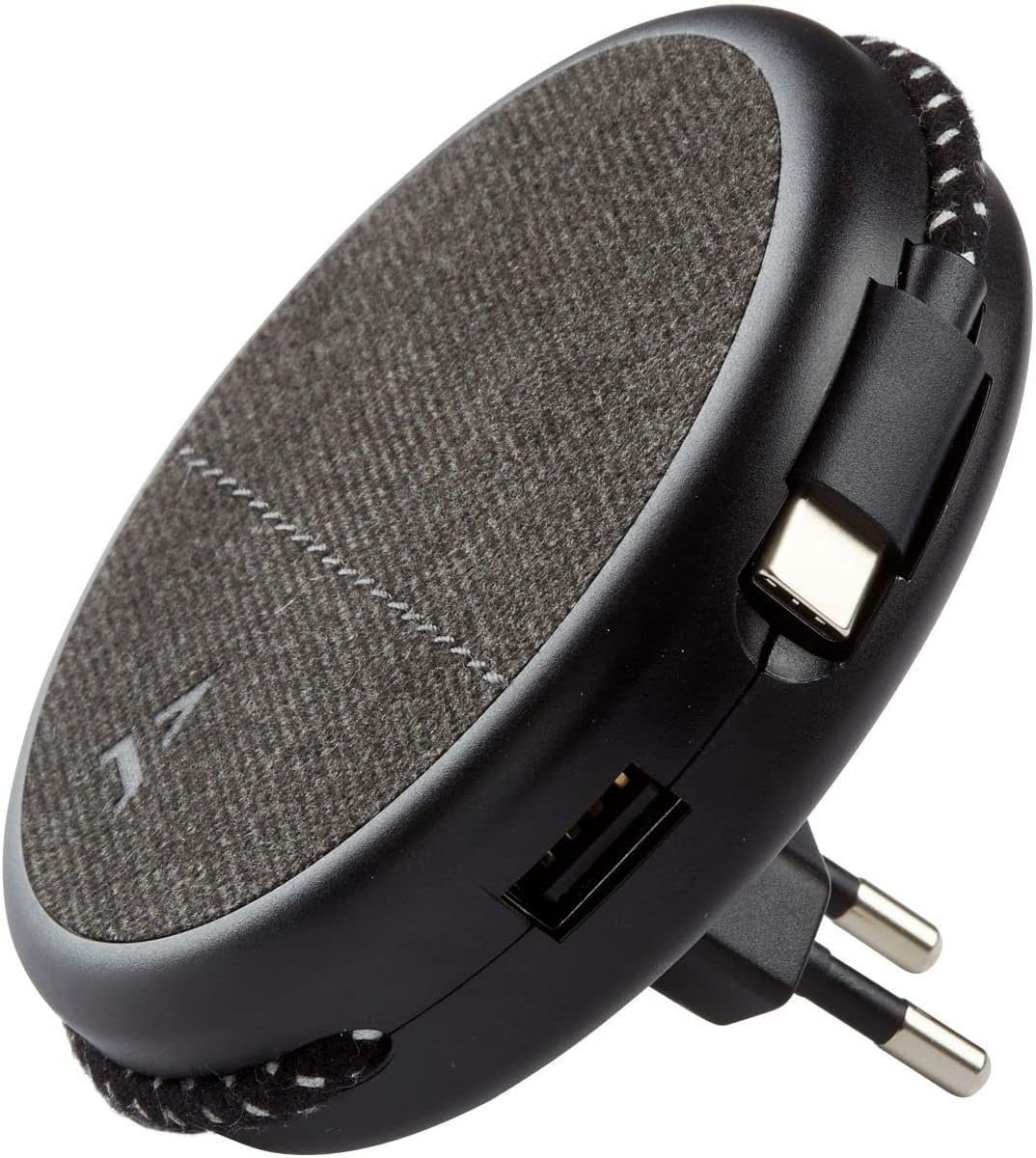
Image: Close-up of the charger, highlighting the integrated USB-C cable and an additional USB-A port.
- Charging with USB-A Port: For devices requiring a USB-A connection, use your own USB-A cable and plug it into the USB-A port on the charger.
- Korištenje magnetne funkcije: Once the charger is plugged into a wall outlet, you can magnetically attach your smartphone (with or without the metallic plate) to the charger's surface for convenient holding while charging.
Održavanje
- čišćenje: Disconnect the charger from the power outlet before cleaning. Use a soft, dry cloth to wipe the surface. Do not use liquid cleaners or abrasive materials.
- Skladištenje: When not in use, store the charger in a cool, dry place, away from direct sunlight and extreme temperatures. The retractable plug can be folded back into the charger for compact storage.
Rješavanje problema
| Problem | Mogući uzrok | Rješenje |
|---|---|---|
| Uređaj se ne puni. | Punjač nije pravilno priključen. Device cable faulty. Device incompatible. | Ensure the charger is fully inserted into the wall outlet. Pokušajte s drugim kabelom. Verify device compatibility with USB charging standards. |
| Magnetsko pričvršćivanje je slabo. | Device not magnetic. Metallic plate not properly attached. | Ensure your device has a magnetic back or use the provided metallic plate. Re-position or re-attach the metallic plate securely. |
| Punjač je topao na dodir. | Normalan rad. Preopterećenje. | A slight warmth during charging is normal. If it becomes excessively hot, disconnect immediately and contact support. Avoid charging multiple high-power devices simultaneously if it causes overheating. |
Specifikacije
| Brand | ADEQWAT |
| Broj modela | 8005668 |
| Boja | Crna |
| Veze | USB (Integrated USB-C Cable, 1x USB-A Port) |
| Posebna karakteristika | Magnetic |
| Ukupni USB portovi | 1 (USB-A) + 1 (Integrated USB-C) |
| Kompatibilni uređaji | Cellular Phones, Tablets |
| Izlazna snaga | 17 Watts |
| Broj stavki | 2 (Charger + Metallic Plate) |
| Izvor napajanja | Corded Electric |
| Prijenosni | Da |
Garancija i podrška
For warranty information or technical support, please refer to the documentation provided with your purchase or visit the official ADEQWAT webSačuvajte dokaz o kupovini za slučaj reklamacije.