
1. Uvod
Thank you for choosing the HIKMICRO HEIMDAL H4D Digital Night Vision Monocular. This device is designed for observation in low light and complete darkness, featuring a high-resolution sensor and AMOLED display for clear imaging.
Ključne karakteristike:
- 1.39" AMOLED display with 454 x 454 resolution
- High-resolution 2560 x 1440 sensor
- Integrated 850 nm infrared illuminator with smart IR function
- Day/Night/Auto/Defog modes
- Elektronska stabilizacija slike (EIS)
- Detection range up to 200 meters
- Replaceable and rechargeable battery with over 4 hours of use
- Compact and portable design, waterproof and dustproof (IP67)
- Integrated 32 GB EMMC for storing recorded videos and photos
- Wireless connection via HIKMICRO Sight app, local album function
Sadržaj paketa:
- HIKMICRO HEIMDAL H4D Digital Night Vision Monocular
- Baterija
- Krpa za prašinu
- Zaštitna torba
- Traka za zapešće
- USB-C kabl
- Kratki vodič
2. Proizvod je gotovview
Familiarize yourself with the components and controls of your HIKMICRO HEIMDAL H4D monocular.
Izgled uređaja
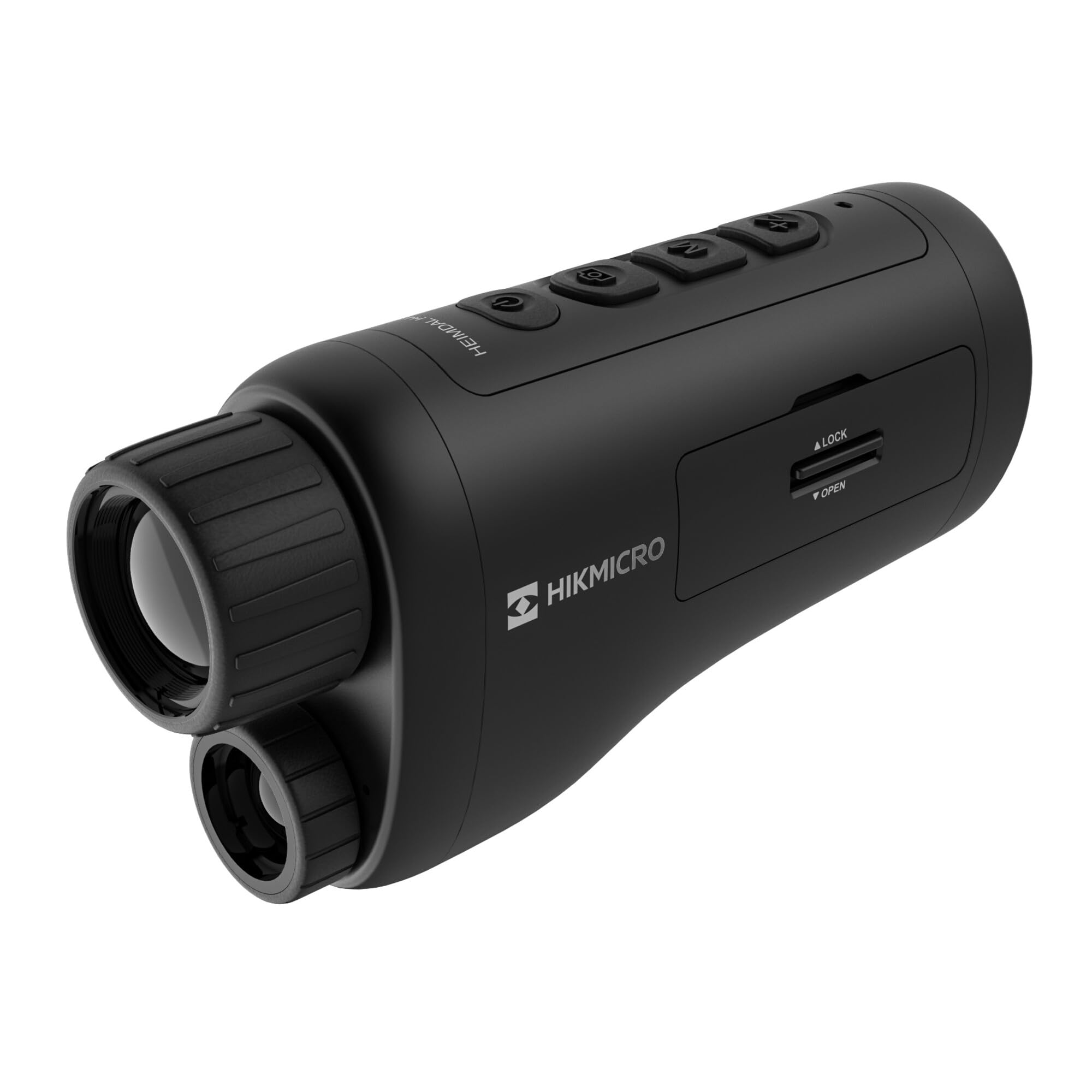
Ugao view of the HIKMICRO HEIMDAL H4D monocular, showing its compact, ergonomic design and the main lens.
Kontrole i dugmad

Top view of the monocular showing the power button, photo/video record button, mode button, and zoom/IR adjustment buttons.
Lenses and Focus

Front view displaying the objective lens and the integrated infrared illuminator.
Pretinac za baterije

Side view showing the battery compartment with 'LOCK' and 'OPEN' indicators.
3. Podešavanje
Instalacija baterije
- Locate the battery compartment on the side of the device.
- Slide the lock mechanism to the 'OPEN' position.
- Umetnite punjivu bateriju, pazeći na ispravan polaritet.
- Close the compartment and slide the lock mechanism to the 'LOCK' position.
Punjenje baterije
Connect the device to a power source using the provided USB-C cable. The charging indicator will show the charging status.
Početno uključivanje
Press and hold the power button (usually marked with Ⓘ) until the HIKMICRO logo appears on the display.
4. Uputstvo za upotrebu
Uključivanje/isključivanje
- Uključeno: Pritisnite i držite dugme za napajanje otprilike 3 sekunde.
- Iskljuciti: Pritisnite i držite dugme za napajanje otprilike 3 sekunde dok se uređaj ne isključi.
Podešavanje fokusa
Rotate the focus ring on the objective lens to achieve a clear image of your target.
Odabir načina rada
Press the 'M' (Mode) button to cycle through observation modes: Day, Night, Auto, and Defog.
Zoom and IR Adjustment
Use the '+' and '-' buttons to adjust the digital zoom level. These buttons also control the intensity of the infrared illuminator in night mode.
Fotografisanje i snimanje videa
- Snimi fotografiju: Press the photo/video button (usually marked with 📷) once to capture an image.
- Snimi video: Press and hold the photo/video button to start recording. Press again to stop.
Connecting to HIKMICRO Sight App
Download the HIKMICRO Sight app from your device's app store. Follow the in-app instructions to connect your monocular for live view, daljinsko upravljanje i upravljanje medijima.
5. Održavanje
Čišćenje
- Use the provided dust cloth or a soft, lint-free cloth to clean the lenses.
- For stubborn dirt, use a lens cleaning solution specifically designed for optics.
- Obrišite tijelo uređaja mekom,amp tkanina. Nemojte koristiti abrazivna sredstva za čišćenje ili rastvarače.
Skladištenje
- Store the monocular in its protective bag in a cool, dry place when not in use.
- Uklonite bateriju ako se uređaj neće koristiti duži period.
Battery Care
- Redovno punite bateriju, čak i ako je ne koristite često, kako biste produžili njen vijek trajanja.
- Avoid extreme temperatures during charging and storage.
6. Otkrivanje problema
Uobičajeni problemi i rješenja
| Problem | Mogući uzrok | Rješenje |
|---|---|---|
| Uređaj se ne uključuje. | Baterija je prazna ili nepravilno instalirana. | Napunite bateriju. Provjerite da li je baterija umetnuta s ispravnim polaritetom. |
| Slika je mutna. | Focus is not adjusted. | Rotate the focus ring on the objective lens until the image is clear. |
| Poor image quality in darkness. | IR illuminator is off or set to low intensity. | Activate the IR illuminator or increase its intensity using the '+' button. Ensure you are in Night mode. |
| Cannot connect to HIKMICRO Sight app. | Bluetooth/Wi-Fi is off on device or phone, or app is not updated. | Ensure Bluetooth/Wi-Fi is enabled on both devices. Restart the app and monocular. Check for app updates. |
| Uređaj se zamrzava ili prestaje reagirati. | Privremeni softverski kvar. | Izvršite soft reset tako što ćete držati pritisnuto dugme za napajanje dok se uređaj ponovo ne pokrene. Ako problem i dalje postoji, obratite se podršci. |
7. Specifikacije
| Feature | Detalj |
|---|---|
| Rezolucija senzora | 2560 x 1440 |
| Display Type | AMOLED |
| Rezolucija ekrana | 454 x 454 |
| Veličina ekrana | 1.39 inča (3.5 cm) |
| Infracrveni osvjetljivač | Integrated 850 nm |
| Domet detekcije | Do 200 metara |
| Skladištenje | 32 GB EMMC (internal) |
| Trajanje baterije | More than 4 hours (replaceable, rechargeable) |
| Waterproof Rating | IP67 |
| Dimenzije | 153 mm x 50 mm x 80 mm (6.02" x 1.97" x 3.15") |
| Težina | 375 grama (0.83 lbs) |
| Materijal | Plastika |
| Kompatibilni uređaji | Rifle, Compound Bow |
| Vrsta montaže | Picatinny nosač |
| Sport Use | Camping, planinarenje |
| Boja | Bijelo |
8. Garancija i podrška
HIKMICRO products are covered by a limited warranty. For detailed warranty information, please refer to the official HIKMICRO websajtu ili kontaktirajte svog lokalnog prodavca.
For technical support, troubleshooting assistance, or service inquiries, please visit the official HIKMICRO support page or contact their customer service department.
Službeno Webstranica: www.hikmicrotech.com