
1. Uvod
Thank you for choosing the LFF DAB/FM Digital Radio YT81107. This manual provides essential information for the safe and efficient use of your new radio. Please read these instructions carefully before operating the device and retain them for future reference.
Sigurnosne informacije
- Ne izlažite uređaj kiši ili vlazi kako biste spriječili požar ili strujni udar.
- Ne otvarajte casing. Za sve servisne radove obratite se kvalifikovanom osoblju.
- Koristite samo navedeni adapter za napajanje ili baterije.
- Izbjegavajte ekstremne temperature, direktnu sunčevu svjetlost i prašnjava okruženja.
2. Proizvod je gotovview
The LFF DAB/FM Digital Radio YT81107 offers versatile listening options with DAB+ and FM radio, Bluetooth connectivity, and convenient features like a dual alarm and sleep timer. Its compact design and dual power options make it suitable for various environments.
Ključne karakteristike
- DAB+ and FM Digital Radio Tuner
- Bluetooth Connectivity for Audio Streaming
- LCD ekran u punoj boji
- 60 Preset Stations (30 DAB+, 30 FM)
- Funkcija dvostrukog budilnika
- Podesivi tajmer za spavanje
- 3.5 mm priključak za slušalice
- AC Power Adapter or Battery Operated (4x AA batteries, not included)

Slika 2.1: Prednja strana view of the LFF DAB/FM Digital Radio highlighting its main features.
Kontrole i komponente
Familiarize yourself with the buttons and ports on your radio:

Slika 2.2: Prednja i gornja strana view of the radio with labeled controls.
- Dugme za napajanje / način rada: Turns the radio on/off and switches between modes (DAB, FM, Bluetooth).
- Dugme Meni/Informacije: Accesses menu settings or displays station information.
- Dugme alarma: Postavlja i upravlja alarmima.
- Unaprijed postavljena dugmad (1-5): Quickly access saved favorite stations.
- Volume Knob/Select: Okreće za podešavanje jačine zvuka ili navigaciju kroz menije; pritisnite za potvrdu odabira.
- Tuning/Scroll Buttons: Navigacija kroz stanice ili opcije menija.
- Prikaz: Full-color LCD screen.
- govornik: Integrisani audio izlaz.
- antena: Izvlačna teleskopska antena za radio prijem.
- DC IN port: Za spajanje AC adaptera za napajanje.
- Priključak za slušalice: 3.5 mm izlaz za privatno slušanje.
- Pretinac za baterije: Located on the back for 4x AA batteries.
3. Podešavanje
Napajanje radija
Your radio can be powered by the included AC adapter or by batteries for portable use.
- AC napajanje: Connect the supplied AC adapter to the DC IN port on the back of the radio and plug it into a standard wall outlet.
- Snaga baterije: Open the battery compartment on the back and insert 4x 1.5V AA (LR6) batteries (not included), ensuring correct polarity. Close the compartment securely.

Figure 3.1: Power options and physical dimensions of the radio.
Antenna Adjustment
Za optimalan radio prijem, potpuno izvucite teleskopsku antenu. Podesite njen položaj za najbolji kvalitet signala.
4. Uputstvo za upotrebu
Turning On/Off and Mode Selection
- Pritisnite Power/Mode dugme za uključivanje ili isključivanje radija.
- While on, press the Power/Mode button repeatedly to cycle through available modes: DAB, FM, and Bluetooth.
Rad DAB/FM radija
Ensure the antenna is fully extended for best reception.

Figure 4.1: Radio reception ranges and preset capacity.
- Automatsko skeniranje: U DAB ili FM modu pritisnite i držite Meni/Informacije button to initiate an automatic scan for available stations. The radio will store them automatically.
- Ručno podešavanje: Koristite Tuning/Scroll dugmad za ručno podešavanje frekvencije.
- Odabir stanica: Rotirajte Volume Knob/Select to browse through available stations. Press the knob to select a station.
- Čuvanje unaprijed postavljenih postavki: To save a station, tune to the desired station, then press and hold one of the Unaprijed postavljena dugmad (1-5) until the display confirms it's saved. You can save up to 30 DAB+ and 30 FM stations.
- Podsjećajući na unaprijed zadane postavke: Kratko pritisnite jednu od Unaprijed postavljena dugmad (1-5) da biste pozvali sačuvanu stanicu.
Bluetooth režim
Povežite svoj pametni telefon, tablet ili drugi uređaj s omogućenim Bluetoothom za bežični prijenos zvuka.
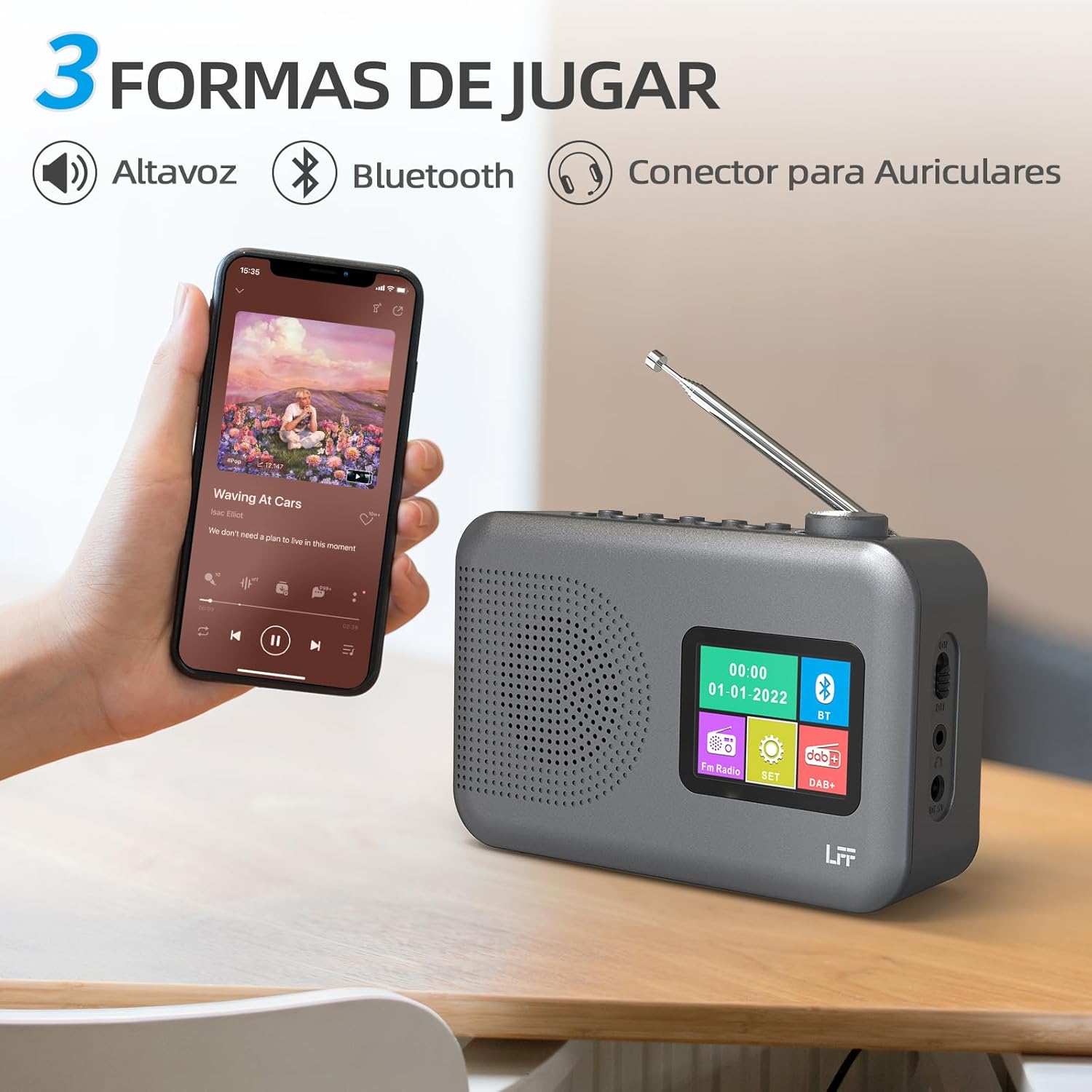
Figure 4.2: Bluetooth connectivity and audio playback options.
- Prebacite radio u Bluetooth način rada pomoću Power/Mode dugme. Na ekranu će se prikazati "Bluetooth Pairing" ili slično.
- On your device, enable Bluetooth and search for "LFF YT81107" (or similar).
- Select the radio to pair. Once connected, you can play audio from your device through the radio's speaker.
- Adjust volume using the radio's Tipka za jačinu zvuka or your connected device.
Funkcija budilnika
Postavite do dva nezavisna alarma.
- Pritisnite Alarm button to enter alarm settings.
- Koristite Tuning/Scroll tipke i Volume Knob/Select to set the alarm time, source (DAB, FM, or buzzer), and frequency (daily, weekdays, weekends, once).
- Pritisnite Alarm button again to confirm and activate the alarm.
- When an alarm sounds, press any button (except Power) to snooze, or press the Power/Mode dugme za isključivanje.
Sleep Timer
Tajmer za spavanje omogućava da se radio automatski isključi nakon određenog perioda.

Figure 4.3: Sleep timer function in use.
- Pritisnite Meni/Informacije dugme za pristup glavnom meniju.
- Navigate to the "Sleep Timer" option using the Tuning/Scroll dugmad i pritisnite Volume Knob/Select.
- Select your desired duration (15, 30, 45, 60, 90, or 120 minutes) and confirm. The radio will automatically turn off after the selected time.
Upotreba slušalica
For private listening, connect standard 3.5mm headphones to the headphone jack on the side of the radio. The internal speaker will be muted automatically.
Note: This radio does not support Bluetooth headphones. The 3.5mm headphone jack is for wired headphones only.
5. Održavanje
- čišćenje: Obrišite radio mekom, suhom krpom. Ne koristite abrazivna sredstva za čišćenje ili rastvarače.
- Zamjena baterije: If using batteries, replace all four AA batteries when the low battery indicator appears on the display or when performance degrades. Ensure proper disposal of old batteries.
- Skladištenje: Ako radio skladištite duži period, izvadite baterije kako biste spriječili curenje.
6. Otkrivanje problema
| Problem | Mogući uzrok | Rješenje |
|---|---|---|
| Nema struje | AC adapter nije priključen ili je neispravan; baterije su prazne ili nepravilno umetnute. | Check AC adapter connection and power outlet. Replace batteries or ensure correct polarity. |
| Loš radio prijem | Antena nije ispružena; područje slabog signala; smetnje. | Potpuno izvucite i podesite teleskopsku antenu. Pokušajte premjestiti radio na drugu lokaciju. |
| Bluetooth se ne povezuje | Radio not in Bluetooth mode; device not in pairing mode; radio already connected to another device. | Ensure radio is in Bluetooth mode. Put your device in pairing mode. Disconnect from other Bluetooth devices. |
| Alarm se ne oglašava | Alarm not activated; volume too low; incorrect alarm settings. | Check alarm settings and ensure it is enabled. Increase volume. Verify alarm time and source. |
7. Specifikacije
| Feature | Detalj |
|---|---|
| Broj modela | YT81107 |
| Brand | LFF ekstenzija |
| Tehnologija podešavanja | DAB+, FM |
| Podržani radio bendovi | DAB+ (174.928 - 239.2 MHz), FM (87.5 - 108 MHz) |
| Povezivanje | Bluetooth, 3.5mm Headphone Jack |
| Izvor napajanja | AC Adapter (included), 4x 1.5V AA (LR6) Batteries (not included) |
| Dimenzije (D x Š x V) | 16.1 cm x 5.9 cm x 10.9 cm |
| Boja | Grey |
| Posebne karakteristike | DAB Radio, DAB Plus Radio, DAB+ Radio, FM Radio, Color Display, Bluetooth, Dual Alarm, Sleep Timer |
| Kompatibilni uređaji | Headphones, MP3 Player, Smartphone, Laptop, Speaker, Tablet |
8. Garancija i podrška
LFF is committed to providing high-quality products. If you encounter any quality issues with your LFF DAB/FM Digital Radio YT81107, please contact us directly. Our customer support team is available to assist you and resolve any problems you may experience.
Molimo pogledajte dokumentaciju o kupovini za specifične uslove garancije i kontakt informacije.