
1. Uvod
Hvala na kupoviniasing the Kapbom KA-3199 Retro Bluetooth Radio. This portable audio device combines classic aesthetics with modern functionality, offering multiple playback options including Bluetooth, FM radio, USB, Micro SD, and AUX input. It features a powerful 5W RMS speaker for excellent sound quality and a built-in flashlight for added utility. Please read this manual carefully before use to ensure proper operation and to maximize your listening experience.
2. Sigurnosne informacije
- Ne izlažite uređaj vodi, vlazi ili ekstremnim temperaturama.
- Izbjegavajte ispuštanje ili izlaganje uređaja jakim udarima.
- Ne pokušavajte sami rastavljati ili popravljati uređaj. Obratite se kvalifikovanom servisnom osoblju.
- Držite uređaj dalje od izvora topline i direktne sunčeve svjetlosti.
- Koristite samo navedeni kabel za punjenje i adapter za napajanje.
- Baterije odložite u skladu sa lokalnim propisima.
3. Sadržaj paketa
Molimo Vas da provjerite da li se u paketu nalaze svi artikli:
- 1 x Kapbom KA-3199 Portable Speaker
- 1 x AC kabel za napajanje (1.5 m)
- 1 x Uputstvo za upotrebu
4. Proizvod je gotovview
Familiarize yourself with the various parts and controls of your Kapbom KA-3199 radio.
Kontrole na prednjoj ploči
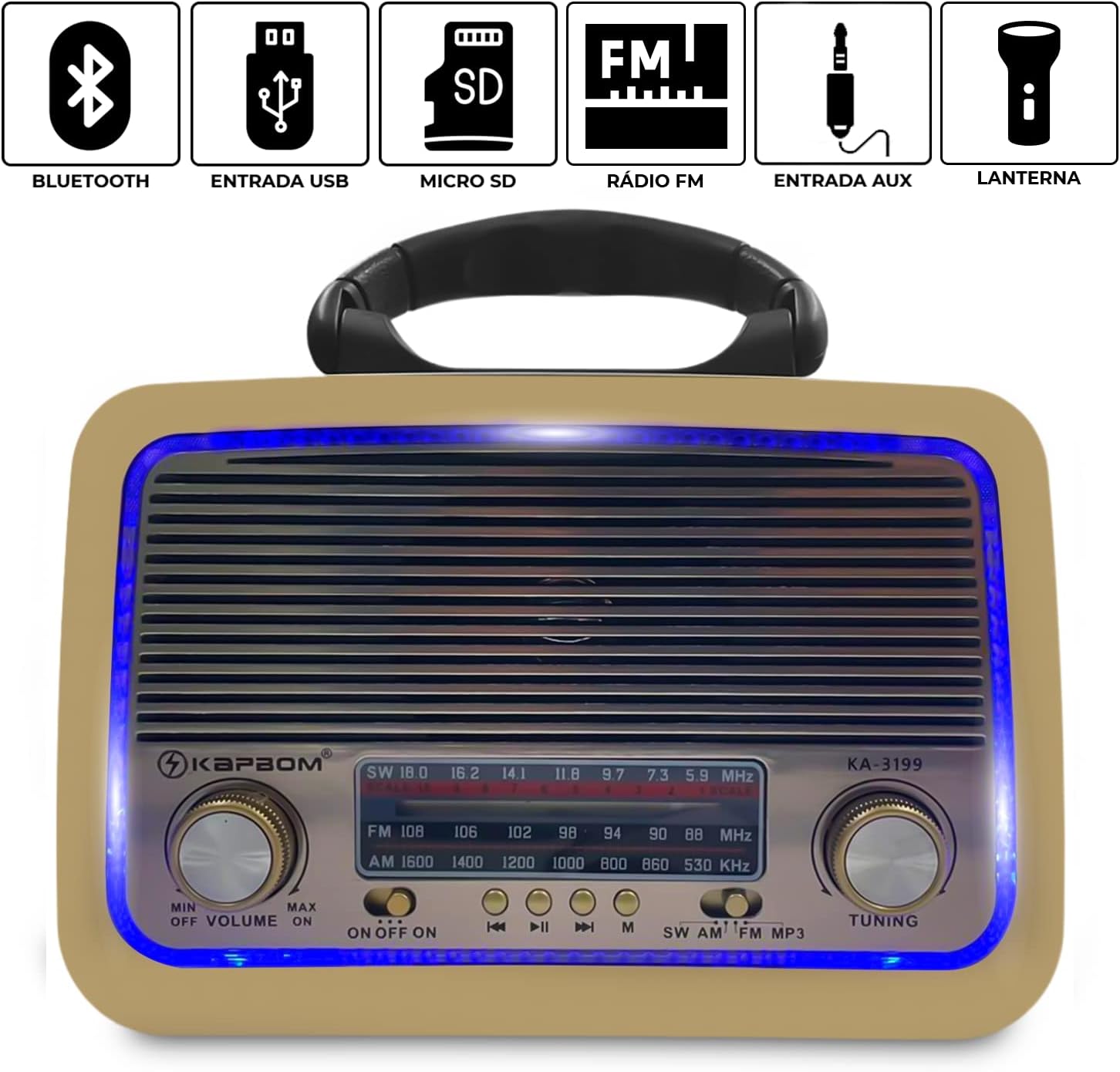
Slika 4.1: Front view of the Kapbom KA-3199 radio. This image highlights the main control panel, including the volume knob on the left, the tuning knob on the right, the mode selector switch (SW/AM/FM/MP3), and playback control buttons (Previous, Play/Pause, Next) located below the frequency display. Icons above the display indicate Bluetooth, USB, Micro SD, FM Radio, AUX, and Flashlight capabilities.
- Volume Knob (MIN/OFF/ON/MAX): Rotate to adjust volume. Turn to 'OFF' to power down the device.
- Dugme za podešavanje: Rotate to tune into radio stations in FM, AM, or SW modes.
- Mode Switch (SW/AM/FM/MP3): Selects the operating mode (Shortwave, AM, FM Radio, or MP3 playback from USB/Micro SD/Bluetooth/AUX).
- Tasteri za kontrolu reprodukcije: For skipping tracks, playing/pausing audio in MP3/Bluetooth modes.
- Prikaz frekvencije: Prikazuje trenutnu radio frekvenciju.
Side Panel and Rear Features

Slika 4.2: Side view of the Kapbom KA-3199 radio, illustrating the USB port, Micro SD card slot, and DC 5V charging input. These ports allow for various audio input methods and charging.

Slika 4.3: Side view of the Kapbom KA-3199 radio, highlighting the integrated flashlight. This feature provides illumination when needed.

Slika 4.4: Pozadi view of the Kapbom KA-3199 radio, displaying the battery compartment and the telescopic antenna. The antenna can be extended for improved radio reception.
- USB port: Za reprodukciju zvuka files USB fleš diska.
- Utor za mikro SD karticu: Za reprodukciju zvuka files from a Micro SD card.
- DC 5V ulaz: For charging the internal battery using the provided AC power cable.
- svjetiljka: Integrated light source on the side.
- Teleskopska antena: Extend for better FM/SW radio reception.
- Pretinac za baterije: Houses the internal rechargeable battery.
5. Podešavanje
5.1. Punjenje baterije
- Ensure the radio is powered off by turning the Volume Knob to 'OFF'.
- Connect the provided AC power cable to the DC 5V input port on the side of the radio.
- Uključite drugi kraj kabla u standardnu zidnu utičnicu.
- The charging indicator (if present) will illuminate. Allow approximately 3-4 hours for a full charge.
- Disconnect the charger once fully charged or when not in use.
5.2. Početno uključivanje
Turn the Volume Knob from 'OFF' to 'ON'. The radio will power on and typically default to the last used mode or FM radio mode.
6. Uputstvo za upotrebu
6.1. Odabir načina rada
Use the Mode Switch (SW/AM/FM/MP3) on the front panel to cycle through the available audio sources.
6.2. Rad FM radija
- Switch the mode to 'FM'.
- Izvucite teleskopsku antenu za optimalni prijem.
- Rotate the Tuning Knob to scan for and select your desired FM radio station. The frequency will be displayed on the screen.
6.3. Bluetooth režim
- Switch the mode to 'MP3'. The radio will automatically enter Bluetooth pairing mode, indicated by an audible prompt.
- Na svom mobilnom uređaju omogućite Bluetooth i potražite dostupne uređaje.
- Select 'KA-3199' from the list of devices to pair.
- Once paired, you can play audio from your device through the radio. Use the playback control buttons on the radio or your device to manage music.
6.4. USB/Micro SD Card Playback
- Switch the mode to 'MP3'.
- Umetnite USB fleš disk ili Micro SD karticu (unaprijed učitanu sa MP3 audio zapisima) files) into the respective port on the side of the radio.
- The radio will automatically detect the storage device and begin playing audio files.
- Use the playback control buttons (Previous, Play/Pause, Next) to navigate through tracks.
6.5. AUX ulazni režim
The device supports AUX input, though a dedicated AUX port is not explicitly shown in all images, it is listed as a compatible device. If an AUX port is present (often shared with another port or a 3.5mm jack), connect an external audio device using a 3.5mm audio cable. Switch the mode to 'MP3' and the radio should automatically detect the AUX input.
6.6. Korištenje svjetiljke
The flashlight is typically activated by a dedicated switch or button on the side of the unit, near the light itself. Refer to the physical unit for the exact location and operation of the flashlight switch.
7. Održavanje
7.1. Čišćenje
Wipe the exterior of the radio with a soft, dry cloth. Do not use abrasive cleaners, waxes, or solvents as they may damage the finish.
7.2. Skladištenje
When not in use for extended periods, store the radio in a cool, dry place away from direct sunlight and extreme temperatures. Ensure the battery is partially charged (around 50%) before storage to prolong its lifespan.
7.3. Održavanje baterije
To maintain battery health, avoid fully discharging the battery frequently. Recharge the battery regularly, even if the device is not used often.
8. Otkrivanje problema
| Problem | Mogući uzrok | Rješenje |
|---|---|---|
| Nema struje | Battery discharged; Power switch off | Charge the battery; Turn the Volume Knob to 'ON' |
| Nema zvuka | Volume too low; Incorrect mode selected; Device not paired (Bluetooth) | Increase volume; Select correct mode; Pair Bluetooth device |
| Loš radio prijem | Antena nije izvučena; Područje slabog signala | Extend the telescopic antenna; Move to an area with better signal |
| Bluetooth se ne povezuje | Radio not in pairing mode; Device too far; Already connected to another device | Ensure radio is in MP3 mode; Keep devices within 10m; Disconnect from other devices |
| USB/Micro SD kartica se ne reprodukuje | Netačno file format; Oštećen files; Drive/card not inserted correctly | Osigurati files are MP3; Try another drive/card; Reinsert securely |
9. Specifikacije
Detailed technical specifications for the Kapbom KA-3199 Retro Bluetooth Radio.
| Feature | Specifikacija |
|---|---|
| Model | KA-3199 |
| Brand | Kapbom |
| Izlazna snaga | 5W RMS |
| Kapacitet baterije | 1200mAh |
| Trajanje baterije (prosječno) | Do 4 sati |
| Frekvencijski odziv | 150 - 20000 Hz |
| Osjetljivost | 80 dB |
| Impedansa | 8 Ohm |
| Prečnik zvučnika | 75 mm |
| Povezivanje | Bluetooth, USB, Micro SD, AUX, FM radio |
| FM Frekvencijski opseg | Do 108 MHz |
| Display Type | LCD |
| Dimenzije (D x Š x V) | 20.5 cm x 8.5 cm x 15 cm |
| Posebne karakteristike | Portable, Lightweight, Built-in Flashlight |
Slika 9.1: Dimensions of the Kapbom KA-3199 Retro Bluetooth Radio.

10. Garancija i podrška
Specific warranty information for the Kapbom KA-3199 Retro Bluetooth Radio is not provided in this manual. Please refer to the retailer or manufacturer's website for details regarding warranty coverage and customer support. Keep your purchase receipt as proof of purchase for any warranty claims.