
1. Uvod
This manual provides detailed instructions for the assembly, installation, operation, and maintenance of your AMANSON H07 ATX Mid Tower PC Case. Please read this manual thoroughly before beginning installation to ensure proper setup and safe operation. Keep this manual for future reference.

Figure 1.1: AMANSON H07 ATX Mid Tower PC Case with illuminated internal components.
2. Sigurnosne informacije
- Always disconnect the power supply from the wall outlet before performing any installation or maintenance inside the PC case.
- Pažljivo rukujte svim komponentama kako biste spriječili oštećenja.
- Nosite antistatičku narukvicu kako biste spriječili oštećenje osjetljivih elektroničkih komponenti uzrokovano elektrostatičkim pražnjenjem (ESD).
- Držite male dijelove i materijale za pakovanje dalje od djece.
- Osigurajte odgovarajuću ventilaciju oko kućišta računara kako biste spriječili pregrijavanje.
3. Sadržaj paketa
Provjerite da li su sve stavke prisutne u paketu:
- AMANSON H07 ATX Mid Tower PC Case
- Accessory Box (screws, standoffs, cable ties, etc.)
- Korisnički priručnik (ovaj dokument)
4. Komponenta je završenaview
The AMANSON H07 PC case features a panoramic design with tempered glass panels for full visibility of your internal components. It supports various motherboard sizes and extensive cooling configurations.

Figure 4.1: Top I/O Panel with power button, USB 3.0, USB 2.0, and audio ports.
The top I/O panel includes:
- Dugme za napajanje
- Reset dugme
- 2x USB 2.0 porta
- 1x USB 3.0 port
- Audio In/Out Jacks
5. Podešavanje i instalacija
5.1. Priprema slučaja
The AMANSON H07 features tool-less hinged tempered glass side panels for easy access. Gently open the side panel by pulling it from the rear edge. The panels can also be removed by lifting them off their hinges for full access during installation.

Figure 5.1: Hinged tempered glass side panel for easy access.
5.2. Instalacija matične ploče
The H07 supports E-ATX, ATX, Micro-ATX, and ITX motherboards. Install the necessary standoffs for your motherboard form factor. Carefully align your motherboard with the standoffs and I/O shield, then secure it with screws.
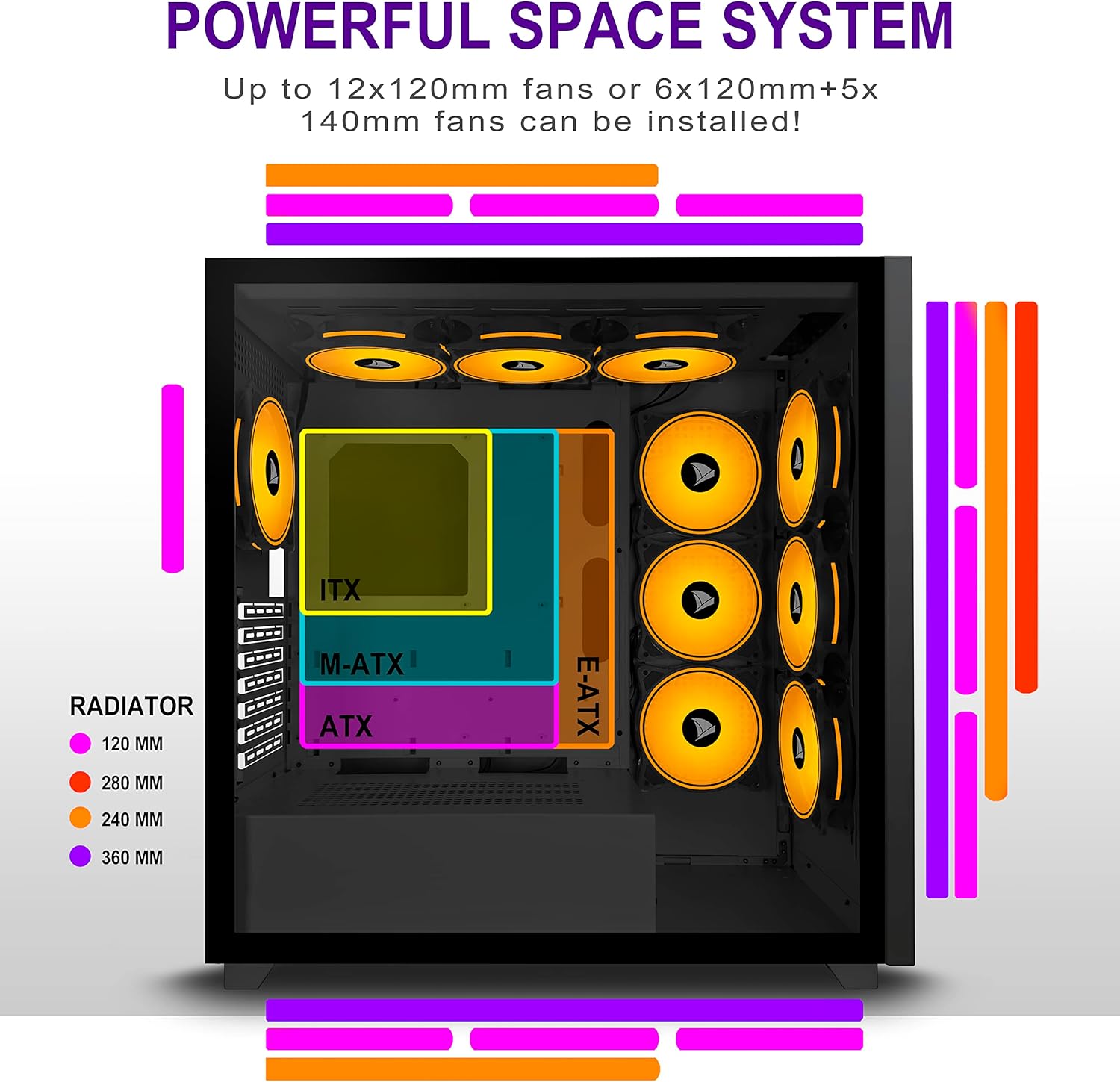
Figure 5.2: Motherboard and cooling component placement options.
5.3. Instalacija napajanja
Install your power supply unit (PSU) into the dedicated compartment at the bottom rear of the case. Secure it with screws from the rear of the case.
5.4. Instalacija uređaja za pohranu podataka
The case provides multiple mounting points for storage devices. Install your 3.5" HDDs and 2.5" SSDs into the designated trays and mounting locations. Refer to the case diagram for specific locations.

Figure 5.3: Storage drive mounting options for HDDs and SSDs.
5.5. Instalacija kartice za proširenje (GPU)
Remove the necessary PCI-E slot covers from the rear of the case. Insert your graphics card or other expansion cards into the motherboard's PCI-E slots and secure them with screws.
5.6. Upravljanje kablovima
Utilize the cable routing cutouts and tie-down points behind the motherboard tray to manage cables. This improves airflow and maintains a clean aesthetic.
6. Uputstvo za upotrebu
6.1. Uključivanje / isključivanje napajanja
Press the power button located on the top I/O panel to turn on your PC. To shut down, use the operating system's shutdown function or press and hold the power button for several seconds.
6.2. Korištenje prednjih I/O portova
Connect USB devices to the USB 2.0 or USB 3.0 ports. Use the audio jacks for headphones, microphones, or speakers.
7. Održavanje
7.1. Čišćenje
Redovno čistite spoljašnjost kućišta mekom,amp cloth. For internal cleaning, use compressed air to remove dust from fans and components. Ensure the PC is powered off and unplugged before cleaning.
7.2. Filteri za prašinu
The AMANSON H07 may include removable dust filters. Clean these filters periodically to maintain optimal airflow and cooling performance.
8. Otkrivanje problema
- Računar se ne uključuje: Check all power connections, including the PSU to the wall, the PSU to the motherboard, and the front panel power switch cable to the motherboard.
- Overheating issues: Ensure all fans are properly installed and functioning. Verify that dust filters are clean and not obstructing airflow. Check thermal paste application on CPU cooler.
- USB ports not working: Confirm that the front panel USB cables are correctly connected to the motherboard headers.
- Audio jacks not working: Verify that the front panel audio cable is correctly connected to the motherboard's audio header.
9. Specifikacije
Below are the technical specifications for the AMANSON H07 PC Case:
| Feature | Detalj |
|---|---|
| Model | H07 |
| Tip slučaja | Mid Tower |
| Kompatibilnost matične ploče | E-ATX, ATX, Micro ATX, ITX |
| Materijal | Kaljeno staklo |
| Dimenzije proizvoda (DxŠxV) | 19.69 x 13.78 x 19.69 inča (500 x 350 x 500 mm) |
| Težina artikla | 24.2 funte |
| Broj USB 2.0 portova | 2 |
| Broj USB 3.0 portova | 1 |
| Broj slotova za proširenje | 8 |
| Metoda hlađenja | Vazduh |
| Vrsta montaže napajanja | Bottom Mount |

Figure 9.1: AMANSON H07 PC Case dimensions (520mm height, 510mm length, 250mm width).
10. Informacije o garanciji
Please refer to the product packaging or the official AMANSON webZa specifične uslove i odredbe garancije posjetite stranicu. Sačuvajte dokaz o kupovini za slučaj reklamacije.
11. Podrška
For technical assistance or customer support, please visit the official AMANSON website or contact their customer service department. Contact details can typically be found on the product packaging or the brand's website.