
1. Uvod
Hvala na kupoviniasing the eppfun SK001 USB Speakerphone. This device is designed to provide clear and efficient audio conferencing for home offices, remote work, and small to medium-sized meeting rooms. It features 360° voice pickup, smart voice enhancement, and broad compatibility with popular conferencing platforms.
2. Sadržaj paketa
Molimo Vas da provjerite da li se u Vašem paketu nalaze svi artikli:
- eppfun SK001 USB Speakerphone
- USB-C na USB-C kabl
- USB-A na USB-C kabel
- Uputstvo za upotrebu (ovaj dokument)
3. Proizvod je gotovview
The eppfun SK001 features intuitive controls for managing your calls and audio settings.

Slika: Vrh view of the eppfun SK001 speakerphone showing its control buttons. The buttons include microphone mute, microphone volume up/down, and speaker volume up/down.
Kontrolna dugmad:
- Dugme za isključivanje mikrofona: Press to mute or unmute the microphone. An indicator light will show the mute status.
- Microphone Volume Up/Down: Podešava osjetljivost ulaza mikrofona.
- Speaker Volume Up/Down: Adjusts the speaker output volume.
luke:
- USB-C priključak: For connecting to your computer using the provided USB cables.
4. Podešavanje
The eppfun SK001 is a plug-and-play device, requiring no driver installation for most operating systems.
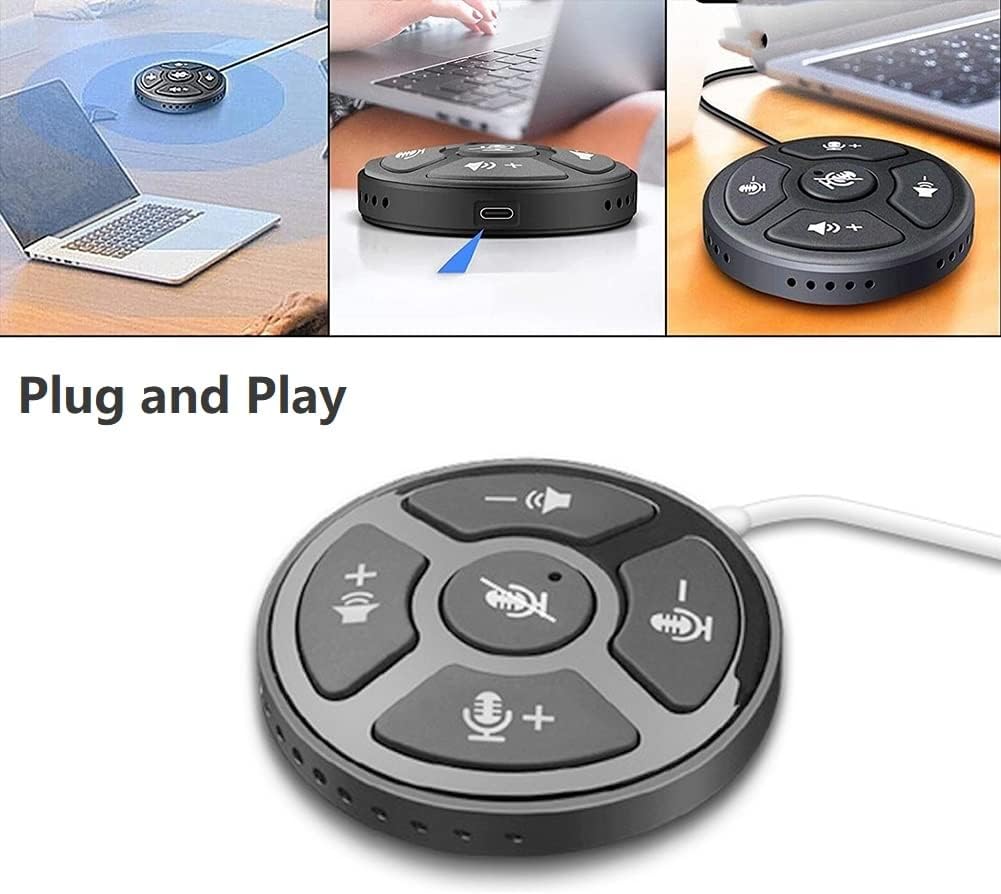
Image: A collage showing the eppfun SK001 speakerphone connected to a laptop via USB, highlighting its plug-and-play functionality.
- Povežite zvučnik:
- Use the provided USB-C to USB-C cable or USB-A to USB-C cable.
- Connect one end of the cable to the USB-C port on the SK001 speakerphone.
- Connect the other end of the cable to an available USB port (USB-A or USB-C) on your computer (PC, laptop, or Mac).
- Prepoznavanje sistema: Vaš računar bi trebao automatski prepoznati i instalirati potrebne upravljačke programe. Ovaj proces može potrajati nekoliko trenutaka.
- Odaberite kao audio uređaj:
- Open your operating system's sound settings (e.g., Windows Sound Settings, macOS System Preferences > Sound).
- Select "eppfun SK001" as your default input (microphone) and output (speaker) device.
- In your conferencing software (e.g., Zoom, Microsoft Teams, Skype), navigate to its audio settings and select "eppfun SK001" for both microphone and speaker.
5. Uputstvo za upotrebu
Basic Call Management:
- Podešavanje jačine zvuka: Use the speaker volume up (+) and down (-) buttons on the device to control the playback volume.
- Isključivanje mikrofona: Press the central microphone mute button to toggle the microphone on or off. A red indicator light typically signifies that the microphone is muted. This mute function is linked with Zoom Meeting certification.
- Osetljivost mikrofona: Use the microphone volume up (+) and down (-) buttons to adjust the microphone's input sensitivity.
Ključne karakteristike:
- 360° omnidirekcionalno snimanje glasa: The SK001 is equipped with high-performance microphones capable of capturing voices from all directions within a 5-meter radius, ideal for small to medium-sized conference rooms.
- Smart Voice Enhancement: Features echo cancellation, reverberation suppression, and noise reduction to ensure clear audio during calls.
- Zoom Meeting Certified: Guarantees high-quality calls and seamless integration with Zoom, including synchronized mute status.
6. Održavanje
- čišćenje: Use a soft, dry cloth to clean the surface of the speakerphone. Do not use liquid cleaners or aerosols.
- Skladištenje: Čuvajte uređaj na hladnom i suvom mestu kada se ne koristi.
- Rukovanje: Izbjegavajte ispuštanje uređaja ili izlaganje ekstremnim temperaturama ili vlazi.
7. Otkrivanje problema
- No Sound / Microphone Not Working:
- Provjerite je li USB kabel sigurno povezan i sa zvučnikom i s računarom.
- Verify that "eppfun SK001" is selected as the default audio input and output device in your computer's sound settings and within your conferencing application.
- Check if the microphone is muted on the device (red indicator light) or within your software.
- Adjust the volume levels on both the speakerphone and your computer.
- Try connecting the speakerphone to a different USB port or a different computer to rule out port or system issues.
- Loš kvalitet zvuka:
- Ensure the speakerphone is placed on a stable surface, away from obstructions.
- Confirm that the microphone sensitivity is appropriately set.
- Check for background noise in your environment. The device has noise reduction, but extreme noise can still affect quality.
- Verify your internet connection stability if experiencing issues during online calls.
- Uređaj nije prepoznat:
- Odspojite i ponovo povežite USB kabl.
- Ponovo pokrenite računar.
- Pokušajte s drugim USB portom na svom računaru.
- Provjerite da li je vaš operativni sistem ažuriran.
8. Specifikacije
| Feature | Detalj |
|---|---|
| Broj modela | SK001 |
| Brand | eppfun |
| Tehnologija povezivanja | USB (USB-C, USB-A) |
| Mikrofon Form Faktor | Mini |
| Polar Pattern | Svesmjerni (360°) |
| Audio Sensitivity | 30 decibela |
| Sound Pickup Range | Do 5 metara |
| Hardverska platforma | Laptop, PC |
| Kompatibilni operativni sistemi | Windows XP/Vista/7/8/10/11, Mac OS |
| Težina artikla | 80 grama (2.82 unci) |
| Dimenzije paketa | 6.1 x 4.72 x 1.3 inča |
9. Garancija i podrška
The eppfun SK001 comes with a 12-mjesečna garancija od datuma kupovine. Ova garancija pokriva proizvodne nedostatke i kvarove pri normalnoj upotrebi.
For technical support, warranty claims, or any questions regarding your eppfun SK001 speakerphone, please contact eppfun customer service. Refer to the contact information provided on the eppfun official webweb-mjesto ili vašu dokumentaciju o kupovini.
Molimo sačuvajte dokaz o kupovini u svrhu garancije.