
Uvod
This manual provides essential information for the safe and efficient use of your ONN 42-Inch Full HD LED Smart TV, Model 100018254. Please read these instructions thoroughly before operating your television and retain them for future reference.
Šta je u kutiji
Prije nego što nastavite s postavljanjem, provjerite jesu li sve komponente prisutne.
- ONN 42-Inch Full HD LED Smart TV
- Daljinski upravljač
- TV stalak (2 komada)
- Vijci za TV stalak
- Kabl za napajanje
- Kratki vodič (nije uključen u ovaj priručnik)

Slika: Front view of the ONN 42-inch Smart TV displaying the Roku TV home screen with various streaming app icons like Netflix, Disney+, Apple TV, Hulu, Peacock, and Roku Channel. The TV is black with slim bezels and two stand feet.
Setup
1. Pričvršćivanje TV postolja
- Pažljivo postavite televizor ekranom prema dolje na meku, čistu površinu kako biste spriječili oštećenja.
- Poravnajte svaki dio postolja s odgovarajućim otvorima za vijke na dnu televizora.
- Pričvrstite svaki dio postolja priloženim vijcima. Provjerite da li su čvrsto zategnuti.

Image: A diagram illustrating the dimensions of the ONN 42-inch TV, showing its width as 43 inches and height as 37 inches when placed on its stand.
2. Montiranje na zid (opciono)
This TV is compatible with VESA standard wall mounts. Refer to your wall mount's instructions for proper installation. Ensure the wall mount can support the weight of the television.

Slika: Stražnja strana view of the ONN 42-inch TV, highlighting the VESA mounting screw holes in a square pattern and various input ports on the side and bottom right.
3. Povezivanje uređaja
Povežite eksterne uređaje kao što su kablovski prijemnici, igraće konzole ili Blu-ray plejeri na ulazne portove televizora.
- HDMI: For high-definition audio and video. Use an HDMI cable to connect devices like set-top boxes, game consoles, or streaming sticks.
- USB: Za povezivanje USB uređaja za pohranu podataka radi reprodukcije medija files.
- Wi-Fi: For internet connectivity to access smart TV features and streaming services.
4. Početno uključivanje i čarobnjak za podešavanje
- Uključite kabel za napajanje u televizor, a zatim u zidnu utičnicu.
- Pritisnite dugme za napajanje na daljinskom upravljaču ili na samom televizoru.
- Follow the on-screen instructions to complete the initial setup, including language selection, network connection (Wi-Fi), channel scanning, and linking to your Roku account (if applicable).
Upravljanje TV-om
1. Daljinski upravljač Overview
Daljinski upravljač vam omogućava navigaciju po interfejsu televizora i kontrolu raznih funkcija.
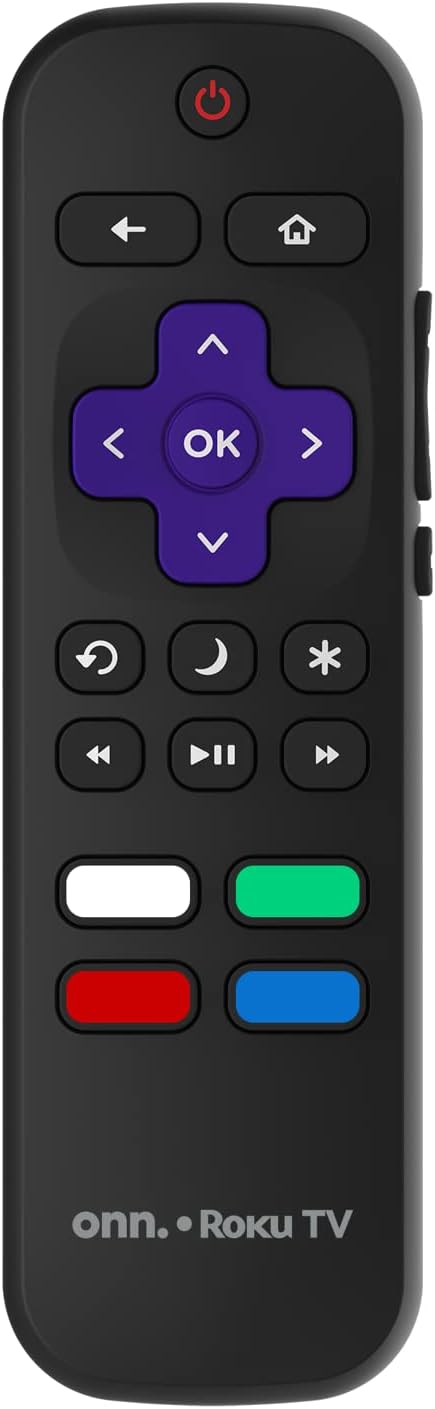
Image: The ONN Roku TV remote control, featuring a power button, directional pad, OK button, home button, back button, volume controls, and dedicated buttons for popular streaming services.
- Dugme za napajanje: Uključuje ili isključuje TV.
- Directional Pad (D-Pad) & OK: Navigacija kroz menije i potvrđivanje odabira.
- Dugme za početnu stranicu: Vraća se na početni ekran Roku TV-a.
- Dugme za povratak: Vraća se na prethodni ekran ili meni.
- Pojačavanje/stišavanje glasnoće: Podešava jačinu zvuka.
- Dugme za isključivanje zvuka: Isključuje ili uključuje zvuk.
- Kanal gore/dolje: Mijenja kanale (za antenske/kablovske ulaze).
- Namjenski gumbi za aplikacije: Quick access to popular streaming services like Netflix, Hulu, etc.
2. Funkcije pametnog televizora
Your ONN Smart TV provides access to a wide range of streaming content and smart functionalities.
- Usluge prijenosa: Access pre-installed apps like Netflix, YouTube, and many more through the Roku Channel Store.
- upravljanje glasom: Compatible with Alexa and Google Assistant for hands-free control (requires a separate compatible voice assistant device).
- Automatic Software Updates: The TV will automatically update its software when connected to the internet, ensuring you have the latest features and security.
3. Izbor ulaza
To switch between connected devices (e.g., cable box, game console), use the Input button on your remote or select the desired input from the Roku TV home screen.
4. Postavke slike i zvuka
Access the TV's settings menu to customize picture and sound preferences. Navigate to Postavke > Postavke TV slike or Postavke > Audio to adjust options like brightness, contrast, color, sound mode, and equalizer settings.
Održavanje
1. Čišćenje ekrana
- Always turn off the TV and unplug it before cleaning.
- Koristite meku krpu koja ne ostavlja dlačice, laganoampoprati vodom ili specijaliziranim sredstvom za čišćenje ekrana.
- Ne prskajte sredstvo za čišćenje direktno na ekran. Prvo ga nanesite na krpu.
- Avoid using abrasive cleaners, alcohol, benzene, or thinners, as these can damage the screen.
2. Ažuriranja softvera
Ensure your TV is connected to the internet to receive automatic software updates. These updates improve performance, add features, and enhance security. You can manually check for updates in the Postavke > Sistem > Ažuriranje sistema meni.
Rješavanje problema
Ako imate problema s televizorom, pogledajte sljedeća uobičajena rješenja:
Nema snage
- Provjerite je li kabel za napajanje sigurno priključen i u televizor i u zidnu utičnicu.
- Provjerite da li zidna utičnica funkcioniše tako što ćete uključiti drugi uređaj.
- Pokušajte pritisnuti dugme za napajanje na samom televizoru, ne samo na daljinskom upravljaču.
Nema slike / Iskrivljena slika
- Ensure the correct input source is selected (e.g., HDMI 1, HDMI 2).
- Provjerite sve kablovske veze između televizora i vanjskih uređaja.
- Ako je moguće, pokušajte s drugim HDMI kabelom.
- Adjust picture settings (brightness, contrast) in the TV menu.
Nema zvuka / Tihi zvuk
- Check if the TV is muted or if the volume is turned down.
- Ensure external audio devices (soundbars, receivers) are properly connected and powered on.
- Provjerite postavke zvuka u meniju televizora.
Problemi sa mrežnom vezom
- Verify your Wi-Fi router is powered on and functioning.
- Ponovo pokrenite ruter i modem.
- Idi na Postavke > Mreža > Provjeri vezu on your TV to diagnose the issue.
- Provjerite jeste li unijeli ispravnu lozinku za Wi-Fi.
Specifikacije
| Feature | Detalj |
|---|---|
| Broj modela | 100018254 |
| Veličina ekrana | 42 inča |
| Display Technology | LED |
| Rezolucija | 1080p (Full HD) |
| Refresh Rate | 60 Hz |
| Povezivanje | USB, Wi-Fi |
| Podržane Internet usluge | Netflix, YouTube (and others via Roku platform) |
| Kontrolni metod | Voice (via Alexa & Google Assistant compatible devices), Remote Control |
| Vrsta montaže | Zidni nosač (kompatibilan sa VESA standardom) |
| Boja | Crna |
| UPC | 671227025567 |

Image: Energy Guide label for Television Model 100018254, indicating an estimated yearly energy cost of $11 based on 12 cents per kWh and 5 hours use per day.
Garancija i podrška
For warranty information and technical support, please refer to the documentation included with your purchase or visit the official ONN support website. Sačuvajte račun o kupovini za reklamacije.