

Uvod
This manual provides comprehensive instructions for the Xtrfy M8 Wireless Gaming Mouse. Designed for professional gamers, the M8 offers an ultra-lightweight design, symmetrical shape, and lag-free 2.4 GHz wireless connectivity.
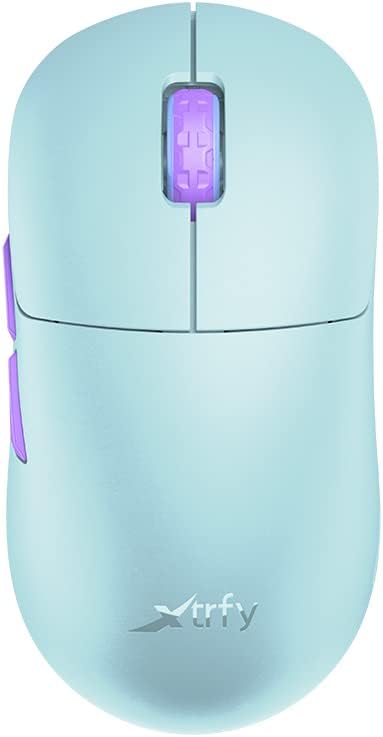
Image: The Xtrfy M8 Wireless Gaming Mouse in Frosty Mint, showcasing njegovim ergonomskim dizajnom.
A key design feature is its ultra-low front, measuring just 4mm, which allows for a unique grip style.

Slika: Krupni plan view of the Xtrfy M8 mouse's front, highlighting its low profile od 4mm.
Sadržaj paketa
Provjerite da li se sve stavke nalaze u vašem paketu:
- Xtrfy M8 Wireless Gaming Mouse
- USB-C kabl za punjenje
- USB Wireless Receiver (Dongle)
- USB-A to USB-C Adapter (for receiver extension)
- Uputstvo za upotrebu (ovaj dokument)

Image: The USB-C charging cable and the USB wireless receiver (dongle) for the Xtrfy M8 mouse.
Setup
- Napunite miša: Before first use, connect the USB-C charging cable to the mouse and a powered USB port. The mouse has an internal Lithium Ion battery.
- Connect the USB Wireless Receiver:
- Insert the USB wireless receiver directly into an available USB-A port on your computer.
- For optimal signal strength or if your computer's USB port is not easily accessible, use the provided USB-A to USB-C adapter with the charging cable to extend the receiver closer to the mouse.
- Uključivanje miša: Locate the power switch on the underside of the mouse. Slide the switch to the "ON" position.
- Automatsko povezivanje: The mouse should automatically connect to the receiver. No additional pairing software is typically required for 2.4 GHz wireless operation.

Image: The underside of the Xtrfy M8 mouse, displaying the power switch, optical sensor, and hardware adjustment buttons.
Uputstvo za upotrebu
The Xtrfy M8 mouse features standard left and right click buttons, a scroll wheel, and two side buttons. All functions are plug-and-play compatible with most operating systems.
Hardware Adjustments
The Xtrfy M8 allows for on-the-fly adjustment of key performance settings directly from the mouse hardware, without the need for software. These settings are typically located on the underside of the mouse.
- DPI/CPI (Dots Per Inch / Counts Per Inch): Adjusts mouse sensitivity. Use the dedicated button on the mouse bottom to cycle through preset DPI levels. An indicator light may change color to show the current setting.
- Polling Rate (PR): Determines how often the mouse reports its position to the computer. Higher polling rates (e.g., 1000 Hz) provide smoother tracking but consume more battery.
- Udaljenost uzlijetanja (LOD): Controls how high the mouse can be lifted before tracking stops. A lower LOD prevents unwanted cursor movement when repositioning the mouse.
Refer to the markings near the buttons on the mouse's underside for specific adjustment procedures.

Slika: Sa strane view of the Xtrfy M8 mouse, highlighting the main click buttons, scroll wheel, and two programmable side buttons.
Punjenje i baterija
The Xtrfy M8 Wireless Gaming Mouse is equipped with a rechargeable Lithium Ion battery. To charge the mouse, connect the supplied USB-C cable to the front port of the mouse and the other end to a powered USB port on your computer or a USB wall adapter.
- A small LED indicator on the mouse will typically show charging status (e.g., solid light for charging, off or different color for fully charged).
- The mouse can be used while charging, though the cable connection point may feel unusual during active use.
- Battery life varies based on usage and polling rate settings.
Održavanje
Proper maintenance ensures the longevity and performance of your Xtrfy M8 mouse.
- čišćenje: Koristite meku, suhu krpu za brisanje površine miša. Za tvrdokornu prljavštinu, lagano obrišiteampNapržite krpu vodom. Izbjegavajte jake hemikalije ili abrazivne materijale.
- senzor: Održavajte optički senzor na donjoj strani miša čistim i bez prašine ili ostataka. Po potrebi koristite pamučni štapić ili komprimirani zrak.
- Skladištenje: Kada se miš ne koristi duži period, čuvajte ga na suhom i hladnom mjestu.
- Održavanje kablova: Avoid sharp bends or excessive pulling on the USB-C charging cable to prevent damage.
Rješavanje problema
If you encounter issues with your Xtrfy M8 mouse, refer to the following common solutions:
- Miš ne reaguje:
- Uvjerite se da je miš uključen.
- Check if the USB wireless receiver is securely plugged into a working USB port.
- Verify the mouse battery is charged. Connect the charging cable and observe the indicator light.
- Pokušajte uključiti prijemnik u drugi USB priključak.
- Kašnjenje ili prekidi veze:
- Provjerite je li prijemnik blizu miša i nije blokiran metalnim predmetima.
- Avoid placing the receiver near other wireless devices that may cause interference (e.g., Wi-Fi routers, other wireless peripherals).
- Lower the polling rate setting on the mouse if experiencing frequent disconnections in a crowded wireless environment.
- Netačno praćenje:
- Očistite optički senzor na donjoj strani miša.
- Pazite da miš koristite na odgovarajućoj površini (preporučuje se podloga za miša).
- Adjust the DPI/CPI settings to a comfortable level.
- Scroll Wheel Issues (e.g., jumping):
- Ensure the mouse firmware is up to date (check the Xtrfy official website for any available updates).
- If the issue persists, contact Xtrfy customer support.
Specifikacije
| Broj modela | M8 |
| Brand | Xtrfy |
| Tehnologija povezivanja | Radio Frequency (2.4 GHz), USB (for charging/wired mode) |
| Tehnologija detekcije pokreta | Optički |
| Posebne karakteristike | Lagan, bežični |
| Težina artikla | 1.94 unci (približno 55 grama) |
| Baterije | 1 litijum-jonska baterija (uključena) |
| Dimenzije paketa | 7.32 x 4.06 x 2.44 inča |
| ASIN | B0BMLF5FMT |
| Datum prve dostupnosti | 16. novembra 2022 |
Garancija i podrška
The Xtrfy M8 Wireless Gaming Mouse typically comes with a 1-year manufacturer's warranty. For specific warranty details, claims, or technical support, please contact Xtrfy directly through their official website.
Xtrfy Official Webstranica: www.xtrfy.com
Always refer to the manufacturer's official resources for the most current support information and firmware updates.