
Uvod
This manual provides instructions for the Kapbom KA685 Wireless Keyboard and Mouse combo. This slim, 2.4GHz wireless input device is designed for use with computers, laptops, and notebooks, offering a smooth, quiet, and fast typing experience.

Slika: Krupni plan view of the Kapbom KA685 wireless keyboard, highlighting the slim, white keys on a silver base.
Sadržaj paketa
- 1 x bežična tastatura
- 1 x bežični miš
- 1 x USB prijemnik
Napomena: Baterije nisu uključene i moraju se kupiti zasebno.
Setup
1. Instalacija baterije
The keyboard requires 2 AAA batteries, and the mouse requires 1 AA battery. Ensure correct polarity when inserting batteries.
- tastatura: Open the battery compartment located on the underside of the keyboard. Insert 2 AAA batteries.
- miš: Open the battery compartment on the underside of the mouse. Insert 1 AA battery.

Image: The underside of the Kapbom KA685 keyboard, illustrating the battery compartment for two AAA batteries and the storage slot for the USB receiver.
2. Povezivanje USB prijemnika
- Locate the USB receiver, which is typically stored within the keyboard's battery compartment or a dedicated slot.
- Uključite USB prijemnik u slobodan USB port na vašem računaru.
- The system should automatically detect and install the necessary drivers. No manual driver installation is usually required.
Uputstvo za upotrebu
Once the batteries are installed and the USB receiver is connected, the keyboard and mouse should be ready for use.
- Ensure any power switches on the keyboard and mouse (if present, usually on the underside) are in the 'ON' position.
- The devices will automatically connect to your computer via the 2.4GHz wireless signal.
- Begin typing with the keyboard and navigating with the mouse.
Karakteristike
2.4 GHz bežična tehnologija
The Kapbom KA685 utilizes advanced 2.4GHz wireless technology, providing a strong, reliable, and secure connection with an extended operating range and reduced interference from other wireless devices.
Slim Design Keyboard
Tastatura ima tanki profesionalni dizajnfile and thin keys, designed to provide a smooth, quiet, and efficient typing experience, enhancing comfort and speed.
Adjustable DPI Mouse
The optical mouse offers three adjustable DPI (Dots Per Inch) levels: 800, 1200, and 1600. This allows you to customize cursor sensitivity to suit different tasks, from precise work to faster navigation. Press the DPI button on the mouse to cycle through these settings.
Tihi klik miš
The mouse is equipped with silent click buttons, significantly reducing clicking noise. This feature is beneficial for maintaining a quiet work environment, especially in shared spaces.

Image: An illustration detailing the Kapbom KA685 mouse's features, including three adjustable DPI settings (800, 1200, 1600) and its silent click mechanism, shown with a sleeping baby to emphasize quiet operation.
Održavanje
Zamjena baterije
When the keyboard or mouse performance degrades (e.g., delayed response, intermittent connection), it is time to replace the batteries. The keyboard can operate for up to 12 months on a fresh set of AAA batteries.
Čišćenje
To clean the keyboard and mouse, use a soft, dry, lint-free cloth. For stubborn dirt, a slightly damp Može se koristiti krpa, pazeći da vlaga ne uđe u uređaj. Izbjegavajte jake hemikalije ili abrazivne materijale.
Rješavanje problema
- No response from keyboard or mouse:
Check if the batteries are correctly installed and have sufficient charge. Replace batteries if necessary. Ensure the USB receiver is securely plugged into a working USB port on your computer. Try plugging the receiver into a different USB port. Make sure any power switches on the devices are turned 'ON'. - Kašnjenje ili povremena veza:
Move the keyboard and mouse closer to the USB receiver. Avoid placing the receiver near large metal objects or other wireless devices (like Wi-Fi routers, cordless phones) that may cause interference. - Mouse cursor moves erratically:
Ensure the mouse sensor is clean and free from debris. Use the mouse on a clean, non-reflective surface. Adjust the DPI setting to a lower value if the cursor is too sensitive.
Specifikacije
| Model | KA685 |
| Povezivanje | 2.4 GHz bežični |
| Baterije za tastaturu | 2 x AAA (nije uključeno) |
| Baterije za miševe | 1 x AA (nije uključeno) |
| Nivoi DPI-ja miša | 800, 1200, 1600 |
| Keyboard Dimensions (approx.) | 28.5 cm (dužina) x 13.5 cm (širina) |
| Dimenzije miša (približno) | 11.5 cm (Dužina) x 2 cm (Visina) |
| Proizvođač | Kapbom |
| ASIN | B0BK2Q3XM5 |
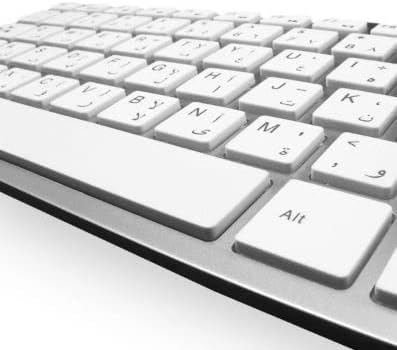
Image: Diagram showing the approximate dimensions of the Kapbom KA685 wireless keyboard (28.5cm x 13.5cm) and mouse (11.5cm x 2cm).
Garancija i podrška
This Kapbom KA685 Wireless Keyboard and Mouse combo comes with a 3-mjesečna garancija obezbedio dobavljač.
For warranty claims, technical assistance, or any product-related inquiries, please contact your original retailer or the supplier directly. Please retain your proof of purchase for warranty validation.