
Uvod
The AQIRYS Mira is a compact 65% mechanical keyboard designed for versatility and performance. It offers triple connectivity options: wired USB-C, 2.4GHz wireless, and Bluetooth, making it compatible with PC, Mac, mobile devices, and consoles. Featuring Outemu Red mechanical switches, N-key rollover, full anti-ghosting, and dynamic RGB backlighting, the Mira keyboard provides a responsive and customizable typing and gaming experience. Its hot-swap design allows for easy switch replacement.
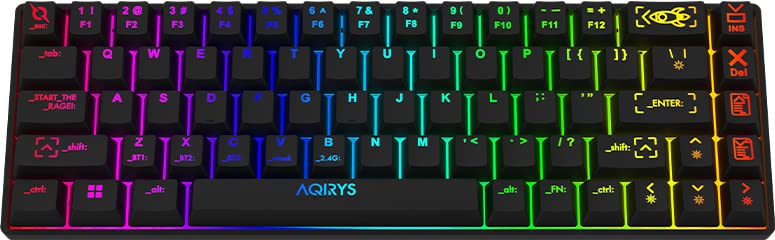
Image: The AQIRYS Mira 65% Mechanical Keyboard, showcasinzahvaljujući kompaktnom rasporedu i živopisnom RGB pozadinskom osvjetljenju.
Setup
Sadržaj paketa
- AQIRYS Mira 65% Mechanical Keyboard
- USB-C na USB-A kabel
- 2.4GHz Wireless Dongle (typically stored in the keyboard's battery compartment or a dedicated slot)
- Keycap Puller (optional, for maintenance)
- Switch Puller (optional, for maintenance)
Punjenje tastature
Before initial use, ensure the keyboard is fully charged. Connect the provided USB-C cable to the keyboard's USB-C port and the other end to a powered USB port on your computer or a USB wall adapter. The charging indicator will show the charging status.
Načini povezivanja
The AQIRYS Mira keyboard supports three connection modes: Wired, 2.4GHz Wireless, and Bluetooth. A switch on the keyboard (usually on the back or side) allows you to select the desired mode.
1. Žična veza
- Set the mode switch on the keyboard to the 'Wired' or 'USB' position.
- Povežite USB-C kabl sa tastaturom, a USB-A kraj sa računarom.
- Vaš operativni sistem će automatski prepoznati tastaturu.
2. Bežična veza od 2.4 GHz
- Locate the 2.4GHz USB dongle.
- Uključite USB adapter u dostupan USB priključak na računaru ili uređaju.
- Postavite prekidač za način rada na tastaturi u položaj '2.4G'.
- Tastatura bi se trebala automatski povezati. Ako ne, pritisnite Fn + P na 3 sekunde da započnete uparivanje.
3. Bluetooth veza
The keyboard can pair with up to three different Bluetooth devices.
- Postavite prekidač za način rada na tastaturi u položaj 'BT'.
- To enter pairing mode for a specific slot (BT1, BT2, or BT3), press and hold Fn + Q (za BT1), Fn + W (za BT2), ili Fn + E (for BT3) for 3-5 seconds. The corresponding key (Q, W, or E) will flash rapidly, indicating pairing mode.
- On your device (PC, Mac, mobile), enable Bluetooth and search for new devices. Select "AQIRYS Mira" from the list.
- Once paired, the flashing light will become solid for a few seconds and then turn off.
- Za prebacivanje između uparenih Bluetooth uređaja, kratko pritisnite Fn + Q, Fn + W, ili Fn + E.

Slika: Sa strane view of the AQIRYS Mira keyboard, highlighting the USB-C port for wired connection and charging.
Uputstvo za upotrebu
Ključne funkcije i kombinacije
The AQIRYS Mira keyboard features a 68-key US layout. Many functions are accessed via the Fn ključ u kombinaciji s drugim ključevima.
- Fn + 1/2/3: Switch between Bluetooth devices (BT1, BT2, BT3).
- Fn + P: Initiate 2.4GHz pairing (hold for 3 seconds).
- Fn + Backspace: Ključ za brisanje.
- Fn + \|: Toggle backlight effects.
- Fn + [{: Smanjite svjetlinu pozadinskog osvjetljenja.
- Fn + ]}: Povećajte svjetlinu pozadinskog osvjetljenja.
- Fn + ;:: Smanjite brzinu pozadinskog osvjetljenja.
- Fn + '"': Povećajte brzinu pozadinskog osvjetljenja.
- Fn + ,<: Decrease backlight color (for static modes).
- Fn + .>: Increase backlight color (for static modes).
- Fn + strelica lijevo: Prethodna pjesma.
- Fn + strelica desno: Sljedeća pjesma.
- Fn + strelica gore: Jačina zvuka.
- Fn + strelica prema dolje: Smanjite jačinu zvuka
- Fn + Enter: Pusti/Pauza.
- Fn + Win: Zaključavanje/otključavanje tipke Windows.
Prilagođavanje pozadinskog osvetljenja
The keyboard features full RGB dynamic backlighting. Basic adjustments can be made using Fn key combinations as listed above. For in-depth customization, including per-key lighting and advanced effects, connect the keyboard in wired mode and use the dedicated AQIRYS software (available for download from the official AQIRYS webweb lokacija).
N-Key Rollover and Anti-Ghosting
The Mira keyboard supports N-key rollover and full anti-ghosting, ensuring that every keystroke is registered accurately, even when multiple keys are pressed simultaneously. This is particularly beneficial for fast typing and gaming.
Hot-Swap Switch Design
The keyboard's hot-swap design allows you to change mechanical switches without soldering. It is compatible with Outemu 3-pin switches. This feature enables customization of typing feel and easy replacement of faulty switches.
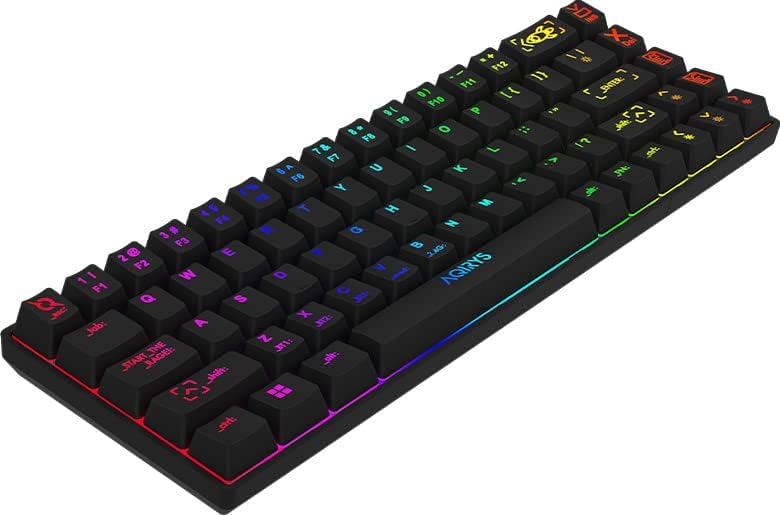
Image: Close-up of the AQIRYS Mira keyboard's keycaps, illustrating the US layout and RGB backlighting.
Održavanje
Čišćenje tastature
- Uklanjanje prašine: Koristite limenku komprimiranog zraka da otpuhate prašinu i ostatke između tipki.
- Čišćenje površine: Gently wipe the keycaps and chassis with a soft, lint-free cloth dampisperite malom količinom vode ili blagim, neabrazivnim sredstvom za čišćenje. Izbjegavajte prekomjernu vlagu.
- Dubinsko čišćenje: For thorough cleaning, you may use a keycap puller to remove keycaps and clean the switches and plate underneath. Ensure the keyboard is powered off and disconnected before removing keycaps.
Switch Replacement (Hot-Swap)
The AQIRYS Mira keyboard features hot-swappable switches, allowing for easy replacement without soldering.
- Iskljuciti: Ensure the keyboard is disconnected from power and turned off.
- Uklonite kapicu tipke: Use a keycap puller to carefully remove the keycap from the switch you wish to replace.
- Ukloni prekidač: Use a switch puller to grasp the top and bottom clips of the switch. Gently pull the switch straight up and out of the PCB.
- Umetni novi prekidač: Align the pins of the new Outemu 3-pin compatible switch with the holes on the PCB. Press the switch firmly until it clicks into place. Ensure the pins are not bent.
- Zamjena tipkovnice: Vratite kapicu tipke na novi prekidač.

Slika: Alternativa view of the AQIRYS Mira keyboard, highlighting the keycap profiles and overall design.
Rješavanje problema
- Tastatura ne reaguje (žična):
- Provjerite je li USB-C kabel sigurno povezan i s tastaturom i s računarom.
- Pokušajte s drugim USB portom na svom računaru.
- Ensure the keyboard mode switch is set to 'Wired' or 'USB'.
- Keyboard not responding (2.4GHz Wireless):
- Ensure the 2.4GHz USB dongle is securely plugged into your device.
- Ensure the keyboard mode switch is set to '2.4G'.
- Provjerite je li baterija tastature napunjena.
- Try re-pairing by holding Fn + P na 3 sekunde.
- Problemi s uparivanjem putem Bluetootha:
- Ensure the keyboard mode switch is set to 'BT'.
- Provjerite je li Bluetooth na vašem uređaju omogućen i vidljiv.
- Make sure the keyboard is in pairing mode (e.g., Fn + Q held for 3-5 seconds, with the key flashing).
- Forget the device from your computer's Bluetooth settings and try pairing again.
- Try pairing to a different Bluetooth slot (BT1, BT2, BT3).
- Tipke se ne registruju ili se tipkaju dvaput:
- Provjerite ima li ostataka ispod tipke ili oko prekidača.
- Ako je određeni prekidač neispravan, razmislite o njegovoj zamjeni pomoću funkcije zamjene tokom rada.
- Backlight not working or dim:
- Provjerite je li baterija tastature napunjena.
- Podesite svjetlinu pomoću Fn + [{ i Fn + ]}.
- Cycle through backlight effects using Fn + \|.
- If using software, ensure settings are correctly applied.
Specifikacije
| Brand | AQIRYS |
| Model | Mira |
| Povezivanje | 2.4 GHz bežično, Bluetooth, USB-C žičano |
| Layout | US Layout, 68 Keys (65% Form Factor) |
| Prekidači | Outemu Red Mechanical (Linear, 4mm travel, 47gF actuation) |
| Anti-Ghosting | N-Key Rollover, Full Anti-Ghosting |
| Pozadinsko osvetljenje | Full RGB Dynamic Backlight |
| Baterija | 1300 mAh litijumska baterija |
| Kompatibilnost | PC (Windows 10), Mac, Mobile (Smartphone, Tablet), Console |
| Dimenzije proizvoda | 30.8 x 10.1 x 3.9 cm |
| Težina artikla | 900 g |
| Materijal | Plastika, guma |
| Uključene komponente | USB kabel |
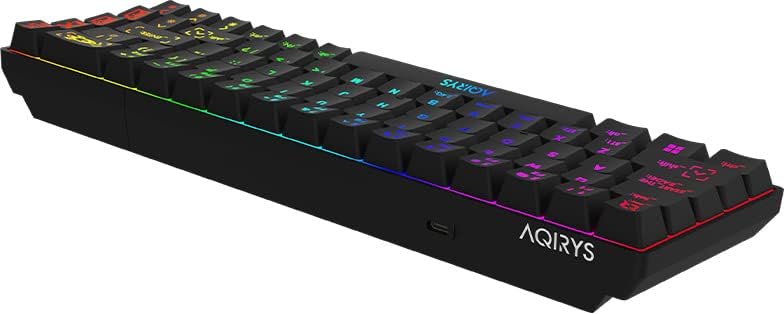
Image: A low-angle view of the AQIRYS Mira keyboard, highlighting the chassis design and rubber coating.
Informacije o garanciji
For detailed warranty terms and conditions, please refer to the warranty card included with your product or visit the official AQIRYS website. Warranty coverage typically includes manufacturing defects for a specified period from the date of purchase. Keep your proof of purchase for warranty claims.
Korisnička podrška
If you encounter any issues not covered in this manual or require further assistance, please visit the AQIRYS official website for support resources, FAQs, and contact information for customer service. You may also reach out to your retailer for product support.