
1. Uvod
Thank you for choosing the VBESTLIFE S21 Ultra Unlocked Cell Phone. This manual provides essential information for setting up, operating, and maintaining your device. Please read it carefully to ensure proper use and to maximize the phone's features. This smartphone features a 6.1-inch HD display, dual SIM capability, and runs on the Android 11 operating system.
2. Sigurnosne informacije
- Ne izlažite uređaj ekstremnim temperaturama, direktnoj sunčevoj svjetlosti ili visokoj vlažnosti.
- Izbjegavajte ispuštanje ili izlaganje telefona jakim udarcima.
- Koristite samo odobrene punjače i dodatnu opremu kako biste spriječili oštećenja i osigurali sigurnost.
- Keep the device away from medical implants and pacemakers.
- Ne pokušavajte sami rastavljati ili popravljati telefon. Obratite se kvalifikovanom servisnom osoblju.
- Uređaj i njegovu bateriju odložite odgovorno u skladu s lokalnim propisima.
3. Sadržaj paketa
Provjerite da li su sve stavke prisutne u kutiji:
- VBESTLIFE S21 Ultra Unlocked Cell Phone
- Adapter (US plug)
- USB kabel
- Slušalice
- Alat za izbacivanje SIM kartice
- Zaštitna torbica
- Screen Protector
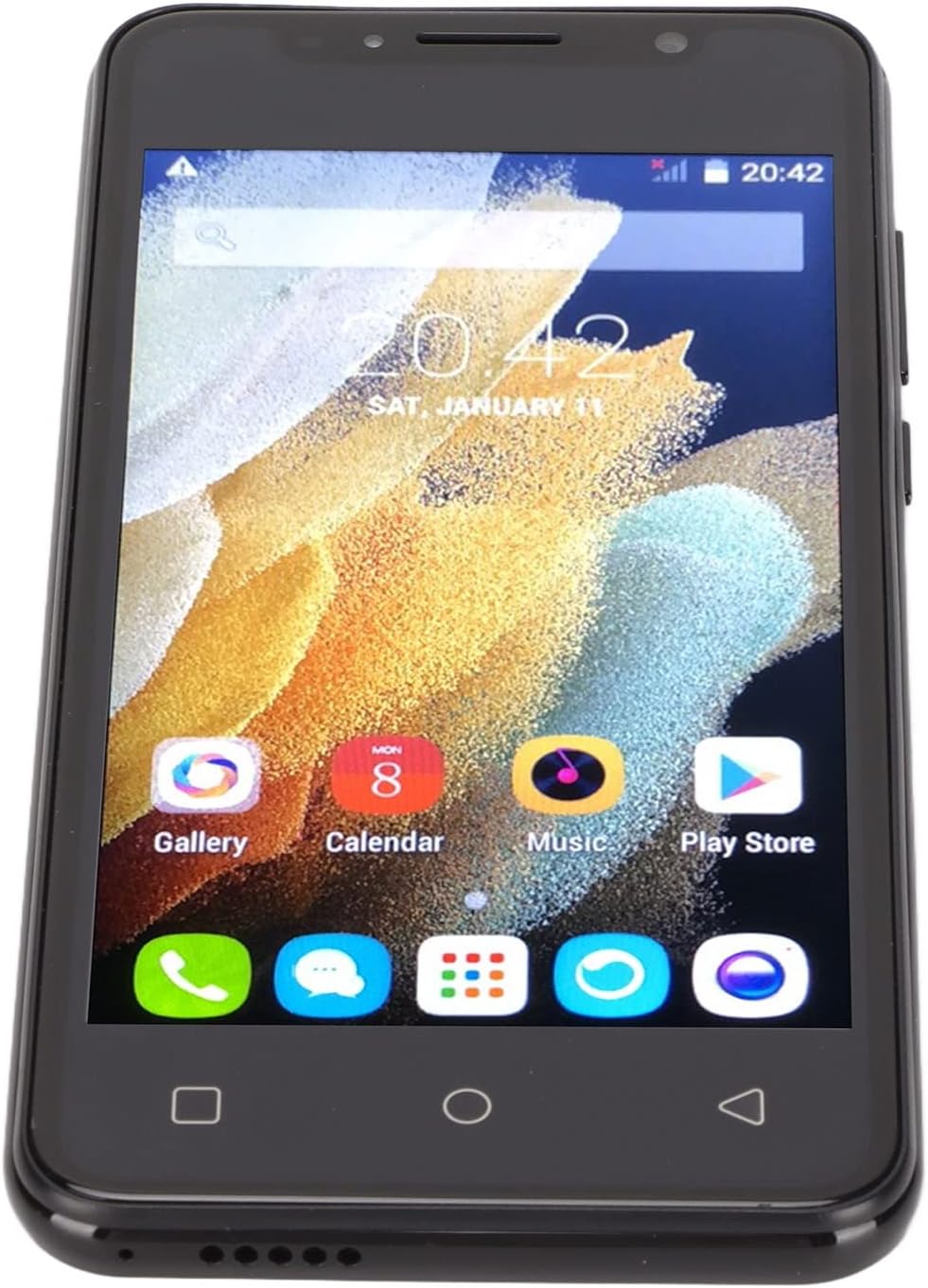
Image: The VBESTLIFE S21 Ultra phone displayed with its accessories, including a charger, USB cable, headphones, SIM ejector tool, protective case, and screen protector.
4. Device Overview
Familiarize yourself with the physical features and components of your VBESTLIFE S21 Ultra smartphone.

Slika: Prednja i zadnja strana views of the VBESTLIFE S21 Ultra phone, highlighting its design and displaying key specifications such as model, resolution, screen size, RAM, and ROM.

Slika: Ugaona view showcasing both the front display and the rear camera module of the VBESTLIFE S21 Ultra smartphone.
4.1 Prikaz
The phone features a 6.1-inch HD+ display with a resolution of 1440 x 3200 pixels, offering a clear and vibrant visual experience.

Image: A user holding the VBESTLIFE S21 Ultra phone, which displays a scenic image on its 6.1-inch HD+ screen.
5. Podešavanje
5.1 Inserting SIM and Memory Card
The VBESTLIFE S21 Ultra supports dual SIM cards and one small memory card simultaneously. Use the provided SIM ejector tool to open the SIM tray.
- Pronađite ladicu za SIM karticu sa strane telefona.
- Umetnite alat za izbacivanje SIM kartice u mali otvor pored ladice i lagano gurnite dok ladica ne iskoči.
- Umetnite svoje Nano SIM kartice u predviđene utore za SIM1 i SIM2.
- If using, insert a small memory card into its dedicated slot.
- Pažljivo gurnite nosač nazad u telefon dok ne klikne na svoje mjesto.

Image: A diagram illustrating the correct placement of two SIM cards (SIM1 and SIM2) and a memory card into the phone's tray.
5.2 Početno uključivanje
Press and hold the Power button located on the side of the phone until the screen lights up. Follow the on-screen prompts to complete the initial setup, including language selection, Wi-Fi connection, and Google account setup.
5.3 Punjenje uređaja
Connect the USB cable to the phone's charging port and plug the adapter into a power outlet. The battery indicator on the screen will show the charging status. For optimal battery life, fully charge the phone before first use.
6. Uputstvo za upotrebu
6.1 Osnovna navigacija
- dodir: Dodirnite ikonu da biste otvorili aplikaciju ili odabrali stavku.
- Prevucite: Prevucite prstom preko ekrana da biste se pomicali ili kretali između ekrana.
- štipanje: Koristite dva prsta za zumiranje ili smanjivanje fotografija i web stranice.
- Dugme za početnu stranicu: Vraća se na početni ekran.
- Dugme za povratak: Vraća se na prethodni ekran.
- Dugme za nedavne aplikacije: Prikazuje nedavno korištene aplikacije.
6.2 Upućivanje poziva i slanje poruka
Tap the Phone icon to access the dialer. Enter the number and tap the call button. To send a message, tap the Messages icon, select a contact or enter a number, type your message, and send.
6.3 Povezivanje s mrežama
- Wi-Fi: Go to Settings > Network & internet > Wi-Fi. Turn Wi-Fi on and select your desired network. Enter the password if required.
- Bluetooth: Idite u Postavke > Povezani uređaji > Bluetooth. Uključite Bluetooth i uparite uređaj s dostupnim uređajima.
- Mobilni podaci: Provjerite je li vaša SIM kartica aktivna i jesu li mobilni podaci omogućeni u Postavke > Mreža i internet > Mobilna mreža.
6.4 Korištenje kamere
Tap the Camera icon to open the camera application. The phone features a 24-megapixel front camera (f/2.0 aperture) and a 48-megapixel rear camera (f/1.8 aperture) with autofocus.
- Dodirnite dugme okidača da biste snimili fotografiju.
- Prebacujte se između prednje i zadnje kamere pomoću ikone za prebacivanje kamere.
- Explore various shooting modes and settings within the camera app.

Image: Details on the HD Front and Rear Camera specifications, including megapixels and aperture for the VBESTLIFE S21 Ultra.
6.5 Prepoznavanje lica
The VBESTLIFE S21 Ultra supports face recognition for quick and secure unlocking.
- Idite u Postavke > Sigurnost > Otključavanje licem.
- Slijedite upute na ekranu da biste registrovali svoje lice. Pobrinite se da se nalazite u dobro osvijetljenom prostoru.
- Nakon registracije, možete otključati telefon jednostavnim pogledom u prednju kameru.

Image: An illustration demonstrating the facial recognition feature, where the front camera recognizes faces for quick unlocking.
7. Održavanje
7.1 Čišćenje
Use a soft, lint-free cloth to clean the phone's screen and body. Avoid using harsh chemicals or abrasive materials that could damage the device.
7.2 Njega baterija
- Izbjegavajte često potpuno pražnjenje baterije.
- Ne ostavljajte telefon da se puni duže vrijeme nakon što je potpuno napunjen.
- Keep the phone within a moderate temperature range to prevent battery degradation.
7.3 Ažuriranja softvera
Regularly check for software updates to ensure your phone has the latest features and security patches. Go to Settings > System > System update to check for and install available updates.
8. Otkrivanje problema
| Problem | Rješenje |
|---|---|
| Telefon se ne uključuje | Ensure the battery is charged. Connect to a charger for at least 30 minutes. If it still doesn't turn on, perform a forced restart (hold Power button for 10-15 seconds). |
| Nije moguće povezati se na Wi-Fi | Check if Wi-Fi is enabled in settings. Restart your router and the phone. Verify the Wi-Fi password. |
| Loš kvalitet poziva | Provjerite jačinu mrežnog signala. Premjestite se na područje s boljim prijemom. Provjerite da ništa ne blokira mikrofon ili zvučnik. |
| Aplikacije se ruše ili zamrzavaju | Close and reopen the app. Clear the app's cache (Settings > Apps > [App Name] > Storage > Clear cache). Restart the phone. |
| Baterija se brzo prazni | Reduce screen brightness. Close unused apps. Turn off Wi-Fi, Bluetooth, and GPS when not in use. Check battery usage in settings to identify power-hungry apps. |
9. Specifikacije
Detailed technical specifications for the VBESTLIFE S21 Ultra Unlocked Cell Phone:
| Feature | Detalj |
|---|---|
| Brand | VBESTLIFE |
| Model | S21 Ultra |
| Operativni sistem | Android 11.0 |
| RAM memorija | 512 MB |
| Kapacitet pohrane | 4 GB |
| Veličina ekrana | 6.1 inča |
| Rezolucija ekrana | 1440 x 3200 piksela |
| Display Type | LCD |
| Wireless Carrier | Otključano |
| Cellular Technology | 4G |
| Tehnologija povezivanja | USB, Wi-Fi |
| Boja | Crna |
| Broj utora za SIM kartice | Dual SIM |
| Tip konektora | 3.5 mm Jack |
| Biometrijska sigurnost | Prepoznavanje lica |
| Rezolucija prednje kamere | 3 MP |
| Rezolucija zadnje kamere | 48 MP |
| Kapacitet baterije | 2500 Milliamp Sati |
| Vrsta baterije | Litijum-jonski |
| Rezolucija video snimanja | 4k at 24 fps |
| Nivo vodootpornosti | Nije vodootporan |

Image: A summary of key features for the S21 Ultra Unlocked Smartphone, including screen size, camera, dual SIM, battery, memory, and face recognition.
10. Garancija i podrška
For warranty information and technical support, please refer to the documentation provided with your purchase or contact VBESTLIFE customer service. Keep your proof of purchase for warranty claims.