
1. Uvod
Hvala na kupoviniasing the Mediacom MCI SK22 Bluetooth Karaoke Speaker. This portable and rechargeable speaker system is designed to provide high-quality audio for music playback and karaoke performances. It comes equipped with two professional wireless microphones, offering a versatile entertainment experience for various occasions.
2. Sigurnosne informacije
- Prije upotrebe proizvoda pažljivo pročitajte sva uputstva.
- Držite zvučnik dalje od vode, vlage i ekstremnih temperatura.
- Ne pokušavajte sami rastavljati ili popravljati uređaj. Sve servisne radove prepustite kvalifikovanom osoblju.
- Za punjenje koristite samo priloženi adapter za napajanje.
- Izbjegavajte stavljanje teških predmeta na zvučnik.
- Osigurajte odgovarajuću ventilaciju oko zvučnika tokom upotrebe.
3. Sadržaj paketa
Molimo označite kućicu za sljedeće stavke:
- Mediacom MCI SK22 Bluetooth Karaoke Speaker
- 2 x bežična mikrofona
- Daljinski upravljač
- Adapter za napajanje
- Uputstvo za upotrebu
4. Proizvod je gotovview
Familiarize yourself with the various parts and controls of your MCI SK22 speaker.
4.1 Prednji View with Microphones

Slika: Front view of the Mediacom MCI SK22 speaker, showcasing the main unit and the two accompanying wireless microphones.
4.2 Strana View

Slika: Sa strane view of the Mediacom MCI SK22 speaker, highlighting its compact and portable design.
4.3 Pozadi View s portovima

Slika: Stražnja strana view of the Mediacom MCI SK22 speaker, displaying the various input and output ports for connectivity.
4.4 Speaker Dimensions
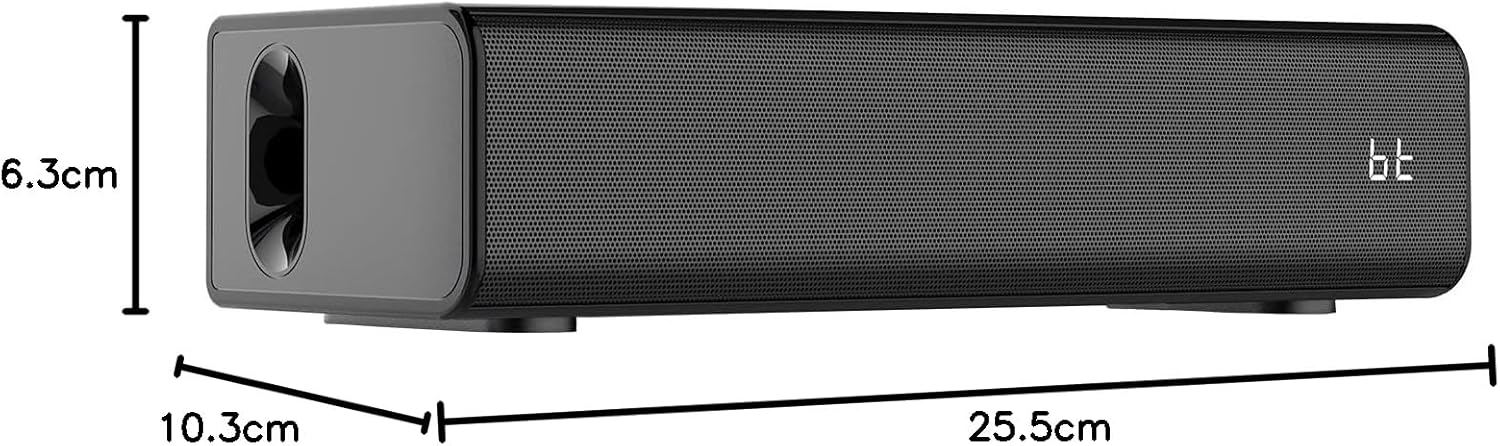
Image: A diagram illustrating the length, width, and height of the Mediacom MCI SK22 speaker.
5. Podešavanje
5.1 Punjenje zvučnika
- Spojite priloženi adapter za napajanje na priključak za punjenje zvučnika.
- Uključite adapter za struju u odgovarajuću utičnicu.
- The charging indicator light will illuminate. Allow the speaker to fully charge before first use (approximately X hours, refer to LED indicator for full charge).
5.2 Uključivanje/isključivanje
- To power on, press and hold the Power button on the speaker or remote control until the display illuminates.
- Da biste isključili napajanje, ponovo pritisnite i držite dugme za napajanje.
5.3 Podešavanje mikrofona
- Ensure the wireless microphones have fresh batteries installed.
- Turn on the microphones using their respective power switches. They should automatically connect to the speaker.
6. Uputstvo za upotrebu
6.1 Bluetooth uparivanje
- Turn on the speaker. The Bluetooth indicator will flash, indicating it is in pairing mode.
- Na svom uređaju (pametnom telefonu, tabletu itd.) omogućite Bluetooth i potražite dostupne uređaje.
- Select "MCI SK22" from the list. Once paired, the Bluetooth indicator will stop flashing and remain solid.
6.2 Reprodukcija s USB-a
- Umetnite USB fleš disk koji sadrži MP3 audio zapis fileu USB priključak na zvučniku.
- The speaker will automatically switch to USB mode and begin playing music. Use the speaker's or remote's controls to navigate tracks.
6.3 AUX ulaz
- Connect an external audio device (e.g., TV, computer, music player) to the speaker's AUX input port using a 3.5mm audio cable (not included).
- The speaker will automatically switch to AUX mode. Adjust volume from both the speaker and the connected device.
6.4 Microphone Usage and Echo Effects
- Once connected, speak or sing into the wireless microphones.
- Use the dedicated controls on the speaker or remote to adjust microphone volume and apply echo effects for an enhanced karaoke experience.
6.5 Kontrola jačine zvuka
- Adjust the main speaker volume using the volume controls on the speaker or the remote control.
- Individual microphone volume can be adjusted separately.
7. Održavanje
- čišćenje: Koristite meku, suhu krpu za čišćenje površine zvučnika. Nemojte koristiti abrazivna sredstva za čišćenje ili rastvarače.
- Skladištenje: Kada se ne koristi duži period, zvučnik čuvajte na hladnom i suhom mjestu, dalje od direktne sunčeve svjetlosti i ekstremnih temperatura.
- Održavanje baterije: To prolong battery life, fully charge the speaker before storing it for long periods and recharge it every few months.
8. Otkrivanje problema
| Problem | Mogući uzrok | Rješenje |
|---|---|---|
| Nema struje | Battery is low or depleted. Power adapter not connected. | Charge the speaker using the provided power adapter. Ensure the power adapter is securely connected to both the speaker and the power outlet. |
| Nema zvuka | Volume is too low. Incorrect input mode selected. Device not properly connected. | Increase the volume on the speaker and the connected device. Ensure the correct input mode (Bluetooth, USB, AUX) is selected. Check all cable connections. |
| Bluetooth se ne uparuje | Speaker is not in pairing mode. Device's Bluetooth is off. Interference. | Ensure the speaker's Bluetooth indicator is flashing. Turn off and on your device's Bluetooth. Move closer to the speaker and away from other wireless devices. |
| Mikrofoni ne rade | Microphone batteries are low. Microphones are not turned on. | Zamijenite baterije mikrofona. Provjerite jesu li mikrofoni uključeni. |
9. Specifikacije
| Feature | Detalj |
|---|---|
| Brand | Mediacom |
| Broj modela | MCI SK22 |
| Tehnologija povezivanja | Bluetooth, AUX, USB |
| Audio ulaz | Bluetooth, AUX, USB |
| Posebne karakteristike | Bass boost, USB port, Built-in microphone, Hi-Res Audio, Echo effects |
| Kompatibilni uređaji | Mobile Phone, iPhone, Laptop, Smartphone, TV, Computer, Tablet, Music Player, DVD Player |
| Izvor napajanja | Battery Powered |
| Materijal | Plastika |
| Boja | Crna |
| Dimenzije artikla (D x Š x V) | 10.3 x 25.5 x 6.3 cm |
| Težina artikla | 1.68 kilograma |
| Proizvođač | Kina |
10. Garancija i podrška
Mediacom products are designed for reliability and performance. For warranty information and technical support, please refer to the warranty card included in your package or visit the official Mediacom webSačuvajte račun kao dokaz o kupovini u slučaju bilo kakvih reklamacija.