
CaDA 61082W
Instruction Manual: Engineering Series 1:20 Scale Excavator Model
Brand: CaDA
Model: 61082W
1. Proizvod je gotovview
The CaDA Engineering Series 1:20 Scale Excavator Model is an advanced building set designed to replicate the intricate details and realistic features of a real excavator. This model provides an immersive building and play experience with its articulated arm, detailed driver's cab, and compressor room.
Ključne karakteristike uključuju:
- Authentic 1:20 scale design with lifelike appearance.
- Realistic features such as the articulated arm, driver's cab, and compressor room.
- Six operational doors that can be manually opened and closed.
- Three control knobs and a function switch for authentic excavator arm and chassis movements.

Figure 1.1: The CaDA Engineering Series Excavator Model (Model 61082W) and its packaging.
2. Sigurnosne informacije
UPOZORENJE: OPASNOST OD GUŠENJA
- Small parts. Not intended for children under 3 years.
- Preporučuje se nadzor odraslih tokom sastavljanja i igre.
- Držite sav materijal za pakovanje dalje od djece kako biste spriječili gušenje.
3. Šta se nalazi u kutiji
Your CaDA Engineering Series Excavator Model package includes:
- All necessary building blocks and components for the 1:20 Scale Excavator Model.
- One (1) Instruction Manual.
Note: The set does NOT include a power pack. Power pack and motors need to be purchased separately for motorization and remote control functions.
4. Postavljanje i montaža
Follow the detailed step-by-step instructions provided in the included Instruction Manual to assemble your excavator model. Ensure all parts are correctly identified and connected as per the diagrams.
4.1. Prva skupština
Begin by sorting the building blocks according to type and size. This will streamline the assembly process. Refer to the manual for specific part identification.

Slika 4.1: Bočna strana view of the assembled excavator model, showcasing its articulated arm and tracks.
4.2. Motorization (Optional)
For enhanced functionality, this model supports optional motorization. If you have purchased the separate power pack and motors, refer to the specific sections in the main instruction manual for their installation. The design allows for quick motorization by integrating the power pack and motors into designated compartments.
The motorization system typically includes:
- L size motors for boom/left track control, stick/right track control, and bucket/cabin control.
- Micro motor for lever control.
- 2.4GHz radio control battery box.
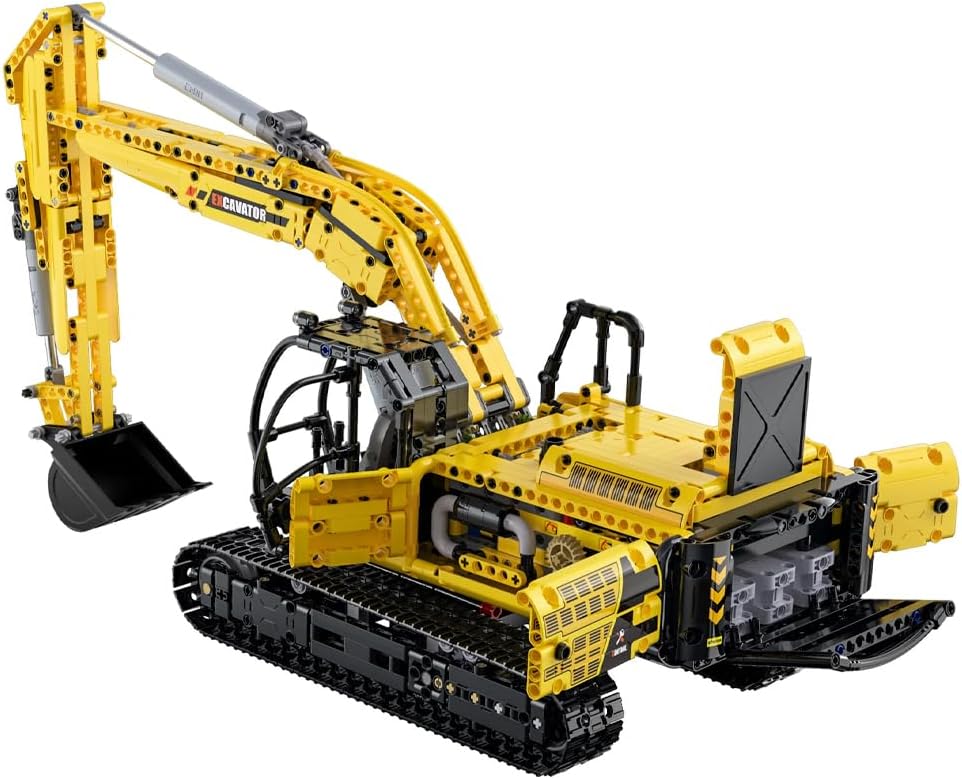
Slika 4.2: Pozadi view of the excavator with operational doors open, revealing internal components and potential motorization points.
5. Uputstvo za upotrebu
The excavator model features manual controls for various functions, providing an interactive experience. If motorized, the remote control will enable additional functionalities.
5.1. Chassis Control (Manual Slewing)
To control the chassis slewing (rotation), locate the designated knob. Rotate the knob down to engage, then turn the left knob to control the 360-degree rotation of the excavator's upper structure.

Figure 5.1: Illustration of manual chassis control for 360-degree slewing.
5.2. Arm and Bucket Control (Manual)
To control the excavator arm and bucket, locate the corresponding lever. Rotate the lever up to engage, then turn the right knob to control the movement of the arm and bucket, simulating hydraulic actions.

Figure 5.2: Illustration of manual arm and bucket control.
5.3. Operational Doors
The model features six operational doors that can be manually opened and closed to reveal internal details such as the compressor room and other mechanical components.
6. Održavanje
To ensure the longevity and optimal performance of your CaDA Excavator Model, follow these maintenance guidelines:
- čišćenje: Use a soft, dry cloth to gently wipe down the model. Avoid using harsh chemicals or abrasive materials, as they may damage the plastic.
- Skladištenje: Store the model in a cool, dry place away from direct sunlight and extreme temperatures. This helps prevent warping or discoloration of the plastic components.
- Rukovanje: Handle the model with care, especially the articulated arm and delicate moving parts, to prevent accidental breakage.
- Integritet dijela: Periodically check for any loose or damaged parts. Reattach or replace as necessary to maintain structural integrity.
7. Otkrivanje problema
If you encounter any issues with your excavator model, consider the following common solutions:
| Problem | Mogući uzrok | Rješenje |
|---|---|---|
| Parts do not fit together properly (too tight/loose). | Minor manufacturing variations; incorrect part orientation. | Ensure correct part is used and oriented as per manual. Apply gentle, even pressure. For very tight fits, slight rotation may help. For loose fits, re-check connections. |
| Nedostaju dijelovi. | Greška u pakovanju. | Carefully check all packaging materials. If parts are genuinely missing, contact CaDA customer support with your purchase details. |
| Manual functions (arm, chassis) are stiff. | Friction from new parts; incorrect assembly of gears/linkages. | Operate functions gently to break in new parts. Review assembly steps for the affected mechanism to ensure all connections are correct and free of obstruction. |
Za probleme koji nisu ovdje navedeni ili ako rješenja ne riješe problem, obratite se korisničkoj podršci.
8. Specifikacije
| Atribut | Detalj |
|---|---|
| Dimenzije proizvoda | 18.11 x 4.13 x 14.96 inča |
| Težina artikla | 7.19 funte |
| Broj modela | 61082W |
| Preporučena starost proizvođača | 8 godina i više |
| Datum izlaska | 20. novembra 2023 |
| Proizvođač | Kada |
9. Informacije o garanciji
Specific warranty details for the CaDA Engineering Series 1:20 Scale Excavator Model are typically provided with your purchase documentation or on the official CaDA webweb-mjesto. Molimo pogledajte te resurse za sveobuhvatne uvjete i odredbe garancije.
10. Korisnička podrška
For further assistance, inquiries about missing parts, or technical support, please visit the official CaDA brand store or contact their customer service directly.
CaDA Brand Store: Visit CaDA Store on Amazon
Note: No official seller videos are available for embedding based on the provided criteria.
Ask a question about this manual
Ask about setup, troubleshooting, compatibility, parts, safety, or missing instructions. Manuals+ will review the question and use this page’s manual context to help answer it.