
Uvod
Thank you for choosing the Glorious Gaming Model O Wireless Mouse. This manual provides essential information for setting up, operating, maintaining, and troubleshooting your new gaming mouse. Designed for competitive gaming, the Model O Wireless combines a superlight honeycomb design with lag-free 2.4GHz wireless technology and customizable RGB lighting to enhance your gaming experience.
Karakteristike proizvoda
- Superlight Design: Weighing only 69 grams, the honeycomb shell reduces weight while maintaining structural integrity and improving airflow.
- Lag-Free 2.4GHz Wireless: Experience ultra-low wireless latency for responsive and crisp clicks, ensuring no unexpected double-clicking.
- Produženi vijek trajanja baterije: Up to 71 hours of playtime with RGB lighting off, allowing for prolonged gaming sessions without frequent recharging.
- Wired & Wireless Modes: Includes a flexible USB-C Ascended charging cable for continuous performance even while charging.
- Ambidextrous Shape: Ergonomski dizajniran za udobno korištenje i ljevorukim i desnorukim korisnicima.
- Prilagodljivo RGB osvjetljenje: Personalize your mouse with various lighting effects and colors via the Glorious CORE software.
- Visokoprecizni optički senzor: Equipped with a Glorious BAMF sensor, offering up to 19,000 DPI and 400 IPS tracking speed for pinpoint accuracy.
- Izdržljivi prekidači: Features switches rated for 80 million clicks, ensuring long-lasting performance.
- G-Skates Premium PTFE Mouse Feet: Provides smooth gliding across any surface with minimal friction.

Slika: Od vrha prema dolje view of the Glorious Model O Wireless Gaming Mouse, showcasinsaćastim kućištem i živopisnim RGB osvjetljenjem.
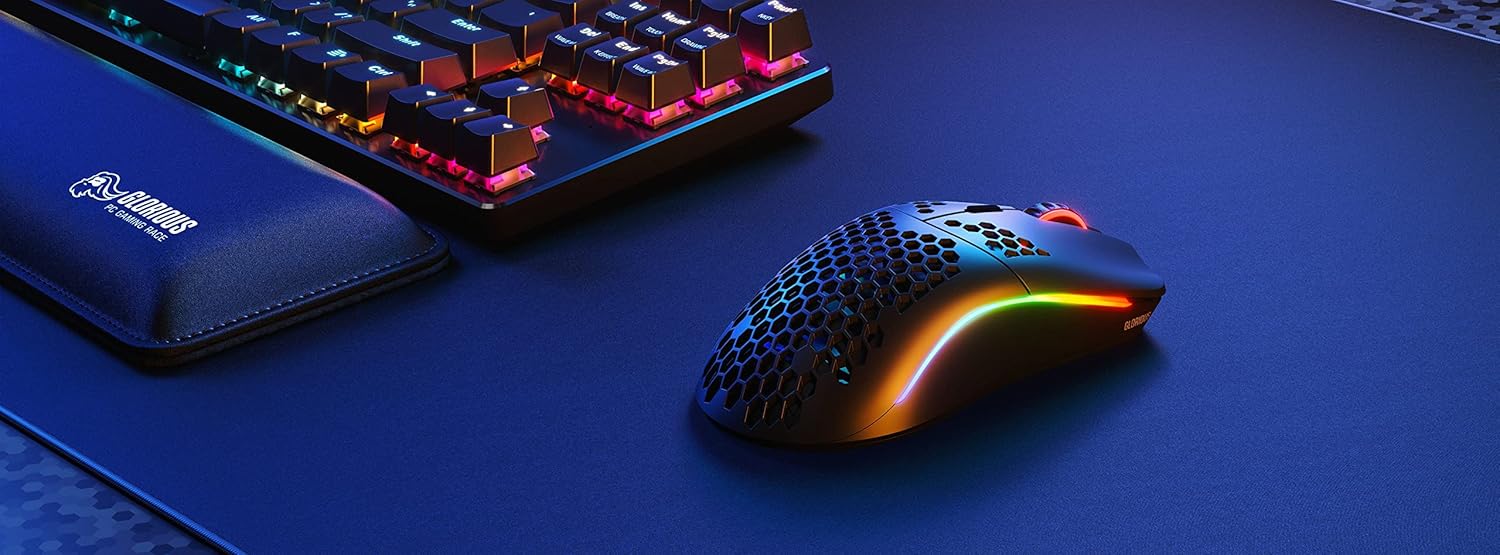
Image: Technical diagram illustrating the dimensions and key specifications of the Glorious Model O Wireless Gaming Mouse.
Setup
- Raspakivanje: Carefully remove the mouse, USB-C Ascended charging cable, and wireless dongle from the packaging.
- Connect Wireless Dongle: Plug the 2.4GHz wireless USB dongle into an available USB port on your computer.
- Uključivanje miša: Locate the power switch on the underside of the mouse and slide it to the 'ON' position. The mouse should automatically connect to the dongle.
- Početna naplata (opciono): For optimal performance, it is recommended to fully charge the mouse before first use. Connect the USB-C Ascended cable to the front of the mouse and the other end to a USB port on your computer or a USB charger.
- Install Glorious CORE Software: Download and install the Glorious CORE software from the official Glorious webstranica (www.gloriousgaming.com/pages/glorious-core) to customize settings, RGB lighting, and button assignments.
Video: A seller demonstrates the unboxing and initial setup of the Glorious Model O Wireless mouse, highlighting its lightweight design and flexible cable.
Uputstvo za upotrebu
The Glorious Model O Wireless mouse features 6 programmable buttons for versatile control during gaming and general use.
- Lijevi klik (dugme 1): Dugme za primarnu akciju.
- Desni klik (dugme 2): Dugme za sekundarnu akciju.
- Scroll Wheel Click (Button 3): Often used for middle-click functions or opening new tabs.
- Dugme za DPI (dugme 4): Cycles through preset DPI settings. Default settings can be customized via Glorious CORE.
- Side Buttons (Buttons 5 & 6): Typically used for forward/backward navigation in browsers or assigned to in-game actions. These are fully programmable.
For advanced customization of button functions, macros, and DPI levels, refer to the Glorious CORE software.
Prilagodba
The Glorious Model O Wireless offers extensive customization options through the Glorious CORE software:
- RGB rasvjeta: Choose from various effects (e.g., Seamless Breathing, Glorious Mode, Single Color) and adjust brightness and speed. You can set different lighting for wired and wireless modes.
- DPI postavke: Kreirajte i sačuvajte više DPI profesionalacafiles, allowing you to switch sensitivity on the fly using the dedicated DPI button.
- Dodjela dugmadi: Remap any of the 6 buttons to perform mouse functions, keyboard commands, custom macros, or multimedia controls.
- Stopa glasanja: Podesite brzinu anketiranja (do 1000 Hz) za optimalnu reakciju.
- Udaljenost od uzlijetanja (LOD): Fine-tune the distance at which the sensor stops tracking when the mouse is lifted.

Image: Screenshot of the Glorious CORE software, displaying options for customizing RGB lighting effects and colors for the mouse.
Održavanje
- čišćenje: Koristite meku, suhu krpu za brisanje miša. Za saćastu ljusku, boca komprimiranog zraka može pomoći u uklanjanju prašine i ostataka. Izbjegavajte upotrebu jakih hemikalija ili abrazivnih materijala.
- Održavanje kablova: Handle the Ascended cable gently to prevent fraying or damage. Avoid sharp bends or excessive pulling.
- Skladištenje: Kada se ne koristi, miš čuvajte na čistom i suhom mjestu, dalje od ekstremnih temperatura.
Rješavanje problema
| Issue | Moguće rješenje |
|---|---|
| Miš ne reaguje (bežični) | Ensure the mouse is powered on and the wireless dongle is securely plugged into a USB port. Try a different USB port. Re-pair the mouse if necessary (refer to Glorious CORE software for pairing instructions). |
| Miš ne reaguje (žični) | Provjerite je li USB-C kabel sigurno povezan i s mišem i s računarom. Pokušajte s drugim USB priključkom. |
| Lag or stuttering | Ensure the mouse is fully charged. Reduce wireless interference by moving the dongle closer to the mouse or away from other wireless devices. Update mouse firmware via Glorious CORE. |
| RGB osvetljenje ne radi | Check RGB settings in Glorious CORE. Ensure brightness is not set to 0. Update mouse firmware. |
| Dugmad ne funkcionišu ispravno | Verify button assignments in Glorious CORE. Reset to default settings if needed. Update mouse firmware. |
Specifikacije
| Feature | Detalj |
|---|---|
| Brand | SLAVNO |
| Model | Model O bežični |
| Boja | Mat crna |
| Povezivanje | 2.4GHz Wireless, USB-C Wired |
| Senzor | Glorious BAMF Optical Sensor |
| DPI | Do 19,000 |
| Tracking Speed (IPS) | 400 |
| Polling Rate | 1000 Hz (Dual Wired/Wireless) |
| Click Latency | 2.08ms (Internal Testing) |
| Težina | 69 grams (+/- 1.5g) |
| Trajanje baterije | Up to 71 Hours (RGB off) |
| Dugmad | 6 (Programabilno) |
| Hand Orientation | Ambidextrous |
| Mouse Feet | G-Skates Premium PTFE |
| Kompatibilni uređaji | Windows, Mac, Linux |
Garancija i podrška
The Glorious Gaming Model O Wireless Mouse comes with a 90-dnevna ograničena garancija. For warranty claims or technical support, please visit the official Glorious Gaming webweb-mjesto ili kontaktirajte njihovu korisničku službu. Sačuvajte dokaz o kupovini radi potvrde garancije.
Video: A seller provides a quick overview of the Glorious Model O Wireless mouse, highlighting its features and suitability for gaming.