
1. Uvod
Thank you for choosing the BTMETER Thermal Imaging Camera Gun. This device is designed for precise temperature measurement and thermal imaging, offering a wide range of applications from industrial inspections to home diagnostics. This manual provides essential information for the safe and effective use of your thermal imager.
The BTMETER Thermal Imaging Camera Gun captures temperature images and marks maximum, minimum, and center temperature points. It features a 220 x 160 IR resolution, 0.07℃ thermal sensitivity, and a temperature range of -4°F to 626°F (-20°C to 330°C). With 6GB of internal storage and adjustable emissivity, it is a versatile tool for various thermal analysis needs.

Figure 1.1: BTMETER Thermal Imaging Camera Gun and accessories.
2. Sigurnosne informacije
Molimo vas da pažljivo pročitate sva sigurnosna upozorenja i upute prije upotrebe ovog proizvoda. Nepoštivanje ovih uputa može dovesti do strujnog udara, požara ili ozbiljnih ozljeda.
- Do not point the thermal imager directly at strong energy sources, such as the sun or high-power lasers, as this may damage the detector.
- Ne uranjajte uređaj u vodu niti ga izlažite prekomjernoj vlazi.
- Koristite samo navedeni kabel za punjenje i adapter.
- Keep the device away from extreme temperatures and corrosive environments.
- Ne pokušavajte rastavljati ili modificirati uređaj. Za sve servisne radove obratite se kvalificiranom osoblju.
- Ensure the lens cap is in place when not in use to protect the lens from damage.
3. Proizvod je gotovview
3.1 Komponente i karakteristike

Figure 3.1: Key components of the BTMETER Thermal Imaging Camera Gun.
The thermal imager features a robust design with key components for optimal performance:
- Poklopac objektiva: Protects the infrared lens from dust and damage.
- HD Sensor (0.3 Megapixel): Captures high-quality visual data.
- Infrared Camera (220 x 160 Resolution): Detects thermal radiation and forms the thermal image.
- okidač: Used to capture and save thermal images.
- 3.5-inch Color LED Display: Shows real-time thermal images and data.
- Navigacijski gumbi: Za navigaciju kroz menije i podešavanje postavki.
3.2 Ključne karakteristike
- Temperature Measurement Range: -4°F ~ 626°F (-20°C ~ 330°C)
- Infrared Resolution: 220 x 160 pixels
- Thermal Sensitivity: 0.07℃
- Display: 3.5-inch large color LED
- Storage: 6GB built-in memory for image storage
- Emisivnost: Podesiva od 0.01 do 1.0
- Color Palettes: Rainbow, Iron Red, White Heat, Black Heat
- Temperature Display: Max/Min/Center temperature points
- Power: USB rechargeable battery (4-6 hours standby)
4. Podešavanje
4.1 Raspakivanje i početni pregled
Carefully remove the thermal imager and all accessories from the packaging. Inspect the device for any signs of damage. If any damage is found, do not use the device and contact customer support.
4.2 Punjenje baterije
The device comes with a built-in rechargeable battery. Before first use, fully charge the battery. Connect the included Type-C USB cable to the charging port on the device and plug the other end into a standard USB power adapter (not included) or a computer USB port.

Figure 4.1: Charging the thermal imager via USB.
The charging indicator on the display will show the charging status. A full charge typically takes several hours. The device supports auto turn-off and adjustable LED display brightness to conserve battery life.
4.3 Uključivanje/isključivanje
To power on the device, press and hold the power button located on the side or top of the unit until the display illuminates. To power off, press and hold the power button again until the display turns off.
5. Uputstvo za upotrebu
5.1 Basic Temperature Measurement and Imaging
Point the thermal imager at the target object. The display will show a real-time thermal image. Press the trigger button to capture and save the thermal image. The device will automatically mark the maximum, minimum, and center temperature points on the captured image.
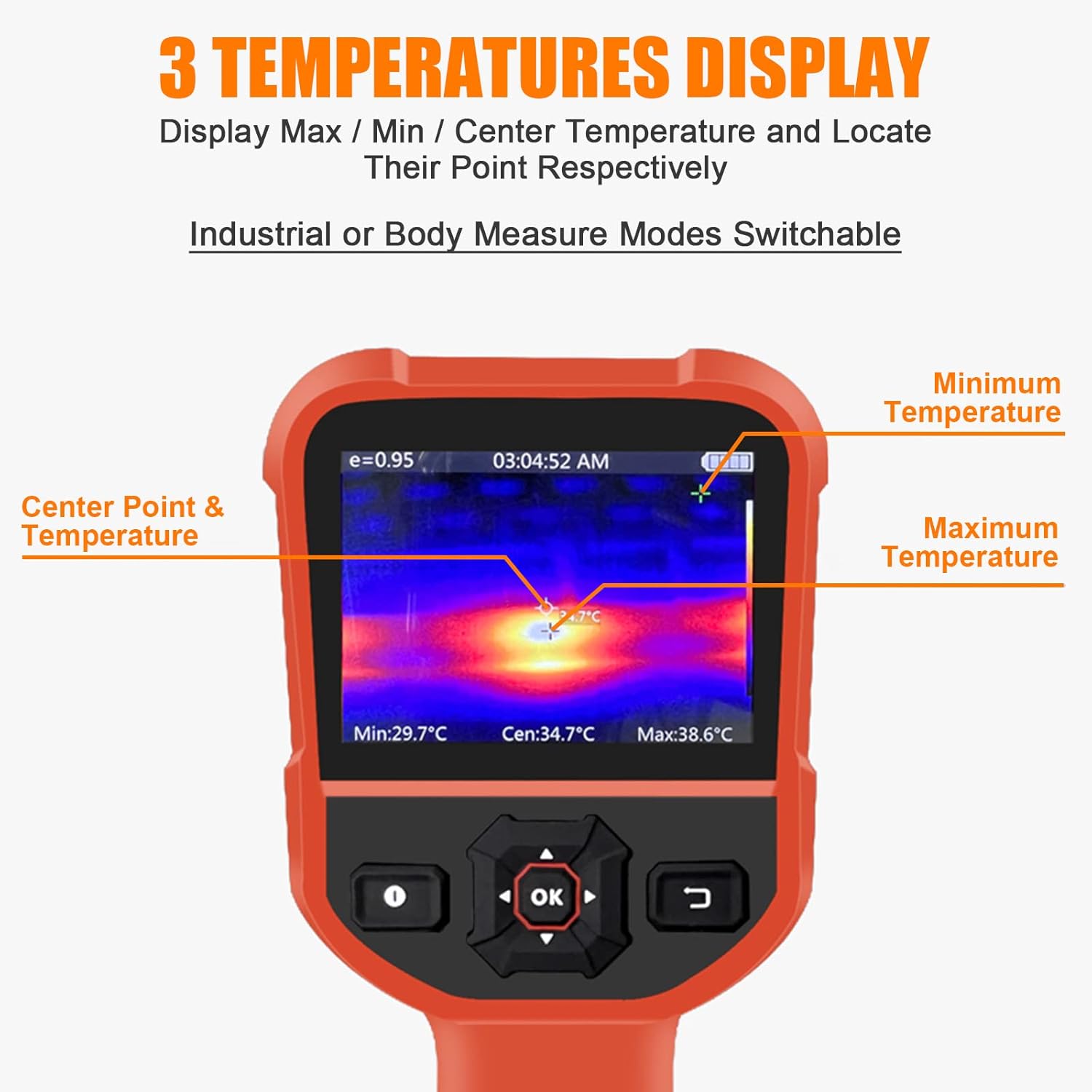
Figure 5.1: Display showing Max/Min/Center temperature points.
5.2 Podešavanje emisivnosti
Emissivity is a measure of an object's ability to emit infrared energy. Different materials have different emissivity values. For accurate temperature readings, adjust the emissivity setting to match the material being measured. The emissivity can be adjusted from 0.01 to 1.0 in the device settings.

Figure 5.2: Adjustable Emissivity Setting for wide applications.
5.3 paleta boja
The thermal imager offers four color palettes to visualize temperature differences:
- duga: Displays a full spectrum of colors, often used for general thermal analysis.
- Iron Red: Highlights hot spots with red and yellow tones.
- White Heat: Hotter areas appear white, cooler areas appear black.
- Black Heat: Hotter areas appear black, cooler areas appear white.
Select the palette that best suits your application and visual preference through the device's menu settings.
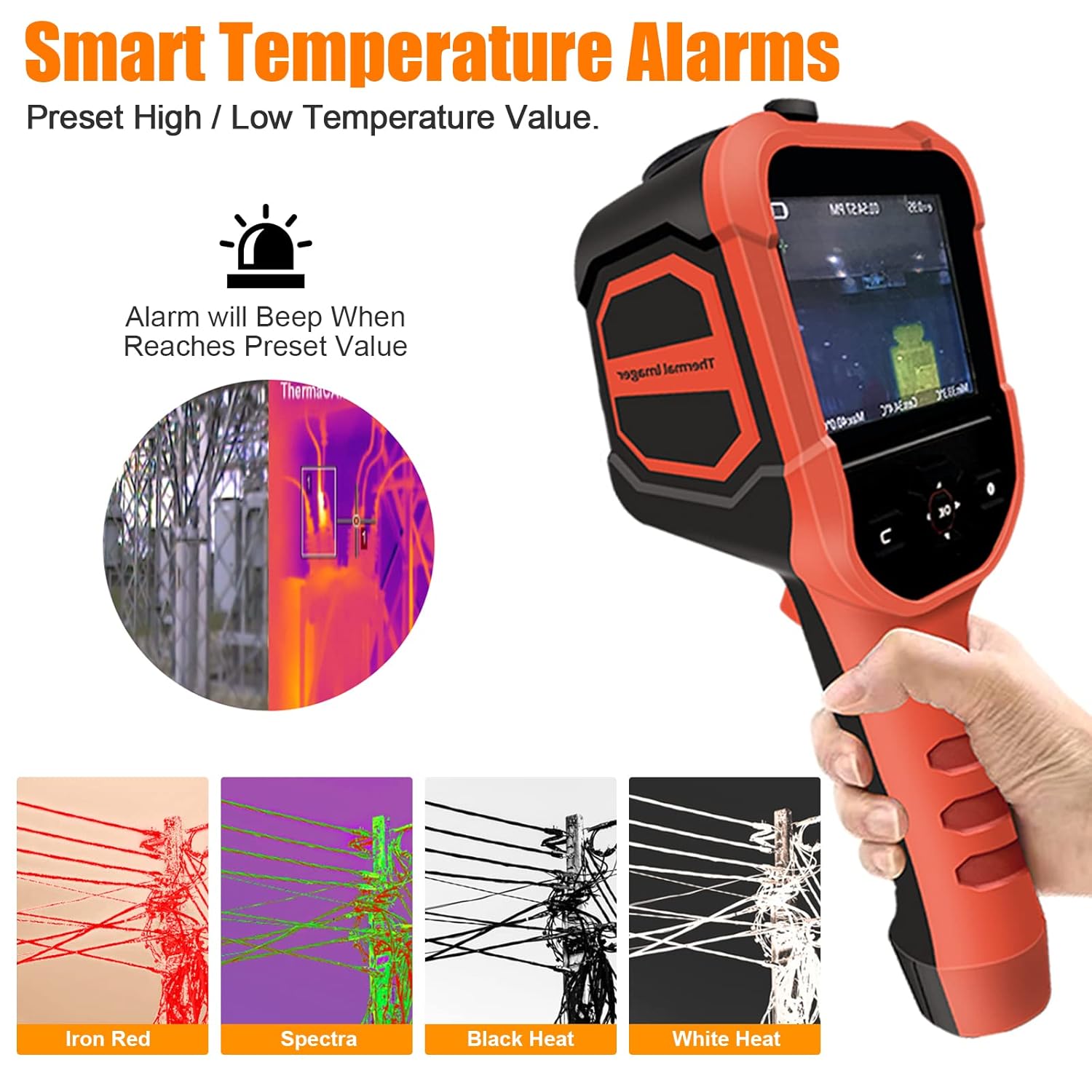
Figure 5.3: Available color palettes for thermal imaging.
5.4 Smart Temperature Alarms
The device allows you to preset high and low temperature alarm values. When the measured temperature reaches or exceeds these preset values, the device will emit an audible beep to alert the user.

Figure 5.4: Alarm settings interface.
5.5 Pohranjivanje i izvoz podataka
The thermal imager has 6GB of built-in memory to store captured thermal images. To view or export these images, connect the device to a computer using the provided USB cable. The device will appear as a removable storage device, allowing you to access and transfer the image files.

Slika 5.5: Povezivanje uređaja sa računarom za izvoz podataka.
6. Održavanje
6.1 Čišćenje
To clean the device, wipe it with a clean, dry cloth. For stubborn dirt, a slightly damp cloth can be used, followed by a dry cloth. Do not use abrasive cleaners, solvents, or harsh chemicals, as these can damage the device's surface or lens.
6.2 Skladištenje
When not in use, store the thermal imager in a cool, dry place, away from direct sunlight and extreme temperatures. Ensure the lens cap is securely in place to protect the infrared lens.
6.3 Njega baterija
To prolong battery life, avoid fully discharging the battery frequently. If storing the device for an extended period, charge the battery to approximately 50% capacity every few months.
7. Otkrivanje problema
| Problem | Mogući uzrok | Rješenje |
|---|---|---|
| Uređaj se ne uključuje. | Baterija je prazna. | Napunite uređaj pomoću USB kabla. |
| Termalna slika je mutna ili nejasna. | Objektiv je prljav ili oštećen. | Clean the lens with a soft, dry cloth. Ensure the lens cap is removed. |
| Netačna očitavanja temperature. | Nepravilno podešavanje emisivnosti. | Podesite postavku emisivnosti tako da odgovara materijalu koji se mjeri. |
| Povezivanje sa računarom nije moguće. | Faulty USB cable or port. | Try a different USB cable or a different USB port on your computer. Ensure the device is powered on. |
| Uređaj se zamrzava ili prestaje reagirati. | Softverski kvar. | Perform a soft reset by holding the power button until the device turns off, then restart it. |
8. Specifikacije
| Parametar | Vrijednost |
|---|---|
| Broj modela | HP-M2-XB-62-B |
| Temperaturni opseg | -4 ° F ~ 626 ° F (-20 ° C ~ 330 ° C) |
| Preciznost | ±2℃ ili ±2% |
| Infracrvena rezolucija | 220 x 160 piksela |
| Toplinska osjetljivost | 0.07℃ |
| Frame Rate | 9Hz |
| Polje of View (FOV) | 27° x 35° |
| Display Type | 3.5-inch Digital LED |
| Emisivnost | Adjustable 0.01 ~ 1.0 |
| Skladištenje | 6 GB interne memorije |
| Povezivanje | USB (tip C) |
| Trajanje baterije (stanje pripravnosti) | 4-6 sata |
| Materijal | Iron |
| IP Rating | IP54 |
| Otporan na udarce | Otpornost na pad od 2 m |

Figure 8.1: Detailed specifications and component overview.
9. Garancija i podrška
The BTMETER Thermal Imaging Camera Gun comes with a 365-dnevna garancija od datuma kupovine. Ova garancija pokriva proizvodne nedostatke i kvarove pri normalnoj upotrebi.
For technical support, warranty claims, or any questions regarding the product, please contact BTMETER customer service. Lifetime technical support is provided for this product.
Please refer to the contact information provided on the product packaging or the official BTMETER webstranicu za najnovije detalje o podršci.