
1. Uvod
Hvala na kupoviniasing the Lenco SCD-341 Portable CD-Radio. This device combines a CD player, DAB+ and FM radio, and Bluetooth connectivity in a compact design. This manual provides essential information for safe and efficient use of your new audio system. Please read it thoroughly before operation and retain it for future reference.
2. Sigurnosne informacije
- Ne izlažite uređaj kiši ili vlazi kako biste spriječili požar ili strujni udar.
- Osigurajte odgovarajuću ventilaciju. Ne blokirajte ventilacijske otvore.
- Koristite samo strujni adapter koji je isporučen s jedinicom.
- Ne otvarajte casing. Za sve servisne radove obratite se kvalifikovanom osoblju.
- Izbjegavajte postavljanje jedinice u blizini izvora topline ili na direktnu sunčevu svjetlost.
- Držite uređaj dalje od jakih magnetnih polja.
3. Sadržaj paketa
Molimo Vas da provjerite da li su svi artikli prisutni i u dobrom stanju:
- Lenco SCD-341 Portable CD-Radio Unit
- Adapter za napajanje
- Korisnički priručnik (ovaj dokument)
- Vodič za brzi početak
4. Proizvod je gotovview
The Lenco SCD-341 features a user-friendly interface with clearly labeled buttons and an LCD display.

Slika 1: Prednja strana view of the Lenco SCD-341, showing the main controls, LCD display, and stereo speakers.

Figure 2: Lenco SCD-341 with its integrated handle and telescopic antenna extended for radio reception.
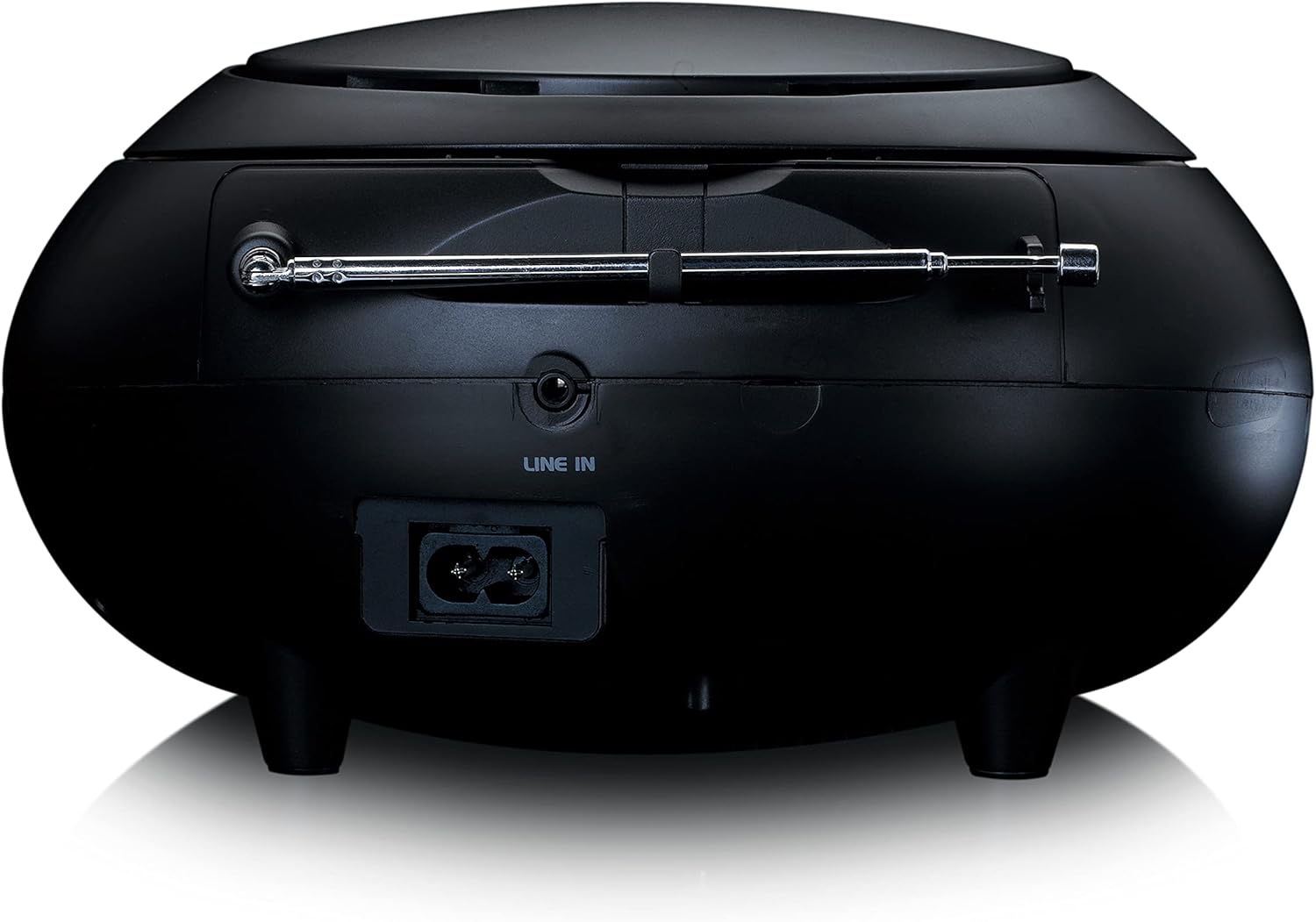
Slika 3: Pozadi view of the Lenco SCD-341, highlighting the power input and LINE IN audio port.
5. Podešavanje
5.1 Priključak za napajanje
The Lenco SCD-341 can be powered by the included AC adapter or by batteries.
- AC napajanje: Connect the supplied power adapter to the AC IN socket on the rear of the unit (refer to Figure 3) and plug the other end into a standard wall outlet.
- Snaga baterije: Open the battery compartment on the bottom of the unit. Insert the required number of C-type batteries (not included), ensuring correct polarity. Close the compartment securely.
5.2 Podešavanje antene
For optimal DAB+ and FM radio reception, fully extend the telescopic antenna located on the rear of the unit. Adjust its position for the best signal.
6. Uputstvo za upotrebu
6.1 Uključivanje/isključivanje napajanja
Pritisnite POWER dugme za uključivanje ili isključivanje jedinice.
6.2 Reprodukcija CD-a
- Pritisnite IZVOR button repeatedly until "CD" is displayed on the LCD screen.
- Open the CD compartment lid by gently lifting it.
- Postavite CD na osovinu diska tako da strana s etiketom bude okrenuta prema gore.
- Close the CD compartment lid. The unit will begin reading the CD.
- Koristite PLAY/PAUSE, STOP, NAPRIJED NAPRIJED, i PRESKOČI NAZAD dugmad za kontrolu reprodukcije.

Slika 4: Vrh view of the Lenco SCD-341 with the CD compartment open, showing a CD being inserted.
6.3 Rad DAB+ radija
- Pritisnite IZVOR više puta pritisnite dugme dok se ne prikaže "DAB".
- The unit will automatically scan for available DAB+ stations. This may take a few moments.
- Kada se skeniranje završi, upotrijebite TUNE +/- buttons to navigate through the available stations.
- Da biste sačuvali stanicu kao predefinisanu, pritisnite i držite PRESET dugme, a zatim koristite TUNE +/- da biste odabrali unaprijed postavljeni broj i pritisnite PRESET ponovo za potvrdu.
6.4 Rad FM radija
- Pritisnite IZVOR više puta pritisnite dugme dok se ne prikaže "FM".
- Pritisnite i držite TUNE +/- dugmad za automatsko skeniranje sljedeće dostupne stanice. Kratko pritisnite za ručno podešavanje.
- Da biste sačuvali stanicu kao predefinisanu, pritisnite i držite PRESET dugme, a zatim koristite TUNE +/- da biste odabrali unaprijed postavljeni broj i pritisnite PRESET ponovo za potvrdu.
6.5 Bluetooth uparivanje
- Pritisnite IZVOR button repeatedly until "Bluetooth" is displayed. The unit will enter pairing mode, indicated by a flashing Bluetooth icon on the display.
- On your external device (smartphone, tablet), enable Bluetooth and search for available devices.
- Select "Lenco SCD-341" from the list of found devices.
- Once paired, the Bluetooth icon on the unit's display will stop flashing and remain solid. You can now play audio from your device through the Lenco SCD-341.
6.6 Kontrola jačine zvuka
Koristite VOLUMEN +/- dugmad za podešavanje nivoa audio izlaza.
7. Održavanje
- čišćenje: Za čišćenje vanjske strane uređaja koristite meku, suhu krpu. Ne koristite abrazivna sredstva za čišćenje ili rastvarače.
- Održavanje CD sočiva: Ako se pojave problemi s reprodukcijom CD-a, koristite komercijalno dostupan disk za čišćenje CD sočiva.
- Skladištenje: When not in use for extended periods, disconnect the power adapter and remove batteries. Store the unit in a cool, dry place.
8. Otkrivanje problema
| Problem | Mogući uzrok | Rješenje |
|---|---|---|
| Nema struje | Power adapter not connected; batteries depleted or incorrectly inserted. | Check power adapter connection; replace batteries or ensure correct polarity. |
| Nema zvuka | Volume too low; incorrect source selected; headphones connected. | Increase volume; select correct source (CD, DAB, FM, Bluetooth); disconnect headphones. |
| CD se ne reproducira | CD inserted incorrectly; CD dirty or scratched; CD format not supported. | Reinsert CD correctly; clean or replace CD; ensure CD is a standard audio CD. |
| Loš radio prijem | Antenna not extended or positioned poorly; strong interference. | Fully extend and adjust antenna; move unit away from other electronic devices. |
| Bluetooth uparivanje nije uspjelo | Bluetooth not enabled on external device; device too far; unit not in pairing mode. | Ensure Bluetooth is on and discoverable; move device closer; select Bluetooth source on unit. |
9. Specifikacije
| Broj modela | SCD-341 |
| Brand | Lenco |
| Dimenzije (D x Š x V) | 21.5 x 21 x 11.5 cm |
| Težina | 1.09 kg |
| Izvor napajanja | AC (adapter included) / Battery-Powered |
| Tehnologija tjunera | DAB+, FM |
| Povezivanje | Bluetooth |
| Način audio izlaza | Stereo |
| Display Type | LCD |
| Izlazna snaga | 3 vati RMS |

Figure 5: Dimensions of the Lenco SCD-341 unit.
10. Garancija i podrška
For warranty information and technical support, please refer to the warranty card included in your package or visit the official Lenco website.
Proizvođač: Lenco GmbH
Zemlja porijekla: Hongkong
11. Zvanični videozapisi proizvoda
Watch this official video for a visual guide to the Lenco SCD-341.
Video 1: A 360-degree product view of the Lenco SCD-341, showcasinnjegov dizajn i karakteristike iz svih uglova.