1. Proizvod je gotovview
This manual provides instructions for the SZHKHXD replacement remote control designed for various GREE AC Air Conditioner models. This remote offers essential functions for controlling your air conditioning unit.

Slika 1: Prednja strana view of the SZHKHXD remote control, showing the LCD screen and various function buttons.

Slika 2: Natrag view of the SZHKHXD remote control, displaying battery type information and a QC Pass sticker.
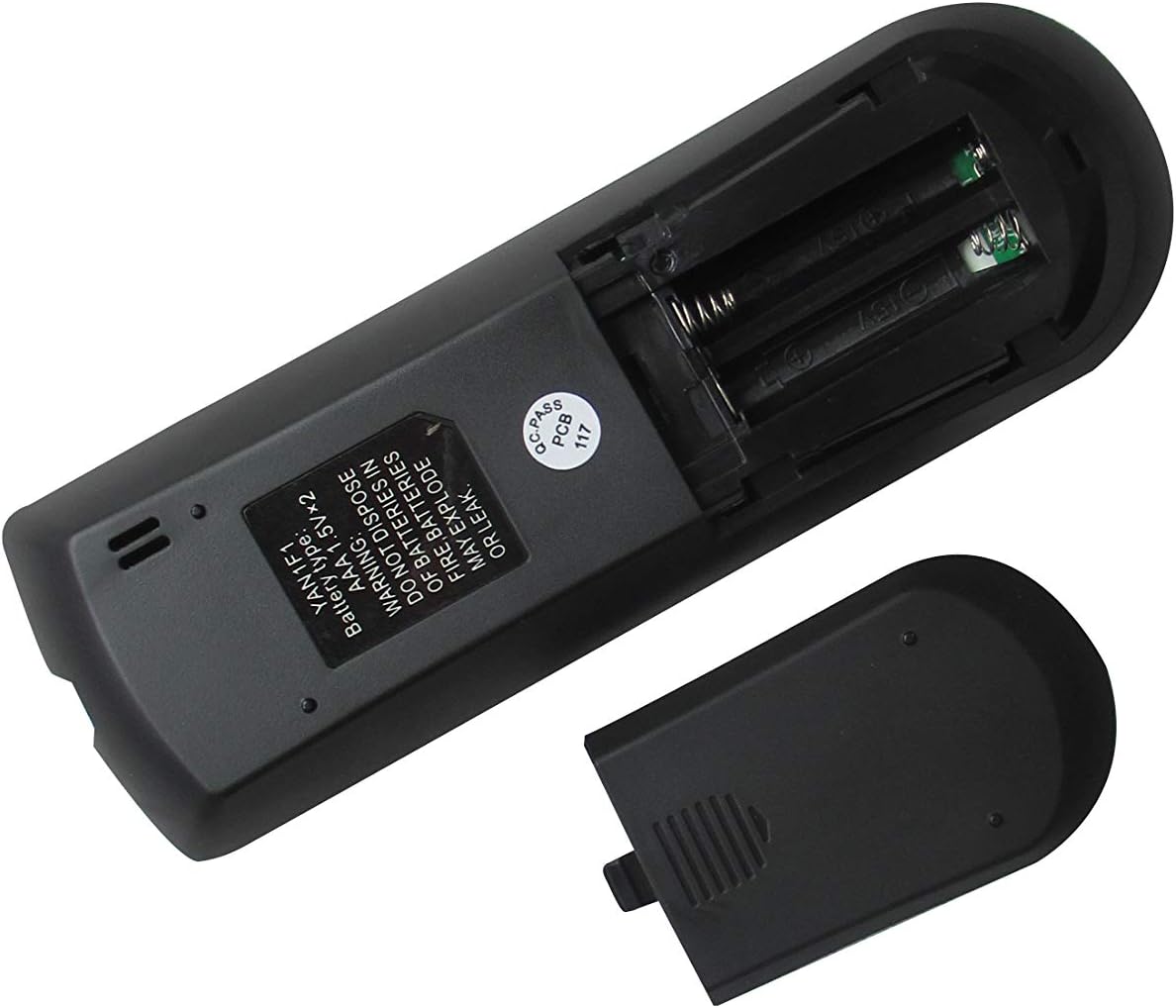
Figure 3: The remote control with its battery compartment open, revealing slots for two AAA batteries.

Slika 4: Natrag view of the remote control with the battery cover securely in place.
Kompatibilni modeli:
- GREE GWH12QC-K3DNA5G
- GREE GWH12QC-K3DNB2G
- GREE GWH09QB-K3DNA1G
- GREE GWH09QB-K3DNA5G
- GREE GWH09QB-K3DNB2G
- GREE GWH09QB-K3DNB4G
- GREE GWH09QB-K3DNB6G
- GREE GWH12QC-K3DNA1G
- GREE GWH12QC-K3DNA2G
2. Podešavanje
Instalacija baterije
The remote control requires two (2) AAA 1.5V batteries (not included). Follow these steps to install them:
- Pronađite odeljak za baterije na poleđini daljinskog upravljača.
- Slide the battery cover downwards to open it (refer to Figure 3).
- Umetnite dvije AAA baterije, pazeći da pozitivni (+) i negativni (-) terminali budu pravilno poravnati s oznakama unutar odjeljka.
- Slide the battery cover back into place until it clicks securely (refer to Figure 4).
Warning: Do not dispose of batteries in fire. Batteries may explode or leak if mishandled.
3. Uputstvo za upotrebu
Familiarize yourself with the buttons on your remote control to operate your GREE AC unit effectively.
Funkcije dugmadi:
| Dugme | Funkcija |
|---|---|
| MODE | Ciklično se mijenja kroz načine rada (npr. Hlađenje, Grijanje, Ventilator, Sušenje, Automatski). |
| Snaga (⏻) | Turns the AC unit On or Off. |
| FAN | Podešava brzinu ventilatora (npr. niska, srednja, visoka, automatska). |
| SWING | Activates or deactivates the vertical louver swing function. |
| Strelica prema gore (▲) | Increases temperature setting or navigates menu options. |
| Strelica prema dolje (▼) | Decreases temperature setting or navigates menu options. |
| TURBO | Aktivira brzo hlađenje ili grijanje za brze promjene temperature. |
| SLEEP | Engages sleep mode, which adjusts temperature and fan speed for comfortable sleep. |
| TEMP | Displays or cycles through temperature settings. |
| CLOCK | Sets or displays the current time. |
| OSJEĆAM | Activates the iFeel function, which senses the temperature at the remote's location. |
| LIGHT | Turns the display light on or off on the indoor unit. |
| TIMER UKLJUČEN | Sets a timer for the AC unit to turn on automatically. |
| TIMER ISKLJUČEN | Sets a timer for the AC unit to turn off automatically. |
Osnovna operacija:
- Uključivanje/isključivanje: Press the red Power button (⏻) da uključite ili isključite jedinicu.
- Odaberite način rada: Pritisnite MODE button repeatedly to cycle through available operating modes (e.g., Cool, Heat, Fan, Dry, Auto). The selected mode will typically be displayed on the remote's LCD screen.
- Podesite temperaturu: Use the Up (▲) and Down (▼) arrow buttons to set your desired temperature.
- Podesite brzinu ventilatora: Pritisnite FAN button to cycle through different fan speeds (e.g., Auto, Low, Medium, High).
4. Održavanje
Čišćenje daljinskog upravljača:
- Obrišite površinu daljinskog upravljača mekom, suhom krpom.
- Do not use liquid cleaners, abrasive cleaners, or chemical sprays, as these may damage the remote.
Zamjena baterije:
- Replace batteries when the remote's display becomes dim or the remote no longer responds to commands.
- Always replace both batteries at the same time with new AAA 1.5V batteries.
- Prilikom umetanja novih baterija, obratite pažnju na ispravan polaritet (+/-).
- Izvadite baterije ako daljinski upravljač nećete koristiti duži period kako biste spriječili curenje.
5. Otkrivanje problema
Ako imate problema s daljinskim upravljačem, pogledajte sljedeće uobičajene probleme i rješenja:
- Daljinski ne reaguje:
- Provjerite jesu li baterije pravilno umetnute s ispravnim polaritetom.
- Zamijenite stare baterije novima.
- Ensure there are no obstructions between the remote control and the AC unit's receiver.
- Confirm you are within the effective operating range of the AC unit.
- Display shows Celsius instead of Fahrenheit (or vice-versa):
- Some replacement remotes may default to Celsius. To switch, try pressing and holding the TEMP button for 3-5 seconds. If this does not work, try holding the MODE button or a combination of TEMP and an arrow key. Refer to your specific AC unit's manual for remote control temperature unit conversion if this remote does not have a direct function for it.
- Certain functions do not work:
- This is a replacement remote. While designed to be compatible, some advanced or specific functions present on your original remote may not be supported by this universal replacement. Refer to the "Special Feature" note in the product specifications.
6. Specifikacije
| Feature | Detalj |
|---|---|
| Dimenzije proizvoda | 6.3 x 3.15 x 1.18 inča |
| Težina artikla | 3.52 unce |
| Baterije su potrebne | 2 AAA baterije (nisu uključene) |
| Tehnologija povezivanja | Infracrveni |
| Kompatibilni uređaji | AC Air Conditioner (Specific GREE models listed in Product Overview) |
| Maksimalni broj podržanih uređaja | 1 |
| Proizvođač | SZHKHXD |
| Zemlja porijekla | Kina |
| Special Feature Note | Replacement item may not work with all functions as original. |
7. Garancija i podrška
This product is manufactured by SZHKHXD. For specific warranty information or technical support, please contact the seller directly through the platform where the purchase was made. As this is a replacement remote, specific warranty details are typically handled by the seller rather than the original equipment manufacturer (GREE).
Please note that the product description indicates "Selling without batteries or instruction, No configuration." This manual serves as the primary instruction guide for basic operation and troubleshooting.


