
1. prekoview
The Hoco ES61 Manner Sports Wireless Bluetooth Headset is designed for active lifestyles, offering a blend of comfort, long battery life, and versatile connectivity. This manual provides detailed instructions to help you get the most out of your headset.
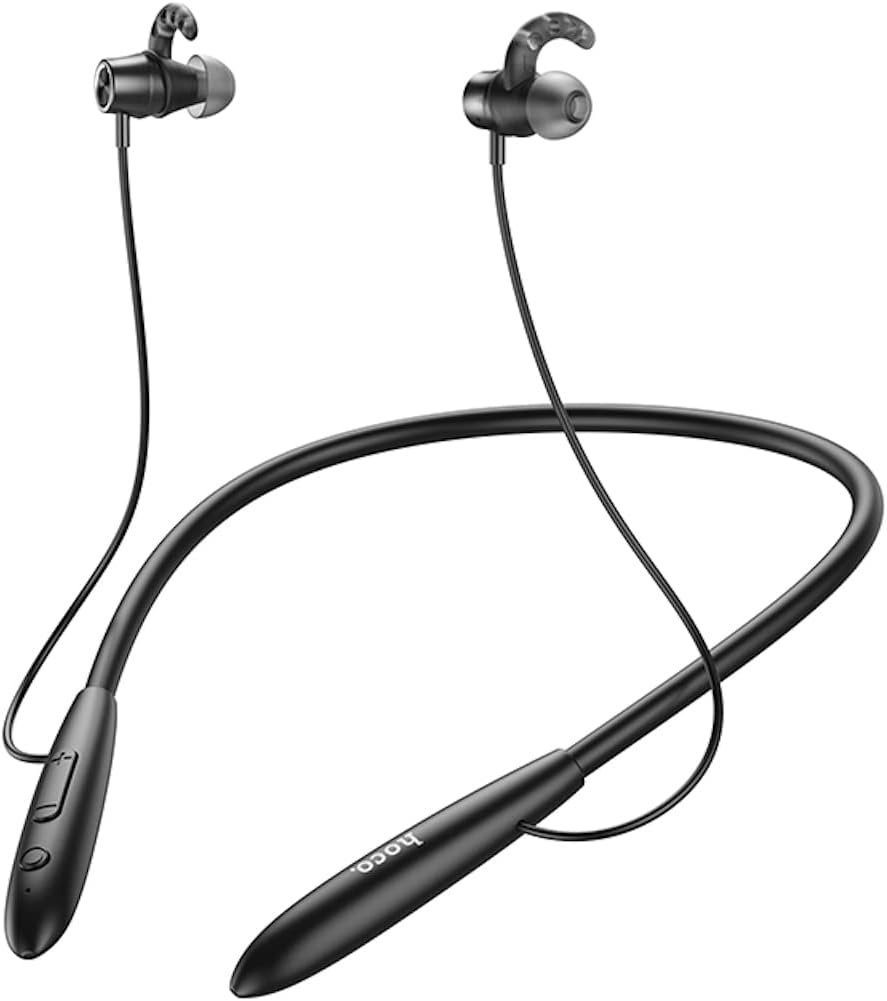
Slika: Front view of the Hoco ES61 headset, showcasing its neckband design and in-ear earbuds.
2. Značajke proizvoda
- Bluetooth 5.1 povezivanje: Equipped with JL AC7006 chip for stable and efficient wireless connection.
- Produženi vijek trajanja baterije: Features a 200mAh battery, providing up to 20 hours of music/talk time and an impressive 330 hours of standby time.
- Brzo punjenje: Potpuno se puni za otprilike 2 sata.
- Lagan i udoban dizajn: The earphone cord measures 85cm in length, and the headset weighs only 22g, ensuring comfort during extended wear.
- Svestrane opcije reprodukcije: Supports Bluetooth audio streaming and TF card playback (up to 32GB) for direct music listening.
- Multi-language Voice Prompts: Offers voice prompts in both Chinese and English for user convenience.
- Široka kompatibilnost: Compatible with a broad range of devices including iPhone, Samsung, OnePlus, Huawei, Xiaomi, and Oppo smartphones.

Slika: Krupni plan view of the Hoco ES61 headset, highlighting the integrated TF card slot for direct music playback.
Video: Zvanična video prezentacija proizvodaasing the Hoco ES61 Bluetooth Headset's features, including its 20-hour battery life, voice prompts, and compatibility with iOS and Android devices.
3. Vodič za postavljanje
3.1 Punjenje slušalica
Before first use, fully charge the headset. Use a standard USB charger (not included) to connect the charging port on the headset to a power source.
- The LED indicator will typically show a red light during charging.
- Once fully charged (approximately 2 hours), the LED indicator will turn blue or off.
3.2 Bluetooth uparivanje
To connect your Hoco ES61 headset to a Bluetooth-enabled device:
- Provjerite jesu li slušalice isključene.
- Press and hold the multi-function button (usually the power button) for approximately 3-5 seconds until the LED indicator flashes red and blue alternately. This indicates pairing mode.
- Na svom uređaju (pametnom telefonu, tabletu itd.) omogućite Bluetooth i potražite dostupne uređaje.
- Select "Hoco ES61" from the list of found devices.
- Once connected, the LED indicator on the headset will typically flash blue slowly or turn off, and you will hear a voice prompt confirming the connection.
3.3 Reprodukcija TF kartice
The Hoco ES61 supports direct music playback from a TF (MicroSD) card.
- Carefully insert a TF card (up to 32GB) with your music files into the designated TF card slot on the headset.
- The headset will automatically switch to TF card playback mode if a card is detected and contains playable audio files.
- Use the headset controls to manage playback (play, pause, skip tracks).
4. Uputstvo za upotrebu
4.1 Osnovne kontrole
| Dugme/Radnja | Funkcija |
|---|---|
| Višenamjensko dugme (MFB) | Uključivanje/Isključivanje, Reprodukcija/Pauza, Odgovor/Završetak poziva |
| Jačina zvuka (+) | Increase Volume, Next Track (long press) |
| Smanjivanje glasnoće (-) | Decrease Volume, Previous Track (long press) |
4.2 Reprodukcija muzike
- Pusti/pauza: Kratko pritisnite MFB.
- Sljedeća pjesma: Dugo pritisnite dugme za pojačavanje zvuka (+).
- Prethodni zapis: Dugo pritisnite dugme za smanjenje jačine zvuka (-).
- Podešavanje jačine zvuka: Short press Volume Up (+) or Volume Down (-) buttons.
4.3 Upravljanje pozivima
- Odgovori/Završi poziv: Short press the MFB during an incoming call.
- odbiti poziv: Long press the MFB during an incoming call.
- Ponovno biranje zadnjeg broja: Double-click the MFB when not on a call.

Image: The Hoco ES61 headset resting on a smartphone, illustrating its use with mobile devices for music and calls.
5. Održavanje i njega
- Keep the headset dry. Do not expose it to extreme temperatures or humidity.
- Clean the earbuds and charging port regularly with a soft, dry cloth to prevent dust and debris buildup.
- Izbjegavajte korištenje jakih kemikalija ili abrazivnih sredstava za čišćenje.
- Čuvajte slušalice na hladnom i suvom mestu kada se ne koriste.
- Ne pokušavajte rastavljati ili modificirati slušalice, jer će to poništiti garanciju i može uzrokovati oštećenje.

Image: The Hoco ES61 headset shown with different sizes of silicone ear tips, emphasizing the importance of proper fit for comfort and sound quality.
6. Otkrivanje problema
6.1 Headset Not Turning On
- Ensure the headset is fully charged. Connect it to a charger and check the LED indicator.
- Press and hold the multi-function button for a few seconds to power on.
6.2 Nije moguće upariti uređaj
- Make sure the headset is in pairing mode (LED flashing red and blue alternately).
- Provjerite je li Bluetooth omogućen na vašem uređaju i je li unutar dometa (obično 10 metara).
- Forget/delete "Hoco ES61" from your device's Bluetooth list and try pairing again.
- Ponovo pokrenite i slušalice i uređaj.
6.3 Nema zvuka ili je jačina zvuka niska
- Povećajte jačinu zvuka i na slušalicama i na povezanom uređaju.
- Provjerite jesu li slušalice pravilno povezane s vašim uređajem.
- Ako koristite TF karticu, provjerite je li kartica ispravno umetnuta i sadrži li audio zapis koji se može reproducirati files.
- Check for any obstructions in the earbud nozzles and clean if necessary.
6.4 Kratak vijek trajanja baterije
- Prije upotrebe provjerite jesu li slušalice potpuno napunjene.
- Trajanje baterije može varirati ovisno o nivou jačine zvuka i obrascima korištenja.
- Izbjegavajte izlaganje baterije ekstremnim temperaturama.
7. Specifikacije
| Feature | Detalj |
|---|---|
| Bluetooth verzija | 5.1 |
| Bluetooth čip | JL AC7006 |
| Kapacitet baterije | 200mAh |
| Vrijeme punjenja | Pribl. 2 sati |
| Vrijeme za muziku/razgovor | Do 20 sati |
| Vrijeme pripravnosti | Do 330 sati |
| Earphone Cord Length | 85cm |
| Težina | 22g |
| Podrška za TF karticu | Da, do 32 GB |
| Glasovni upiti | kineski i engleski |
| Kompatibilnost | iPhone, Samsung, OnePlus, Huawei, Xiaomi, Oppo |
8. Garancija i podrška
For warranty information and customer support, please refer to the product packaging or contact your retailer. Keep your purchase receipt as proof of purchase for any warranty claims.