
1. Uvod
Welcome to the Radiant Miami Smartwatch user manual. This guide provides essential information for setting up, operating, maintaining, and troubleshooting your new smartwatch. The Radiant Miami Smartwatch (Model RAS21005) is designed for both men and women, offering a blend of modern design and advanced health monitoring features.
Key features include heart rate monitoring, blood pressure measurement, sleep tracking, and various activity tracking functions. It also supports notifications for calls and messages from compatible smartphones.

Image 1.1: The Radiant Miami Smartwatch worn on a wrist, showcasing njegovim elegantnim dizajnom.
2. Podešavanje
2.1 Punjenje pametnog sata
Before initial use, fully charge your Radiant Miami Smartwatch. Connect the charging cable to the charging port on the back of the watch and plug the USB end into a standard USB power adapter (not included) or a computer's USB port. A full charge typically takes approximately 2 hours and provides up to 10 days of battery life, depending on usage.
2.2 Instalacija i uparivanje aplikacije
- Preuzmite prateću aplikaciju: Traži the official Radiant companion app on your smartphone's app store (compatible with iOS 8.4+ and Android 4.4+).
- Omogući Bluetooth: Provjerite je li Bluetooth omogućen na vašem pametnom telefonu.
- Otvorite aplikaciju: Launch the Radiant app and follow the on-screen instructions to create an account or log in.
- Uparite uređaj: Within the app, navigate to the 'Device' or 'Add Device' section. Select your Radiant Miami Smartwatch from the list of available devices. Confirm the pairing request on both your phone and the smartwatch if prompted.
Once paired, the smartwatch will synchronize time and data with your smartphone.
3. Upravljanje pametnim satom
3.1 Osnovna navigacija
- Prevucite gore/dolje: Skrolajte kroz menije i obavještenja.
- Prevucite lijevo/desno: Pristupite brzim funkcijama ili različitim ekranima s podacima.
- Dodirnite: Odaberite stavku ili potvrdite radnju.
- Bočno dugme: Pritisnite za povratak na početni ekran ili buđenje uređaja.
3.2 Monitoring zdravlja
The Radiant Miami Smartwatch continuously monitors various health metrics:
- Otkucaji srca: Access the heart rate monitor from the main menu or a quick-access screen. The watch will display your current heart rate in beats per minute (BPM).
- krvni pritisak: Initiate a blood pressure measurement from the dedicated function. Ensure the watch is snug on your wrist for accurate readings.
- Kiseonik u krvi (SpO2): Measure your blood oxygen saturation level.
- Monitor spavanja: The watch automatically tracks your sleep patterns, including awake, light, and deep sleep stages. View detaljni podaci o spavanju u pratećoj aplikaciji.
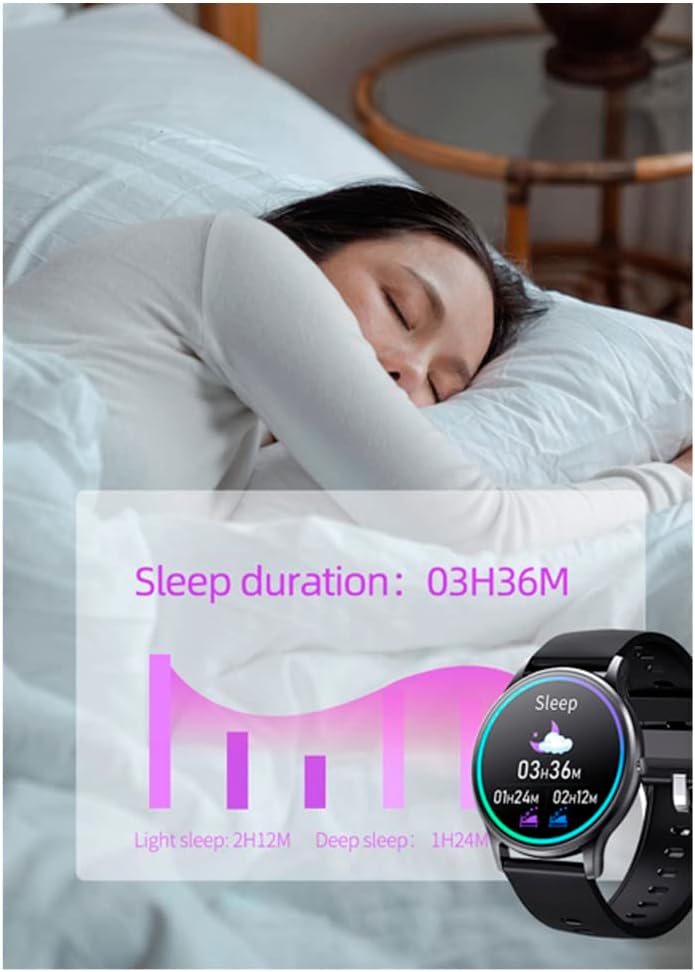
Image 3.1: The smartwatch screen showing sleep duration and different sleep stages (light, deep).
3.3 Praćenje aktivnosti
Pratite svoje dnevne aktivnosti i treninge:
- Koraci, Udaljenost, Kalorije: The watch automatically records your steps, estimated distance, and calories burned throughout the day.
- Multi-Sport modovi: Select specific sport modes (e.g., running, walking, cycling) to get more accurate data for your workouts.

Slika 3.2: Primjeramples of activity tracking screens on the smartwatch, showing metrics for different exercises.
3.4 Obavještenja i pozivi
Receive notifications directly on your smartwatch:
- Poruka upozorenja: Get alerts for messages from apps like WhatsApp and Facebook. You can view the message text on your watch.
- Dolazni pozivi: See who is calling and reject calls directly from your smartwatch.
- Podsjetnici vibracijom: The watch provides vibration alerts for sedentary reminders, alarm clocks, low battery, and water intake reminders.

Image 3.3: The smartwatch screen showing an incoming message notification from Facebook.
3.5 Prilagođavanje
Personalizirajte iskustvo korištenja pametnog sata:
- Lica za gledanje: Change the watch face through the companion app's 'Dial Center' to match your style.

Image 3.4: The companion app's 'Dial Center' displaying multiple watch face options for customization.
4. Održavanje
4.1 Čišćenje
Regularly clean your smartwatch and strap to prevent skin irritation and maintain functionality. Use a soft, damp krpu za brisanje ekrana i remena. Izbjegavajte upotrebu jakih hemikalija ili abrazivnih materijala.
4.2 Njega baterija
Da produžite vijek trajanja baterije:
- Izbjegavajte ekstremne temperature.
- Napunite sat prije nego što se baterija potpuno isprazni.
- Ne ostavljajte sat da se puni duže vrijeme nakon što se potpuno napuni.
5. Otkrivanje problema
5.1 Smartwatch Not Turning On
Provjerite je li sat potpuno napunjen. Ako se i dalje ne uključuje, pokušajte ga spojiti na punjač najmanje 30 minuta.
5.2 Nije moguće upariti uređaj sa pametnim telefonom
- Provjerite je li Bluetooth omogućen na vašem pametnom telefonu.
- Provjerite je li pametni sat unutar Bluetooth dometa vašeg telefona.
- Ponovo pokrenite i pametni telefon i pametni sat.
- Pokušajte odvojiti i ponovo upariti uređaj putem aplikacije.
5.3 Netačna očitanja zdravlja
For accurate readings, ensure the smartwatch is worn snugly on your wrist, about one finger's width above the wrist bone. Avoid excessive movement during measurements. Note that the smartwatch is not a medical device and readings are for reference only.
5.4 Obavještenja se ne prikazuju
- Verify that notifications are enabled in the companion app settings.
- Check your smartphone's notification settings to ensure the app has permission to send notifications.
- Provjerite je li pametni sat povezan putem Bluetootha.
6. Specifikacije
| Feature | Specifikacija |
|---|---|
| Broj modela | RAS21005 |
| Vrsta baterije | 1 Lithium metal battery (required) |
| Trajanje baterije | Do 10 dana (u stanju pripravnosti) |
| Vrijeme punjenja | Pribl. 2 sati |
| Kompatibilnost | iOS 8.4+ / Android 4.4+ |
| Proizvođač | RADIANT |
| Dimenzije proizvoda | 16.3 x 14.5 x 3.5 cm |
| Težina artikla | 100 grama |
7. Garancija i podrška
Radiant is a recognized and respected Spanish brand in the watch industry, known for producing high-quality watches for decades. For warranty information or technical support, please refer to the documentation included with your purchase or visit the official Radiant webSačuvajte dokaz o kupovini za slučaj reklamacije.
For further assistance, please contact Radiant customer service through their official channels.