
Mesqool MQL-CR1019
Mesqool Digital Alarm Clock User Manual
Model: MQL-CR1019
Product Overview
The Mesqool Digital Alarm Clock is a versatile device designed to enhance your living space with its multi-functional display and convenient features. It provides accurate time, date, temperature, and humidity readings, along with dual alarm capabilities and charging ports for your electronic devices.

Figure 1: Mesqool Digital Alarm Clock with charging capabilities.
Šta je u kutiji
- Drveni digitalni budilnik
- US AC Power Adapter
- Kabl za punjenje
- Papirni priručnik

Slika 2: Sadržaj paketa.
Ključne karakteristike
- Veliki ekran: An 8.7-inch screen clearly displays time, date, and day of the week.
- Praćenje temperature i vlažnosti: Assists in monitoring indoor environment conditions.
- Loud Alarm with Snooze: Adjustable alarm volume from 65dB to 120dB with a 9-minute snooze function.
- Multiple Alarm Settings: Four alarm modes available: Every day, Weekend, Weekdays, or One Time Alarm. Supports dual alarm settings.
- USB and Type-C Charging Ports: Equipped with both USB and Type-C ports to charge two electronic devices simultaneously.
- 5 Levels Dimmer: Easily adjust display brightness with five levels to suit various lighting conditions.
- Moderan dizajn: Features a wood grain pattern and metal buttons for a modern aesthetic.
- Power Cord Operated with Battery Backup: Primarily AC powered, with 2x AAA batteries (not included) for memory backup during power outages.
Video 1: Krajview of Mesqool Digital Alarm Clock features, including dual alarm, adjustable brightness, charging ports, and environmental monitoring.
Setup
1. Priključak za napajanje
Connect the provided AC power adapter to the clock's power input port and plug it into a standard wall outlet. The clock is primarily AC powered.

Figure 3: Power connection and battery backup.
2. Instalacija rezervne baterije
Za sigurnosnu kopiju memorije tokom nestanka strujetages, install 2x AAA batteries (not included) into the battery compartment located at the back of the clock. This ensures that time and alarm settings are retained.
Uputstvo za upotrebu
1. Podešavanje vremena i datuma
- Pritisnite DATUM button to cycle through date display modes (e.g., MM-DD-YYYY).
- Pritisnite TIME 12/24H dugme za prebacivanje između 12-satnog i 24-satnog formata vremena.
- Da biste podesili vreme, pritisnite i držite TIME 12/24H button until the hour digits flash. Use the +HOUR i -MIN buttons to adjust the hour and minute. Press ODGODI/OK za potvrdu svake postavke.
- To set the date, press and hold the DATUM button until the year digits flash. Use the +HOUR i -MIN buttons to adjust the year, month, and day. Press ODGODI/OK za potvrdu svake postavke.

Figure 4: Multiple display styles and unit switching.
2. Postavljanje alarma
The clock supports dual alarms (ALM1 and ALM2).
- Pritisnite ALM1 or ALM2 button to select the alarm you wish to set.
- Press and hold the selected alarm button (e.g., ALM1) until the alarm time flashes. Use +HOUR i -MIN da biste postavili željeno vrijeme alarma. Pritisnite ODGODI/OK za potvrdu.
- After setting the time, the alarm mode will flash. Use +HOUR or -MIN to select one of the four alarm modes:
- pon-ned: Alarm se oglašava svaki dan.
- pon-pet: Alarm se oglašava samo radnim danima.
- Sub-Ned: Alarm se oglašava samo vikendom.
- Jednom: Alarm sounds once.
- To turn an alarm ON/OFF, short press the corresponding ALM1 or ALM2 dugme. Ikona alarma će se pojaviti/nestati na ekranu.

Figure 5: Dual alarm settings and modes.
3. Podešavanje svjetline (zatamnjivač)
Pritisnite DIMMER button to cycle through 5 levels of display brightness. Select the level that best suits your environment and preference.

Slika 6: Podešavanje svjetline ekrana.
4. Podešavanje jačine zvuka alarma
Pritisnite VOL DST button to adjust the alarm volume. The volume can be set between 65dB and 120dB across 5 levels.

Figure 7: Alarm volume adjustment and snooze button.
5. Funkcija odgode alarma
Kada se oglasi alarm, pritisnite veliko dugme ODGODI/OK dugme na vrhu sata da biste aktivirali funkciju odgode alarma. Alarm će se pauzirati 9 minuta, a zatim ponovo oglasiti.
6. Prikaz temperature i vlažnosti
The clock displays indoor temperature and humidity. Press the °F/°C button to switch between Fahrenheit and Celsius temperature units.
7. Charging Electronic Devices
Utilize the USB and Type-C charging ports located at the back of the clock to charge your smartphones, tablets, or other compatible electronic devices.

Figure 8: USB and Type-C charging ports in use.
Održavanje
- Čistite sat mekom, suhom krpom. Ne koristite abrazivna sredstva za čišćenje ili rastvarače.
- Izbjegavajte izlaganje sata ekstremnim temperaturama, direktnoj sunčevoj svjetlosti ili visokoj vlažnosti.
- Ensure proper ventilation around the clock, especially if using the charging ports for extended periods.
Rješavanje problema
| Problem | Mogući uzrok | Rješenje |
|---|---|---|
| Ekran je prazan ili taman. | Nema struje, nestalo strujetage, or brightness set too low. | Check power adapter connection. Ensure batteries are installed for backup. Press the DIMMER dugme za povećanje osvetljenosti. |
| Alarm se ne oglašava. | Alarm is off, volume is too low, or incorrect alarm mode. | Ensure the alarm is activated (icon visible). Increase alarm volume using VOL DST. Verify the alarm mode (Mon-Sun, Mon-Fri, etc.) is correctly set. |
| Vrijeme/datum je netačan. | Not set correctly or power interruption without battery backup. | Follow the "Setting Time and Date" instructions to reset. Install fresh AAA batteries for backup. |
| Uređaji se ne pune. | Incorrect cable, device not compatible, or clock not powered. | Ensure correct USB/Type-C cable is used. Verify the clock is powered on. Check device compatibility. |
Specifikacije
- Brand: Mesqool
- Broj modela: MQL-CR1019
- Vrsta prikaza: Digital
- Dimenzije proizvoda: 8.07 cm Š x 3.62 cm V
- Izvor napajanja: Corded Electric (AC Adapter included)
- Rezervna kopija baterije: 2 x AAA baterije (nisu uključene)
- Jačina alarma: 65dB - 120dB (5 levels)
- Osvetljenost ekrana: 5 nivoa podesiva
- Priključci za punjenje: 1 x USB, 1 x Type-C
- Materijal: Plastic (wood grain finish)
- Posebne karakteristike: Calendar Display, Temperature Display, Humidity Display, Dual Alarm, Large Screen Display, Snooze
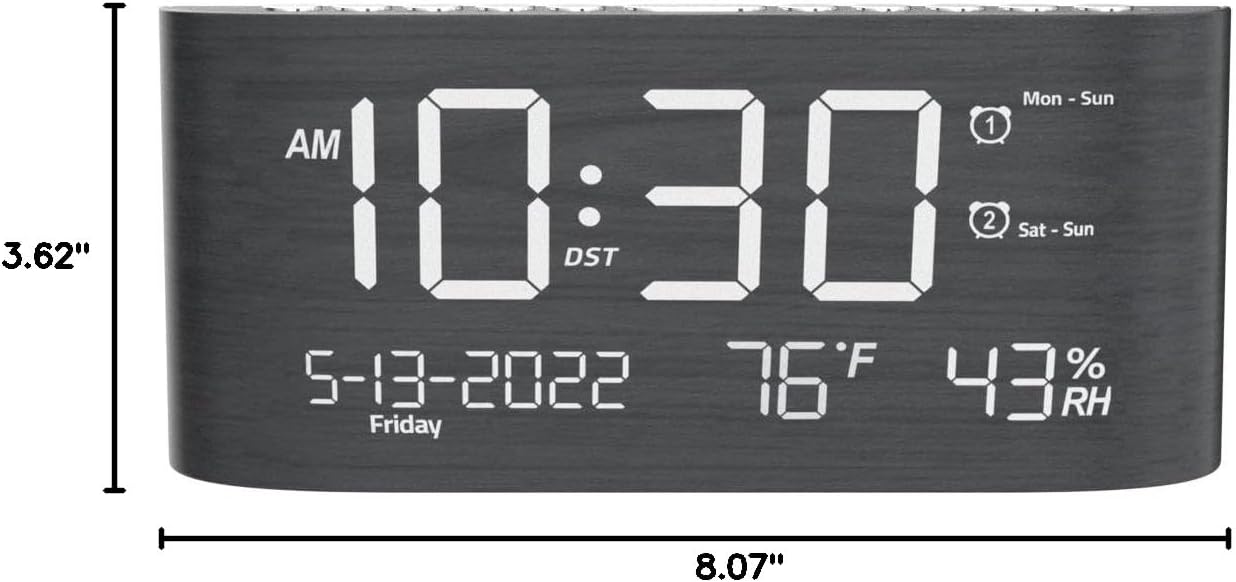
Slika 9: Dimenzije proizvoda.
Garancija i podrška
This Mesqool product comes with a 2 Years Exchange Warranty. For any support inquiries, troubleshooting assistance, or warranty claims, please refer to the official Mesqool webweb-mjesto ili direktno kontaktirajte njihovu korisničku službu.
Elektronska verzija ovog korisničkog priručnika dostupna je za preuzimanje: Preuzmite korisnički priručnik (PDF)
Ask a question about this manual
Ask about setup, troubleshooting, compatibility, parts, safety, or missing instructions. Manuals+ will review the question and use this page’s manual context to help answer it.