
1. Proizvod je gotovview
The Xigmatek LUX S Arctic (Model EN48298) is a mid-tower PC case designed for computer enthusiasts and gamers. It features a distinctive triangular mesh front panel for optimal airflow and comes equipped with four 120mm X24A A-RGB fans to provide efficient cooling and customizable lighting. The case supports Micro ATX motherboards and is constructed with durable materials, including tempered glass for a clear view unutrašnjih komponenti.
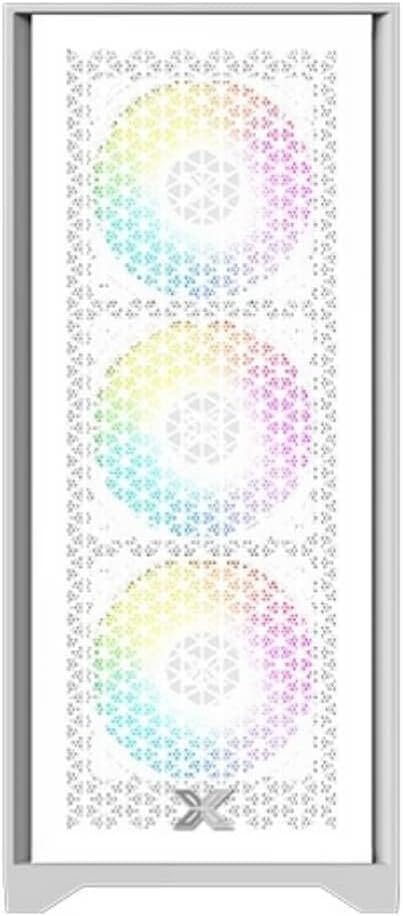
Slika 1.1: Front view of the Xigmatek LUX S Arctic PC case, showcasing the triangular mesh design and the pre-installed A-RGB fans.
2. Sadržaj paketa
Before proceeding with installation, please ensure all components listed below are present in your package. If any items are missing or damaged, contact your retailer or Xigmatek support.
- Xigmatek LUX S Arctic Mid-Tower PC Case
- 4 x 120mm X24A A-RGB Fans (pre-installed)
- Accessory box (screws, cable ties, standoffs, user manual)
3. Postavljanje i instalacija
Follow these steps to install your computer components into the Xigmatek LUX S Arctic PC case. Ensure your system is powered off and unplugged before beginning any installation.
3.1. Priprema slučaja
- Postavite kućište na ravnu, stabilnu površinu.
- Carefully remove the tempered glass side panel by unscrewing the thumb screws at the rear of the case and gently pulling the panel away.
- Remove the opposite side panel (metal) in a similar manner to access the cable management area.

Slika 3.1: Enterijer view of the PC case, illustrating the spacious layout for component installation.
3.2. Instalacija matične ploče
- Install the I/O shield that came with your motherboard into the designated opening at the rear of the case.
- Align your Micro ATX motherboard with the pre-installed standoffs. Ensure all screw holes on the motherboard match the standoffs.
- Secure the motherboard using the provided screws from the accessory box. Do not overtighten.
3.3. Instalacija jedinice za napajanje (PSU)
- Locate the PSU mounting area at the rear bottom of the case.
- Slide your PSU into the bay from the rear, ensuring the fan faces the bottom (if the case has a filtered intake) or upwards.
- Pričvrstite napajanje vijcima sa vanjske strane kućišta.
3.4. Instalacija pogona za pohranu podataka
The case supports various storage configurations. Refer to the accessory box for specific mounting hardware.
- 2.5" SSD diskovi: Mount SSDs to the designated brackets behind the motherboard tray.
- 3.5" tvrdi diskovi: Install HDDs into the drive cage located beneath the PSU shroud.

Slika 3.2: Zadnji enterijer view, highlighting cable management cutouts and storage drive mounting locations.
3.5. Expansion Card Installation (GPU, etc.)
- Uklonite potrebne poklopce PCIe utora sa stražnje strane kućišta.
- Insert your expansion card (e.g., graphics card) into the corresponding PCIe slot on your motherboard until it clicks into place.
- Secure the card with a screw to the case chassis.
3.6. Upravljanje kablovima i priključci
Connect all necessary cables from the PSU to your motherboard and components. Utilize the cable routing cutouts and tie-down points behind the motherboard tray for a clean build and improved airflow.
- Connect front panel headers (Power SW, Reset SW, HDD LED, Power LED) to the motherboard.
- Connect USB 2.0 and USB 3.0 headers to the motherboard.
- Connect audio header to the motherboard.
- Connect the pre-installed A-RGB fans to your motherboard's A-RGB header or a compatible controller. Ensure power is supplied to the fan hub/controller if applicable.
4. Uputstvo za upotrebu
Nakon što su sve komponente instalirane i kablovi povezani, možete uključiti sistem.
- Replace both side panels and secure them with their respective screws.
- Spojite monitor, tastaturu, miš i kabel za napajanje na stražnju stranu računara.
- Okrenite prekidač za napajanje na vašem PSU-u u položaj 'UKLJUČENO'.
- Press the power button on the front panel of the case.
- The pre-installed A-RGB fans will illuminate. You can control their lighting effects via your motherboard's software (if connected to an A-RGB header) or a dedicated controller (if included with the fans or purchased separately).
5. Održavanje
Redovno održavanje pomaže u osiguravanju optimalnih performansi i dugotrajnosti komponenti vašeg računara.
- Filteri za prašinu: The Xigmatek LUX S Arctic case likely includes removable dust filters (e.g., top, bottom, front). Clean these filters every 1-3 months, depending on your environment, by gently brushing or washing them with water and allowing them to dry completely before reinstallation.
- Čišćenje unutrašnjosti: Periodically (every 6-12 months), open the case and use compressed air to remove dust buildup from fans, heatsinks, and other components. Hold fan blades gently to prevent them from spinning too fast during cleaning.
- Eksterijerno čišćenje: Obrišite vanjske površine mekom krpom, damp cloth. Avoid harsh chemicals that may damage the finish or tempered glass.
6. Otkrivanje problema
If you encounter issues with your PC build, refer to these common troubleshooting steps.
- Sistem se ne uključuje:
- Provjerite je li prekidač za napajanje u položaju 'UKLJUČENO'.
- Check all power cables (24-pin ATX, 8-pin CPU, GPU power) are securely connected.
- Verify front panel power switch header is correctly connected to the motherboard.
- Ventilatori se ne okreću/RGB se ne pali:
- Check fan power connections to the motherboard or fan hub.
- Ensure A-RGB cables are correctly connected to the motherboard's A-RGB header or controller.
- Verify that any fan hub or controller is receiving power.
- Nema izlaza za prikaz:
- Ensure your monitor cable is connected to the graphics card (not the motherboard's integrated graphics ports, unless you are using integrated graphics).
- Ponovo umetnite grafičku karticu u njen PCIe slot.
- Check graphics card power connections.
For more complex issues, consult your motherboard manual or component manufacturer's support resources.
7. Specifikacije
| Feature | Detalj |
|---|---|
| Brand | Xigmatek |
| Naziv modela | LUX S Arctic |
| Broj modela | EN48298 |
| Tip slučaja | Mid-Tower |
| Boja | Arctic White |
| Materijal | Tempered Glass (side panel) |
| Kompatibilnost matične ploče | Micro ATX |
| Unaprijed instalirani ventilatori | 4 x 120mm X24A A-RGB Fans |
| Metoda hlađenja | Vazduh |
| Ulaz / izlaz prednje ploče | 2 x USB ports (type not specified, typically USB 2.0/3.0), Audio Jacks |
| Montaža napajanja | Rear Mount (bottom) |
| Preporučena upotreba | Gaming |
8. Garancija i podrška
For information regarding warranty coverage, technical support, or replacement parts, please refer to the warranty card included with your product or visit the official Xigmatek website.