
PALOVUE iSound
PALOVUE Wireless Earbuds User Manual
Model: iSound
Your guide to setting up, operating, and maintaining your PALOVUE iSound Wireless Earbuds.
1. Uvod
The PALOVUE iSound Wireless Earbuds are designed to provide a superior audio experience with advanced features for daily use. Equipped with Qualcomm CSR and Bluetooth 5.0 technology, these earbuds offer a stable and crystal-clear connection, supporting aptX HD sound quality. The CVC 8.0 Noise Cancelling technology with 4 built-in microphones ensures clear calls by effectively reducing ambient noise. Their ergonomic design and multiple ear-tip sizes provide a comfortable and secure fit for extended wear.
The iSound earbuds feature convenient one-step reconnection and intuitive one-touch operation. With up to 24 hours of playtime using the compact charging case, they are ideal for on-the-go listening. Further customization and control are available through the PALOVUE iSound APP.

Image: PALOVUE iSound Wireless Earbuds resting in their open charging case, showcasing njihov elegantan crni dizajn.
2. Šta se nalazi u kutiji
Upon opening your PALOVUE iSound package, you will find the following components:
- Futrola za bežično punjenje
- PALOVUE iSound Earbuds (Left and Right)
- Ear Tips (multiple sizes for a customizable fit)
- Kabl za punjenje (USB-C)
- Lanyard
- Packing Box
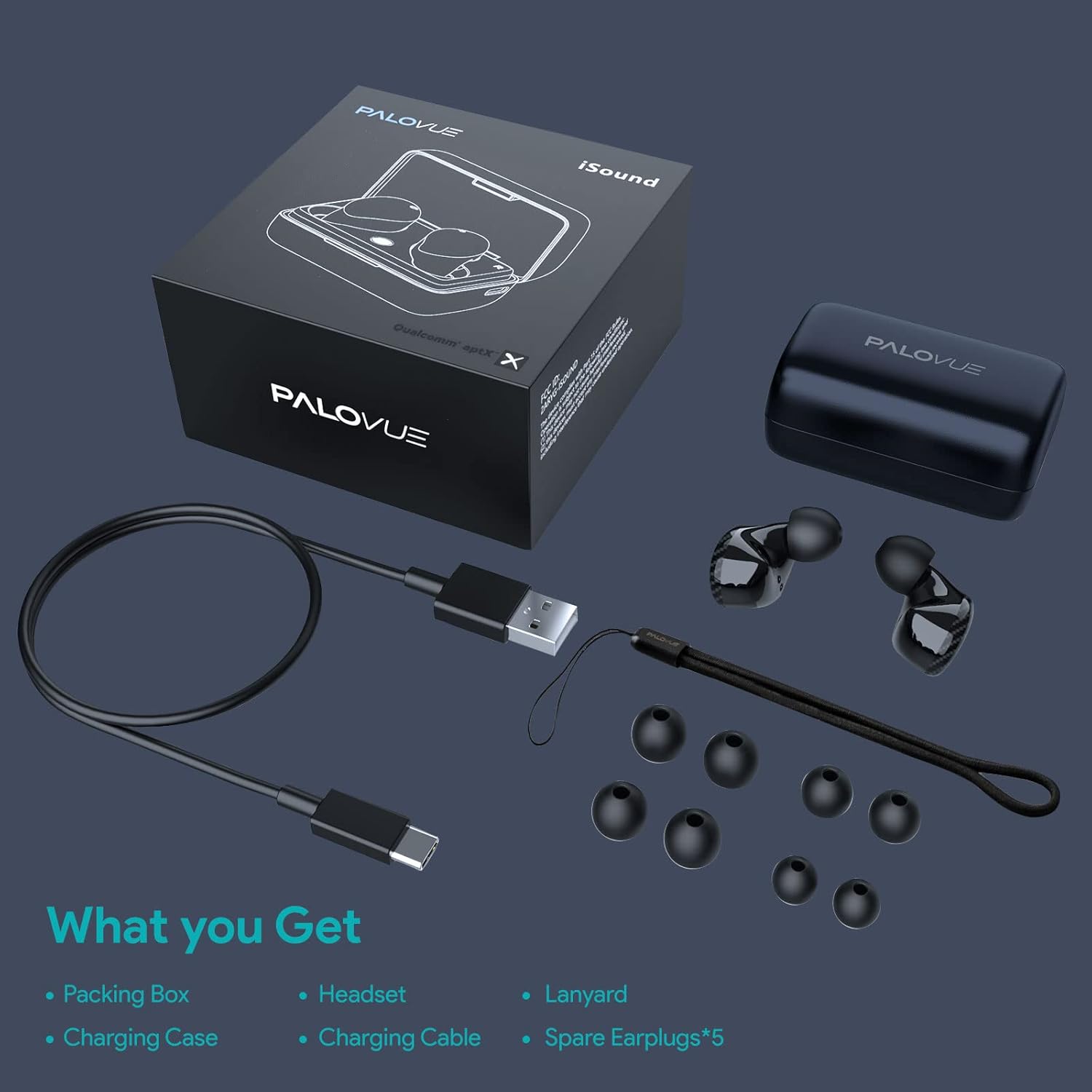
Image: A flat lay showing all items included in the PALOVUE iSound package: the packing box, charging case, earbuds, charging cable, lanyard, and five pairs of spare ear tips.
3. Vodič za postavljanje
3.1 Početno punjenje
Before first use, ensure both the earbuds and the charging case are fully charged. Place the earbuds into the charging case. Connect the provided USB-C cable to the charging case and a power source. The indicator lights on the case will show charging status. A full charge typically takes approximately 2 hours for the case.
3.2 Uparivanje s vašim uređajem
The PALOVUE iSound earbuds feature one-step reconnection for convenience.
- Otvorite kutijicu za punjenje. Slušalice će se automatski uključiti i ući u način rada za uparivanje.
- Na pametnom telefonu ili uređaju s omogućenom Bluetooth vezom idite na postavke Bluetootha.
- Traži "PALOVUE iSound" in the list of available devices and select it to connect.
- Nakon povezivanja, čut ćete zvučnu potvrdu i slušalice će biti spremne za upotrebu.
- Za naknadnu upotrebu, jednostavno otvorite kućište za punjenje i slušalice će se automatski povezati s posljednjim uparenim uređajem.
Video: A detailed guide demonstrating the connection and operation of the PALOVUE iSound earbuds, including initial pairing steps and touch control functions.
4. Korištenje slušalica
4.1 Kontrole na dodir
The PALOVUE iSound earbuds feature intuitive touch controls on each earbud. The specific functions can be customized via the PALOVUE iSound APP.
| Akcija | Lijeva slušalica | Desna slušalica |
|---|---|---|
| Single Tap | Utišavanje zvuka | Volume Up |
| Double Tap | Reprodukcija/Pauziranje muzike, Odgovor/Završetak poziva | Reprodukcija/Pauziranje muzike, Odgovor/Završetak poziva |
| Dugi pritisak | Previous Song, Reject Call | Next Song, Reject Call |
Video: A short demonstration of the touch controls for the PALOVUE iSound earbuds, showing how to adjust volume, skip tracks, and manage calls.
4.2 Using the PALOVUE iSound APP
Enhance your experience by downloading the PALOVUE iSound APP. The app allows you to:
- Customize touch control functions (e.g., volume, track control, call management).
- Adjust equalizer (EQ) settings for personalized sound profiles (Male Vocals, Electronic, Jazz, Rock, Classical, Female Vocals, Original, Customize).
- Check battery levels of each earbud.
- Access device information and firmware updates.

Image: A woman wearing PALOVUE iSound earbuds, illustrating their comfortable fit and suitability for daily use.

Slika: Eksplodirala view diagram of the PALOVUE iSound earbud, detailing its internal structure and emphasizing Qualcomm AptX and Deep Bass sound capabilities.
5. Održavanje
To ensure the longevity and optimal performance of your PALOVUE iSound Wireless Earbuds, follow these maintenance guidelines:
- čišćenje: Redovno čistite slušalice i kutijicu za punjenje mekom, suhom krpom koja ne ostavlja dlačice. Nemojte koristiti abrazivna sredstva za čišćenje ili rastvarače. Nježno uklonite ušni vosak ili ostatke sa vrhova slušalica i mrežice zvučnika pomoću male, meke četkice ili pamučnog štapića.
- Skladištenje: Kada se ne koriste, slušalice čuvajte u kutijici za punjenje kako biste ih zaštitili od prašine, prljavštine i fizičkih oštećenja.
- Održavanje baterije: Avoid fully depleting the battery frequently. For long-term storage, charge the earbuds and case to about 50% to preserve battery health.
- Otpornost na vodu: The earbuds are rated IPX4 for water resistance, meaning they are protected against splashing water from any direction. They are designed for sports and can withstand sweat and light rain, but they are not suitable for swimming or submersion in water. Ensure the earbuds are dry before placing them back in the charging case.
Video: A short promotional video highlighting the compact size and powerful features of the iSound True Wireless Earbuds, including their IPX4 water resistance.
6. Otkrivanje problema
If you encounter issues with your PALOVUE iSound Wireless Earbuds, try the following solutions:
6.1 Problemi sa uparivanjem
- Slušalice se ne povezuju: Ensure Bluetooth is enabled on your device. Place earbuds back in the case, close it, wait a few seconds, then open it again to re-initiate pairing mode.
- Samo jedna slušalica radi: Try placing both earbuds back in the charging case, closing the lid, and then reopening it. Ensure both earbuds have sufficient charge.
- Slušalice se ne prikazuju na Bluetooth listi: Turn off Bluetooth on your device, then turn it back on. Restart your device if necessary.
6.2 Problemi s kvalitetom zvuka
- Mala jačina zvuka: Increase the volume on both your earbuds (via touch control) and your connected device.
- Iskrivljeni zvuk: Ensure the earbuds are within Bluetooth range of your device. Check for obstructions between the earbuds and your device.
- Loš kvalitet poziva: Ensure the microphones are not obstructed. CVC 8.0 Noise Cancelling technology helps, but extreme noise environments can still affect clarity.
6.3 Battery and Charging Issues
- Slušalice se ne pune: Ensure the charging contacts on the earbuds and inside the case are clean and dry. Try a different charging cable or power adapter.
- Futrola se ne puni: Provjerite da li kabel za punjenje i izvor napajanja ispravno rade.
6.4 How to Reset Your Earbuds
Ako imate stalne probleme, vraćanje na tvorničke postavke ih može riješiti:
- Stavite obe slušalice u futrolu za punjenje.
- Press and hold the reset button on the charging case (usually located inside or near the charging port) until the indicator lights on the earbuds flash red and green alternately.
- Release the button and wait until only the green light flashes, indicating the reset is complete.
- Izvadite slušalice iz kutijice i pokušajte ih ponovo upariti sa svojim uređajem.
Refer to the "PALOVUE iSound Connection operation guide" video in the Setup section for a visual demonstration of the reset process.
7. Specifikacije
| Feature | Detalj |
|---|---|
| Brand | PALOVUE |
| Naziv modela | iSound |
| Tehnologija povezivanja | Bežično (Bluetooth 5.0) |
| Bežična komunikacijska tehnologija | Bluetooth |
| Čipset | Qualcomm CSR QCC3020 |
| Kontrola buke | CVC 8.0 Noise Cancellation (for calls) |
| Mikrofoni | 4 mikrofona |
| Tip kontrole | Touch Control |
| Postavljanje uha | U uhu |
| Form Factor | U uhu |
| Trajanje baterije (slušalice) | Do 6 sati (otprilike) |
| Ukupno vrijeme reprodukcije (sa kutijom) | Do 24 sati |
| Vrijeme punjenja (futrola) | 2 sata |
| Bluetooth domet | Do 10 metara (32.8 stope) |
| Nivo vodootpornosti | IPX4 (otporan na prskanje) |
| Materijal | Silicone (Ear Tips) |
| Težina artikla | 1.76 unce |
| Kompatibilni uređaji | Smartphones, Tablets, Laptops, Desktops, Smart TVs, Car Audio Systems |
8. Garancija i podrška
PALOVUE products typically come with a manufacturer's warranty. Please refer to the warranty card included in your product packaging for specific terms and conditions, including warranty period and coverage details. For technical support, troubleshooting assistance, or warranty claims, please contact PALOVUE customer service through their official webweb-mjesto ili kontakt informacije navedene u dokumentaciji vašeg proizvoda.
You can also visit the official PALOVUE store on Amazon for more information and support: PALOVUE Amazon Store.
Ask a question about this manual
Ask about setup, troubleshooting, compatibility, parts, safety, or missing instructions. Manuals+ will review the question and use this page’s manual context to help answer it.